
Perintah Check CPU Linux: Lengkap dengan Info RAM·Disk·OS


Jumlah core CPU Linux langsung muncul hanya dengan satu baris [nproc]. Perintah untuk cek CPU Linux, kapasitas RAM Linux, serta info disk·OS dikumpulkan di tabel di bawah menurut urutan yang paling sering dipakai.
|
Perintah |
Yang diperiksa |
|---|---|
|
nproc |
Jumlah CPU yang bisa dipakai (core logis) |
|
lscpu |
Model·soket·core·thread CPU |
|
free -h |
Kapasitas RAM total·terpakai·tersisa |
|
df -h |
Pemakaian per disk (sistem file) |
|
lsblk |
Struktur disk dan partisi |
|
cat /etc/os-release |
Nama dan versi distribusi |
|
uname -r |
Versi kernel |
$ nproc
2

$ lscpu
CPU(s):                2
Model name:            Intel(R) Xeon(R) Platinum 8259CL CPU @ 2.50GHz
Thread(s) per core:    2
Core(s) per socket:    1
Socket(s):             1

$ free -h
               total        used        free      shared  buff/cache   available
Mem:           3.8Gi       2.1Gi       312Mi        96Mi       1.4Gi       1.5Gi
Swap:          2.0Gi       384Mi       1.6Gi
Ini hasil yang dijalankan di server AlmaLinux 9 pada 2026-10-05. [CPU(s)] adalah jumlah core dikalikan jumlah thread per core, kasus yang sama dengan bagian Hyper-Threading di bawah.
✅ Perintah Cek Info CPU Linux
1. cat /proc/cpuinfo
cat /proc/cpuinfo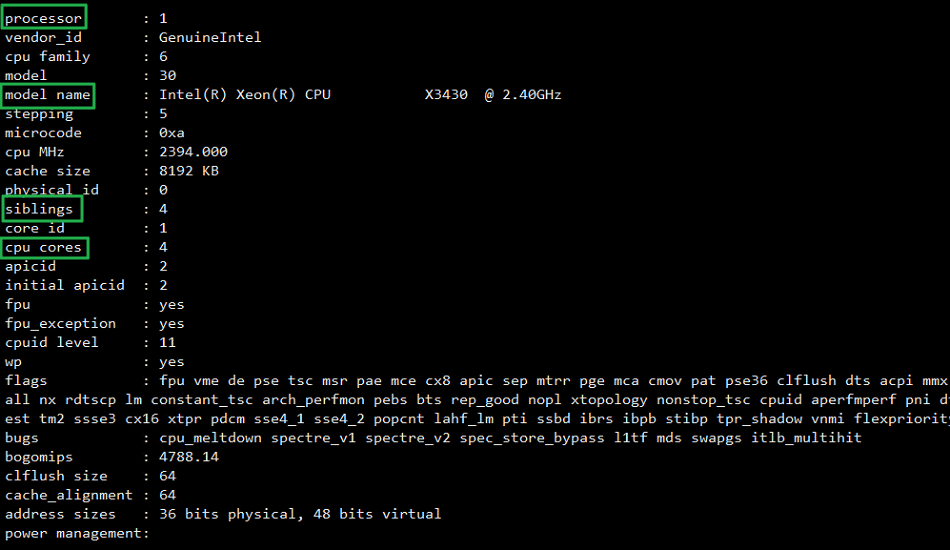
📖 Buka penjelasan item /proc/cpuinfo
2. Menghitung jumlah semua CPU dan CPU fisik
Jika hanya butuh jumlah core, [nproc] adalah yang paling singkat. Untuk melihat CPU fisik dan core secara terpisah, hitung /proc/cpuinfo seperti di bawah.
# Jumlah total core CPU : terlihat ada 4 core CPU (virtual) secara total
~]# grep -c processor /proc/cpuinfo
4
# Jumlah core CPU fisik
~]# grep -c ^processor /proc/cpuinfo
1
# Jumlah core per CPU
grep -c ^processor /proc/cpuinfo | wc -l
4
3. Hyper-Threading: memeriksa apakah sudah aktif
Jika nilai siblings tampil dua kali jumlah core CPU, berarti teknologi Hyper-Threading sudah diterapkan.
~]# cat /proc/cpuinfo | egrep 'siblings|cpu cores' | head -2
siblings : 4
cpu cores : 4
##
~]# cat /proc/cpuinfo | egrep 'siblings|cpu cores' | head -2
siblings : 2
cpu cores : 1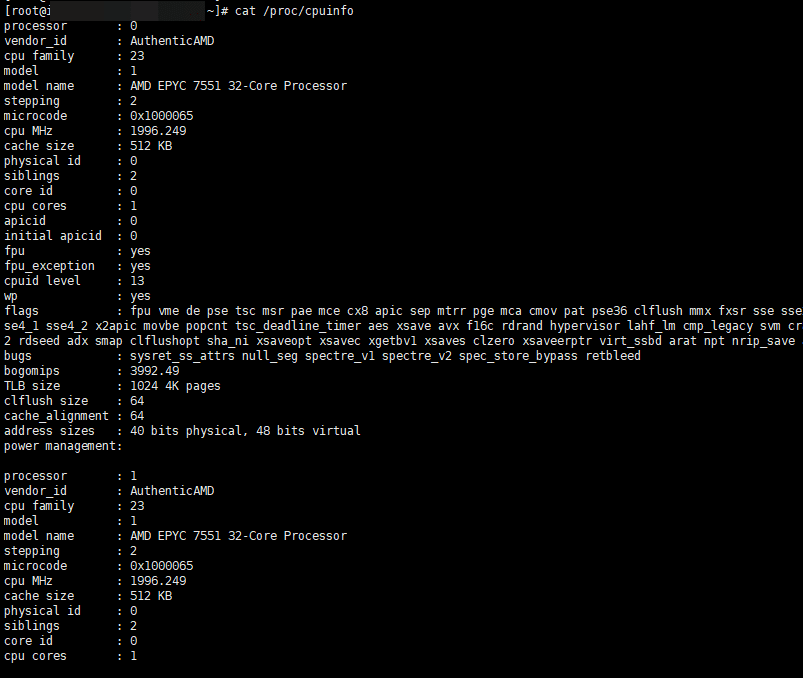
4. Perintah lscpu
Dengan perintah lscpu, informasi CPU bisa diperiksa dengan mudah.
~]# lscpu
Architecture:            x86_64
  CPU op-mode(s):        32-bit, 64-bit
  Address sizes:         40 bits physical, 48 bits virtual
  Byte Order:            Little Endian
CPU(s):                  2
  On-line CPU(s) list:   0,1
Vendor ID:               AuthenticAMD
  BIOS Vendor ID:        QEMU
  Model name:            AMD EPYC 7551 32-Core Processor
    BIOS Model name:     pc-i440fx-4.2
    CPU family:          23
    Model:               1
    Thread(s) per core:  2
    Core(s) per socket:  1
    Socket(s):           1
    Stepping:            2
    BogoMIPS:            3992.49
    Flags:               fpu vme de pse tsc msr pae mce cx8 apic sep mtrr pge mca cmov pat pse36 clflush mmx fxsr sse sse2 ht syscall nx mmxext fxsr_opt pdpe1gb rdtscp lm rep_good nopl cpuid extd_apicid
                          tsc_known_freq pni pclmulqdq ssse3 fma cx16 sse4_1 sse4_2 x2apic movbe popcnt tsc_deadline_timer aes xsave avx f16c rdrand hypervisor lahf_lm cmp_legacy svm cr8_legacy abm sse4
                         a misalignsse 3dnowprefetch osvw topoext perfctr_core ssbd ibpb vmmcall fsgsbase tsc_adjust bmi1 avx2 smep bmi2 rdseed adx smap clflushopt sha_ni xsaveopt xsavec xgetbv1 xsaves
                         clzero xsaveerptr virt_ssbd arat npt nrip_save arch_capabilities
Virtualization features:
  Virtualization:        AMD-V
  Hypervisor vendor:     KVM
  Virtualization type:   full
Caches (sum of all):
  L1d:                   64 KiB (1 instance)
  L1i:                   64 KiB (1 instance)
  L2:                    512 KiB (1 instance)
  L3:                    16 MiB (1 instance)
NUMA:
  NUMA node(s):          1
  NUMA node0 CPU(s):     0,1
Vulnerabilities:
  Itlb multihit:         Not affected
  L1tf:                  Not affected
  Mds:                   Not affected
  Meltdown:              Not affected
  Mmio stale data:       Not affected
  Retbleed:              Mitigation; untrained return thunk; SMT vulnerable
  Spec store bypass:     Mitigation; Speculative Store Bypass disabled via prctl
  Spectre v1:            Mitigation; usercopy/swapgs barriers and __user pointer sanitization
  Spectre v2:            Mitigation; Retpolines, IBPB conditional, STIBP disabled, RSB filling, PBRSB-eIBRS Not affected
  Srbds:                 Not affected
  Tsx async abort:       Not affected
✅ Cek Kapasitas RAM Linux
1. cat /proc/meminfo
Dengan cat /proc/meminfo, kapasitas RAM Linux (informasi pemakaian memori saat ini) bisa diperiksa.
cat /proc/meminfo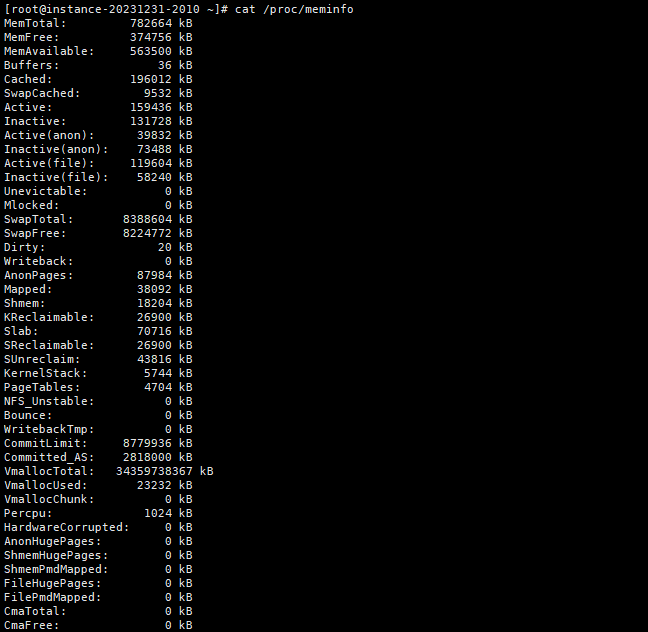
2. Memakai perintah free
Dengan perintah free, kapasitas RAM Linux bisa dilihat dalam bentuk yang lebih mudah dibaca. Opsi (-h) membuatnya lebih mudah dibaca lagi.
~]# free -h
               total        used        free      shared  buff/cache   available
Mem:           764Mi       208Mi       370Mi        17Mi       217Mi       555Mi
Swap:          8.0Gi       159Mi       7.8Gi
~]# free -h
  total        used        free      shared  buff/cache   available
Mem:          5.8Gi       3.1Gi       754Mi        35Mi       1.9Gi       2.4Gi
Swap:         5.9Gi       808Mi       5.1Gi
✅ Cek Pemakaian Disk: df -h
Total pemakaian disk bisa diperiksa dengan perintah df -h.
~]# df -h
Filesystem              Size  Used Avail Use% Mounted on
devtmpfs                4.0M     0  4.0M   0% /dev
tmpfs                   383M     0  383M   0% /dev/shm
tmpfs                   153M   20M  134M  13% /run
/dev/mapper/rocky-root  119G   11G  109G  10% /
/dev/sda2               994M  275M  720M  28% /boot
/dev/sda1                99M  7.0M   92M   8% /boot/efi
tmpfs                    77M     0   77M   0% /run/user/1000
~]#
Pembagian disk dan partisi dilihat dengan [lsblk]. Jika ditambah [-e7], perangkat loop seperti snap tidak ikut tampil sehingga hanya disk sungguhan yang tersisa. Cara membuat partisi baru ada di artikel perintah gdisk.
$ lsblk -e7
NAME        MAJ:MIN RM   SIZE RO TYPE MOUNTPOINTS
nvme0n1     259:0    0    80G  0 disk
├─nvme0n1p1 259:1    0     1M  0 part
├─nvme0n1p2 259:2    0   200M  0 part /boot/efi
├─nvme0n1p3 259:3    0     1G  0 part /boot
└─nvme0n1p4 259:4    0  78.8G  0 part /
✅ Cek Berbagai Info Server
## Cek nama model server
dmidecode -s system-product-name
## Cek nama model server, lebih rinci
dmidecode | grep "Product Name:"

# Jenis dan versi OS (singkat)
~]# cat /etc/redhat-release
Rocky Linux release 9.3 (Blue Onyx)

# Jenis dan versi OS (/etc/*release*)
~]# cat /etc/*release*
NAME="Rocky Linux"
VERSION="9.3 (Blue Onyx)"
ID="rocky"
ID_LIKE="rhel centos fedora"
VERSION_ID="9.3"
PLATFORM_ID="platform:el9"
PRETTY_NAME="Rocky Linux 9.3 (Blue Onyx)"
ANSI_COLOR="0;32"
LOGO="fedora-logo-icon"
CPE_NAME="cpe:/o:rocky:rocky:9::baseos"
HOME_URL="https://rockylinux.org/"
BUG_REPORT_URL="https://bugs.rockylinux.org/"
SUPPORT_END="2032-05-31"
ROCKY_SUPPORT_PRODUCT="Rocky-Linux-9"
ROCKY_SUPPORT_PRODUCT_VERSION="9.3"
REDHAT_SUPPORT_PRODUCT="Rocky Linux"
REDHAT_SUPPORT_PRODUCT_VERSION="9.3"
Rocky Linux release 9.3 (Blue Onyx)
Rocky Linux release 9.3 (Blue Onyx)
Derived from Red Hat Enterprise Linux 9.3
Rocky Linux release 9.3 (Blue Onyx)
cpe:/o:rocky:rocky:9::baseos


# Jenis dan versi OS (perintah rpm)
~]# rpm -qa | grep release
rocky-release-cloud-9-1.el9.noarch
epel-release-9-7.el9.noarch
rocky-release-9.3-1.2.el9.noarch
remi-release-9.3-2.el9.remi.noarch

## Cek versi OS (/proc/version)
~]# cat /proc/version
Linux version 5.14.0-162.12.1.el9_1.0.2.x86_64 (mockbuild@dal1-prod-builder001.bld.equ.rockylinux.org) (gcc (GCC) 11.3.1 20220421 (Red Hat 11.3.1-2), GNU ld version 2.35.2-24.el9) #1 SMP PREEMPT_DYNAMIC Mon Jan 30 22:14:42 UTC 2023

## Cek nama model CPU
cat /proc/cpuinfo | grep nameℹ️ Pemberitahuan Afiliasi
Konten di situs ini berisi tautan afiliasi. Jika pengunjung membeli produk atau layanan melalui tautan tersebut, situs ini menerima komisi dari penjual. Harga yang dibayar pembeli(turun saat ada diskon promo ↓), tidak naik karena hal ini. Harga, diskon, dan informasi stok yang ditampilkan berlaku pada saat penulisan dan bisa berbeda dengan kondisi sebenarnya, jadi pastikan kembali di situs penjual sebelum membeli. Pemilihan dan penilaian produk dibuat berdasarkan standar kami sendiri, dan ada tidaknya komisi tidak memengaruhi urutan maupun isi penilaian.