
리눅스 Logrotate 개념과 설정


리눅스 Logrotate는 “로그를 회전하다.”라는 뜻에서 알 수 있듯이 로그와 Rotate(회전하다[동사])의 합성어입니다. 리눅스 설치 시 기본으로 설치되어 있습니다.
로테이션(Rotation)은 사람을 일정한 순서에 따라 교대하는 일, 야구 경기에서 선발 투수를 차례로 기용하는 일 등의 예에서 볼 수 있듯이 반복과 교대의 개념을 가지고 있습니다.
리눅스에서 로그로테이션(Logrotation) > 로그 회전이라는 명사로도 언급됩니다.
rpm -qa | grep logrotate
logrotate-3.18.0-7.el9.x86_64
rsyslog-logrotate-8.2102.0-105.el9.x86_64
Logrotate가 설치되어 있지 않다면 명령어를 통해서 설치할 수 있습니다.
yum -y install logrotate
dnf -y install logrotate✅ 리눅스 Logrotate란
리눅스 로그회전(Logrotation)은 리눅스의 로그 정보를 저장하는 가장 기본적인 파일입니다. 로그를 그대로 방치하게 되면 파티션 디스크의 용량이 가득 차거나 웹사이트에 404 에러가 발생하는 등의 문제가 발생할 수 있습니다.
1. 로그의 필요성
2. 일반적인 리눅스 로그 저장 기간
보통 리눅스 뿐만 아니라 로그의 저장 기간은 길게 3년, 1년, 6개월, 3개월 단위로 설정할 수 있으며, 짧게는 최소 1개월(4주) 단위로 로테이션 할 수 있습니다. 디스크 용량이 크지 않더라도 1개월 단위로 저장하는 것이 최소 선택이라고 할 수 있습니다. 그 외에 디스크 저장 공간이 여유롭지 않을 경우 그 이하로 설정할 수 있습니다.
✅ 리눅스 Logrotate 설정
Logrotate는 기본 설정 파일 /etc/logrotate.conf와 /etc/logrotate.d/ 폴더 내에 프로세스 설정 파일로 나뉘게 됩니다.
- /usr/sbin/logrotate: 데몬 프로그램
- /etc/logrotate.conf: 데몬 설정 파일
- /etc/logrotate.d/: 로그로테이트 프로세스 설정 파일
- /etc/cron.daily/logrotate : 로그로테이트 작업 내역에 대한 히스토리 로그
1. /etc/logrotate.conf
# see "man logrotate" for details

# global options do not affect preceding include directives

# rotate log files weekly
weekly

# keep 4 weeks worth of backlogs
rotate 4

# create new (empty) log files after rotating old ones
create

# use date as a suffix of the rotated file
dateext

# uncomment this if you want your log files compressed
#compress

# packages drop log rotation information into this directory
include /etc/logrotate.d

# system-specific logs may be also be configured here.2. /etc/logrotate.d/
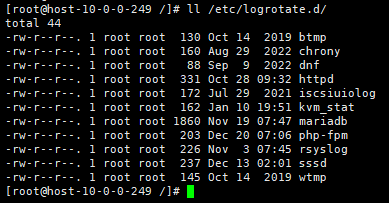
/etc/logrotate.d/ 폴더의 기본 구성은 다음과 같습니다.(록키 리눅스 기준)
✅ logrotate 명령어 및 옵션(환경)
# 기본 명령어
logrotate -옵션 [파일명]
# 명령어 위치
/usr/sbin/logrotate
# 리눅스 logrotate 디버깅 실행 : logrotate -d
logrotate -d /etc/logrotate.d/httpd
WARNING: logrotate in debug mode does nothing except printing debug messages!  Consider using verbose mode (-v) instead if this is not what you want.

reading config file /etc/logrotate.d/httpd
Reading state from file: /var/lib/logrotate/logrotate.status
error: error opening state file /var/lib/logrotate/logrotate.status: No such file or directory
Allocating hash table for state file, size 64 entries

Handling 1 logs

rotating pattern: /var/log/httpd/*log  1048576 bytes (no old logs will be kept)
empty log files are not rotated, old logs are removed
considering log /var/log/httpd/access_log
Creating new state
  Now: 2024-01-13 17:28
  Last rotated at 2024-01-13 17:00
  log does not need rotating (log size is below the 'size' threshold)
considering log /var/log/httpd/error_log
Creating new state
  Now: 2024-01-13 17:28
  Last rotated at 2024-01-13 17:00
  log does not need rotating (log size is below the 'size' threshold)
not running postrotate script, since no logs were rotatedlogrotate -v /etc/logrotate.d/httpd
reading config file /etc/logrotate.d/httpd
Reading state from file: /var/lib/logrotate/logrotate.status
Allocating hash table for state file, size 64 entries
Creating new state
Creating new state
Handling 1 logs
rotating pattern: /var/log/httpd/*log 1048576 bytes (no old logs will be kept)
empty log files are not rotated, old logs are removed
considering log /var/log/httpd/access_log
Now: 2024-01-13 17:31
Last rotated at 2024-01-13 17:30
log does not need rotating (log size is below the 'size' threshold)
considering log /var/log/httpd/error_log
Now: 2024-01-13 17:31
Last rotated at 2024-01-13 17:30
log does not need rotating (log size is below the 'size' threshold)
not running postrotate script, since no logs were rotated
set default create context to unconfined_u:object_r:logrotate_var_lib_t:s0

ℹ️ 제휴 안내
본 사이트의 콘텐츠에는 제휴 링크가 포함되어 있습니다. 방문자가 이 링크를 통해 상품 또는 서비스를 구매하면 본 사이트는 판매처로부터 수수료를 지급받습니다. 이 과정에서 구매자가 지불하는 금액(이벤트 할인 시 금액이 내려갑니다↓)은 오르지 않습니다. 게시된 가격·할인·재고 정보는 작성 시점 기준이며 실제와 다를 수 있으므로, 구매 전 판매처에서 최종 확인하시기 바랍니다. 상품 선정과 평가는 자체 기준에 따라 작성되며, 수수료 지급 여부가 소개 순서나 평가 내용에 영향을 주지 않습니다.