
워드프레스 Redis Cache 설치 및 설정


Redis Cache는 비관계형 데이터베이스 관리 시스템으로, 오픈 소스 기반으로 개발된 Remote Dictionary Server의 약자입니다. 이 시스템은 키-값 구조의 비정형 데이터를 저장하고 관리합니다.
✅ Redis Cache 설치
~]# dnf -y install redis
Last metadata expiration check: 3:09:28 ago on Thu 01 Aug 2024 07:16:40 AM UTC.
Dependencies resolved.
==========================================================================================================
 Package                  Architecture              Version                        Repository                    Size
==========================================================================================================
Installing:
 redis                    x86_64                    6.2.7-1.el9                    appstream                    1.3 M

Transaction Summary
==========================================================================================================
Install  1 Package

Total download size: 1.3 M
Installed size: 4.7 M
Downloading Packages:
redis-6.2.7-1.el9.x86_64.rpm                                                           28 MB/s | 1.3 MB     00:00
----------------------------------------------------------------------------------------------------------
Total                                                                                 1.7 MB/s | 1.3 MB     00:00
Running transaction check
Transaction check succeeded.
Running transaction test
Transaction test succeeded.
Running transaction
  Preparing        :                                                                                              1/1
  Running scriptlet: redis-6.2.7-1.el9.x86_64                                                                     1/1
  Installing       : redis-6.2.7-1.el9.x86_64                                                                     1/1
  Running scriptlet: redis-6.2.7-1.el9.x86_64                                                                     1/1
  Verifying        : redis-6.2.7-1.el9.x86_64                                                                     1/1

Installed:
  redis-6.2.7-1.el9.x86_64

Complete!
~]# rpm -qa | grep redis
redis-6.2.7-1.el9.x86_64

~]# dnf -y install redis-devel
Last metadata expiration check: 3:13:27 ago on Thu 01 Aug 2024 07:16:40 AM UTC.
Dependencies resolved.
======================================================================================================================
 Package                      Architecture            Version                        Repository                  Size
======================================================================================================================
Installing:
 redis-devel                  x86_64                  6.2.7-1.el9                    appstream                   21 k

Transaction Summary
======================================================================================================================
Install  1 Package

Total download size: 21 k
Installed size: 67 k
Downloading Packages:
redis-devel-6.2.7-1.el9.x86_64.rpm                                                    101 kB/s |  21 kB     00:00
----------------------------------------------------------------------------------------------------------------------
Total                                                                                  26 kB/s |  21 kB     00:00
Running transaction check
Transaction check succeeded.
Running transaction test
Transaction test succeeded.
Running transaction
  Preparing        :                                                                                              1/1
  Installing       : redis-devel-6.2.7-1.el9.x86_64                                                               1/1
  Running scriptlet: redis-devel-6.2.7-1.el9.x86_64                                                               1/1
  Verifying        : redis-devel-6.2.7-1.el9.x86_64                                                               1/1

Installed:
  redis-devel-6.2.7-1.el9.x86_64

Complete!
~]# systemctl status redis
~]# systemctl start redis
~]# systemctl enable redis
Created symlink /etc/systemd/system/multi-user.target.wants/redis.service → /usr/lib/systemd/system/redis.service.

# 정상 작동 확인 $
~]# redis-cli ping
PONG

~]# dnf -y install php-redis
Last metadata expiration check: 0:40:38 ago on Thu 01 Aug 2024 11:39:12 AM UTC.
Dependencies resolved.
=========================================================================================================
 Package                       Architecture       Version                              Repository                Size
=========================================================================================================
Installing:
 php-pecl-redis6               x86_64             6.0.2-1.el9.remi.8.3                 remi-modular             331 k
Installing dependencies:
 liblzf                        x86_64             3.6-22.el9                           epel                      27 k
 php-pecl-igbinary             x86_64             3.2.15-1.el9.remi.8.3                remi-modular              71 k
 php-pecl-msgpack              x86_64             2.2.0-2.el9.remi.8.3                 remi-modular              56 k

Transaction Summary
=========================================================================================================
Install  4 Packages

Total download size: 485 k
Installed size: 2.3 M
Downloading Packages:
(1/4): php-pecl-msgpack-2.2.0-2.el9.remi.8.3.x86_64.rpm                                52 kB/s |  56 kB     00:01
(2/4): liblzf-3.6-22.el9.x86_64.rpm                                                    25 kB/s |  27 kB     00:01
(3/4): php-pecl-igbinary-3.2.15-1.el9.remi.8.3.x86_64.rpm                              53 kB/s |  71 kB     00:01
(4/4): php-pecl-redis6-6.0.2-1.el9.remi.8.3.x86_64.rpm                                426 kB/s | 331 kB     00:00
---------------------------------------------------------------------------------------------------------
Total                                                                                 169 kB/s | 485 kB     00:02
Running transaction check
Transaction check succeeded.
Running transaction test
Transaction test succeeded.
Running transaction
  Preparing        :                                                                                              1/1
  Installing       : php-pecl-msgpack-2.2.0-2.el9.remi.8.3.x86_64                                                 1/4
  Installing       : php-pecl-igbinary-3.2.15-1.el9.remi.8.3.x86_64                                               2/4
  Installing       : liblzf-3.6-22.el9.x86_64                                                                     3/4
  Installing       : php-pecl-redis6-6.0.2-1.el9.remi.8.3.x86_64                                                  4/4
  Running scriptlet: php-pecl-redis6-6.0.2-1.el9.remi.8.3.x86_64                                                  4/4
  Verifying        : liblzf-3.6-22.el9.x86_64                                                                     1/4
  Verifying        : php-pecl-igbinary-3.2.15-1.el9.remi.8.3.x86_64                                               2/4
  Verifying        : php-pecl-msgpack-2.2.0-2.el9.remi.8.3.x86_64                                                 3/4
  Verifying        : php-pecl-redis6-6.0.2-1.el9.remi.8.3.x86_64                                                  4/4

Installed:
  liblzf-3.6-22.el9.x86_64                                 php-pecl-igbinary-3.2.15-1.el9.remi.8.3.x86_64
  php-pecl-msgpack-2.2.0-2.el9.remi.8.3.x86_64             php-pecl-redis6-6.0.2-1.el9.remi.8.3.x86_64

Complete!
✅ Redis Cache 설정
🔲 redis.conf 설정
  1 # 최대 메모리 사용량
  2 maxmemory 512mb
  3 maxmemory-policy allkeys-lru
  4
  5 # 내부 접속만 허용 (보안 강화)
  6 bind 127.0.0.1 -::1
  7 protected-mode yes
  8
  9 # 비밀번호 설정 (내부만 쓸 경우 비활성)
 10 # requirepass MyStrongPassword123!
 11
 12 # 포트 - 기본 6379 (비활성해도 socket으로 통신 가능)
 13 port 6379
 14
 15 # UNIX socket 설정
 16 unixsocket /var/run/redis/redis.sock
 17 unixsocketperm 777
 18
 19 # 지속 저장 비활성 (워드프레스 캐시 전용)
 20 save ""
 21 appendonly no
 22
 23 # 백그라운드 리클레임 및 메모리 최적화
 24 activerehashing yes
 25 lazyfree-lazy-eviction yes
 26 lazyfree-lazy-expire yes
🔲 wp-config.php 설정
## Redis 설정 ##
# socket 설정 #
define( 'WP_REDIS_PATH', '/var/run/redis/redis.sock' );
define( 'WP_REDIS_SCHEME', 'unix' );
# 3시간으로 설정
define( 'WP_REDIS_METRICS_MAX_TIME',10800);
🔲 redis Service 설정
systemctl enable redis
systemctl start redis
✅ Redis Object Cache Plugin 설치 및 확인
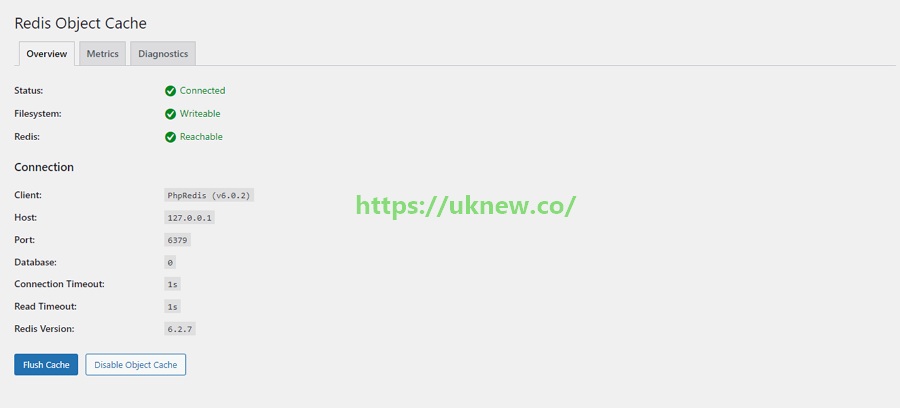
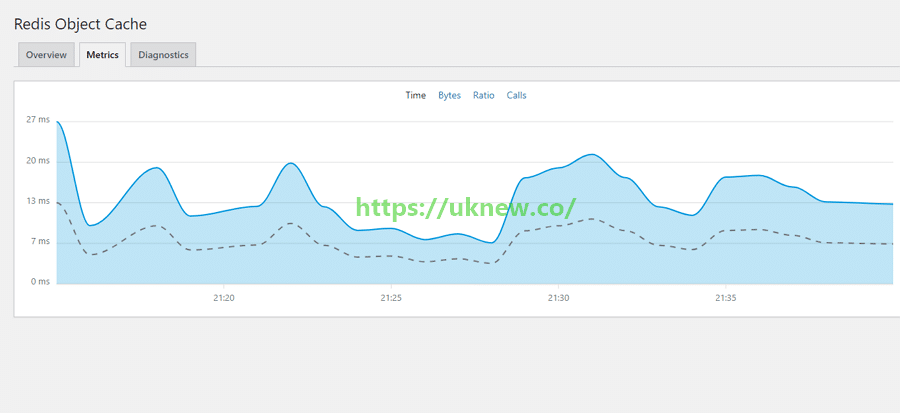
아래 화면처럼 플러그인 설치 후 Redis Cache의 정상적인 구동을 확인할 수 있습니다.
ℹ️ 제휴 안내
본 사이트의 콘텐츠에는 제휴 링크가 포함되어 있습니다. 방문자가 이 링크를 통해 상품 또는 서비스를 구매하면 본 사이트는 판매처로부터 수수료를 지급받습니다. 이 과정에서 구매자가 지불하는 금액(이벤트 할인 시 금액이 내려갑니다↓)은 오르지 않습니다. 게시된 가격·할인·재고 정보는 작성 시점 기준이며 실제와 다를 수 있으므로, 구매 전 판매처에서 최종 확인하시기 바랍니다. 상품 선정과 평가는 자체 기준에 따라 작성되며, 수수료 지급 여부가 소개 순서나 평가 내용에 영향을 주지 않습니다.