
Alma Linux 업데이트: 9.4 → 9.8 in LightSail


기존에 사용하던 아마존 라이트세일의 Alma Linux 업데이트를 합니다. 9.4에서 9.8로 진행하며, 2026년 9월 기준 라이트세일에서 새로 만들면 9.7까지 제공됩니다. 직접 올리면 신규 인스턴스보다 한 단계 앞선 버전으로 운영하게 됩니다.
1️⃣ Alma Linux 업데이트 전 확인 사항
되돌릴 지점을 먼저 만듭니다. 아마존 라이트세일은 인스턴스 스냅샷으로 그 시점 전체를 통째로 복구할 수 있습니다. 파일과 DB를 따로 뜨는 백업과 달리 운영체제까지 포함되므로, OS 업데이트처럼 시스템 전반이 바뀌는 작업에서는 이쪽이 맞습니다. 스냅샷을 뜬 뒤에 시작합니다.
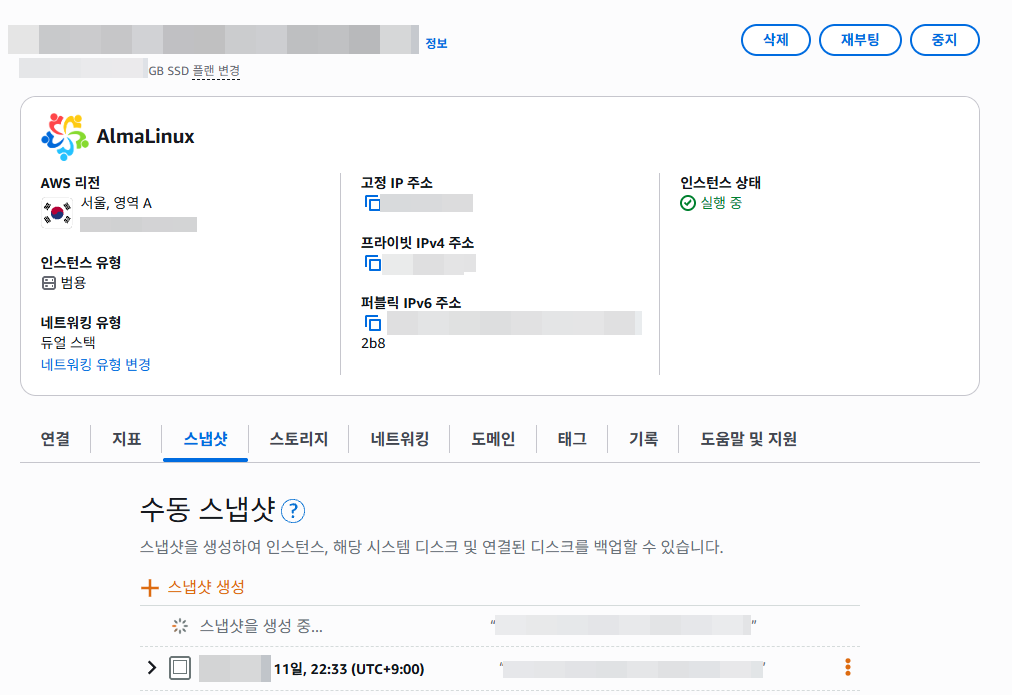
웹 스택은 이번 업데이트에서 제외합니다. nginx, PHP, Apache를 시스템 패키지와 같이 올리면 문제가 생겼을 때 원인을 가를 수 없습니다. 설정 파일과 모듈이 얽혀 있어 되돌리기도 까다롭습니다. 시스템 패키지만 먼저 올리고, 웹 스택은 따로 판단합니다.
SSH가 끊겨도 업데이트가 계속되게 합니다. 패키지가 많으면 수십 분이 걸리고, 그 사이 연결이 끊기면 작업이 중간에 멈춥니다. 명령을 세션에서 떼어 내고 진행 내용은 로그 파일로 남깁니다. 다시 접속해서 로그를 읽으면 됩니다.
사이트가 멈추는 구간이 있습니다. 커널이 바뀌므로 재부팅이 필요하고, 그동안 2~3분 정도 응답이 없습니다. 트래픽이 적은 시간대에 잡는 편이 낫습니다.
2️⃣ Alma Linux 업데이트 실행
1단계. 업데이트
nohup dnf -y update --exclude='nginx*' --exclude='php*' --exclude='httpd*' --exclude='mod_*' > /root/dnf-update-260912.log 2>&1 &nohup dnf -y update --exclude='nginx*' --exclude='php*' --exclude='httpd*' --exclude='mod_*' > /root/dnf-update-260912.log 2>&1 &
[1] 1323186nginx·PHP·Apache는 제외하고 시스템 패키지만 올립니다. nohup으로 돌려서 SSH가 끊겨도 업데이트는 계속됩니다. 진행 내용은 로그 파일에 남습니다.
tail -f /root/dnf-update-260912.log(459/466): libsodium-1.0.18-9.el9.x86_64.rpm 518 kB/s | 160 kB 00:00
(460/466): rav1e-libs-0.8.1-2.el9.x86_64.rpm 713 kB/s | 1.1 MB 00:01
(461/466): snapd-selinux-2.76-0.el9.noarch.rpm 352 kB/s | 101 kB 00:00
(462/466): xdelta-3.1.0-17.el9.x86_64.rpm 279 kB/s | 87 kB 00:00
(463/466): snap-confine-2.76-0.el9.x86_64.rpm 1.3 MB/s | 3.3 MB 00:02
(464/466): oniguruma5php-6.9.10-1.el9.remi.x86_ 126 kB/s | 222 kB 00:01
(465/466): remi-release-9.8-1.el9.remi.noarch.r 30 kB/s | 33 kB 00:01
(466/466): snapd-2.76-0.el9.x86_64.rpm 4.6 MB/s | 21 MB 00:04
--------------------------------------------------------------------------------
합계 18 MB/s | 487 MB 00:26
합계 18 MB/s | 487 MB 00:26
합계 18 MB/s | 487 MB 00:26
연결 확인 실행 중
연결 확인에 성공했습니다.
연결 시험 실행 중
연결 시험에 성공했습니다.
연결 실행 중
구현 중 : filesystem-3.16-5.el9.x86_64 1/1
구현 중 : selinux-policy-targeted-38.1.75-2.el9_8.noarch 1/1
준비 중 : 1/1
향상 중 : crypto-policies-20260224-1.gitea0f072.el9_8.noarch 1/914
구현 중 : crypto-policies-20260224-1.gitea0f072.el9_8.noarch 1/914
향상 중 : filesystem-3.16-5.el9.x86_64 2/914
향상 중 : tzdata-2026c-1.el9_8.noarch 3/914
향상 중 : glibc-common-2.34-275.el9_8.x86_64 4/914
향상 중 : glibc-gconv-extra-2.34-275.el9_8.x86_64 5/914
구현 중 : glibc-gconv-extra-2.34-275.el9_8.x86_64 5/914
향상 중 : glibc-langpack-en-2.34-275.el9_8.x86_64 6/914
향상 중 : glibc-langpack-ko-2.34-275.el9_8.x86_64 7/914
향상 중 : libgcc-11.5.0-14.el9.alma.1.x86_64 8/914
구현 중 : libgcc-11.5.0-14.el9.alma.1.x86_64 8/914
구현 중 : glibc-2.34-275.el9_8.x86_64 9/914
향상 중 : glibc-2.34-275.el9_8.x86_64 9/914
구현 중 : glibc-2.34-275.el9_8.x86_64 9/914
향상 중 : libstdc++-11.5.0-14.el9.alma.1.x86_64 10/914
향상 중 : libzstd-1.5.5-1.el9.x86_64 11/914
향상 중 : audit-libs-3.1.5-8.el9.x86_64 12/914
향상 중 : bzip2-libs-1.0.8-11.el9.x86_64 13/914
......
구현 중 : systemd-libs-252-67.el9_8.4.alma.1.x86_64 178/914
Detected system with incompatible nobody defined, creating /etc/systemd/dont-synthesize-nobody
향상 중 : krb5-libs-1.21.1-10.el9_8.x86_64 179/914
향상 중 : libblkid-2.37.4-25.el9.x86_64 180/914
구현 중 : libblkid-2.37.4-25.el9.x86_64 180/914
향상 중 : libmount-2.37.4-25.el9.x86_64 181/914
향상 중 : glib2-2.68.4-19.el9_8.10.x86_64 182/914
향상 중 : gdk-pixbuf2-2.42.6-6.el9_8.1.x86_64 183/914
향상 중 : kmod-libs-28-11.el9.x86_64 184/914
향상 중 : kmod-28-11.el9.x86_64 185/914
......
구현 중 : audit-3.1.5-8.el9.x86_64 403/914
Warning: The unit file, source configuration file or drop-ins of auditd.service changed on disk. Run 'systemctl daemon-reload' to reload units.
향상 중 : parted-3.5-3.el9.x86_64 404/914
향상 중 : authselect-1.2.6-3.el9.x86_64 405/914
구현 중 : cyrus-sasl-2.1.27-22.el9.x86_64 406/914
......
구현 중 : openssh-server-9.9p1-9.el9_8.alma.1.x86_64 409/914
향상 중 : openssh-server-9.9p1-9.el9_8.alma.1.x86_64 409/914
경고: /etc/ssh/sshd_config created as /etc/ssh/sshd_config.rpmnew
구현 중 : openssh-server-9.9p1-9.el9_8.alma.1.x86_64 409/914
......
정리 : mesa-libEGL-24.1.2-3.el9.alma.1.x86_64 585/914
정리 : git-core-2.43.0-1.el9.x86_64 586/914
구현 중 : openssh-clients-8.7p1-38.el9.x86_64 587/914
정리 : openssh-clients-8.7p1-38.el9.x86_64 587/914
정리 : gstreamer1-1.22.1-2.el9.x86_64 588/914
......
정리 : fwupd-1.9.13-2.el9.alma.1.x86_64 605/914
구현 중 : fwupd-1.9.13-2.el9.alma.1.x86_64 605/914
Failed to set unit properties on pesign.service: Unit pesign.service not found.
정리 : polkit-libs-0.117-11.el9.x86_64 606/914
정리 : colord-libs-1.4.5-4.el9.x86_64 607/914
정리 : perl-Net-SSLeay-1.92-2.el9.x86_64 608/914
......
정리 : snapd-2.63-0.el9.x86_64 621/914
구현 중 : snapd-2.63-0.el9.x86_64 621/914
Failed to set unit properties on snapd.autoimport.service: Unit snapd.autoimport.service not found.
Failed to connect to bus: 미디어가 없음
Failed to connect to bus: 미디어가 없음
정리 : snap-confine-2.63-0.el9.x86_64 622/914
정리 : boost-program-options-1.75.0-8.el9.x86_64 623/914
정리 : gdk-pixbuf2-modules-2.42.6-4.el9_4.x86_64 624/914
정리 : libnvme-1.6-1.el9.x86_64 625/914
정리 : rpm-plugin-systemd-inhibit-4.16.1.3-29.el9.x86_64 626/914
......
구현 중 : rootfiles-8.1-35.el9.noarch 914/914
구현 중 : libgcc-11.4.1-3.el9.alma.1.x86_64 914/914
Failed to start jobs: Failed to enqueue some jobs, see logs for details: Invalid argument
Failed to start jobs: Failed to enqueue some jobs, see logs for details: Invalid argument
확인 중 : fftw-libs-single-3.3.8-12.el9.x86_64 1/914
확인 중 : libbabeltrace-1.5.8-10.el9.x86_64 2/914
확인 중 : llvm-filesystem-21.1.8-2.el9.x86_64 3/914
......
fwupd-2.0.19-2.el9_8.alma.1.x86_64
fwupd-plugin-flashrom-2.0.19-2.el9_8.alma.1.x86_64
gcc-11.5.0-14.el9.alma.1.x86_64
gcc-c++-11.5.0-14.el9.alma.1.x86_64
gcc-plugin-annobin-11.5.0-14.el9.alma.1.x86_64
gdbm-libs-1:1.23-1.el9.x86_64
gdk-pixbuf2-2.42.6-6.el9_8.1.x86_64
gdk-pixbuf2-modules-2.42.6-6.el9_8.1.x86_64
geoclue2-2.6.0-8.el9_6.1.x86_64
oniguruma-6.9.6-1.el9.6.x86_64
openssl-fips-provider-1:3.5.5-6.el9_8.x86_64
perl-Module-Load-1:0.36-4.el9.noarch
  python3-inotify-0.9.6-25.el9.noarch
  spirv-tools-libs-2025.4-1.el9.x86_64
  systemtap-sdt-dtrace-5.4-4.el9.x86_64

완료되었습니다!
^C
[1]+ 완료 nohup dnf -y update --exclude='nginx*' --exclude='php*' --exclude='httpd*' --exclude='mod_*' > /root/dnf-update-260912.log 2>&1 진행 상황을 실시간으로 봅니다. 다 봤다면[Ctrl+C]로 빠져나옵니다. 업데이트는 진행 중입니다.
tail -5 /root/dnf-update-260912.log python3-inotify-0.9.6-25.el9.noarch
spirv-tools-libs-2025.4-1.el9.x86_64
systemtap-sdt-dtrace-5.4-4.el9.x86_64
완료되었습니다!끝났는지 확인합니다. “마지막에 완료되었습니다!” 또는 “Complete!”가 나오는지 확인합니다.
2단계. 업데이트 확인
~]# dnf history list | head -4ID | 명령행 | 날짜와 시간 | 작업 | 변경됨
--------------------------------------------------------------------------------------------------------------------------------------------------------------------------------------------------
48 | -y update --exclude=nginx* --exclude=php* --exclude=httpd* --exclude=mod_* | 2026-09-12 20:46 | I, O, U | 467 EE
47 | install -y python3-pillow | 2026-09-02 21:11 | Install | 2
~]# 업데이트 내역을 확인합니다.
그리고 Alma Linux 업데이트 9.8 버전이 반영되었는지는 재부팅 후에 확인합니다.
3단계. 재부팅 전 확인
find /etc -name '*.rpmnew' -cmin -120/etc/cloud/cloud.cfg.rpmnew
/etc/ssh/sshd_config.rpmnew
/etc/rsyslog.conf.rpmnew새 기본 설정 파일이 떨어졌는지 봅니다. 나와도 그대로 두면 됩니다. 내 설정은 바뀌지 않았고, 새 기본값이 옆에 참고용으로 놓인 것뿐입니다.
sshd -t && echo sshd OK; nginx -t; httpd -t; php-fpm -tsshd OK
nginx: the configuration file /etc/nginx/nginx.conf syntax is ok
nginx: configuration file /etc/nginx/nginx.conf test is successful
Syntax OK
[12-Sep-2026 20:57:39] NOTICE: configuration file /etc/php-fpm.conf test is successful설정 문법 4종을 확인합니다. 전부 OK 또는 successful이 나와야 합니다.
3️⃣ 재부팅과 확인
needs-restarting -rCore 라이브러리와 서비스는 재시작 이 후에 최신화 됩니다:
* dbus-broker
* glibc
* kernel
* microcode_ctl
* systemd
재시작은 이들 최신화를 완전히 사용하려면 필요합니다.
자세한 정보: https://access.redhat.com/solutions/27943
~]# 재부팅이 필요한지 확인합니다. 커널이 바뀌었으니 “재부팅 필요”로 나옵니다.
1단계. 재부팅
reboot ~]# Connection closing...Socket close.
Connection closed by foreign host.
Disconnected from remote host(Light Sail) at 21:05:10.
Type `help' to learn how to use Xshell prompt.
[C:\~]$ 새 커널로 다시 시작합니다. 사이트가 2~3분 멈춥니다. SSH 세션은 끊기니 잠시 뒤 다시 접속합니다.
2단계. 재접속 후 확인
cat /etc/almalinux-release; uname -r; uptimeAlmaLinux release 9.8 (Olive Jaguar)
5.14.0-687.46.1.el9_8.x86_64
21:06:34 up 1 min, 1 user, load average: 2.52, 0.85, 0.30Alma Linux 운영체제가 9.8, 커널이 el9_8로 바뀌었는지, 방금 부팅 됐는지 확인합니다.
systemctl is-active nginx httpd php-fpm mariadb redis; curl -s -o /dev/null -w "uknew %{http_code}\n" https://uknew.co/; curl -s -o /dev/null -w "mysite2%{http_code}\n" https://mysite2domain.com/active
active
active
active
active
uknew 200
mysite2 200서비스 5개가 전부 active이고, 두 사이트가 200으로 응답하는지 확인합니다.
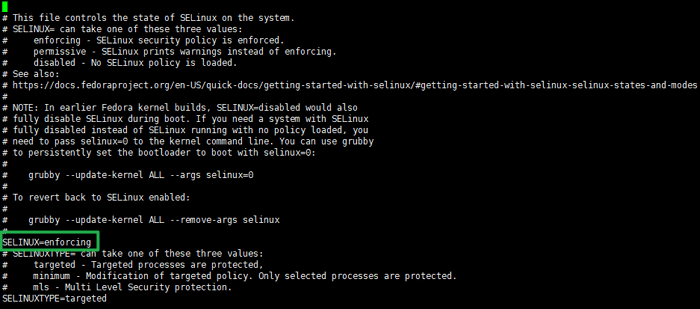
grubby --update-kernel=ALL --args="selinux=0"기존에 selinux를 꺼짐 상태로 두었다면, 다시 꺼짐 상태로 적용합니다.
Alma Linux 업데이트 후 서버의 설정은 서버마다 다를 수 있으니 나머지 설정은 직접 확인 후 체크가 필요합니다.
🔢 FAQ 및 추천 콘텐츠




ℹ️ 제휴 안내
본 사이트의 콘텐츠에는 제휴 링크가 포함되어 있습니다. 방문자가 이 링크를 통해 상품 또는 서비스를 구매하면 본 사이트는 판매처로부터 수수료를 지급받습니다. 이 과정에서 구매자가 지불하는 금액(이벤트 할인 시 금액이 내려갑니다↓)은 오르지 않습니다. 게시된 가격·할인·재고 정보는 작성 시점 기준이며 실제와 다를 수 있으므로, 구매 전 판매처에서 최종 확인하시기 바랍니다. 상품 선정과 평가는 자체 기준에 따라 작성되며, 수수료 지급 여부가 소개 순서나 평가 내용에 영향을 주지 않습니다.