
yum-config-manager 명령어 | YUM 저장소 설정


yum 명령어는 기본 사용 시 기본 저장소(보통 안정화 버전)에서 패키지를 설치합니다. 저장소 파일을 추가하면 안정화(stable) 또는 최신(mainline) 버전 중 활성화된 저장소에서 패키지를 설치할 수 있습니다.
안정화와 최신 버전 저장소가 모두 활성화되어 있을 경우, yum은 버전이 더 높은 패키지(보통 최신 버전)를 설치합니다.
원하는 버전을 설치하려면, remi 저장소 설정 또는 yum-config-manager를 사용하여 특정 저장소를 활성화해서 진행할 수 있습니다.
|
방법 |
설명 |
|---|---|
|
Remi 저장소 설정 |
· Remi 저장소 설치 후 설치 가능 버전 지정(주로 PHP) |
|
yum-config-manager |
특정 저장소 활성화/비활성화하여 원하는 저장소 패키지 설치 |
✅ yum 저장소 /etc/yum.repos.d/
yum 저장소는 기본 저장소, EPEL, REMI 저장소 등으로 나뉩니다.
├── yum
│    ├──repo
│        ├── Base.repo
│        ├── epel.repo
│        ├── remi.repo
├── yum-utils
│    ├── yum-config-manager
│    ├── yum-groups-manager
│    ├── yum-builddep
│    ├── yumdownloader
│    ├── yum-debuginfo-install
│    ├── package-cleanup
│    ├── repoquery
│    └── repo-graph
🔲 .Base.repo
기본 저장소는 레드햇 계열 리눅스 배포판에 기본으로 포함된 공식 저장소로, 안정화 되고 검증된 패키지를 제공합니다. 이 저장소는 시스템의 기본 소프트웨어 설치와 업데이트에 주로 사용됩니다.
/etc/yum.repos.d/almalinux-baseos.repo
/etc/yum.repos.d/CentOS-Base.repo
CentOS-Base.repo 파일입니다.
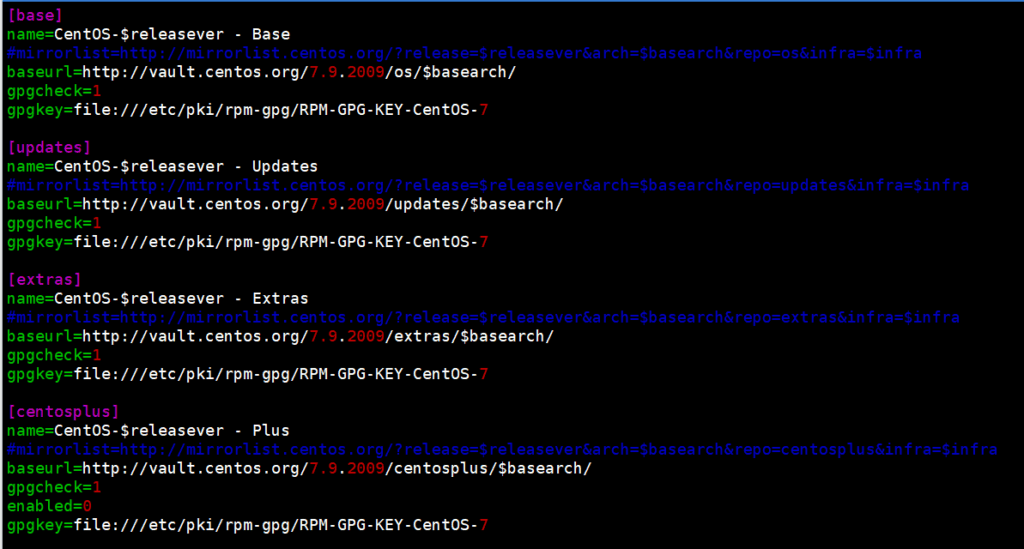
[저장소 이름]
name=저장소 표시이름
baseurl=저장소 주소
enabled=활성화 여부 (0 또는 1)
gpgcheck=GPG 서명키 사용 여부 (0 또는 1)
gpgkey=서명키를 사용할 경우 서명키 파일 또는 URL 입력

[base] : 기본 패키지 저장소
[updates] : 기본 패키지의 업데이트 저장소
[extras] : 기본 패키지에 포함되지 않은 추가 패키지 제공
[centosplus] : 기본 패키지의 확장 버전 저장소
🔲 epel.repo
EPEL 저장소는 Extra Packages for Enterprise Linux의 약자로, 기본 저장소에 포함되지 않은 추가적인 오픈소스 소프트웨어 패키지를 제공합니다.
yum -y install epel-release

yum.repos.d]# ll epel*
-rw-r--r--. 1 root root 1050 10월  3  2017 epel-testing.repo
-rw-r--r--. 1 root root  951 10월  3  2017 epel.repo
🔲 remi.repo
Remi 저장소는 최신 PHP 버전과 관련 확장 패키지를 제공하는 저장소로, 프랑스 개발자 Remi Collet의 이름에서 시작되었습니다. 기본 저장소에 없는 최신 PHP 기능과 버전을 손쉽게 설치하고 관리할 수 있도록 지원합니다.
EPEL을 먼저 설치하지 않으면 Remi 저장소에서 일부 의존 패키지가 누락되어 설치 오류가 날 수 있습니다.
red Hat 계열에 따른 Remi 저장소 설치 경로

RHEL/CentOS/AlmaLinux/RockyLinux 7
https://rpms.remirepo.net/enterprise/remi-release-7.rpm

RHEL/CentOS/AlmaLinux/RockyLinux 8
https://rpms.remirepo.net/enterprise/remi-release-8.rpm

RHEL/AlmaLinux/RockyLinux 9
https://rpms.remirepo.net/enterprise/remi-release-9.rpm

yum -y install https://rpms.remirepo.net/enterprise/remi-release-7.rpm
root@localhost yum.repos.d]# ll remi*
-rw-r--r--. 1 root root  855 11월 28  2023 remi-modular.repo
-rw-r--r--. 1 root root  456 11월 28  2023 remi-php54.repo
-rw-r--r--. 1 root root 1314 11월 28  2023 remi-php70.repo
-rw-r--r--. 1 root root 1314 11월 28  2023 remi-php71.repo
-rw-r--r--. 1 root root 1314 11월 28  2023 remi-php72.repo
-rw-r--r--. 1 root root 1314 11월 28  2023 remi-php73.repo
-rw-r--r--. 1 root root 1314 11월 28  2023 remi-php74.repo
-rw-r--r--. 1 root root 1314 11월 28  2023 remi-php80.repo
-rw-r--r--. 1 root root 1314 11월 28  2023 remi-php81.repo
-rw-r--r--. 1 root root 1314 11월 28  2023 remi-php82.repo
-rw-r--r--. 1 root root 1314 11월 28  2023 remi-php83.repo
-rw-r--r--. 1 root root  750 11월 28  2023 remi-safe.repo
-rw-r--r--. 1 root root 2605 11월 28  2023 remi.repo
🔲 저장소 활용
일반 저장소 nginx 공식 저장소를 추가 후 nginx 설치를 진행합니다.
RHEL, Debian 등 주요 리눅스 배포판용 Nginx 공식 저장소입니다.
RHEL 계열에서는 RPM 패키지가 저장된 URL을 YUM 저장소에서 등록하여 설치를 진행합니다.
yum.repos.d]# vi nginx.repo

[nginx-stable]
name=nginx stable repo
baseurl=http://nginx.org/packages/centos/$releasever/$basearch/
enabled=1
gpgcheck=1
gpgkey=https://nginx.org/keys/nginx_signing.key

[nginx-mainline]
name=nginx mainline repo
baseurl=http://nginx.org/packages/mainline/centos/$releasever/$basearch/
enabled=0
gpgcheck=1
gpgkey=https://nginx.org/keys/nginx_signing.key

yum.repos.d] yum --enablerepo="nginx-stable" list available nginx
yum.repos.d] yum -y install nginx
yum.repos.d]# nginx -v
nginx version: nginx/1.26.1
Remi 저장소를 설치할때 의존성으로 EPEL 저장소가 함께 설치됩니다.
root@localhost ~]# yum -y install https://rpms.remirepo.net/enterprise/remi-release-7.rpm

root@localhost ~]# yum install -y php83 php83-php-mbstring php83-php-cli php83-php-fpm php83-php-mysqlnd php83-php-xml
root@localhost ~]# php83 -v
PHP 8.3.8 (cli) (built: Jun  4 2024 14:53:17) (NTS gcc x86_64)
Copyright (c) The PHP Group
root@localhost ~]# Zend Engine v4.3.8, Copyright (c) Zend Technologies
which php83
/usr/bin/php83
root@localhost ~]# which php83
/usr/bin/php83
root@localhost ~]# ln -s /usr/bin/php83 /usr/bin/php
root@localhost ~]# which php
/usr/bin/php
root@localhost ~]# php -v
PHP 8.3.8 (cli) (built: Jun  4 2024 14:53:17) (NTS gcc x86_64)
Copyright (c) The PHP Group
Zend Engine v4.3.8, Copyright (c) Zend Technologies

root@localhost ~]# ll /etc/opt/remi/php83/php.ini
-rw-r--r--. 1 root root 63038  6월  5  2024 /etc/opt/remi/php83/php.ini
✅ yum-config-manager
yum-config-manager를 사용하려면 yum-utils 패키지를 먼저 설치합니다.(Remi 저장소도 설치되어 있어야 합니다.)
yum install -y yum-utils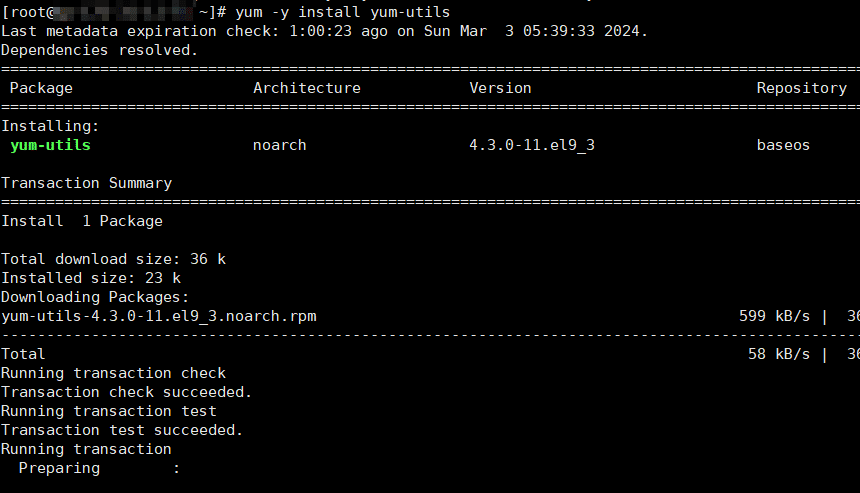
설치된 저장소를 확인합니다.
root@localhost yum.repos.d]#  yum repolist
Loaded plugins: fastestmirror
Loading mirror speeds from cached hostfile
 * remi-safe: ftp.riken.jp
repo id                           repo name                                                                     status
base/x86_64                       CentOS-7 - Base                                                               10,072
extras/x86_64                     CentOS-7 - Extras                                                                526
remi-safe                         Safe Remi's RPM repository for Enterprise Linux 7 - x86_64                     5,596
updates/x86_64                    CentOS-7 - Updates                                                             6,173
repolist: 22,367
설치 가능한 PHP 리스트를 확인합니다.
root@localhost yum.repos.d]# yum repolist all | grep php
remi-php54                          Remi's PHP 5.4 RPM repositor disabled
remi-php55                          Remi's PHP 5.5 RPM repositor disabled
remi-php55-debuginfo/x86_64         Remi's PHP 5.5 RPM repositor disabled
remi-php56                          Remi's PHP 5.6 RPM repositor disabled
remi-php56-debuginfo/x86_64         Remi's PHP 5.6 RPM repositor disabled
remi-php70                          Remi's PHP 7.0 RPM repositor disabled
remi-php70-debuginfo/x86_64         Remi's PHP 7.0 RPM repositor disabled
remi-php70-test                     Remi's PHP 7.0 test RPM repo disabled
remi-php70-test-debuginfo/x86_64    Remi's PHP 7.0 test RPM repo disabled
remi-php71                          Remi's PHP 7.1 RPM repositor disabled
...

root@localhost yum.repos.d]# yum repolist all | grep php83
remi-php83                          Remi's PHP 8.3 RPM repositor disabled
remi-php83-debuginfo/x86_64         Remi's PHP 8.3 RPM repositor disabled
remi-php83-test                     Remi's PHP 8.3 test RPM repo disabled
remi-php83-test-debuginfo/x86_64    Remi's PHP 8.3 test RPM repo disabled
yum –enablerepo=remi-safe 명령으로 안전 모드를 활성화 한 후에 설치할 php 8.0 버전을 활성화 합니다.
yum --enablerepo=remi-safe list php*

yum-config-manager --enable remi-php80
yum-config-manager --enable remi-php83

yum repolist enabled | grep php
 * remi-php80: ftp.riken.jp
remi-php80     Remi's PHP 8.0 RPM repository for Enterprise Linux 7 - x86    418

 php -v
PHP 8.0.30 (cli) (built: Jun  4 2024 15:19:49) ( NTS gcc x86_64 )
Copyright (c) The PHP Group

 [root@localhost ~]# which php
/usr/bin/php
php 7.2 버전을 직접 입력해서 설치 해 보겠습니다.
yum -y install php72

php72 -v
PHP 7.2.34 (cli) (built: Jun  5 2024 08:10:44) ( NTS )
Copyright (c) 1997-2018 The PHP Group
Zend Engine v3.2.0, Copyright (c) 1998-2018 Zend Technologies

which php72
/usr/bin/php72

ll /usr/bin/php72
lrwxrwxrwx. 1 root root 32  6월 14 22:48 /usr/bin/php72 -> /opt/remi/php72/root/usr/bin/php
php 8.0 버전은 모듈 설치 방식(yum-config-manager + remi-phpXX enable)으로 진행하였으며, 기본 php 저장 경로에 설치 되었습니다. php 7.2 버전의 경우 SCL 방식(Software Collections)으로 설치가 되었으며, /opt/remi/php72 경로에 설치 되었습니다.
|
특징 / 방식 |
SCL 방식 |
모듈 전환 방식 |
|---|---|---|
|
설치 경로 |
/opt/remi/php[xx]/ |
/usr/bin/php |
|
공존 가능 여부 |
가능 |
불가 |
|
기본 PHP 영향 |
없음 |
교체됨 |
|
실행 명령 예시 |
php83, php74 등 별도 실행 |
php 명령어로 바로 실행 |
|
다중 버전 운영 |
가능 (심볼릭 링크로 전환 가능) |
불가능 (한 버전만 활성화) |
ℹ️ 제휴 안내
본 사이트의 콘텐츠에는 제휴 링크가 포함되어 있습니다. 방문자가 이 링크를 통해 상품 또는 서비스를 구매하면 본 사이트는 판매처로부터 수수료를 지급받습니다. 이 과정에서 구매자가 지불하는 금액(이벤트 할인 시 금액이 내려갑니다↓)은 오르지 않습니다. 게시된 가격·할인·재고 정보는 작성 시점 기준이며 실제와 다를 수 있으므로, 구매 전 판매처에서 최종 확인하시기 바랍니다. 상품 선정과 평가는 자체 기준에 따라 작성되며, 수수료 지급 여부가 소개 순서나 평가 내용에 영향을 주지 않습니다.