
nslookup 指令:用法與選項、記錄查詢與指定 DNS 伺服器
nslookup 指令是向 DNS 伺服器查詢網域名稱,取得 IP 位址以及 MX、NS、TXT 等 DNS 記錄的查詢指令。在 AlmaLinux 9 伺服器上依類型查詢 example.com 的記錄並更換查詢的 DNS 伺服器後,同一個網域會因詢問的伺服器不同而有不同結果:回應開頭的 Non-authoritative answer 一行消失,或 ANY 查詢的結果改變。
下方輸出是在 AlmaLinux 9.8 伺服器的 root 帳號執行的結果。伺服器上設定的 DNS 伺服器位址已換成範例值 192.0.2.53,套件版本號也換成了範例值。
1️⃣ nslookup 指令用法
基本格式是 [nslookup -選項 名稱 DNS伺服器],選項和 DNS 伺服器都可以省略。只寫名稱時,nslookup 會向伺服器上設定的 DNS 伺服器詢問該名稱的位址。
nslookup example.comServer: 192.0.2.53
Address: 192.0.2.53#53
Non-authoritative answer:
Name: example.com
Address: 172.66.147.243
Name: example.com
Address: 104.20.23.154
Name: example.com
Address: 2606:4700:10::6814:179a
Name: example.com
Address: 2606:4700:10::ac42:93f3最上方的 Server 和 Address 兩行是接收查詢的 DNS 伺服器,結尾的 #53 是 DNS 連接埠號。沒有指定記錄類型時,會依序查詢 A 記錄(IPv4)與 AAAA 記錄(IPv6),所以兩個 IPv4 位址後面接著兩個 IPv6 位址。
Non-authoritative answer 的意思是,回應的不是直接管理 example.com 記錄的伺服器,而是把該值存在快取裡的 DNS 伺服器。因此剛修改記錄後,值可能與實際值不同。
2️⃣ nslookup 選項
選項要在名稱前加上連字號來寫。
-type 與 -query 或簡寫 -q 是同一個選項。用 -q=mx 詢問 8.8.8.8,得到與 -type=mx 相同的一行郵件伺服器。
nslookup -q=mx google.com 8.8.8.8Server: 8.8.8.8
Address: 8.8.8.8#53
Non-authoritative answer:
google.com mail exchanger = 10 smtp.google.com.
Authoritative answers can be found from:-timeout 與 -retry 決定要等候沒有回應的 DNS 伺服器多久。192.0.2.1 是保留給文件範例的位址,所以沒有伺服器會回應。
nslookup -timeout=2 -retry=1 example.com 192.0.2.1;; connection timed out; no servers could be reached用 -timeout=2 -retry=1 執行時,2 秒後輸出 [connection timed out] 一行就結束了。改成 -retry=2 需要 4 秒,不加選項則花了 15 秒。若不想讓指令碼因沒有回應的伺服器而長時間停住,就把兩個值調小。
加上 -debug 會原樣輸出回應封包的問題與答案區段。
nslookup -debug example.com 8.8.8.8Server: 8.8.8.8
Address: 8.8.8.8#53
------------
QUESTIONS:
example.com, type = A, class = IN
ANSWERS:
-> example.com
internet address = 104.20.23.154
ttl = 300
-> example.com
internet address = 172.66.147.243
ttl = 300
AUTHORITY RECORDS:
ADDITIONAL RECORDS:
------------
Non-authoritative answer:
Name: example.com
Address: 104.20.23.154
Name: example.com
Address: 172.66.147.243
------------
QUESTIONS:
example.com, type = AAAA, class = IN
ANSWERS:
-> example.com
has AAAA address 2606:4700:10::6814:179a
ttl = 300
-> example.com
has AAAA address 2606:4700:10::ac42:93f3
ttl = 300
AUTHORITY RECORDS:
ADDITIONAL RECORDS:
------------
Name: example.com
Address: 2606:4700:10::6814:179a
Name: example.com
Address: 2606:4700:10::ac42:93f3每筆記錄都多了一般輸出沒有的 ttl = 300。這個值表示收到此回應的 DNS 伺服器最多可以把該記錄放在快取 300 秒。
-norecurse 要求 DNS 伺服器不要經由其他伺服器查找,只回覆自己已有的值。不加選項詢問同一台 8.8.8.8 時得到四個位址,但加上 -norecurse 後以 [SERVFAIL] 結束。
nslookup -norecurse example.com 8.8.8.8Server: 8.8.8.8
Address: 8.8.8.8#53
** server can't find example.com: SERVFAIL| 選項 | 複製 | 說明 |
|---|---|---|
| -type= | 指定要查詢的記錄類型,省略時先 A 再 AAAA | |
| -q= | 與 -type 相同的選項,指定要查詢的記錄類型 | |
| -timeout= | 第一次查詢的回應等候時間(秒) | |
| -retry= | 沒有回應時送出查詢的次數 | |
| -debug | 輸出回應封包的問題與答案,連 TTL 一起 | |
| -norecurse | 不經由其他伺服器,只要求該伺服器已有的值 |
| 選項 | 複製 | 說明 |
|---|---|---|
| -query= | 與 -type 相同的選項,指定要查詢的記錄類型 | |
| -port= | 指定要查詢的連接埠,預設 53 | |
| -version | 輸出版本後結束 |
3️⃣ 用 nslookup 查詢記錄(MX、NS、TXT、SOA)
在 -type= 後面寫上記錄類型,就只查詢該記錄。值用大寫或小寫都可以。
| -type= 的值 | 包含的資訊 |
|---|---|
| A · AAAA | IPv4 位址、IPv6 位址 |
| MX | 接收郵件的伺服器與優先順序 |
| NS | 管理網域記錄的名稱伺服器 |
| TXT | SPF 等文字值 |
| SOA | 區域的主要名稱伺服器、管理員郵件、序號、更新週期 |
| CNAME | 指向其他名稱的別名 |
| PTR | 與 IP 位址連結的主機名稱(反向) |
| ANY | 一次要求該名稱的所有記錄 |
郵件伺服器用 MX 記錄確認。
nslookup -type=mx google.comServer: 192.0.2.53
Address: 192.0.2.53#53
Non-authoritative answer:
google.com mail exchanger = 10 smtp.google.com.
Authoritative answers can be found from:mail exchanger 後面的 10 是優先順序。有多台郵件伺服器時,寄件端會從數字較小的伺服器開始嘗試遞送。對 example.com 做相同查詢時出現 [mail exchanger = 0 .],只有一個點的 MX 表示這個網域不收郵件。
MX 查詢結尾的 [Authoritative answers can be found from:] 是標題行,下方會接著顯示回應中一併帶來的權威名稱伺服器資訊。本文的 MX、NS、TXT 查詢中,回應沒有這些資訊,所以標題行下方是空的。
NS 記錄裡是直接管理該網域記錄的名稱伺服器。
nslookup -type=ns example.comServer: 192.0.2.53
Address: 192.0.2.53#53
Non-authoritative answer:
example.com nameserver = hera.ns.cloudflare.com.
example.com nameserver = elliott.ns.cloudflare.com.
Authoritative answers can be found from:example.com 的名稱伺服器有兩台。這兩台伺服器就是 example.com 的權威名稱伺服器。
TXT 記錄可以放入沒有固定格式的文字值。
nslookup -type=txt example.comServer: 192.0.2.53
Address: 192.0.2.53#53
Non-authoritative answer:
example.com text = "_k2n1y4vw3qtb4skdx9e7dxt97qrmmq9"
example.com text = "v=spf1 -all"
Authoritative answers can be found from:v=spf1 -all 是表示沒有任何伺服器可以用這個網域名稱寄信的 SPF 值。一個網域有多筆 TXT 記錄時,會像這樣每行顯示一筆。
SOA 記錄包含該區域的基本資訊。
nslookup -type=soa example.comServer: 192.0.2.53
Address: 192.0.2.53#53
Non-authoritative answer:
example.com
origin = elliott.ns.cloudflare.com
mail addr = dns.cloudflare.com
serial = 2418004112
refresh = 10000
retry = 2400
expire = 604800
minimum = 1800
Authoritative answers can be found from:origin 是主要名稱伺服器,mail addr 是把管理員郵件地址的 @ 改寫成點的值。serial 是每次修改記錄都會增加的序號,refresh、retry、expire 是次要名稱伺服器與主要伺服器同步記錄時使用的時間值(秒)。minimum 是把不存在記錄的回應放在快取的時間。
別名用 CNAME 記錄確認。查詢 www.github.com 時,出現一行說明它是 github.com 的別名。
nslookup -type=cname www.github.comServer: 192.0.2.53
Address: 192.0.2.53#53
www.github.com canonical name = github.com.-type=any 會一次要求該名稱的所有記錄。詢問伺服器上設定的 DNS 伺服器時,A、AAAA、MX、NS 記錄一次全部出現。
nslookup -type=any example.comServer: 192.0.2.53
Address: 192.0.2.53#53
Non-authoritative answer:
Name: example.com
Address: 172.66.147.243
Name: example.com
Address: 104.20.23.154
Name: example.com
Address: 2606:4700:10::6814:179a
Name: example.com
Address: 2606:4700:10::ac42:93f3
example.com mail exchanger = 0 .
example.com nameserver = hera.ns.cloudflare.com.
example.com nameserver = elliott.ns.cloudflare.com.
Authoritative answers can be found from:把相同查詢送到 8.8.8.8 時,只回來一行 [hinfo = “RFC8482”] 和簽章行。
nslookup -type=any example.com 8.8.8.8Server: 8.8.8.8
Address: 8.8.8.8#53
Non-authoritative answer:
example.com hinfo = "RFC8482" ""
example.com rdata_46 = HINFO 13 2 3600 20261029212708 20261027192708 34505 example.com. 2YBHcD7GmqHiW6E7e8Lx3z/gPoCsLbYw/Uegjy801hQ+4fYp5U7wKqc2 NXOONd8WS0xjgzfW5Dn0akDqdjltOw==
Authoritative answers can be found from:RFC 8482 是規定 ANY 查詢可以用簡短回應取代所有記錄的文件。因此需要的記錄要一次指定一種類型來查詢。
4️⃣ 在 nslookup 指定 DNS 伺服器
在名稱後面寫上 DNS 伺服器,nslookup 就會改向該伺服器詢問,而不是伺服器上設定的 DNS 伺服器。
nslookup example.com 8.8.8.8Server: 8.8.8.8
Address: 8.8.8.8#53
Non-authoritative answer:
Name: example.com
Address: 104.20.23.154
Name: example.com
Address: 172.66.147.243
Name: example.com
Address: 2606:4700:10::6814:179a
Name: example.com
Address: 2606:4700:10::ac42:93f3Server 行變成 8.8.8.8,四個位址與伺服器上設定的 DNS 伺服器的回應相同。更換名稱伺服器後,要確認新值是否已擴散到各個公共 DNS 伺服器時,就用這個格式。
把 NS 查詢得到的名稱伺服器指定為 DNS 伺服器,就是直接詢問權威伺服器。
nslookup example.com elliott.ns.cloudflare.comServer: elliott.ns.cloudflare.com
Address: 2606:4700:58::a29f:2ce4#53
Name: example.com
Address: 104.20.23.154
Name: example.com
Address: 172.66.147.243
Name: example.com
Address: 2606:4700:10::6814:179a
Name: example.com
Address: 2606:4700:10::ac42:93f3這次 Non-authoritative answer 一行消失了。這是管理記錄的伺服器直接回答的值,所以是沒有經過快取的目前值。Server 行正下方的 Address 顯示了這台名稱伺服器的 IPv6 位址。
查詢不存在的名稱會出現 [NXDOMAIN]。.invalid 是保留起來不實際使用的頂級網域,所以回應是名稱不存在。
nslookup example.invalidServer: 192.0.2.53
Address: 192.0.2.53#53
** server can't find example.invalid: NXDOMAIN相對地,no-such-host.example.com 不是 NXDOMAIN,而是以 [No answer] 結束。這表示查詢的記錄不在回應中,與名稱本身不存在的 NXDOMAIN 是不同的結果。
nslookup no-such-host.example.comServer: 192.0.2.53
Address: 192.0.2.53#53
Non-authoritative answer:
*** Can't find no-such-host.example.com: No answer5️⃣ 用 nslookup 反向查詢
寫 IP 位址代替名稱時,nslookup 會查詢 PTR 記錄,找出與該位址連結的主機名稱。
nslookup 8.8.8.88.8.8.8.in-addr.arpa name = dns.google.
Authoritative answers can be found from:8.8.8.8.in-addr.arpa 是把 IPv4 位址倒過來寫再加上 in-addr.arpa 的名稱。這個名稱的 PTR 記錄值 dns.google. 就是 8.8.8.8 的主機名稱。
反向查詢時,最上方的兩行 Server 沒有出現。在 Debian 12 伺服器上用 nslookup 9.18 查詢同一個位址時,格式也一樣。
6️⃣ nslookup 互動模式
不帶引數執行 nslookup,會進入出現 > 提示字元的互動模式。連續查詢多個名稱和記錄類型時,不必每次都從頭重打指令。
nslookup> server 8.8.8.8
Default server: 8.8.8.8
Address: 8.8.8.8#53
> set type=mx
> google.com
Server:		8.8.8.8
Address:	8.8.8.8#53

Non-authoritative answer:
google.com	mail exchanger = 10 smtp.google.com.

Authoritative answers can be found from:
> set type=txt
> example.com
Server: 8.8.8.8
Address: 8.8.8.8#53
Non-authoritative answer:
example.com text = "_k2n1y4vw3qtb4skdx9e7dxt97qrmmq9"
example.com text = "v=spf1 -all"
Authoritative answers can be found from:
> exit用 server 更換要查詢的 DNS 伺服器,再用 set type= 指定記錄類型,之後只要輸入名稱就會以該設定查詢。輸入 exit 會回到 shell。
set all 會輸出目前所有的設定值。
nslookup> set type=txt
> set all
Default server: 192.0.2.53
Address: 192.0.2.53#53
Set options:
novc nodebug nod2
search recurse
timeout = 0 retry = 3 port = 53 ndots = 1
querytype = txt class = IN
srchlist = example.internal
> exitquerytype 已變成前面設定的 txt。retry = 3 和 port = 53 是沒有另外修改的預設值。
7️⃣ 在 Linux 安裝 nslookup 並與 dig、host 比較
在 Linux 執行 nslookup 出現 [command not found] 時,請安裝 BIND 工具套件。AlmaLinux 伺服器的 nslookup 來自 bind-utils 套件。
rpm -qf /usr/bin/nslookupbind-utils-9.16.20-30.el9_8.2.x86_64Debian 12 伺服器上則是 bind9-dnsutils 套件。舊名稱 dnsutils 仍以安裝 bind9-dnsutils 的過渡套件形式保留。
dpkg -S /usr/bin/nslookupbind9-dnsutils: /usr/bin/nslookupRHEL 系列用下方指令安裝 bind-utils 套件。
dnf install bind-utilsDebian 系列安裝 bind9-dnsutils 套件。
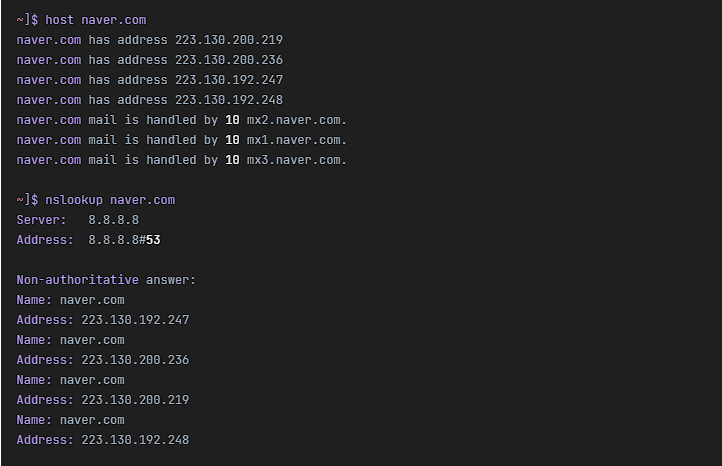
apt install bind9-dnsutils同一個套件也包含 dig 和 host。三個指令都會查詢 DNS,但輸出的樣子不同。
| 指令 | 輸出 | 使用時機 |
|---|---|---|
| nslookup | Server 行 + 回應、互動模式 | 連續查詢多個名稱與記錄 |
| dig | 回應封包的所有區段,加 +short 只剩值 | 在指令碼中只取出值時 |
| host | 每筆記錄一行句子 | 一次確認 A、AAAA、MX |
host example.comexample.com has address 172.66.147.243
example.com has address 104.20.23.154
example.com has IPv6 address 2606:4700:10::6814:179a
example.com has IPv6 address 2606:4700:10::ac42:93f3
example.com mail is handled by 0 .host 不加選項也會一次查詢 A、AAAA、MX 記錄,並各以一行句子輸出。dig 加上 +short 就只剩 IP 位址。
dig +short example.com104.20.23.154
172.66.147.243在指令碼中只取出值時,dig +short 比較好處理;要連續確認多個名稱時,nslookup 互動模式比較方便。
🔲 nslookup 指令模擬器
在下方模擬器中,可以一邊更換記錄類型和 DNS 伺服器,一邊親自輸入 nslookup。
🔢 FAQ & 推薦內容



ℹ️ 聯盟行銷說明
本站內容包含聯盟行銷連結。訪客透過這些連結購買商品或服務時,本站會從賣家獲得佣金。在這個過程中,購買者支付的金額(遇到活動折扣時金額會降低↓)並不會因此提高。刊登的價格、折扣與庫存資訊以撰寫當時為準,可能與實際情況不同,購買前請向賣家做最後確認。商品的挑選與評價依本站自訂的標準撰寫,是否支付佣金不會影響介紹順序或評價內容。