
วิธีตั้งค่าพาร์ทิชันบน Linux: คำสั่ง gdisk


การตั้งค่าพาร์ทิชันบน Linux (สร้าง แก้ไข และลบ) ใช้คำสั่ง fdisk หรือคำสั่ง gdisk บทความนี้จะอธิบายการแก้ไขข้อมูลพาร์ทิชันด้วย gdisk
ก่อนเมานต์ การตั้งค่าพาร์ทิชันจะทำตามลำดับต่อไปนี้
การเปลี่ยนแปลงพาร์ทิชันจะยังไม่ถูกเขียนลงดิสก์จนกว่าจะบันทึกแล้วออก
✅ ตั้งค่าพาร์ทิชัน Linux ด้วยคำสั่ง gdisk
gdisk เป็นยูทิลิตีจัดการพาร์ทิชันบนระบบ Linux แบบเดียวกับ fdisk โดยทั่วไปดิสก์ที่มีขนาดต่ำกว่า 2TB จะใช้ fdisk ส่วนดิสก์ขนาดใหญ่ตั้งแต่ 2TB ขึ้นไปจะใช้ parted หรือ gdisk ในการจัดการพาร์ทิชัน
gdisk -[ตัวเลือก] [ไฟล์ อุปกรณ์ เป้าหมาย]ใส่ตัวเลือก -l กับคำสั่ง gdisk หรือ fdisk เพื่อดูข้อมูลพาร์ทิชันที่ตั้งไว้
gdisk -l
Disk /dev/xvda: 10 GiB, 10737418240 bytes, 20971520 sectors
Units: sectors of 1 * 512 = 512 bytes
Sector size (logical/physical): 512 bytes / 512 bytes
I/O size (minimum/optimal): 512 bytes / 512 bytes
Disklabel type: gpt
Disk identifier: 0EF4456F-5883-478F-B913-FBB62350113E

Device       Start      End  Sectors  Size Type
/dev/xvda1    2048   204799   202752   99M EFI System
/dev/xvda2  204800  2252799  2048000 1000M Linux filesystem
/dev/xvda3 2252800  2260991     8192    4M PowerPC PReP boot
/dev/xvda4 2260992  2263039     2048    1M BIOS boot
/dev/xvda5 2265088 20969471 18704384  8.9G Linux filesystem


Disk /dev/xvdf: 3 GiB, 3221225472 bytes, 6291456 sectors
Units: sectors of 1 * 512 = 512 bytes
Sector size (logical/physical): 512 bytes / 512 bytes
I/O size (minimum/optimal): 512 bytes / 512 bytes
1. ตัวเลือกของ gdisk
หน้าจอเริ่มต้นที่แสดงหลังรัน gdisk
gdisk /dev/xvdf
GPT fdisk (gdisk) version 1.0.7

Partition table scan:
  MBR: not present
  BSD: not present
  APM: not present
  GPT: not present

Creating new GPT entries in memory.

Command (? for help):
2. รัน gdisk แล้วตรวจด้วยตัวเลือก p
Command (? for help): p
Disk /dev/xvda: 20971520 sectors, 10.0 GiB
Sector size (logical/physical): 512/512 bytes
Disk identifier (GUID): 0EF4456F-5883-478F-B913-FBB62350113E
Partition table holds up to 128 entries
Main partition table begins at sector 2 and ends at sector 33
First usable sector is 34, last usable sector is 20971486
Partitions will be aligned on 2048-sector boundaries
Total free space is 6077 sectors (3.0 MiB)

Number  Start (sector)    End (sector)  Size       Code  Name
   1            2048          204799   99.0 MiB    EF00  EFI System Partition
   2          204800         2252799   1000.0 MiB  8300  primary
   3         2252800         2260991   4.0 MiB     4100  primary
   4         2260992         2263039   1024.0 KiB  EF02  primary
   5         2265088        20969471   8.9 GiB     8300  primary
3. สร้างพาร์ทิชันด้วย gdisk
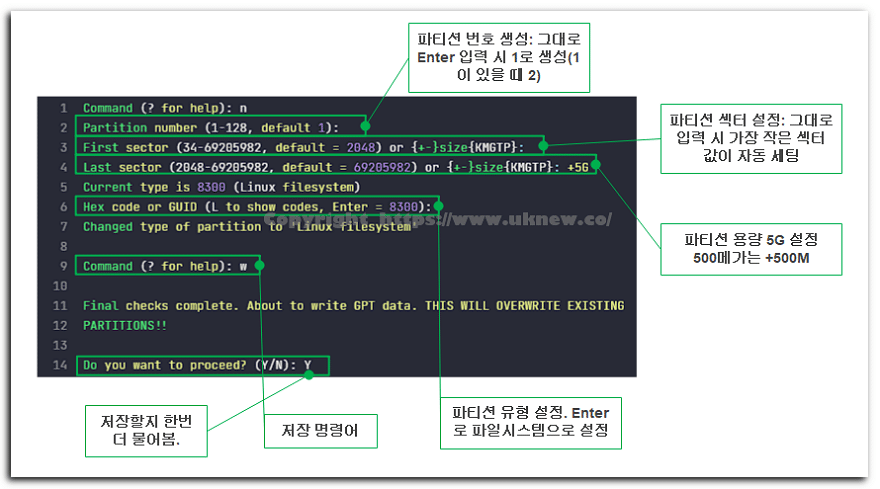
ตรวจดูประเภทพาร์ทิชันได้ด้วยคำสั่ง L
Hex code or GUID (L to show codes, Enter = 8300): L
Type search string, or <Enter> to show all codes:
0700 Microsoft basic data                0701 Microsoft Storage Replica
0702 ArcaOS Type 1                       0c01 Microsoft reserved
2700 Windows RE                          3000 ONIE boot
3001 ONIE config                         3900 Plan 9
4100 PowerPC PReP boot                   4200 Windows LDM data
4201 Windows LDM metadata                4202 Windows Storage Spaces
7501 IBM GPFS                            7f00 ChromeOS kernel
7f01 ChromeOS root                       7f02 ChromeOS reserved
8200 Linux swap                          8300 Linux filesystem
8301 Linux reserved                      8302 Linux /home
8303 Linux x86 root (/)                  8304 Linux x86-64 root (/)
8305 Linux ARM64 root (/)                8306 Linux /srv
8307 Linux ARM32 root (/)                8308 Linux dm-crypt
8309 Linux LUKS                          830a Linux IA-64 root (/)
830b Linux x86 root verity               830c Linux x86-64 root verity
830d Linux ARM32 root verity             830e Linux ARM64 root verity
830f Linux IA-64 root verity             8310 Linux /var
8311 Linux /var/tmp                      8312 Linux user's home
8313 Linux x86 /usr                      8314 Linux x86-64 /usr
8315 Linux ARM32 /usr                    8316 Linux ARM64 /usr
8317 Linux IA-64 /usr                    8318 Linux x86 /usr verity
Press the <Enter> key to see more codes, q to quit:
ตั้งประเภทพาร์ทิชันได้โดยใส่หมายเลข 8200 สำหรับไฟล์ swap และ 8300 สำหรับระบบไฟล์ Linux
4. ลบพาร์ทิชันด้วย gdisk
ลบพาร์ทิชันด้วยตัวเลือก [d] ใส่หมายเลขพาร์ทิชันที่จะลบเพื่อดำเนินการ ถ้ามีพาร์ทิชันเพียงพาร์ทิชันเดียว พาร์ทิชันนั้นจะถูกลบโดยอัตโนมัติ
Command (? for help): d
Partition number (1-5): 3ℹ️ ประกาศเรื่องลิงก์แอฟฟิลิเอต
เนื้อหาของเว็บไซต์นี้มีลิงก์แอฟฟิลิเอต หากผู้เข้าชมซื้อสินค้าหรือบริการผ่านลิงก์เหล่านี้ เว็บไซต์นี้จะได้รับค่าคอมมิชชันจากผู้ขาย ในกระบวนการนี้ ราคาที่ผู้ซื้อจ่าย(ราคาจะลดลงเมื่อมีโปรโมชัน↓)จะไม่สูงขึ้นแต่อย่างใด ราคา ส่วนลด และข้อมูลสต็อกที่แสดงเป็นข้อมูล ณ เวลาที่เขียนและอาจต่างจากความเป็นจริง โปรดตรวจสอบกับผู้ขายอีกครั้งก่อนซื้อ การเลือกและการประเมินสินค้าเขียนตามเกณฑ์ของเราเอง และการได้รับค่าคอมมิชชันหรือไม่ไม่มีผลต่อลำดับการแนะนำหรือเนื้อหาการประเมิน