ตัวแก้ไขเว็บไซต์ WordPress: การแก้ไขทั้งเว็บไซต์ด้วยธีมบล็อกและความต่างจากตัวปรับแต่ง

ประกาศแอฟฟิลิเอต Ver 3.1
ประกาศแอฟฟิลิเอต Ver 3.2 (เฉพาะมือถือ)
สภาพแวดล้อมทดสอบ ตระกูล RHELWordPress 7.1.3PHP 8.3Twenty Twenty-Five 1.5ตรวจสอบ 2026-10-19

ตัวแก้ไขเว็บไซต์ WordPress คือหน้าจอผู้ดูแลที่ใช้แก้ไขส่วนหัวและส่วนท้าย เทมเพลต และสไตล์ของทั้งเว็บไซต์ในธีมบล็อกด้วยบล็อก โดยเปิดจากเมนูรูปลักษณ์ บทความนี้เปิดเทมเพลต 8 รายการและ Template Parts 7 รายการดูจริงใน WordPress 7.1.3 กับธีม Twenty Twenty-Five แล้วสรุปความต่างจากตัวปรับแต่งไว้

1️⃣ หน้าจอตัวแก้ไขเว็บไซต์ WordPress: รูปลักษณ์ › ตัวแก้ไข

ชื่อรายการในเมนู [รูปลักษณ์] ที่ใช้เปิดตัวแก้ไขเว็บไซต์จะต่างกันไปตามธีมที่ใช้ ในธีมบล็อกจะแสดงเป็น [Editor] GeneratePress และ Astra ซึ่งเป็นธีมคลาสสิกที่รองรับสไตล์ตัวแก้ไขหรือ [theme.json] จะแสดงเป็น [Design] ส่วนธีมคลาสสิกอื่นจะแสดงเป็น [Patterns] ทั้งสามรายการเปิดหน้าจอตัวแก้ไขเดียวกันคือ [site-editor.php] แต่ใน [Design] ใช้ได้แค่ Style Book กับรายการแพตเทิร์น และใน [Patterns] ใช้ได้แค่รายการแพตเทิร์น

หน้าจอเมนูรูปลักษณ์: รายการ Editor ในธีมบล็อก Twenty Twenty-Five รายการ Design ใน GeneratePress และรายการ Patterns ใน Ashe (WordPress 7.1.3)
ประเภทธีมรายการในเมนู [รูปลักษณ์]สิ่งที่ใช้ได้ในหน้าจอที่เปิดขึ้นเมนู [ปรับแต่ง]
ธีมบล็อก (Twenty Twenty-Five)ตัวแก้ไขสไตล์ · เทมเพลต · แพตเทิร์น❌
คลาสสิกที่รองรับสไตล์ตัวแก้ไข · theme.json (GeneratePress · Astra)ออกแบบStyle Book · รายการแพตเทิร์น✅
คลาสสิกอื่น ๆ (Ashe)แพตเทิร์นรายการแพตเทิร์น✅

เมื่อเปิด [รูปลักษณ์ › ตัวแก้ไข] แผงสีเข้มที่มีหัวข้อ [Design] จะแสดงทางซ้ายแทนเมนูผู้ดูแล และตัวอย่างเว็บไซต์จะเปิดทางขวา การแก้ไขทั้งเว็บไซต์ของธีมบล็อกทำผ่าน [สไตล์] [เทมเพลต] และ [Patterns] ในหน้าจอนี้
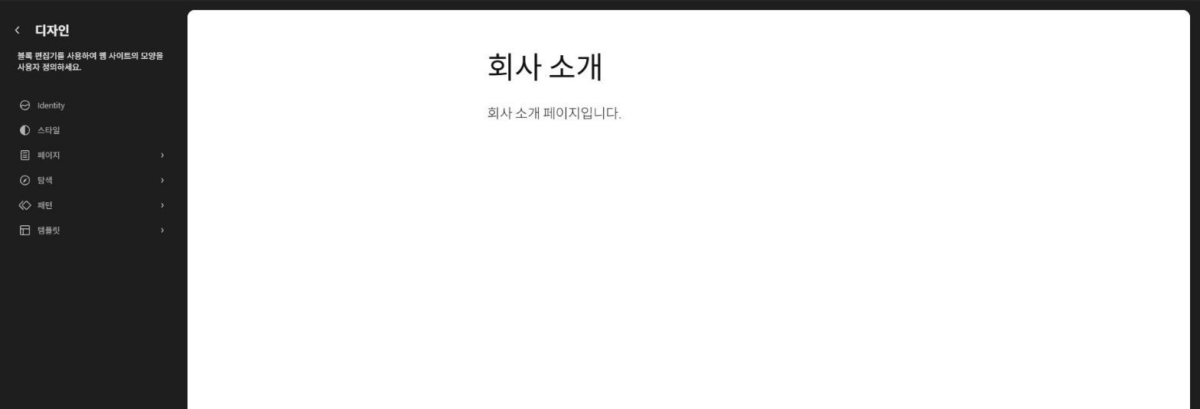
หน้าจอแรกของตัวแก้ไขเว็บไซต์ WordPress: แผง Design ทางซ้าย (Identity, สไตล์, หน้า, การนำทาง, แพตเทิร์น, เทมเพลต) และตัวอย่างเว็บไซต์ทางขวา (WordPress 7.1.3)

[Theme File Editor] ที่ใช้แก้ไขไฟล์ธีมเป็นโค้ดโดยตรง มีชื่อคล้าย [Editor] แต่เป็นคนละหน้าจอ และเมื่อใช้ธีมบล็อกจะแสดงอยู่ใต้เมนู [เครื่องมือ]

หน้าจอเมนูเครื่องมือ: รายการ Theme File Editor และ Plugin File Editor ในธีมบล็อก Twenty Twenty-Five (WordPress 7.1.3)

ชื่อเว็บ คำโปรย โลโก้ และไอคอน ตั้งค่าได้ที่ [Identity] ในแผง [Design] ทางซ้าย

🧭 ตัวจำลองตัวแก้ไขเว็บไซต์ WordPress
ตัวจำลอง
เลือกแท็บประเภทธีม แล้วลองกด Editor, Design หรือ Patterns ในเมนูรูปลักษณ์
wp-admin
แผงควบคุม › หน้าแรกรูปลักษณ์ › ตัวแก้ไขรูปลักษณ์ › ตัวแก้ไข › Identityรูปลักษณ์ › ตัวแก้ไข › สไตล์รูปลักษณ์ › ตัวแก้ไข › หน้ารูปลักษณ์ › ตัวแก้ไข › การนำทางรูปลักษณ์ › ตัวแก้ไข › แพตเทิร์นรูปลักษณ์ › ตัวแก้ไข › แพตเทิร์น › All Template Partsรูปลักษณ์ › ตัวแก้ไข › เทมเพลตรูปลักษณ์ › ตัวแก้ไข › เทมเพลต › หน้ารูปลักษณ์ › ตัวแก้ไข › แพตเทิร์น › All Template Parts › Footer Columnsรูปลักษณ์ › ตัวแก้ไข › แพตเทิร์น › All Template Parts › Vertical site headerรูปลักษณ์ › ตัวแก้ไข › แพตเทิร์น › All Template Parts › Header with large titleรูปลักษณ์ › ตัวแก้ไข › แพตเทิร์น › All Template Parts › Footerรูปลักษณ์ › ตัวแก้ไข › แพตเทิร์น › All Template Parts › Headerรูปลักษณ์ › ตัวแก้ไข › แพตเทิร์น › All Template Parts › Footer Newsletterรูปลักษณ์ › ตัวแก้ไข › แพตเทิร์น › All Template Parts › Sidebarรูปลักษณ์ › Designรูปลักษณ์ › Design › สไตล์รูปลักษณ์ › Design › แพตเทิร์นรูปลักษณ์ › Patterns
ออกแบบ

Customize the appearance of your website using the block editor.

หน้า
การนำทาง

Navigation Menus are a curated collection of blocks that allow visitors to get around your site.

หน้าตัวอย่าง เกี่ยวกับเรา
แพตเทิร์น

Manage what patterns are available when editing the site.

เทมเพลต

Create new templates, or reset any customizations made to the templates supplied by your theme.

ออกแบบ

Explore block styles and patterns to refine your site.

สไตล์

Preview your website's visual identity: colors, typography, and blocks.

แพตเทิร์น

Manage what patterns are available when editing the site.

แพตเทิร์น

Manage what patterns are available when editing the site.

บันทึกได้
알림판
แผงควบคุม
ยินดีต้อนรับสู่เวิร์ดเพรสLearn more about the 7.1.3 version.
Author rich content with blocks and patterns

Block patterns are pre-configured block layouts. Use them to get inspired or create new pages in a flash.

Add a new page
Customize your entire site with block themes

Design everything on your site — from the header down to the footer, all using blocks and patterns.

Switch up your site’s look & feel with Styles

Tweak your site, or give it a whole new look! Get creative — how about a new color palette or font?

Start Customizing

Configure your site’s logo, header, menus, and more in the Customizer.

Open the Customizer
Discover a new way to build your site.

There is a new kind of WordPress theme, called a block theme, that lets you build the site you’ve always wanted — with blocks and styles.

Learn about block themes
สถานะสุขภาพเว็บ
สรุปคร่าวๆ
ความเคลื่อนไหว
ฉบับร่างอย่างเร็ว
ข่าวและกิจกรรมเกี่ยวกับ WordPress
Identity
ชื่อเว็บเว็บไซต์ตัวอย่างDisplays in your site’s layout via the Site Title block.
คำโปรยเว็บIn a few words, explain what this site is about. Displays in your site’s layout via the Site Tagline block.
โลโก้เว็บเลือกรูปโลโก้Displays in your site’s layout via the Site Logo block.
รูปไอคอนเว็บChoose iconShown in browser tabs, bookmarks, and mobile apps. It should be square and at least 512 by 512 pixels.
สไตล์

Customize the appearance of specific blocks for the whole site.

Browse styles

Choose a variation to change the look of the site.

ค่าเริ่มต้น
Evening
Noon
Dusk
Afternoon
Twilight
Morning
Sunrise
Midnight
หน้า
นโยบายความเป็นส่วนตัวadmin · ฉบับร่าง
หน้าตัวอย่างadmin · เผยแพร่แล้ว
เกี่ยวกับเราหน้าแรกadmin · เผยแพร่แล้ว
All patterns

A list of all patterns from all sources.

Banner with book descriptionNot synced
Cover with big headingNot synced
Short heading and paragraph and image on the leftNot synced
Intro with left-aligned descriptionNot synced
Poster-like sectionNot synced
Banner with description and images gridNot synced
Centered headingNot synced
Newsletter sign-upNot synced
All Template Parts

Includes every template part defined for any area.

Footer Columns · Template Part
Template Partบล็อก
Footer Columns
เนื้อหา
ชื่อเว็บ
คำโปรยเว็บ
การนำทาง
การนำทาง
ออกแบบ
Footer with centered site title and tagline.
Footer columns with title, tagline and links.
Footer with large site title and newsletter signup.
Footer with centered site title and social links.
Footer columns with logo, title, tagline and links.
Vertical site header · Template Part
Template Partบล็อก
Vertical site header
เนื้อหา
การนำทาง
ชื่อเว็บ
ออกแบบ
Site header with centered site title and navigation.
Site header with site title and navigation in columns.
Site header with large site title and right-aligned navigation.
Site header with site title and navigation.
Header with large title · Template Part
Template Partบล็อก
Header with large title
เนื้อหา
ชื่อเว็บ
การนำทาง
ออกแบบ
Site header with centered site title and navigation.
Site header with site title and navigation in columns.
Site header with large site title and right-aligned navigation.
Site header with site title and navigation.
Footer · Template Part
Template Partบล็อก
Footer
เนื้อหา
โลโก้เว็บ
ชื่อเว็บ
คำโปรยเว็บ
การนำทาง
การนำทาง
ออกแบบ
Footer with centered site title and tagline.
Footer columns with title, tagline and links.
Footer with large site title and newsletter signup.
Footer with centered site title and social links.
Footer columns with logo, title, tagline and links.
ส่วนหัว · Template Part
Template Partบล็อก
ส่วนหัว
เนื้อหา
ชื่อเว็บ
การนำทาง
ออกแบบ
Site header with centered site title and navigation.
Site header with site title and navigation in columns.
Site header with large site title and right-aligned navigation.
Site header with site title and navigation.
Footer Newsletter · Template Part
Template Partบล็อก
Footer Newsletter
ออกแบบ
Footer with centered site title and tagline.
Footer columns with title, tagline and links.
Footer with large site title and newsletter signup.
Footer with centered site title and social links.
Footer columns with logo, title, tagline and links.
Sidebars · Template Part
Template Partบล็อก
Sidebars
เนื้อหา
Query Loop
เทมเพลตเรื่อง
ชื่อ
Post Date
No Results
เทมเพลต
ผลการค้นหาโดย Twenty Twenty-Five
หน้าเดี่ยวโดย Twenty Twenty-Five
All Archivesโดย Twenty Twenty-Five
Blog Homeโดย Twenty Twenty-Five
Indexโดย Twenty Twenty-Five
Page No Titleโดย Twenty Twenty-Five
Page: 404โดย Twenty Twenty-Five
หน้า · เทมเพลต
เทมเพลตบล็อก
หน้า

Displays a static page unless a custom template has been applied to that page or a dedicated template exists.

เนื้อหา
ส่วนหัว
Footer
All patterns

A list of all patterns from all sources.

Sync status
Not synced
Not synced
Not synced
Not synced
Not synced
Not synced
Not synced
Not synced
หน้า 1 จาก 4
All patterns

A list of all patterns from all sources.

Sync status
Not synced
Not synced
Not synced
Not synced
Not synced
Not synced
Not synced
Not synced
หน้า 1 จาก 4

2️⃣ สไตล์: สีและฟอนต์ของทั้งเว็บไซต์ และรูปแบบสไตล์

สีและฟอนต์ที่เปลี่ยนใน [สไตล์] จะใช้กับทั้งเว็บไซต์ ถ้าจะเปลี่ยนเฉพาะฟอนต์ให้เปิด [แบบอักษร] ถ้าจะเปลี่ยนเฉพาะสีให้เปิด [สี] โดยเปิดรายการในแผงทีละรายการเพื่อกำหนดค่าของทั้งเว็บไซต์ ส่วน [บล็อก] ใช้ปรับหน้าตาของบล็อกแต่ละประเภท เช่นบล็อกคำอ้างอิง ให้เหมือนกันทั้งเว็บไซต์ (อ้างอิงจากเอกสารทางการ)
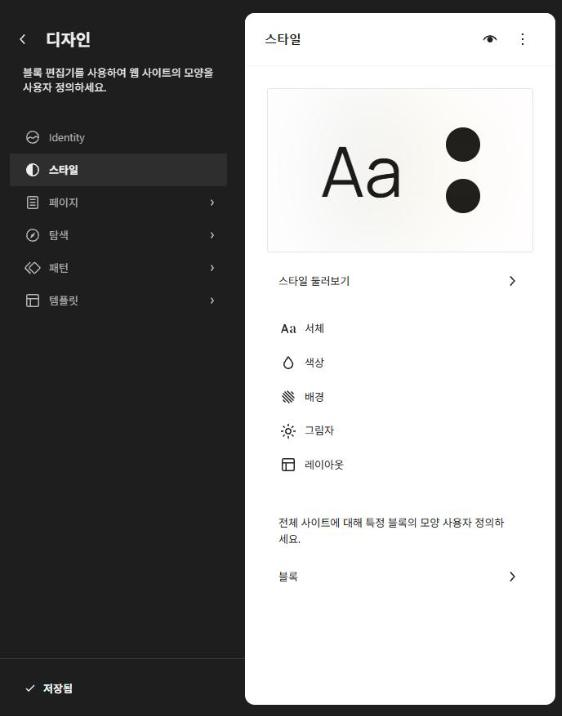
แผงสไตล์ของตัวแก้ไขเว็บไซต์ WordPress: Browse styles, แบบอักษร, สี, พื้นหลัง, เงา, Layout, บล็อก (WordPress 7.1.3)

[Browse styles] คือรายการรูปแบบที่เปลี่ยนชุดสีและฟอนต์ได้ในครั้งเดียวโดยไม่ต้องเปลี่ยนธีม Twenty Twenty-Five 1.5 มี 9 แบบรวมค่าเริ่มต้น ถ้าอยากให้หน้าเดียวดูต่างออกไป ให้เปลี่ยนในการตั้งค่าบล็อกของหน้านั้นแทนการใช้รูปแบบ เพราะรูปแบบจะเปลี่ยนหน้าตาของทั้งเว็บไซต์พร้อมกัน

3️⃣ เทมเพลตและ Template Parts: แก้ไขส่วนหัวและส่วนท้าย

การจัดวางชื่อเว็บและเมนูในส่วนหัวและส่วนท้ายแก้ไขได้ใน Template Parts ส่วนสไตล์เปลี่ยนแค่สีและฟอนต์ ไม่ได้เปลี่ยนโครงสร้างนี้

หมวดTwenty Twenty-Five 1.5บทบาท
เทมเพลต8 รายการโครงทั้งหน้าตามประเภทหน้าจอ เช่น หน้า เรื่องเดี่ยว คลังเก็บ และ 404
Template Part7 รายการ (ส่วนหัว 3 · ส่วนท้าย 3 · ทั่วไป 1)ส่วนหัวและส่วนท้ายที่หลายเทมเพลตใช้ร่วมกัน
Style Variations9 แบบ (รวมค่าเริ่มต้น)ชุดสีและฟอนต์ของทั้งเว็บไซต์

เมื่อคลิก [หน้า] ใน [เทมเพลต] หน้าจอแก้ไขเทมเพลตจะเปิดขึ้น และส่วนหัวกับส่วนท้ายที่เทมเพลตนี้ใช้จะแสดงใน [เนื้อหา] ของแท็บ [เทมเพลต] ทางขวา เนื่องจาก Template Parts ถูกใช้ร่วมกันในหลายเทมเพลต การแก้ไขส่วนหัวจึงมีผลกับทุกเทมเพลตที่ใช้ส่วนหัวเดียวกัน
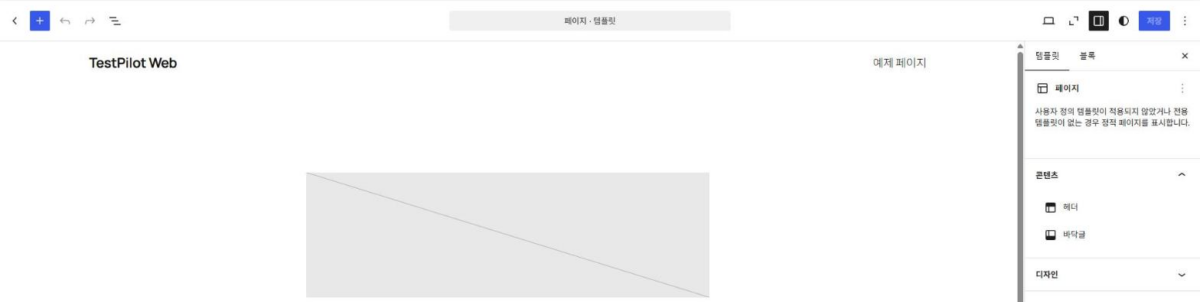
หน้าจอแก้ไขเทมเพลตหน้าในตัวแก้ไขเว็บไซต์ WordPress มีส่วนหัวและส่วนท้ายในเนื้อหาของแท็บเทมเพลต (WordPress 7.1.3)

สิ่งที่แก้ไขจะแสดงให้ผู้เยี่ยมชมเห็นก็ต่อเมื่อคลิก [บันทึก] ที่มุมขวาบนของหน้าจอแก้ไข และถ้าไม่มีอะไรเปลี่ยน ปุ่ม [บันทึก] จะใช้งานไม่ได้

4️⃣ ความต่างจากตัวปรับแต่ง WordPress: ธีมคลาสสิกและธีมบล็อก

ในธีมบล็อก การตั้งค่าแบบเดียวกันทำด้วยบล็อกในตัวแก้ไขเว็บไซต์แทน [ตัวปรับแต่ง] ดังนั้นถ้าไม่มีปลั๊กอินหรือธีมที่ใช้ตัวปรับแต่ง ธีมบล็อกจะไม่แสดงเมนู [ปรับแต่ง] (อ้างอิงจากเอกสารทางการ)

เมื่อใช้ธีมบล็อก Twenty Twenty-Five เมนู [รูปลักษณ์] จะแสดงแค่สามรายการ คือ ธีม Editor และ Fonts ส่วนบทบาทของวิดเจ็ตและเมนูในธีมคลาสสิกจะถูกแทนด้วย Template Parts และ [การนำทาง]
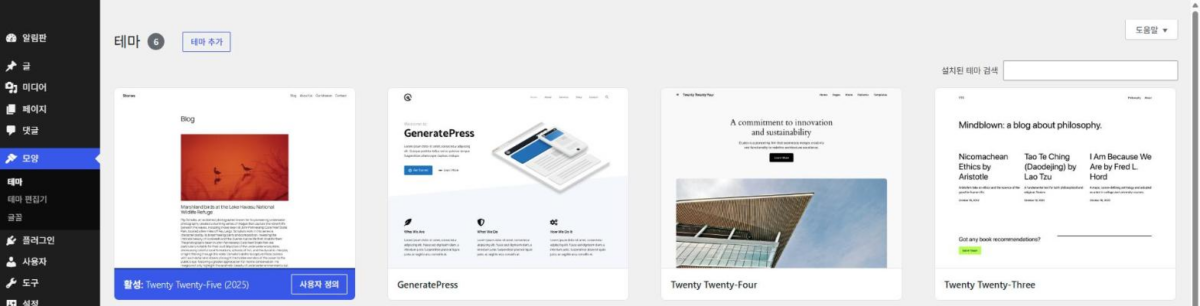
เมนูรูปลักษณ์ของ WordPress ที่ใช้ธีมบล็อก: ธีม, Editor, Fonts (WordPress 7.1.3)

เมื่อใช้ธีมคลาสสิกอย่าง Astra หรือ GeneratePress เมนู [รูปลักษณ์] จะแสดงธีม Design ปรับแต่ง วิดเจ็ต Fonts และเมนู และ [Theme File Editor] ก็อยู่ในเมนูนี้ด้วย วิดเจ็ตและเมนูจะแสดงเฉพาะเมื่อธีมรองรับ และธีมที่รองรับรูปส่วนหัวกับพื้นหลังจะมี [Header] และ [Background] เพิ่มเข้ามา

หน้าจอเมนูรูปลักษณ์: รายการธีม, Design, ปรับแต่ง, วิดเจ็ต, Fonts, เมนู และ Theme File Editor ในธีม Astra (WordPress 7.1.3)

GeneratePress เมื่อเปิดด้วย [ดูตัวอย่างแบบสด] ตัวปรับแต่งจะมีส่วน Layout สี แบบอักษร และทั่วไปเพิ่มขึ้น และมีส่วน [เมนู] สำหรับกำหนดตำแหน่งเมนูด้วย
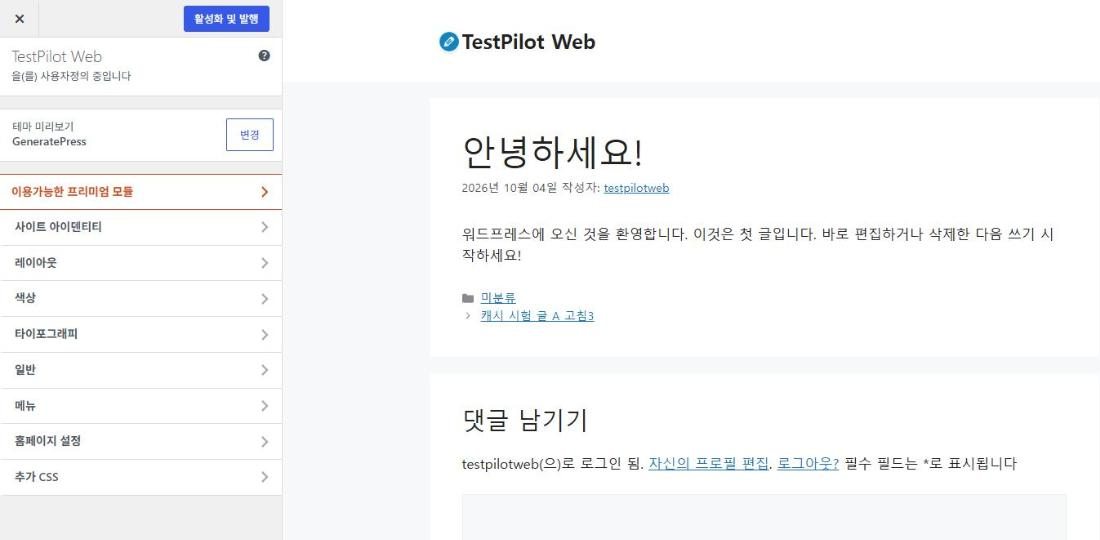
หน้าจอตัวปรับแต่ง: ส่วนอัตลักษณ์เว็บไซต์ Layout สี แบบอักษร ทั่วไป และเมนู ในการดูตัวอย่างแบบสดของ GeneratePress

🔢 FAQ & เนื้อหาแนะนำ

ยังอยู่ เทมเพลตที่บันทึกจะถูกเก็บในฐานข้อมูลพร้อมชื่อธีม และถูกใช้ก่อนไฟล์เทมเพลตชื่อเดียวกันของธีม ดังนั้นเนื้อหาของเทมเพลตนั้นที่เปลี่ยนจากการอัปเดตธีมจะมีผลหลังจากรีเซ็ตเทมเพลตแล้ว

เทมเพลตและ Template Parts ที่แก้ไขจะบันทึกไว้ในชื่อธีมนั้น จึงไม่ถูกนำไปใช้กับธีมใหม่ และสีกับฟอนต์ที่เปลี่ยนในสไตล์ก็บันทึกแยกตามธีมด้วย สิ่งที่แก้ไขยังคงอยู่ในฐานข้อมูล และจะถูกใช้อีกครั้งเมื่อกลับไปใช้ธีมเดิม

เป็นค่าเดียวกัน ทั้งสองหน้าจอใช้การตั้งค่าชื่อเว็บเดียวกัน และบนหน้าจอผู้เยี่ยมชม บล็อกชื่อเว็บจะแสดงค่านี้

ℹ️ ประกาศเรื่องลิงก์แอฟฟิลิเอต
เนื้อหาของเว็บไซต์นี้มีลิงก์แอฟฟิลิเอต หากผู้เข้าชมซื้อสินค้าหรือบริการผ่านลิงก์เหล่านี้ เว็บไซต์นี้จะได้รับค่าคอมมิชชันจากผู้ขาย ในกระบวนการนี้ ราคาที่ผู้ซื้อจ่าย(ราคาจะลดลงเมื่อมีโปรโมชัน↓)จะไม่สูงขึ้นแต่อย่างใด ราคา ส่วนลด และข้อมูลสต็อกที่แสดงเป็นข้อมูล ณ เวลาที่เขียนและอาจต่างจากความเป็นจริง โปรดตรวจสอบกับผู้ขายอีกครั้งก่อนซื้อ การเลือกและการประเมินสินค้าเขียนตามเกณฑ์ของเราเอง และการได้รับค่าคอมมิชชันหรือไม่ไม่มีผลต่อลำดับการแนะนำหรือเนื้อหาการประเมิน

ใส่ความเห็น

อีเมลของคุณจะไม่แสดงให้คนอื่นเห็น ช่องข้อมูลจำเป็นถูกทำเครื่องหมาย *

Prove your humanity: 7   +   4   =