
gdiskコマンド:Linuxのパーティション設定方法
Linuxのパーティション設定(作成・変更・削除)には、fdiskコマンドまたはgdiskコマンドを使います。ここではgdiskを使ったパーティション情報の編集を扱います。
マウントする前のパーティション設定は、次の順序で進めます。
保存して終了するまで、パーティションの作業内容はディスクに反映されません。
✅ gdiskコマンドでLinuxのパーティションを設定する
gdiskは、Linuxシステムでパーティション管理に使われる、fdiskと同様のユーティリティです。通常、ディスク容量が2TB未満の場合はfdiskを使い、2TB以上の大容量の場合はpartedやgdiskでパーティション作業を行います。
gdisk -[オプション] [対象 デバイス ファイル]設定済みパーティションの情報は、-l オプションを付けた gdisk または fdisk コマンドで確認できます。
gdisk -l
Disk /dev/xvda: 10 GiB, 10737418240 bytes, 20971520 sectors
Units: sectors of 1 * 512 = 512 bytes
Sector size (logical/physical): 512 bytes / 512 bytes
I/O size (minimum/optimal): 512 bytes / 512 bytes
Disklabel type: gpt
Disk identifier: 0EF4456F-5883-478F-B913-FBB62350113E

Device       Start      End  Sectors  Size Type
/dev/xvda1    2048   204799   202752   99M EFI System
/dev/xvda2  204800  2252799  2048000 1000M Linux filesystem
/dev/xvda3 2252800  2260991     8192    4M PowerPC PReP boot
/dev/xvda4 2260992  2263039     2048    1M BIOS boot
/dev/xvda5 2265088 20969471 18704384  8.9G Linux filesystem


Disk /dev/xvdf: 3 GiB, 3221225472 bytes, 6291456 sectors
Units: sectors of 1 * 512 = 512 bytes
Sector size (logical/physical): 512 bytes / 512 bytes
I/O size (minimum/optimal): 512 bytes / 512 bytes
1. gdiskのオプション
gdiskを実行すると表示される基本画面です。
gdisk /dev/xvdf
GPT fdisk (gdisk) version 1.0.7

Partition table scan:
  MBR: not present
  BSD: not present
  APM: not present
  GPT: not present

Creating new GPT entries in memory.

Command (? for help):
2. gdiskを実行してpオプションで確認
Command (? for help): p
Disk /dev/xvda: 20971520 sectors, 10.0 GiB
Sector size (logical/physical): 512/512 bytes
Disk identifier (GUID): 0EF4456F-5883-478F-B913-FBB62350113E
Partition table holds up to 128 entries
Main partition table begins at sector 2 and ends at sector 33
First usable sector is 34, last usable sector is 20971486
Partitions will be aligned on 2048-sector boundaries
Total free space is 6077 sectors (3.0 MiB)

Number  Start (sector)    End (sector)  Size       Code  Name
   1            2048          204799   99.0 MiB    EF00  EFI System Partition
   2          204800         2252799   1000.0 MiB  8300  primary
   3         2252800         2260991   4.0 MiB     4100  primary
   4         2260992         2263039   1024.0 KiB  EF02  primary
   5         2265088        20969471   8.9 GiB     8300  primary
3. gdiskでパーティションを作成
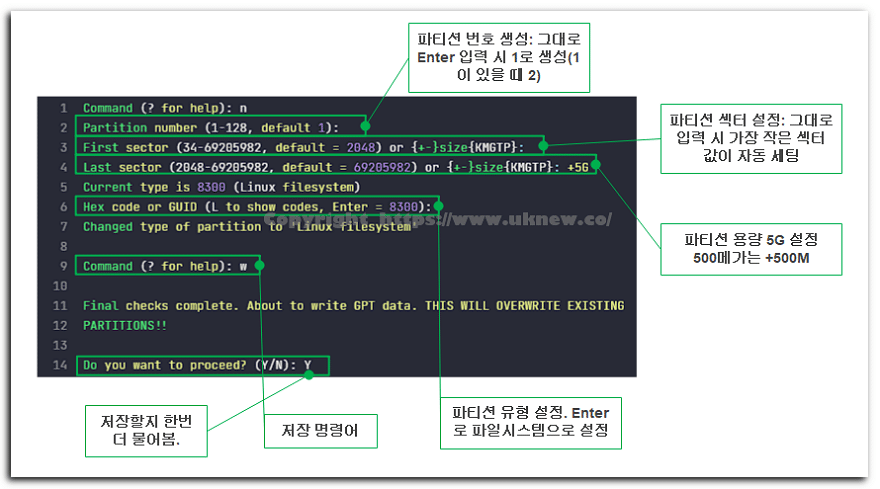
パーティションの種類はLコマンドで確認できます。
Hex code or GUID (L to show codes, Enter = 8300): L
Type search string, or <Enter> to show all codes:
0700 Microsoft basic data                0701 Microsoft Storage Replica
0702 ArcaOS Type 1                       0c01 Microsoft reserved
2700 Windows RE                          3000 ONIE boot
3001 ONIE config                         3900 Plan 9
4100 PowerPC PReP boot                   4200 Windows LDM data
4201 Windows LDM metadata                4202 Windows Storage Spaces
7501 IBM GPFS                            7f00 ChromeOS kernel
7f01 ChromeOS root                       7f02 ChromeOS reserved
8200 Linux swap                          8300 Linux filesystem
8301 Linux reserved                      8302 Linux /home
8303 Linux x86 root (/)                  8304 Linux x86-64 root (/)
8305 Linux ARM64 root (/)                8306 Linux /srv
8307 Linux ARM32 root (/)                8308 Linux dm-crypt
8309 Linux LUKS                          830a Linux IA-64 root (/)
830b Linux x86 root verity               830c Linux x86-64 root verity
830d Linux ARM32 root verity             830e Linux ARM64 root verity
830f Linux IA-64 root verity             8310 Linux /var
8311 Linux /var/tmp                      8312 Linux user's home
8313 Linux x86 /usr                      8314 Linux x86-64 /usr
8315 Linux ARM32 /usr                    8316 Linux ARM64 /usr
8317 Linux IA-64 /usr                    8318 Linux x86 /usr verity
Press the <Enter> key to see more codes, q to quit:
swapは8200、Linuxファイルシステムは8300の番号を入力して、パーティションの種類を設定できます。
4. gdiskでパーティションを削除
[d]オプションでパーティションを削除します。削除するパーティション番号を入力して削除を進め、パーティションが1つしかない場合は自動的に削除されます。
Command (? for help): d
Partition number (1-5): 3ℹ️ 提携について
当サイトのコンテンツにはアフィリエイトリンクが含まれています。訪問者がこのリンクを通じて商品やサービスを購入すると、当サイトは販売元から手数料を受け取ります。この過程において、購入者が支払う金額(イベント割引適用で金額が下がります↓)は上昇しません。掲載されている価格・割引・在庫情報は作成時点のものであり、実際とは異なる場合がありますので、ご購入前に販売元にて最終確認をお願いいたします。商品の選定および評価は独自の基準に基づいて行われており、手数料の支払いの有無は紹介順や評価内容に影響を与えません。