
Cache Enabler:設定簡單的 WordPress 快取外掛


在 Cloudways 伺服器的 WordPress 安裝 Cache Enabler,並以設定畫面的預設值直接啟用後,未登入請求的首位元組時間中位數從 220.9ms 縮短為 55.1ms。
WordPress 網站的外掛數量一旦超過一定程度,就可能出現 速度變慢 的現象。要找到功能與效能都令人滿意的外掛並不容易,而速度問題可能導致 訪客流失與 技術 SEO 上的不利影響。
因此,快取外掛已經成為 必備而非選項。
其中 Cache Enabler 是 KeyCDN 提供的 設定簡單的免費快取外掛,也是許多剛開始使用 WordPress 的網站管理員會選擇的外掛之一。
Cache Enabler 的啟用安裝數超過 10 萬,評分為 4.3 分(滿分 5 分),是經過驗證的快取外掛。設定頁面只有一頁,初學者也能輕鬆使用,並且只精簡地提供 HTML 壓縮、WebP 支援等核心功能。
✅ 安裝 Cache Enabler
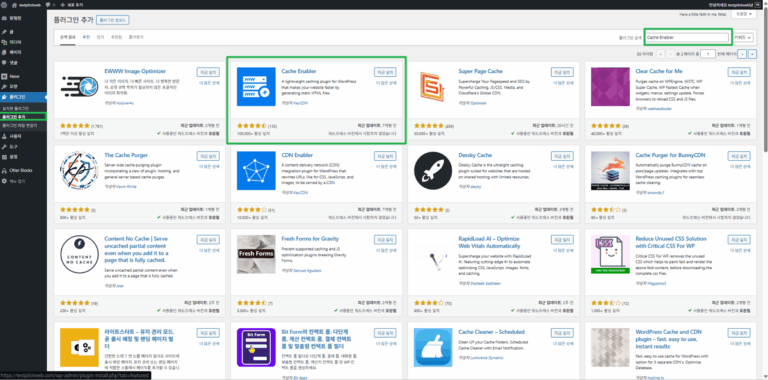
在 WordPress 管理後台前往 [安裝外掛],搜尋 Cache Enabler 並安裝外掛。
, that should bypass the cache.2,43,65/^(\/|\/forums\/)$//^nocache$//^(?!(fbclid|ref|mc_(cid|eid)|utm_(source|medium|campaign|term|content|expid)|gclid|fb_(action_ids|action_types|source)|age-verified|usqp|cn-reloaded|_ga|_ke)).+$//^(comment_author|woocommerce_items_in_cart|wp_woocommerce_session)_?//^(wp-postpass|wordpress_logged_in|comment_author)_/✅ Cache Enabler 設定
🔲 快取行為
◻️ 過期
◻️清除
◻️版本
◻️壓縮
壓縮 CSS 與 JavaScript 檔案時,依所使用的外掛不同,部分表格或輪播功能可能無法正常運作,或無法顯示在畫面上。
這是因為腳本的相依結構或 DOM 載入順序被打亂,在 Genesis Blocks、Spectra、Elementor、Beaver Builder、WPBakery 這類區塊型或頁面建構器外掛中,可能出現版面錯亂或互動功能錯誤。
無論使用哪一款快取外掛,依所用的區塊或頁面建構器不同,本來就可能發生無法正常運作的錯誤,因此使用快取外掛時,壓縮行內程式碼後一定要測試。
🔲 快取排除
✅ 速度測試
在 Cloudways 測試伺服器的 WordPress 上安裝 Cache Enabler 1.8.17,並以首頁的首位元組時間(TTFB)測量速度。在沒有快取外掛、Cache Enabler 預設值、本文設定畫面值這三種狀態下,各送出兩輪、每輪 10 次未登入的請求,比較中位數。
沒有快取外掛時為 220.9ms 的首位元組時間,在啟用 Cache Enabler 後縮短為 55.1ms 與 49.8ms。兩種狀態下 20 次請求全都由快取檔案回應;由於本文的設定畫面值就是所有項目都停用的預設值,第三種狀態的設定與預設值相同。
首位元組時間以 curl 的 [time_starttransfer] 值確認。清除快取後的第一個請求是用來建立快取檔案的請求,因此排除在外;請求中加入與瀏覽器相同的 Accept 標頭,以 1 秒間隔送出 10 次。
for i in $(seq 1 10); do curl -o /dev/null -s -H 'Accept: text/html,application/xhtml+xml,application/xml;q=0.9,image/avif,image/webp,image/apng,*/*;q=0.8,application/signed-exchange;v=b3;q=0.7' -w '%{time_starttransfer} dns=%{time_namelookup} connect=%{time_connect} tls=%{time_appconnect} code=%{http_code} size=%{size_download}\n' https://example.com/; sleep 1; done0.044486 dns=0.000822 connect=0.003370 tls=0.020494 code=200 size=69959
0.071422 dns=0.000931 connect=0.003773 tls=0.031606 code=200 size=69959
0.070819 dns=0.001895 connect=0.004429 tls=0.031945 code=200 size=69959
0.071406 dns=0.000864 connect=0.003669 tls=0.032210 code=200 size=69959
0.069090 dns=0.000730 connect=0.003313 tls=0.033588 code=200 size=69959
0.054738 dns=0.001762 connect=0.004164 tls=0.023497 code=200 size=69959
0.060193 dns=0.000968 connect=0.003666 tls=0.031874 code=200 size=69959
0.057628 dns=0.000701 connect=0.003082 tls=0.030156 code=200 size=69959
0.061533 dns=0.000578 connect=0.003010 tls=0.025478 code=200 size=69959
0.079976 dns=0.000556 connect=0.003346 tls=0.029491 code=200 size=69959上面的輸出是 Cache Enabler 預設值狀態下的第 2 輪測量;每次請求都會重新連線,因此 [tls] 欄位中到 TLS 連線完成為止的時間,也包含在首位元組時間內。
用 curl 測得的首位元組時間沒有縮短,並不代表 Cache Enabler 沒有運作。因為對於 Accept 標頭中沒有 [text/html] 的請求,Cache Enabler 不會建立或提供快取檔案。
for i in $(seq 1 10); do curl -o /dev/null -s -w '%{time_starttransfer} dns=%{time_namelookup} connect=%{time_connect} tls=%{time_appconnect} code=%{http_code} size=%{size_download}\n' https://example.com/; sleep 1; done0.251081 dns=0.005972 connect=0.009569 tls=0.042509 code=200 size=69876
0.205716 dns=0.000560 connect=0.003334 tls=0.022671 code=200 size=69876
0.229798 dns=0.000759 connect=0.003258 tls=0.031652 code=200 size=69876
0.230230 dns=0.001500 connect=0.004246 tls=0.032241 code=200 size=69876
0.189573 dns=0.000645 connect=0.003234 tls=0.030598 code=200 size=69876
0.227845 dns=0.000759 connect=0.003265 tls=0.030934 code=200 size=69876
0.208334 dns=0.001538 connect=0.003971 tls=0.021570 code=200 size=69876
0.229638 dns=0.000571 connect=0.002924 tls=0.020581 code=200 size=69876
0.214610 dns=0.000575 connect=0.003165 tls=0.020606 code=200 size=69876
0.217078 dns=0.000610 connect=0.003252 tls=0.022737 code=200 size=69876去掉 Accept 標頭時,curl 會送出預設的 [Accept: */*],即使在同樣的預設值狀態下,首位元組時間也是 0.19~0.25 秒。回應大小也是少了一行 Cache Enabler 註解的 69,876 位元組。
curl -s -o /dev/null -D - -H 'Accept: text/html,application/xhtml+xml,application/xml;q=0.9,image/avif,image/webp,image/apng,*/*;q=0.8,application/signed-exchange;v=b3;q=0.7' https://example.com/HTTP/2 200
server: nginx
date: Sat, 17 Oct 2026 23:32:11 GMT
content-type: text/html; charset=UTF-8
vary: Accept-Encoding
vary: Accept-Encoding
x-cache-handler: cache-enabler-engine瀏覽器開啟頁面時,會在 Accept 標頭中帶上 [text/html],因此未登入的訪客會收到快取檔案。以快取檔案回應的請求,會加上 [x-cache-handler: cache-enabler-engine] 標頭。
Cache Enabler 只處理 GET 請求,所以像 [curl -I] 這樣以 HEAD 送出請求時,即使有快取檔案,也不會顯示這個標頭。
✅ 綜合評價
| 比較項目 | 沒有快取外掛 | Cache Enabler 預設值 | 備註 |
|---|---|---|---|
| 首位元組時間中位數 | 220.9ms | 55.1ms | 縮短約 75% |
| 150ms 以下比例 | 0%(0/20 次) | 100%(20/20 次) | 套用後最高 123.1ms |
| 快取檔案回應 | 0/20 次 | 20/20 次 | 回應標頭 [x-cache-handler] |
| curl 預設請求中位數 | 203.3ms | 222.5ms | [Accept: */*] · 快取檔案回應 0/20 次 |
Cache Enabler 只要啟用,即使設定畫面的 16 個項目都維持預設值,也會以快取檔案回應未登入訪客的頁面請求。首位元組時間落在 50ms 上下,約為沒有快取外掛時的四分之一。
Cache Enabler 設定畫面中沒有壓縮外部 CSS 與 JavaScript 檔案的項目,因此下一步是設定優化外掛。
🔢 FAQ & 推薦內容

![WP Super Cache 外掛_簡單設定_1 啟用快取[英文]](https://uknew.co/storage/2025/07/WP-Super-Cache-%ED%94%8C%EB%9F%AC%EA%B7%B8%EC%9D%B8_%EB%8B%A8%EC%88%9C-%EC%84%A4%EC%A0%95_1-%EC%BA%90%EC%8B%9C-%ED%99%9C%EC%84%B1%ED%99%94%EC%98%81%EC%96%B4-768x352.png "Cache Enabler:設定簡單的 WordPress 快取外掛 3")
![WP Fastest Cache 選項-設定[Premium]](https://uknew.co/storage/2025/08/WP-Fastest-Cache-%EC%98%B5%EC%85%98-%EC%84%A4%EC%A0%95%ED%94%84%EB%A6%AC%EB%AF%B8%EC%97%84-768x783.png "Cache Enabler:設定簡單的 WordPress 快取外掛 5")




ℹ️ 聯盟行銷說明
本站內容包含聯盟行銷連結。訪客透過這些連結購買商品或服務時,本站會從賣家獲得佣金。在這個過程中,購買者支付的金額(遇到活動折扣時金額會降低↓)並不會因此提高。刊登的價格、折扣與庫存資訊以撰寫當時為準,可能與實際情況不同,購買前請向賣家做最後確認。商品的挑選與評價依本站自訂的標準撰寫,是否支付佣金不會影響介紹順序或評價內容。