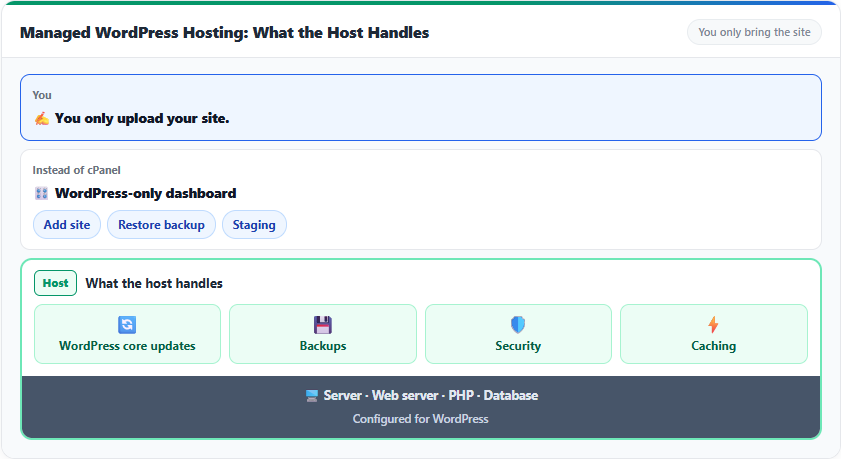
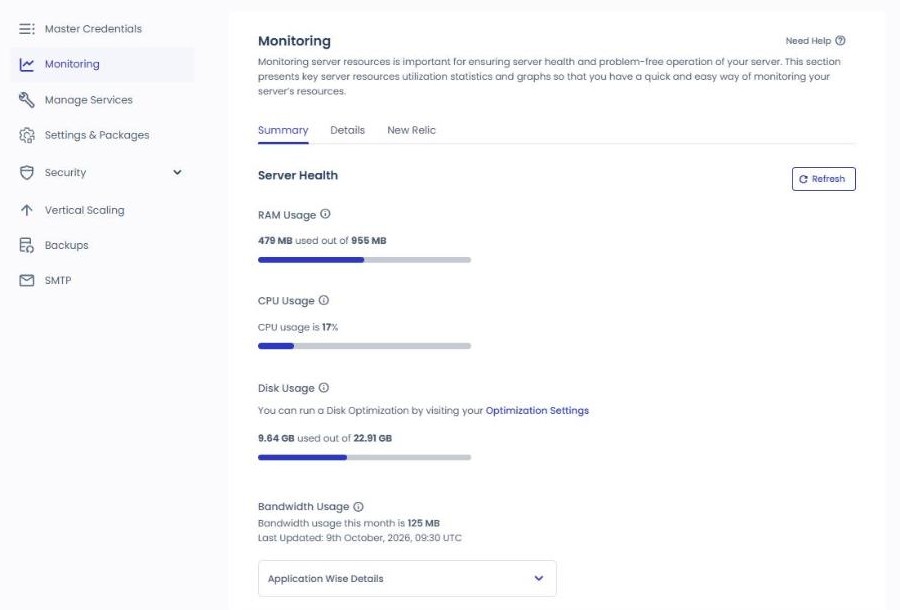
When you put WordPress on Cloudways, the management screens are split between the server and the application, and because menus such as backups, security and PHP exist on both sides, the first thing to check is which side a setting belongs to. A Cloudways server is one VPS from a provider such as DigitalOcean or Vultr, and a Cloudways application is one WordPress installed on that server. That is also why a 1GB server with a single WordPress shows 9.64GB of disk in use while WordPress itself accounts for only 125MB.
If the server is a building, an application is a shop inside it. RAM, CPU, disk and the monthly fee are charged per building, while the database, file folders, domain and SFTP login details belong to each shop. Applications on the same server share RAM and CPU, so when traffic floods one site, the other sites on that server slow down too.
So think of cost and performance per server, and of site operations such as backup restores, staging, SSL and domains per application.
TOC
8mn read
TOC
8mn read
View more
Ⅰ. Cloudways Server
↪️ & Application
The simulator below reproduces, menu for menu, the management screens of a Vultr Seoul 1GB server created on October 9, 2026. Click a menu on the left to switch the screen and its explanation, or type the setting you are looking for, such as Redis, PHP or backup, into the search box at the top to jump to that screen.
☁️ Cloudways management screensSettings simulator
Analytics
Logs
Master CredentialsMaster account
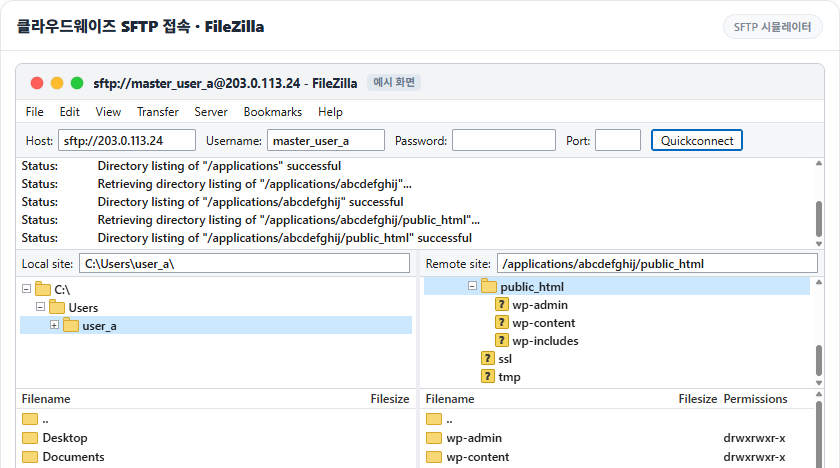
The Master Credentials tab provides the details for connecting over SFTP and SSH, using the public IP.
These are the server login details; if an IT staff member needs to hand work to a developer, they pass these details along with the request.
Public IP · Username · Password
SFTP and SSH login details used for the whole server; the username and password can be changed with the pencil button on the right.
SSH Public Keys
Register one or more public keys to connect to the server without typing a password.
Web application(WordPress) This covers not just files but the database, logs and system files, and includes master files and backups, so it differs from the application size.
The items can be checked on the Details tab.
The 10.05GB shown as Disk Usage under Monitoring is not what WordPress uses but the whole server's usage. The actual applications (two WordPress sites) take only about 200MB; the remaining 9.8GB or so is the baseline the server needs to run.
It consists of about 7GB for the OS and hosting stack (PHP, MySQL, Nginx, Apache and so on), a 2.4GB swap file as a buffer against running out of memory, plus logs and system files. So on a 25GB disk plan, the space your site can actually use is about 15GB, and this baseline barely grows unless the site does.
The Vultr Seoul 1GB server created on October 9, 2026 (one WordPress) also showed Disk Usage of 9.64GB / 22.91GB, of which the application accounted for 123MB. The [Details] tab graphs 15 metrics such as CPU Consumption, Free memory and MySQL Connections, and when CPU stays above 80% it advises scaling the server up.
1 / 2
Summary · 2026-10-09Details · CPU Consumption
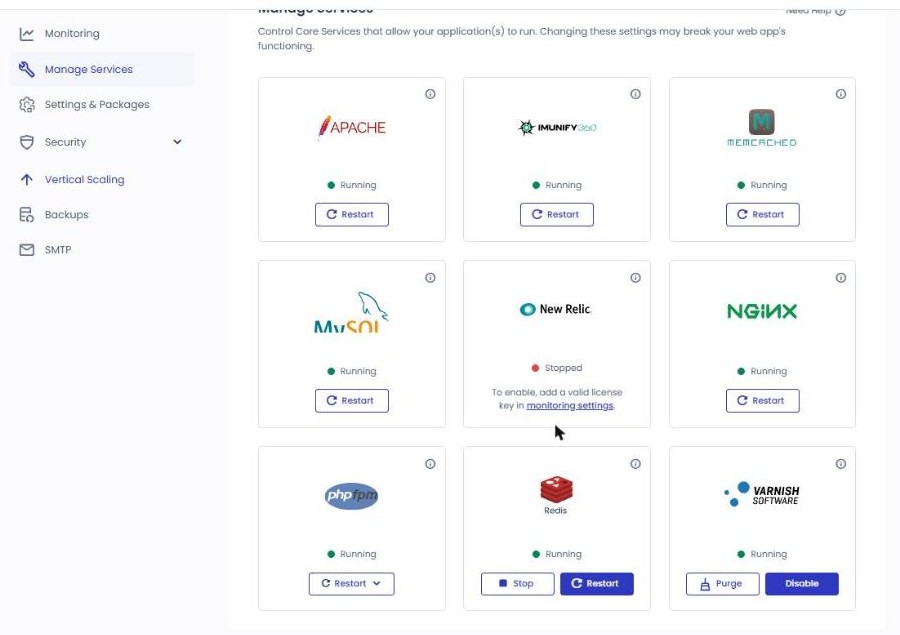
Manage ServicesService management
1 / 2
2026-072026-10-09
ApacheRunning
ⓘ Webserver serving content for your application(s).
Apache is the web server, the core service that delivers the website to visitors. Think of this as the place to restart it when a setting change does not take effect or the site stops responding.
Imunify360Running
ⓘ A comprehensive security suite to protect against malware infections, web attacks, vulnerability exploitation and all other threats.
IMUNIFY360 is the security feature installed on the server. It scans for and blocks malware and acts as a firewall automatically, so normally you only need to confirm it is running.
MemcachedRunning
ⓘ Another caching layer dealing mainly with database queries. If restarted, all the cache is lost and needs to be rebuilt.
A cache service that keeps database query results temporarily in memory.
MySQLRunning
ⓘ Database for your applications
The database that stores all of the site's data.
Posts, comments, user accounts and settings are all stored here.
When "Error establishing a database connection" appears, restart it here and check again.
New RelicStopped
ⓘ Get comprehensive insights with NewRelic Application Monitoring.
Not a server feature itself but an integration with an external performance analysis service (APM).
When enabled, performance data such as per-page load time and slow queries can be examined in detail in your New Relic account.
The default is off (Stopped); leave it that way if you do not need performance analysis.
NginxRunning
ⓘ Webserver serving static content for your application(s).
Nginx sits in front of Apache and is the first service to receive visitor requests. Static files such as images and CSS are served quickly by Nginx itself, and only the remaining requests are passed on to Apache, a division of labor.
Because Cloudways runs the two web servers together, when the site cannot be reached at all, Nginx is restarted along with Apache.
PHP-FPMRunning
ⓘ PHP-FPM (FastCGI Process Manager) is an alternative PHP FastCGI implementation with some additional features useful for sites of any size, especially busier sites.
Not a cache, but it keeps PHP workers waiting instead of starting PHP anew for every request, so processing is fast.
RedisRunning
ⓘ Redis typically holds the whole dataset in memory
An object cache service that reduces the load on the database.
It holds data WordPress reads repeatedly (settings, query results) in memory, has more features than Memcached and keeps its data across reboots.
Both Memcached and Redis are on from the start, so a new server begins with both caches running. Having both on at once causes no conflict.
As of the server created on October 9, 2026, Redis was also shown as Enabled under , the server's package tab.
VarnishRunning
ⓘ One of the serveral layers of caching for your application(s). You can disable it (i.e when developing or on test/staging server). Do not disable on production servers. If restarted, all the cache is lost and needs to be rebuilt.
A page cache service that stores finished pages as a whole.
Cached pages are served without going through PHP or the database, so of the three caches this one makes the biggest perceived difference in speed.
The Purge button clears the stored cache; use it when your edits are not showing up on the site.
For reference, the default Cloudways setup stays on HTTP/2 because Varnish does not support HTTP/3.
The Settings and Packages tab manages server-level settings and packages. If you have been producing WordPress blog or YouTube content for two or three years or more, this is territory you should be able to handle yourself.
Execution Limit300 SEC
The maximum time in seconds a single PHP task may run. Raise it when long jobs such as backups or large imports get cut off midway. The default of 300 seconds is enough for most work.
Upload Size100 MB
The maximum size of a single file you can upload to WordPress. Check here when a theme or plugin zip or a video upload fails with "exceeds the maximum upload size".
Memory Limit256 MB
The maximum memory a single PHP task may use. The "Allowed memory size exhausted" error, a common cause of the WordPress white screen, is tied directly to this value. Raising it blindly can exceed the server's RAM, so it has to be judged together with the server spec.
Display ErrorNo
Whether PHP errors are printed on the visitor's screen. A live site must be set to "No", because error messages expose internal information such as server paths.
Sets which level of errors gets logged. The default (E_ALL & ~E_DEPRECATED) means "log every error except deprecation warnings", so it can stay as it is.
This is at the application level, not the server level. Under Monitoring → Logs on the application screen there are two sections, Access Logs and Error Logs, where the Apache, Nginx and PHP logs can each be viewed up to the latest 1,000 lines with search and filters.
PHP TimezoneSelect…
The time zone PHP uses as its reference. Scheduled posts and the run times of cron jobs depend on it, so check that it matches your local time zone.
It confirms once again that Cloudways can serve everyone from beginners to advanced users.
The options available for Error Reporting.
Developers choose Development; everyone else keeps Default. The advanced settings continue under , covered below.
Settings & Packages › AdvancedAdvanced settings
In Settings & Packages the basic settings can also be left as they are and changed only when needed. From the advanced settings onward it is territory for advanced users such as server or developer roles, so beginners edit only what they need, and intermediate users and above refer to the content to manage the Cloudways server side.
📄 PHP
Max Input Variables10000
The maximum number of variables a single form can submit. Plain PHP defaults to 1,000, but large menus and page builders send thousands of variables in one save, so Cloudways has already raised it to 10,000.
The well-known WordPress symptom of menu items disappearing after saving comes from this value being too low. At 10,000 you will practically never run into it.
Max Input Time60 SEC
The time limit in seconds for PHP to receive and parse submitted data. It is easy to confuse with the execution limit (300 seconds), but this one limits the "receiving time" before processing starts.
With a 100MB upload size, 60 seconds is enough. A job large enough to need a higher value should be done over SSH rather than through browser upload.
OPCACHE Memory64 MB
A cache that stores compiled PHP files so they need not be recompiled. The amount needed is proportional to the total volume of code, not the number of plugins, and WordPress core alone takes 15 to 20MB.
64MB is below the usual recommendation (128 to 256MB), but it is a value tied to the spec, protecting the share MySQL and PHP need on a 1GB RAM server. When heavy plugins pile up and it runs short, the answer is to scale the server up, not to adjust the value.
Short Open TagOff
Whether the abbreviated PHP opening tag (<? ?>) is allowed. WordPress and any properly written plugin or theme use the full tag (<?php), so there is no reason to turn it on. Leave it off.
XDEBUGOff
A developer debugging tool that traces PHP code line by line. Leaving it on adds tracing overhead to every PHP execution and slows the site noticeably, so on a live server it stays off as a rule. Turn it on only briefly while developing a plugin or theme and tracking down a problem.
📄 MYSQL
TimezoneSelect…
The time zone MySQL uses when recording time data. If empty it follows the server system time zone, and since WordPress works with its own time zone setting (storing in UTC), this is an item you need not set.
EncodingLatin1 (Default)
The default character encoding applied when a new database is created. Latin1 is the default, but there is nothing to worry about: WordPress creates its own database as utf8mb4 at install time, so Korean text and emoji are stored correctly regardless of this value.
Max Connection Limit150
The ceiling on simultaneous connections to MySQL. Beyond it, a "Too many connections" error shows up on the site as a database connection error.
But when that error appears, look for the cause before raising the value. Usually slow queries are holding connections open for too long, and raising only the ceiling can turn into a RAM shortage.
Buffer Pool SizeDefault
ⓘ The amount of memory to use to cache tables, indexes and a few other things.
The memory size used to cache tables, indexes and so on.
Lock Wait TimeoutDefault
The maximum time in seconds a later operation waits for a row lock held by another operation to be released. If exceeded, the later operation fails and is cancelled. It matters in environments like WooCommerce where simultaneous orders pile up; at blog scale there is no need to touch it.
Wait TimeoutDefault
The time in seconds before MySQL drops an idle connection that is doing nothing. Short means connections are cleaned up early and resources saved; long means idle connections eat into the max connection count. It moves as a pair with the max connection limit above, and Default is again enough.
📄 NGINX & Apache
Access Application via IP (HTTP/HTTPS section)Off
Whether the site opens when the server IP address, rather than the domain, is typed directly into the browser.
Off is the normal and recommended state for security. It stops bots that scan IPs at random from getting in.
Default ApplicationNone
Specifies which application (site) to show when someone connects via the server IP. With the toggle above off, access is blocked anyway, so None is fine.
Static Cache Expiry525600 MINS
How long static files such as images, CSS and JS are kept in visitors' browser caches. 525,600 minutes = 365 days, that is, one year. Returning visitors do not download the files again, so loading is faster.
TLS Versions1.2, 1.3
The protocol versions allowed for HTTPS encrypted communication. The current setting, which excludes the old versions (1.0, 1.1) for their security flaws and allows only 1.2 and 1.3, is the standard.
Apache – Request Body Size Limit128 MB
The maximum amount of data that can be sent to the server in one request. In WordPress, media uploads and plugin or theme zip uploads fail when they exceed this limit. 128MB is plenty.
📄 System & Varnish
System (Locales)None
The language and region settings of the server operating system (Linux). The default is English_US, and locales such as Korean (ko_KR) can be added here. This has nothing to do with the site's display language; it is a system setting used inside the server for things like date formats and character encoding. Unless you call specific locale functions in PHP, None is fine.
Varnish (Cache Lifetime)30 days
Varnish is a program that caches whole pages (HTML) in front of the server. When a visitor requests a page, instead of WordPress running PHP to build it, Varnish hands back the copy it has stored. Cache Lifetime sets how many days at most that copy is kept, and 30 days is the default.
In practice, though, the same cache is not kept for the full 30 days. When you edit or publish a post, WordPress refreshes (purges) that cache, so treat this value as "the maximum retention when nothing changes". Leave it at 30 days.
Settings & Packages › PackagesPackages
MariaDBMariaDB 10.11
The database version can be upgraded with [Modify], and a notice says that after upgrading you cannot go back to the previous version.
Search EngineDisabled
Installs Elasticsearch or OpenSearch, chosen for site search.
SupervisorNot Installed
Supervisord is described as currently supported for Laravel.
RabbitMQ (Beta)Not Installed
Available on server sizes of 4GB and above.
RedisEnabled
Redis ACL is enabled, and you can turn it off with [Disable].
The PHP version is not on this tab; it is chosen per application under the application's [Application Settings › PHP Settings] (PHP 8.2 as of October 9, 2026). A notice at the bottom of the screen asks you to confirm that the application and plugins are compatible before installing a package.
Server maintenance is a regular job for security and stability, and according to the on-screen notice the default window is 05:00 to 06:00 UTC. It can be moved to a time that suits your business with [Select Day] and [Select Time], and the server or sites may be briefly unavailable during maintenance.
Select DayWednesday
The day of the week for maintenance; on the newly created server it was set to Wednesday.
Select Time04:00 UTC
The time maintenance starts. On the newly created server it was set to 04:00 UTC, which differed from the 05:00~06:00 UTC in the on-screen notice. It is in UTC, so convert it to your local time.
Save
Saves the day and time you changed.
Security › OverviewSecurity overview
[Overview] charts the security incidents recorded during the selected period, and the default period is the last 30 days (Last 30 Days).
Total Alerts2
The total number of alerts recorded in the selected period. On the newly created server, the two SSH attacks logged in showed up here as they were.
OSSEC: Network Level Attacks2
OSSEC's count of attacks detected on the network, and the same 2 SSH attacks were caught here too.
According to the official help, [SplashScreen Events] is the number of times a security check screen was shown to suspicious visitors, and [Files Cleaned] is the number of infected files cleaned. [Malware Detected] is the number of malware found, and [WAF Alerts] is the number of alerts for requests the web firewall filtered out as risky; on the newly created server all four fields were 0.
Below the number fields come daily charts such as [Alert Events] and [OSSEC: Network Level].
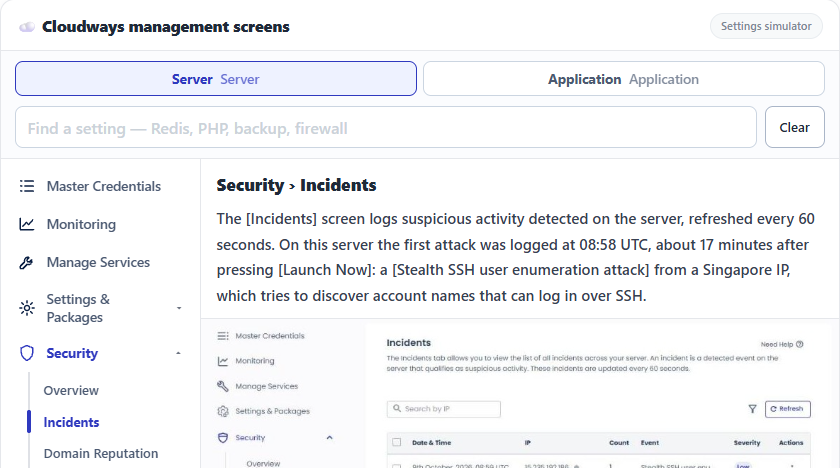
Security › IncidentsSecurity incident log
The [Incidents] screen logs suspicious activity detected on the server, refreshed every 60 seconds. On this server the first attack was logged at 08:58 UTC, about 17 minutes after pressing [Launch Now]: a [Stealth SSH user enumeration attack] from a Singapore IP, which tries to discover account names that can log in over SSH.
Security › Domain ReputationDomain reputation
Checks whether the domains registered on the server appear on the blacklists of several reputation engines; if so, the table shows the domain and threat type. The new server showed [Affected Domains: 0].
Security › FirewallFirewall
: the Singapore IP recorded there was already auto-blocked in the [Firewall] list with the reason [Automatically blocked due to distributed attack], with no security settings changed by hand.
Clicking [Add Custom Rule] opens a window for adding a rule, and the [IP Address] and [Country] tabs at the top let you add rules by IP or by country.
IP Address
Enter the IP address or IP range (subnet) to allow or block.
Choose whether the rule goes on the allow list or the block list; when the window first opened, [White List] was selected.
Add Comment
A note field for writing down why you added the rule.
Add IP Address
Adds the entered IP as a rule to the chosen list (White List or Black List).
Security › Malware ProtectionMalware protection
Imunify360-based malware protection status; the new server showed protected 0, unprotected 1, infected 0.
[Enable Protection] is a paid add-on: $4 per month per application for 1 to 5 applications, $3 for 6 to 15, and $2 for more than 15.
Security › Shell AccessSSH and MySQL access control
1 / 2
SSH/SFTPMySQL
The [SSH/SFTP] tab offers a choice of two modes. The default allows every IP and lets the Cloudways security system block only attacking IPs; the other allows only the IPs you register in the whitelist.
Even in the default mode your own IP can get blocked after several wrong passwords, so the screen advises registering your IP in the whitelist. The [MySQL] tab is where you register the IPs allowed to connect to the database remotely.
Vertical ScalingServer resizing
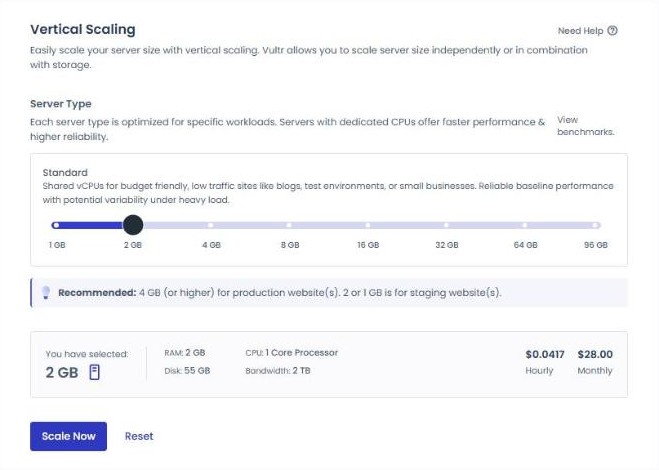
The screen for changing the server size (RAM and CPU); for Vultr servers it says the size can be changed alone or together with storage.
The current 1GB (1GB RAM, 25GB disk, 1 core, 1TB transfer) is shown at $0.0208 per hour, $14 per month; pick a size on the slider and press [Scale Now].
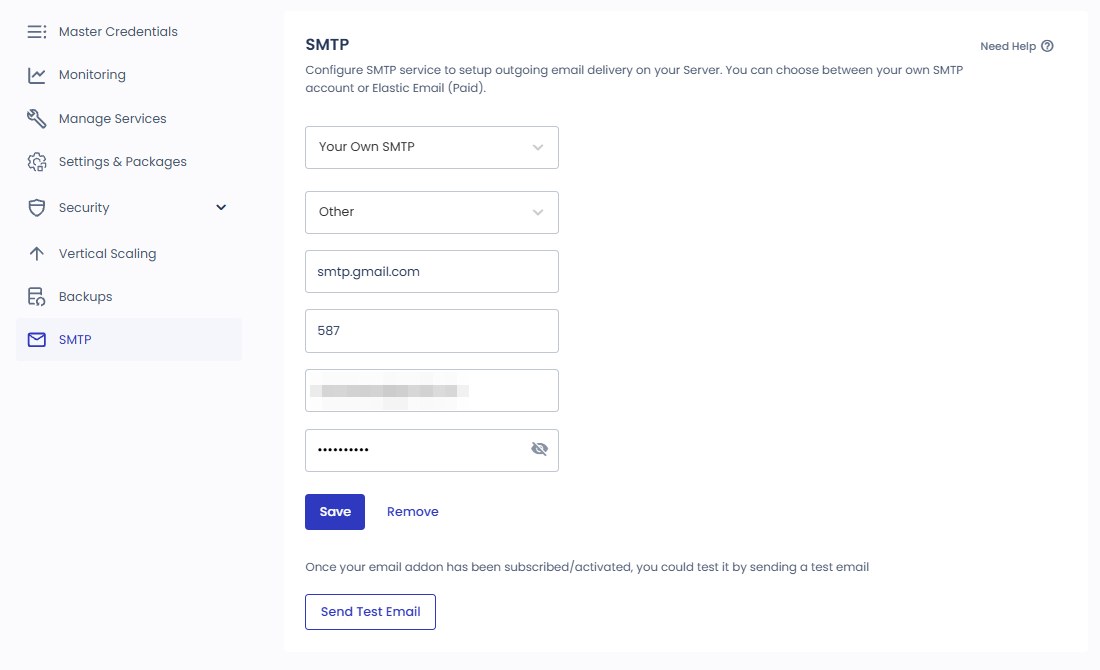
The screen for the server's outgoing mail: choose either your own SMTP account or the paid Elastic Email. After enabling the mail add-on you can send a test message with [Send Test Email].
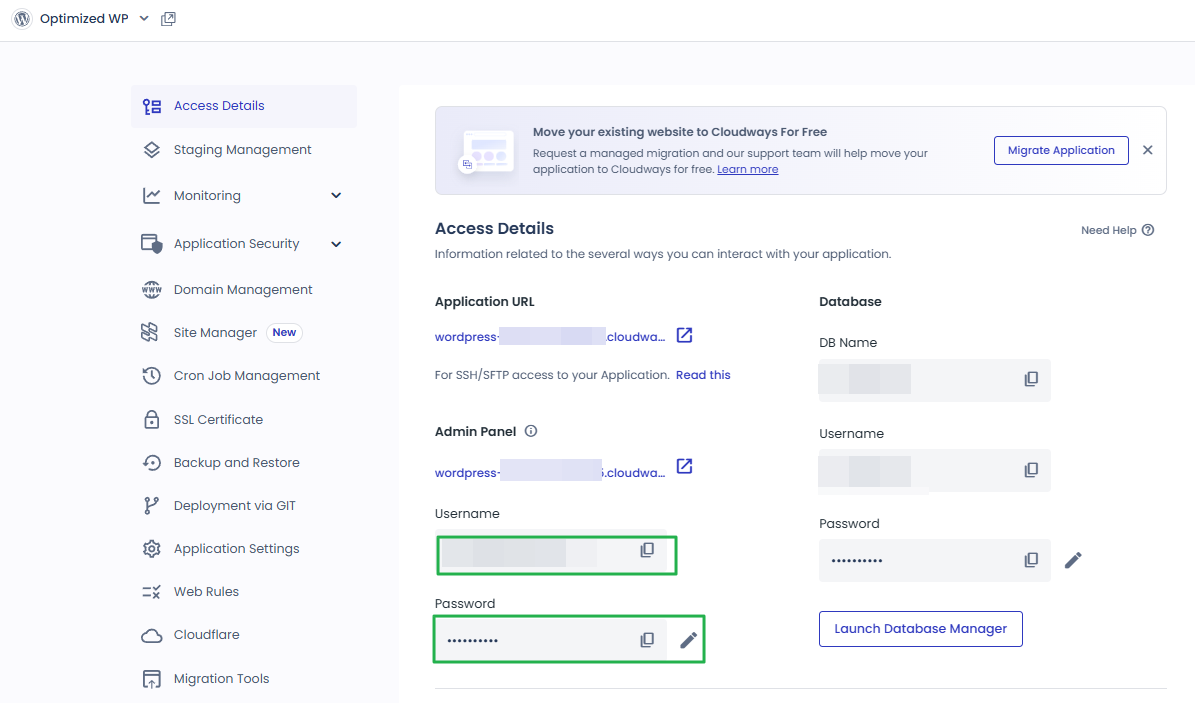
While the server's , which apply to every application, are the server-wide login, the Application Credentials here are an SFTP and SSH account for this application only.
Application URL
A temporary address assigned by Cloudways (cloudwaysapps.com) that lets you open the site even before connecting a domain.
Admin Panel
The WordPress admin (/wp-admin/) address and admin account; for a new application the admin username was generated from the signup email.
Database
The DB name, user and password, plus a [Launch Database Manager] button.
Redis
Redis connection details for the object cache (Prefix, Username, Password).
Password ProtectionNew
When on, only users with the credentials can view the site.
Application Credentials
[Add SFTP User] adds an SFTP and SSH user dedicated to this application.
Staging is a separate environment copied from the live site where new code, plugins and themes can be tested without affecting the live site. When ready, some or all of the changes can be pushed to the live site, and before working you can pull the live site's content into staging to sync it.
Password Protected Sites
Staging has htpasswd password protection turned on by default, and you can turn it off.
SSH and SFTP Access
The field is named SSH/SFTP, but the on-screen description is about moving changes between the live site and staging with one click instead of copying test server changes by hand.
Granular Controls
You can choose to move only files, only the database, or both.
SSL-Enabled Staging
An SSL certificate is preinstalled on every staging application, using Let’s Encrypt or a certificate you own.
Shows the requests that reached the site, split into five tabs: IP, bots, URLs, response codes and bandwidth.
IP Requests
The top 10 IPs that sent the most requests and the number of requests per IP (Request Count).
Bot Traffic
The names of the bots that sent requests and the number of requests per bot.
URL Requests
The most requested URLs and the number of requests per URL.
Status Codes
The number of requests per response code, such as 200 or 404.
Bandwidth
The bandwidth used per URL.
Period and Refresh
The period field at the top right defaults to [15 minutes], and the queried period is shown in UTC above the table. [Refresh] reloads it.
Since the site was newly created, there were no records on October 9, and when the screen was opened again on October 29 all five tabs still showed [No data Available].
Monitoring › Analytics › PHPPHP performance
Shows the requests PHP handled and the running processes, split into three tabs.
Requested Pages
The most requested PHP page URLs, their average processing time (seconds) and the number of requests.
Running Processes
The names of the running PHP processes, CPU%/Memory% and running time (seconds); this tab has no period field.
Slow Pages
The slow PHP pages, the number of requests, the longest time (Max Time) and the average time (Avg. Time).
On the October 29 screen, only Running Processes had one line, and the other two tabs showed [No data Available].
The database status is checked in two tabs, Summary and Slow Queries.
Summary
The number of database connections (Connections/Active Connections), plus the Host, command type (Command Type) and running time (seconds) of the queries running now.
Slow Queries
Queries that took a long time to run (Slow Query) and their running time (seconds); the period field defaults to [15 Minutes].
On the October 29 screen, both tabs showed [No data Available].
This screen shows how much of the server's resources the cron jobs running now use; cron jobs are added in .
Cron
The cron commands running now; for the newly created application the list showed [No data Available].
CPU%/Memory%
The share of CPU and memory that cron uses.
Duration(in sec)
How long the cron ran (seconds).
Refresh
Reloads the list.
Monitoring › Analytics › Disk UsageDisk usage
Shows the application's web files and database usage separately; the new WordPress had 124MB of files and 1MB of database, 125MB in total. The disk usage shown under the server's , meanwhile, was 9.64GB.
Monitoring › Logs › Access LogsAccess logs
Log times are in UTC, and the notice at the top of the screen shows the difference from your computer's time zone.
BACKEND
Dynamic requests such as PHP handled by Apache.
STATIC
Requests for static files such as images, JS and CSS handled by Nginx.
PHP
PHP process information per request, such as the file and path, and CPU and memory usage.
Filter, Search, Refresh
Set conditions with the funnel icon and search with the magnifier; [Refresh] loads new records. Above the list, the number of lines found appears, as in [7 Logs Found].
One log line
Shows the time, request IP, request method and URL, response code, response size and User-Agent, in that order.
The new server's first entry was a wp-cron and Breeze cache check request at 08:49 UTC, and the WordPress version shown in the request was 7.1.3.
Monitoring › Logs › Error LogsError logs
Shows Apache errors and warnings raised by the application; the new site showed [0 Logs Found].
After an error was logged once in the same application on October 26, it changed to [1 Log Found], and clicking the funnel icon opens a list for choosing the error type.
Filter
Pick one of five types (PHP Errors, Fatal Error, Notice, Parse Error, Warning), apply it with [Apply] and clear it with [Clear Filters].
Search
Clicking the magnifier icon opens the [Search Logs] field, where you search by log content.
Refresh
Reloads newly added records.
Visible range
As the notice below the list says, only the latest 1,000 lines are shown; check the full log over SSH/SFTP.
Logs suspicious activity detected at the application level, refreshed every 60 seconds; the new application showed [No incidents detected on your app]. The server's , by contrast, had two SSH attacks logged.
Imunify360-based; an application without protection enabled shows the warning [Your application is prone to malware attacks]. Pricing is $4 per month per application for 1 to 5 applications, $3 for 6 to 15 and $2 for more than 15.
It is described as including Phishing Protection, System Protection, Database Protection, Malware Cleanup and Proactive Defense.
Patchstack data is used to detect and report vulnerabilities in WordPress core, themes and plugins and to recommend how to respond. On October 9 the new application had no data yet, and when the screen was opened again on October 29, the tables were filled with the results of the October 28 scan.
Core · Theme(s) · Plugin(s)
WordPress core, the installed themes and the plugins appear in three separate tables.
Name · Version
The item name and the installed version.
Status
Shows [Secure] if there is no vulnerability and [Insecure. View Details] if there is one.
Recommendation
Recommends the version to upgrade to for items with a vulnerability; on October 28, WordPress core 7.1.3 showed [Upgrade to 7.1.4 Version].
Last scan date · Refresh
The date of the last scan appears next to the [Refresh] button.
The table had no separate column for severity.
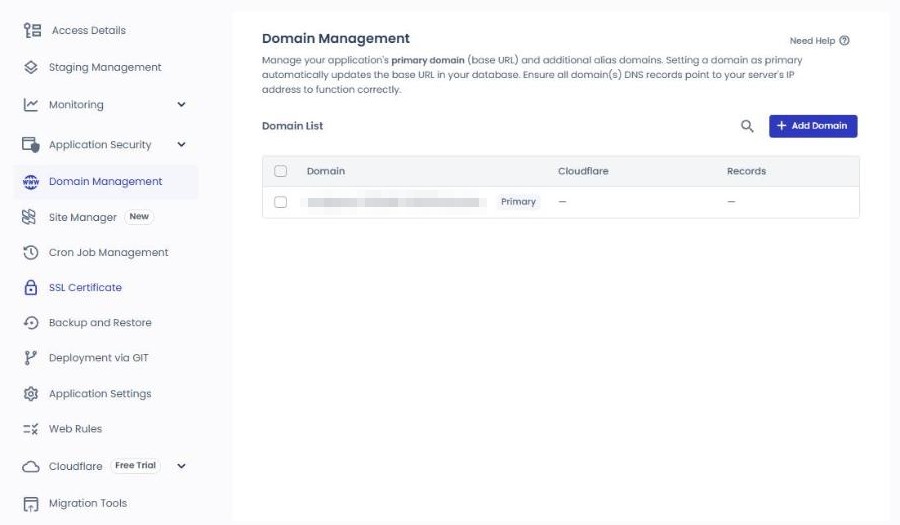
Domain ManagementDomain management
Manages the application's primary domain and additional domains (aliases); changing the primary domain also changes the site address (base URL) in the database. The DNS of every domain must point at the server IP for things to work.
Manages WordPress users, plugins, themes and updates from inside Cloudways. Basic is free, and Pro, at $3 per application per month ($1 off with 5 or more applications), adds Safe Updates, scheduled auto updates, performance monitoring, activity logs and update history.
A notice says that subscribing to Site Manager automatically whitelists Site Manager's system IPs.
Cron Job ManagementCron job management
Cron jobs for the application are added with [Add New Cron Job], on either the Basic or Advanced tab. The new application showed [No Cron Jobs added].
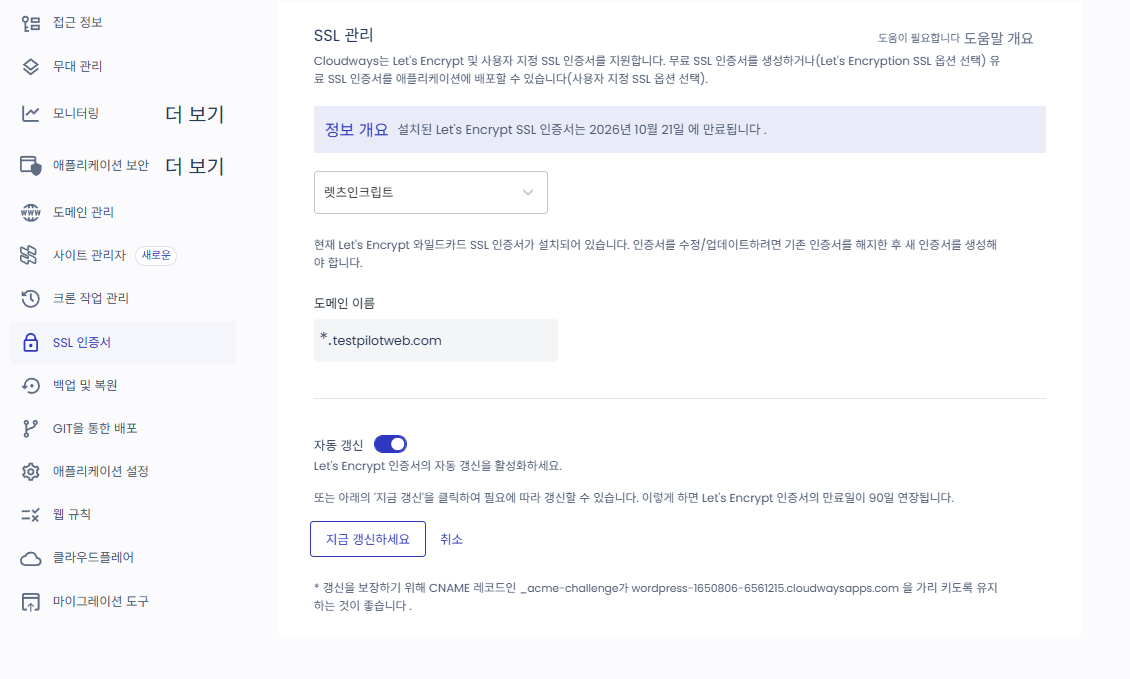
SSL CertificateSSL certificate
Installs a free Let’s Encrypt certificate or a paid Custom SSL certificate; for Let’s Encrypt you enter the email and domain and press [Install Certificate]. Selecting [Apply Wildcard] installs it as a wildcard certificate.
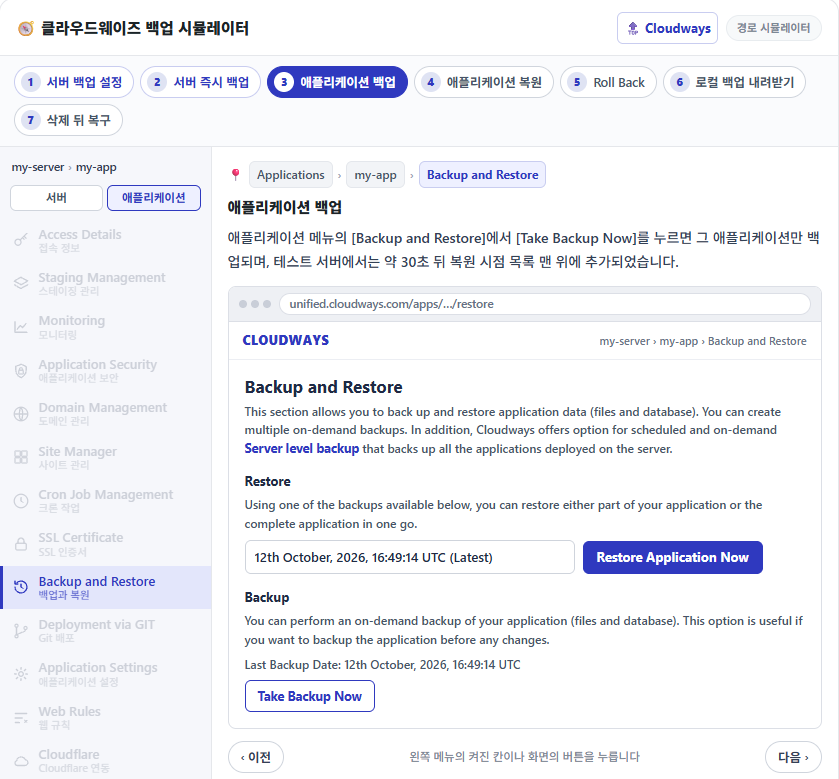
Backs up and restores per application (files and database); pick one backup from the list and restore part or all of it. Full-server backups are scheduled or run immediately from .
The PHP version is chosen per application (Public Preview); the new application was on PHP 8.2. With [PHP Editor] the server's default PHP settings can be overridden for this application only; the server-side defaults are under .
Clicking [PHP Editor] opens the [Advanced PHP Editor] window.
Allowed Directives
Only four formats can be used: php_flag, php_admin_flag, php_value and php_admin_value.
Example values
Values such as memory_limit, max_execution_time, post_max_size, upload_max_filesize and max_input_vars are filled in as examples, and only lines with the semicolon (;) at the start removed are applied.
Save Changes
Saves the contents of the edit field and applies them to this application.
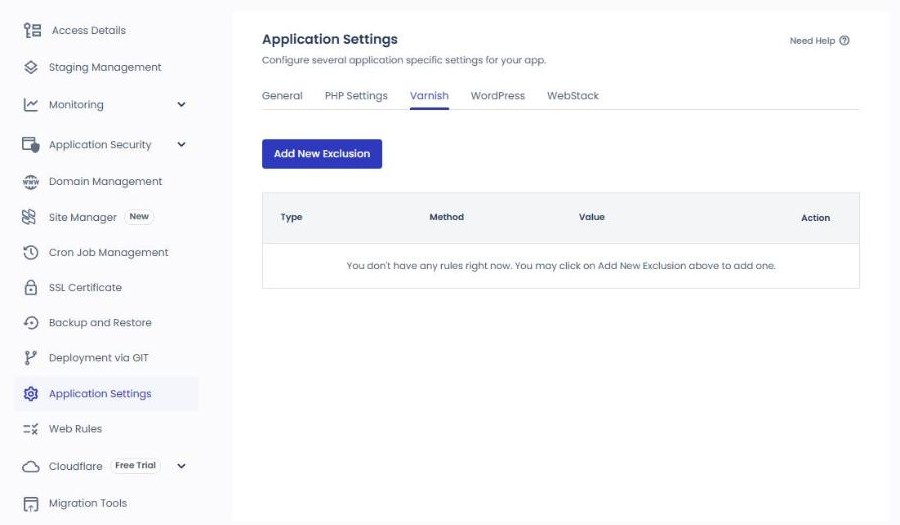
Rules to exclude from the Varnish cache (Type, Method, Value) are added with [Add New Exclusion]; the new application had no rules.
On an application with Varnish turned off, this tab shows only the notice [Varnish is disabled for your Application], and there is no [Add New Exclusion] button.
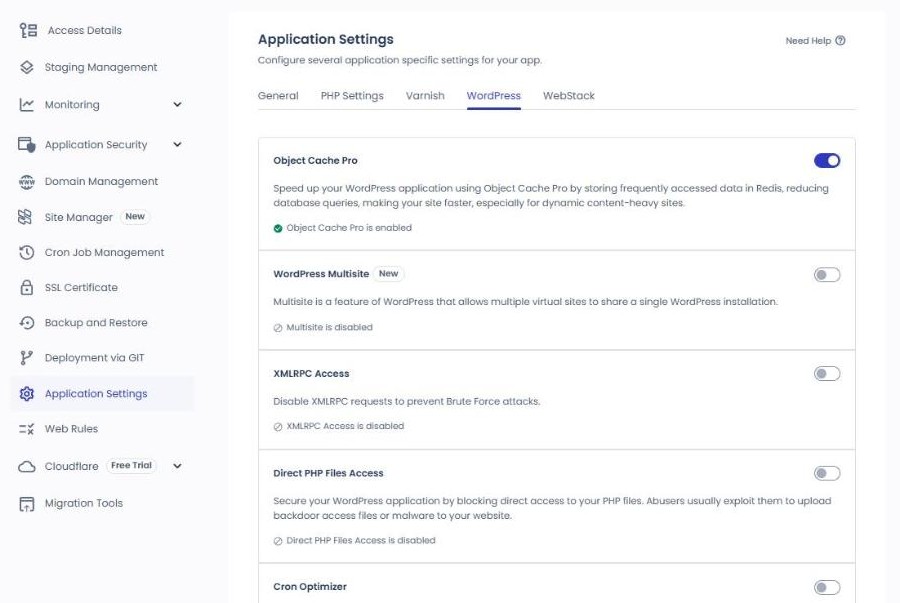
Stores frequently read data in Redis to reduce database queries; it was on from the start in the new application.
WordPress MultisiteOff
The multisite feature for running several sites from one WordPress.
XMLRPC AccessOff
The on-screen note reads [Disable XMLRPC requests to prevent Brute Force attacks], and the new application's status read [XMLRPC Access is disabled].
Direct PHP Files AccessOff
Blocks direct access to PHP files, which is abused for backdoors and malware uploads; the new application's status read [Direct PHP Files Access is disabled].
Cron OptimizerOff
When on, scheduled tasks run on the Cloudways server cron instead of the WordPress built-in cron.
Manages response headers and redirect/rewrite rules on two tabs, Header Rules and Rewrite Rules, without editing .htaccess directly (Public Preview).
Clicking [Add Header Rule] opens the rule fields on a full screen, not in a window.
Type · Action
Choose the rule type and action; the initial values are Custom and Set. A notice at the top of the screen also says you can use ready-made templates.
Header Name · Value
The name and value of the response header to add.
Always Apply
With [true] the rule always applies, and with [false] it applies only under supported conditions (per the official help); [true] is selected initially.
Add Rules
Adds the entered header rule to this application.
Rewrite Rules
The tab for adding redirect rules (Rewrite) with [Add Rewrite Rule]; on the October 29 screen it showed [No Rewrite Rules Added].
CloudflareCloudflare integration
Connects Cloudflare Enterprise from $4.99 per domain per month, and a domain enabling Cloudflare Enterprise for the first time gets the first 30 days free. Each domain includes 100GB of bandwidth, with $0.02 per GB beyond that.
The submenus are Domain, Overview, Settings, Analytics and Security; this screen is Domain, before a domain has been connected.
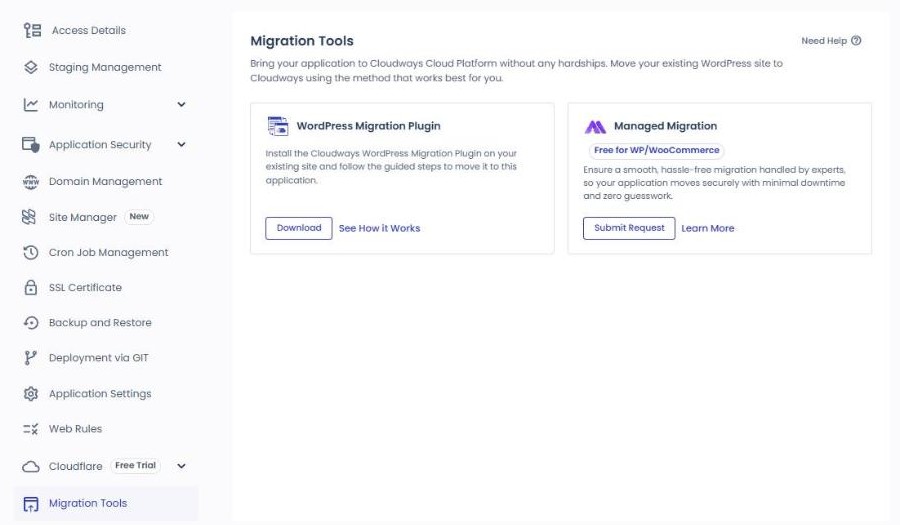
Migration ToolsMigration tools
There are two ways to move an existing WordPress site: do it yourself with the WordPress Migration Plugin, or have Cloudways do it with Managed Migration (free for WordPress and WooCommerce).
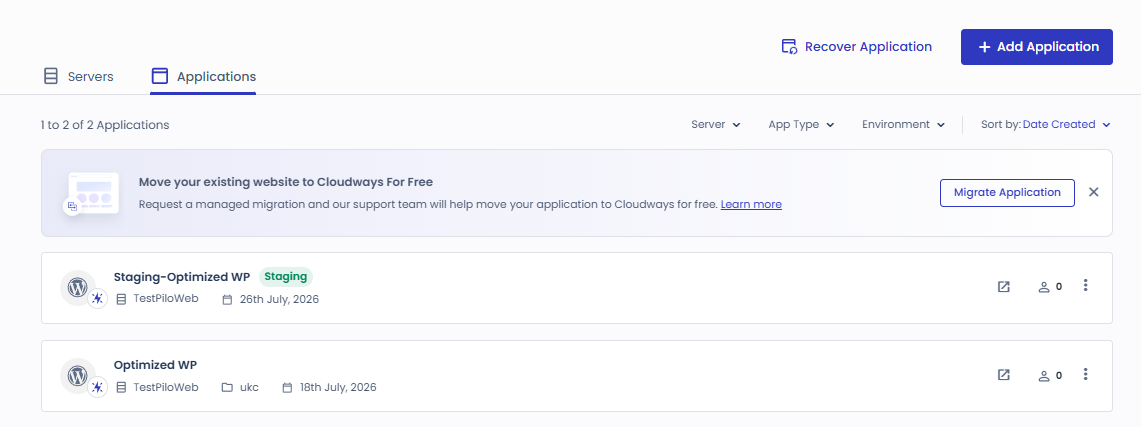
The screenshots show the existing server from July 2026 and the Vultr Seoul 1GB server and WordPress created on October 9, 2026. Click an image to enlarge it. Menu names are left in English as on the Cloudways screens, and account details such as email, addresses and IPs are masked.
Ⅱ. Cloudways Application
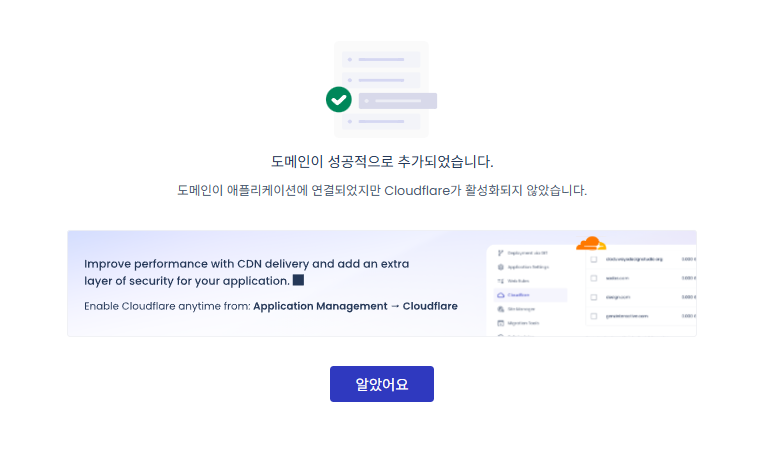
The application menus can be seen by pressing the [Application] button in the simulator above. A new WordPress is set up in the order admin login, domain connection, SSL installation, then staging and backups, and pressing [View screen] on a card switches the simulator above to that screen.
1Admin login
Access Details
Log in to the WordPress admin (/wp-admin/) with the Admin Panel address and admin account; for a new application the admin username was generated from the signup email.
Menus that exist on both the server and the application, such as Monitoring, security, backups, PHP and cache, use different scopes: the server side covers the whole server, the application side one WordPress. On the same day, Incidents showed two SSH attacks on the server and zero on the application.
Item
Server menu
Application menu
When to use which
Monitoring
MonitoringWhole-server RAM, CPU, disk (9.64GB) and bandwidth
Monitoring › Traffic · PHP · MySQL · Disk UsageTraffic, slow pages, queries and disk (125MB)
If the whole site is slow, check the server's RAM and CPU; if only certain pages are slow, check the application's PHP Slow Pages.
Security
SecuritySSH attack log, firewall, IPs allowed for SSH and MySQL
If SSH or SFTP access is blocked, check the server's Firewall and Shell Access; for plugin vulnerabilities, check the application's Vulnerability Scanner.
Backup and RestorePer-application backup and restore
Set the backup schedule on the server; to roll back a single site, restore from the application.
PHP
Settings & PackagesDefaults such as execution limit (300 s) and memory limit (256MB)
Application Settings › PHP SettingsPHP version (8.2) selection and PHP Editor
The PHP version is chosen per application, while defaults such as execution and memory limits are changed on the server.
Cache
Manage ServicesRun and restart Varnish, Memcached and Redis
Application Settings › GeneralPurge Site Cache, Varnish on and off
If your edits do not show up, clear the cache with the application's Purge Site Cache; if a service has stopped, restart it from the server's Manage Services.
🔢 FAQ & Recommended Content
Yes. Click the grid icon at the bottom right of the server screen, choose [Add App], set the type, name and project, and the application is installed on the same server. Billing is per server only, so adding applications does not change the bill; instead, the applications share the RAM, CPU and disk.
In the server's [Vertical Scaling] menu, pick a larger size on the slider (1GB to 96GB on Vultr) and click [Scale Now]; RAM, CPU and disk grow together on the same server, and the server pauses briefly during the operation. Vultr and Linode do not support scaling down, so moving to a smaller size means cloning the server, while AWS and Google Cloud also allow scaling down.
On the application screen, open [Quick Actions], choose [Clone App/Create Staging] and pick the destination: the same server, another server in your account or a new server. Web files, the database, PHP settings and the WordPress admin account are copied, but SSH users, CDN settings and the site URL are not, and applications under 30GB usually take 20 to 30 minutes. Staging applications cannot be cloned.
☁️Cloudways related postsPost 21 · Tool 2
🗂️ Running Cloudways
📄 What Is Cloudways📄 Signup and basic setup📄 Domain connection📄 SSL setup
📋 Server & Application📄 Admin login📄 Staging Management📄 Billing · Pricing📄 Email · SMTP add-on📄 MCP · AI Server Management📄 SFTP and SSH Access📄 Migration📄 Backup📄 Vertical Scaling
📋 Hosting Comparison Top 7📄 What is cloud hosting📄 What is managed hosting📄 Web Hosting Costs📄 Cloudways for Small Businesses📄 Cloudways WooCommerce📄 Cloudways Alternatives
ℹ️ Affiliate Disclosure This site's content contains affiliate links. When a visitor buys a product or service through one of them, the site receives a commission from the seller. The amount the buyer pays(it goes down during event discounts ↓)does not go up. Posted prices, discounts, and stock reflect the time of writing and may differ, so confirm with the seller before buying. Products are chosen and reviewed by our own standards, and commissions do not affect the order or content of reviews.



 Summary · 2026-10-09
 Details · CPU Consumption
 2026-07
 2026-10-09


 SSH/SFTP
 MySQL
MySQL


 Access Details
 Application Credentials




 1
1 2
2

 1
1 2
2