
WHOIS Domain Lookup and Name Server Check: Enter a Domain → Check DNS Records (1,400+ TLDs)


Sometimes your site still points to the old server after a hosting move, or you need to check when a domain expires. This WHOIS domain lookup and name server check runs from a single domain name and shows the registrar, registration date, expiration date and A, AAAA, MX, TXT and SOA records on one screen.
Registration data comes from domain RDAP first, or from the WHOIS domain server when RDAP is not offered, and the registered name servers are compared side by side with the live DNS responseto see whether they match. You do not need to sign in to your registrar's dashboard.


Ⅰ. How to Read WHOIS Domain Lookup Results
The WHOIS domain lookup results come in four blocks: registration data, name servers, DNS records and detected services. They describe the same domain but come from different sources. Registration data is the value in the ledger kept by the registry and registrar, while DNS records are the answers the name servers are actually returning right now. The fact that these two can disagree is the starting point for reading the screen.
1️⃣ Registration data: registrar, registration date, expiration date, status
Registration data comes from the ledger that manages the domain. It has nothing to do with whether the site is up or what it shows. Even if the site is down, these fields still appear as long as the registration is alive.
Registraris where domains are sold. It is not the same as the registry. The company that manages the whole .com namespace is Verisign, and the businesses below it that sell individual domains and take renewals are registrars. Gabia, Whois, Namecheap and GoDaddy are examples.
IANA IDis a unique number assigned to each ICANN-accredited registrar. When several companies have similar names, this number tells them apart. If there is no number, the domain did not go through an ICANN-accredited registrar, which is common with country-code domains.
Published is shown together with the number of years since registration. Domain age does not raise rankings by itself, but it is a useful reference when comparing sites on the same topic. Last updatedis not the date the site's content was edited. It changes when the name servers are switched, contact details are edited or the domain is renewed.
Expiration Dateis also shown as a badge at the top. It turns green when plenty of time is left, orange within 30 days and red once it has passed. A domain does not disappear the moment it expires; Ⅲ covers this.
Statusis a code showing the locks and progress states on the domain. The tool keeps the code as is and adds an explanation in front. clientTransferProhibited means a transfer lock set by the registrar; codes starting with client are set by the registrar, and those starting with server are set by the registry. A transfer lock is not a problem but usually the default. Registrars set it to prevent domain theft through unauthorized transfers.
DNSSECverifies with a signature that DNS responses have not been forged. If it is on, a signature is registered; having it off does not by itself mean there is a problem.
2️⃣ Why the name server check shows two columns
Name servers appear in two columns. It is not the same field shown twice but two values from different sources placed side by side.
Registry datais the value written in the registrar's and registry's ledger. It changes when you enter name servers in your domain dashboard. Live DNSis the answer received by asking the name servers right now. It is the actual state at the moment you press the lookup button.
If the two values are the same, a green Match badge appears in the left column. If they differ, an orange Mismatch badge appears. Sometimes there is no badge at all, which happens when one side is empty and no comparison can be made. You will see this with country-code domains that do not publish registration data.
A different count is also flagged as a mismatch, for example when the ledger lists two but the live answer returns three. This is what it looks like when you add a name server but do not update it at the registrar.
What a mismatch means and how long to wait is covered in Ⅱ.
3️⃣ DNS lookup: what each record type means
DNS records are the entries that turn a domain name into an actual address or setting value. Each type does a different job.
|
Type |
Task |
|---|---|
|
A |
Points the domain to an IPv4 address. This value tells you which server the website is on. |
|
AAAA |
Does the same with an IPv6 address. Not having one is not a problem. |
|
CNAME |
An alias pointing to another name. Often used to send www to the main domain. |
|
MX |
The server that receives mail. The number in front is the priority; lower numbers are tried first. |
|
NS |
The name servers responsible for this domain. |
|
TXT |
Free-form text. SPF entries that specify sending servers and ownership verification values for Google or Naver go here. |
|
SOA |
The authoritative information for the whole zone. It holds the primary name server and the serial number. |
The TTLon the right is how long, in seconds, the value may be stored. 300 is 5 minutes, 3600 is one hour and 86400 is one day. This is usually why a change does not show up right away.
No MX record means the domain does not receive mail. A TXT line starting with v=spf1 means mail sending servers have been specified.
4️⃣ Detected services: hosting, DNS management, mail
This section combines the values above to estimate which services are actually in use.
Hostinglooks up the network that the A record's IP belongs to and shows the provider name and AS number. An AS number is a unique number given to each network on the internet. Countryis the country where that network is registered, and reverse DNSis the name returned when the IP is looked up in reverse. Reverse DNS often keeps the provider's name as is, giving one more clue for identifying the host.
DNS managementis identified from the name server addresses. ns.cloudflare.com means Cloudflare, and ns.gabia.co.kr means Gabia. Mailis identified from the MX host. aspmx.l.google.com means Google Workspace, and mail.protection.outlook.com means Microsoft 365.
Keep two things in mind. First, providers not in the table do not get a chip. With a lesser-known name server, the DNS management chip may be empty, and that does not mean the lookup failed. Second, for sites behind a CDN such as Cloudflare, the IP and provider shown belong to the CDN. This method cannot tell you where the real server is.
5️⃣ Why the source is either RDAP or WHOIS
The Source field at the bottom of the results shows whether the data came via RDAP or WHOIS. That is because the tool uses both methods.
WHOIS has been in use since the 1980s. You connect on port 43, send a domain name and the server returns human-readable text as is. There is no fixed format, so field names differ from server to server. RDAP is its successor: HTTPSrequests return responses in a defined JSON structure. Field names are standardized, and it supports multiple languages and access control.
As of January 28, 2025, ICANN made RDAPthe official way to provide gTLD registration data. For generic top-level domains such as .com, .net and .org, RDAP is now the standard. This decision applies only to gTLDs; country-code domains are run by each registry under its own policy. Domains such as .kr that do not offer RDAP are looked up with the existing WHOIS method.
This tool tries RDAP first, and if the top-level domaindoes not offer RDAP, it falls back to WHOIS. Which one was used is written in Source. The fields you get also differ a little by source. RDAP has the IANA ID and abuse contact built into its structure, so it usually fills in more fields.
View rawshows the response exactly as received. If the data came via RDAP, a Also look up via WHOIS button appears as well. Only pressing it runs one more lookup over port 43; if you do not press it, no request is sent. If the raw data contains contact emails and phone numbers, they are masked on screen.
Ⅱ. Checking Name Servers and Change Propagation
Name servers are the signposts that decide which server a domain name is sent to. You change them when moving hosts or adding Cloudflare, but the change does not take effect everywhere at once. Putting the name servers in the registration data next to the values the live DNS returns lets you tell from the screen which stage you are at.
1️⃣ When you need to check name servers
You rarely need to look at name servers. These are the situations where you check them.
- After moving hosts : you switched to the name servers from your new host, but the site still points to the old server.
- CDNsetup : Cloudflare works by replacing the name servers with its own, so whether they changed tells you whether it is active.
- When mail is not arriving : even if MX is set correctly, the old settings answer if the name servers still point to the old ones.
- After taking over a domain : the first step in checking whether the previous owner's settings are still in place.
- When the site looks different for different people : some see the new site, others the old one.
The last case is the clearest sign that propagation is still in progress.
2️⃣ If registry data and live DNS differ, it is still propagating
If a mismatch badge appears during a name server check, it is usually right after the name servers were changed. The value is not wrong; it is still spreading.
Changing name servers goes through three stages. First, the registrar submits the new value to the registry. Next, the top-level domain's name servers pick up that value. Finally, resolvers around the world drop the old value they stored and ask again. The last stage is the part that takes time.
It usually settles within a few hours to 48 hours. Until then, visitors may reach the old server or the new one depending on their location and ISP. If you edit the site during this period, it is hard to tell which side the change landed on, so it is better to work after propagation finishes.
If the mismatch continues after 48 hours, it is not a propagation issue. Check the two points below.
- The change may not have been saved in the registrar's dashboard. If the ledger value is unchanged, it will never update no matter how long you wait.
- If the domain has a clientUpdateProhibited lock, changes themselves are blocked. You can check this in the status field of the registration data.
Conversely, if a match badge appears but the site still looks old, the name servers have settled. Then look at the A record, the browser cache or the site cache.
3️⃣ Propagation time and TTL
The value that decides propagation time is the TTL. When a resolver receives an answer, it stores the value for the number of seconds in the TTL and does not ask again during that time. A TTL of 3600 means the old value may be used for up to an hour.
In the DNS records table, you can see that the TTL on the NS line is set higher than on other records. Name servers rarely change, so they are configured to be stored for a long time. That is also why a change to them takes longer.
This lets you prepare in advance. If you plan to change name servers or an A record, lower that record's TTL to about 300 seconds a day before. By the time you make the change, it is already refreshing on a short cycle, so it takes effect faster. Once things settle, set it back to the original value.
Your own computer also keeps a record. On Windows, running ipconfig /flushdns in Command Prompt clears it. Browsers have their own cache too, so checking in a private window is more accurate.
4️⃣ Checking it yourself with commands: nslookup and host
To check directly without a lookup tool, use commands.
On Windows, use nslookup. In Command Prompt, type the following.
nslookup -q=ns mydomain.com
nslookup -q=a mydomain.com
nslookup -q=mx mydomain.com
On Linux and macOS, use host.
host -t ns mydomain.com
host -t a mydomain.com
host -t txt mydomain.comOn Linux and macOS, dig does the same job with more detailed output.
Commands and lookup tools can return different results. A command asks the resolver your computer uses, while the lookup tool asks the resolver on the server where the tool runs. During propagation, it is normal for the two to differ. In fact, if the two results differ, that is evidence it is still spreading.
Ⅲ. Registrant Details and Expiration Dates
Open a WHOIS record and the registrant's name and contact details are usually hidden. The tool did not fail to fetch them; the registrar does not publish them. Country-code domains are different, though, and .kr often shows the registrant as is. The expiration date shown also does not mean the domain stops working on that day.
1️⃣ Why the domain owner is hidden
Look up a .com domain and the registrant field says [REDACTED FOR PRIVACY] or is empty altogether. The lookup did not fail.
When the EU data protection law (GDPR) took effect in 2018, ICANNchanged gTLD registration data to hide personally identifying fields by default: name, address, phone number and email. The same rule applies to registrants worldwide, not only to residents of Europe.
On top of this comes the privacy service offered by registrars. It puts a proxy company's details in place of the registrant's, and many registrars now offer it for free.
So what a lookup can give you stops at the registrar. If you need to reach the owner, use the registrar's abuse contact. The registrar passes it on to the registrant. Trademark infringement and scam site reports are handled this way.
2️⃣ .kr shows the registrant: the disclosure field
Country-code domains follow policies set by each country's registry. .kr is managed by KISA, and registrants can choose for themselves whether to publish their details.
The raw lookup result has a Publishes field. With 'Y', the registrant's name and address and the contact person's details are shown as is. With 'N', they are restricted. Company domains are often public, while personal domains are often restricted.
That is why the same tool shows only the registrar for .com but the registrant as well for .kr. It is not a problem with the tool; each top-level domain has a different disclosure policy.
If the raw data contains contact details, emails and phone numbers are masked on screen. Even when the information is public, it would be a problem if the lookup result pages were indexed by search engines as is.
3️⃣ Expiration, grace period and pending delete
A domain does not vanish on the day it expires. gTLDs go through several stages after expiry.
First comes the grace period. It usually lasts 30 to 45 days, and during it you can restore the domain at the normal renewal price. The site usually stops and the registrar's notice page appears instead.
After the grace period, the domain enters the redemption period. The status shows redemptionPeriod. It lasts about 30 days, and a separate restore fee applies, often several times the renewal price.
Next comes pending delete. The status shows pendingDelete, usually for 5 days. At this stage even the original registrant cannot restore it. When the period ends, the registration is released and anyone can register the domain.
Country-code domains have different stages and timelines. .kr follows the policies of its registry and the registrar, so when expiry is near, it is safer to check directly with your registrar.
When the expiry badge at the top of the tool turns orange, there are fewer than 30 days left. Even with auto-renewal on, it can fail if your payment method has expired, so when you see this badge it is a good time to check your registrar dashboard.
4️⃣ What to check before registering, and domain prices
While checking the expiration date, you also end up looking at renewal prices and transfer terms. The same items matter when registering a new domain.
The first-year price and the renewal price are different. Many registrars discount the first year heavily and charge full price from the second year. A domain is not something you use for a year and throw away, so it makes sense to compare by renewal price. .com has a wholesale price set by the registry, so the gap between registrars is small, but some new top-level domains renew at several times the first-year price.
Check whether privacy protection is free. More registrars now include it for free, but some still charge for it yearly. This is the masking covered in Ⅲ-1.
It also helps to know the transfer lock rule. For 60 days after registering a new domain or moving it to another registrar, you cannot transfer it again. This is an ICANN rule, so registrars cannot lift it at will. If you plan to switch registrars, factor in this period.
Country-code domains have their own conditions. .kr requires an address in Korea, and depending on the country, some require a local company or residency.
Ⅳ. Comparing Domain Lookup Sites
Enter the same domain and each site shows different fields. Services differ in where they get their data and how long they keep results. Korean services are strong on .kr while global services tend to show more detail for gTLDs, so it is better to choose based on what you want to check.
1️⃣ Korean lookup sites: KISA, Whois, Gabia
KISA whoisis the domain lookup service run directly by the agency that manages .kr. For .kr domains it is the source, so it is the most accurate. It also offers IP address and AS number lookups. Its screen, however, is close to the raw output and can be hard to read at first.
Whois (whois.co.kr) and Gabia are lookup pages run by registrars. You can use them without being a customer, and the results page leads straight into registration or transfer.
Korean services give detailed .kr fields and Korean-language guidance. On the other hand, top-level domains other than .kr sometimes show fewer fields.
2️⃣ Global lookup sites
ICANN Lookup is the lookup provided directly by ICANN. It is the right place to check the reference values for gTLDs.
who.is or whois.domaintools.com and similar services highlight that they show past records and change history too. Some features are paid.
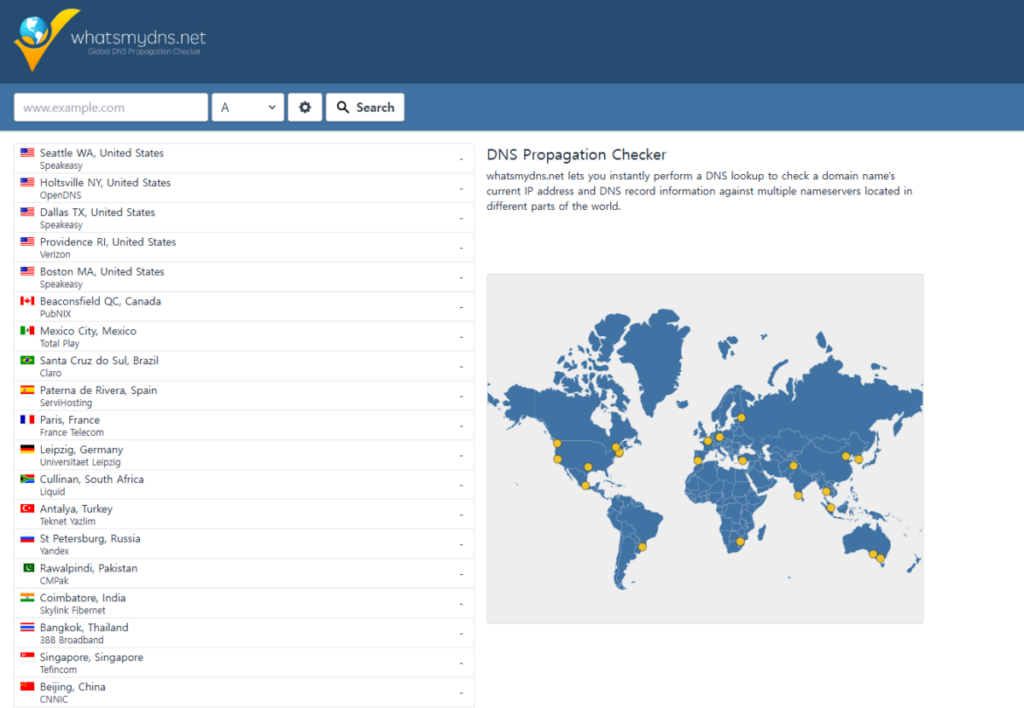
whatsmydns.net is a different kind of tool. It asks resolvers in many countries at once and shows propagation on a map. If you have just changed your name servers, this is the one that fits. The tool in this article queries from a single server, so it does not show worldwide propagation.
3️⃣ Why domain search results differ from site to site
There are four reasons the same domain looks different on different sites.
The source is different. Services that use RDAP and those that use WHOIS over port 43 receive different responses to begin with. The field names and the number of fields differ.
The time the result was saved is different. Most lookup services keep results for a while and reuse them. If you just changed your name servers, a site showing a value saved yesterday and one asking again now will give different results. This tool shows the lookup time at the bottom of the results and notes when a result was served from storage.
The resolver location is different. The DNS record fields show the answer that service's server received. During propagation, answers differ by server location.
The coverage is different. Country-code domains follow different policies depending on the registry, so some services show the .kr registrant while others leave it blank.
So different results do not mean one side is wrong. Where to look depends on what you want to check. For the original registration data, go to the registry for that top-level domain; for worldwide propagation, use a propagation checker; and to compare registration data with live DNS side by side, this tool is the right fit.
Ⅴ. Domain FAQ
If there is neither registration data nor a DNS response, the domain has most likely not been registered by anyone yet. Right after registration, though, the registry can take a while to update, so it may look like this for a short time. If registration status matters, check once more in the registrar's search page.
It has taken effect once the registry value and the live DNS value match. This usually takes a few hours to 48 hours, and the longer the TTL on the old name server records, the longer it takes. If they still differ after 48 hours, check that the change was saved at the registrar and that no transfer lock is in place.
For gTLDs such as .com, registrant details are hidden under privacy rules. A lookup only tells you the registrar. If you need to make contact, use the registrar's abuse contact. For .kr, the registrant is shown as is if they chose to make it public.
If the site does not use a CDN such as Cloudflare, it is the real server address. For sites behind a CDN, the IP and provider shown belong to the CDN, and the origin server's location cannot be found this way. If a CDN provider's name appears in the hosting chip under detected services, that is the case.
Right after expiry there is a grace period, so the registration is still alive. The site loads because the name servers and the server are still running as before. Once the status shows redemptionPeriod or pendingDelete, the domain has moved into a stage where it is hard to recover.
Yes. If one person runs repeated lookups in a short time, they are blocked for a while. The servers being queried belong to others, so the limit is there to avoid putting load on them. Looking up the same domain again shows the saved result and does not count toward the limit.
Yes, 30 days including the expiration date. During this period the website and services using the domain stop working, and the status shows clientHold. Renewing within 30 days restores it; after that it is deleted and becomes available for registration again on the morning of day 31. Unlike gTLDs such as .com, there is no separate redemption period.






Ⅵ. Update Log
2026-08-14

· Reordered the dates in the registration data.
  → Expiration date now follows registration date; last updated moved to the end
· Highlighted the expiration date.
  → Same color scale as the expiry D-day badge at the top
· Moved the source label.
  → Moved from inside the registration table to a line below it
ℹ️ Affiliate Disclosure
This site's content contains affiliate links. When a visitor buys a product or service through one of them, the site receives a commission from the seller. The amount the buyer pays(it goes down during event discounts ↓)does not go up. Posted prices, discounts, and stock reflect the time of writing and may differ, so confirm with the seller before buying. Products are chosen and reviewed by our own standards, and commissions do not affect the order or content of reviews.