
What Is Shared Hosting? CPU and RAM Isolation, Limits, and Pros and Cons (WordPress and All Websites)


Shared hosting is hosting where many websites share the CPU and RAM of a single server. This guide covers how isolation puts a resource limit on each account, what happens when you hit that limit, and when shared hosting fits WordPress and other websites, split into pros and cons.
Shared hosting means sharing a server with neighboring sites, so CPU and RAM isolation is what matters most. Here is what isolation can and cannot prevent, why the 508 error appears, the pros and cons of shared hosting, and when to move to a VPS.
1️⃣ How Shared Hosting Works: One Server, Many Accounts
A single shared hosting server holds anywhere from dozens to hundreds of Linux accounts. What you get is one of those accounts and your own folder under /home/username/.
Accounts are separated by files and permissions. From your account, you cannot open another account's folders, and each account gets its own databases.
But the resources that run your site all come from that one server. The web server that receives requests, the CPU and memory that run PHP, the database server, the disk, and even the network line and IP address are shared by every account.
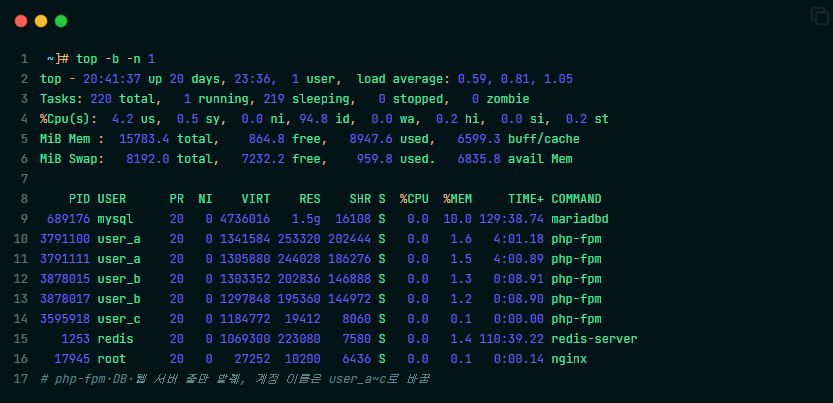
Linux servers show, through the top command, PHP processes (php-fpm) from several accounts listed together under the same CPU and memory.
🔲 CloudLinux Shared Hosting
Many shared hosting providers in the global market run on CloudLinux, an operating system built for shared servers. Hostinger, Namecheap, and ChemiCloud are among them.
CloudLinux puts each account inside a partition called LVE and sets limits on CPU, memory, disk speed, and concurrent connections. When an account goes over a limit, only that account slows down or stops.
It works with many control panels, including cPanel, Plesk, and DirectAdmin. Some providers, like Hostinger, run it under their own panel (hPanel).
The limits are written as numbers in pricing tables or help docs. Hostinger's Web Single shared plan comes with 1 CPU core, 1 GB of memory, 6,144 KB/s of disk speed, and 20 PHP workers. The Unlimited plan in the same table has 2 CPU cores and 3 GB of memory.
🔲 Shared Hosting in Korea
I'm Korean, so I'd also like to cover shared hosting in Korea for readers there. Korean shared hosting plans are tiered by traffic and disk space, not by CPU and RAM.
None of the three Korean providers we checked publish the CPU and memory limit for a single account. Instead, some plans cap daily traffic and block the site once it is used up.
Korean shared hosting usually limits daily traffic and concurrent connections per account with Apache's mod_cband. Many providers don't split CPU and memory by account; every account shares the whole server.
2️⃣ Shared Hosting vs. VPS, Cloud, and Dedicated Servers
The difference between shared hosting and a VPS comes down to limits versus guarantees. Shared hosting only sets a line you must not cross; a VPS gives you a fixed share of CPU and memory from the start.
3️⃣ CPU and RAM Isolation: What It Prevents and What It Doesn't
CloudLinux partitions stop a neighboring account from hogging the CPU and memory. Even when a neighbor gets a traffic spike, that account only uses up to its own limit. A server without partitions can't even prevent this.
But a limit is not a guarantee. If a provider packs many accounts onto one server, everyone slows down when several accounts hit their limits at the same time.
If the server itself goes down, every account goes down with it, partitions or not. And because accounts share the IP address, your email can be blocked too if a neighbor sends spam and the IP gets blacklisted.
4️⃣ When You Hit a Limit: The 508 Error and Slowdowns
Each limit causes a different symptom. When you hit the CPU or disk speed limit, the site slows down.
When you go over the concurrent connection limit, visitors get the [508 Resource Limit Is Reached] error. When you go over the memory limit, processes are cut off and a 500 or 503 error appears.
On CloudLinux hosting, you can see which limit you hit on the Resource Usage page in cPanel, Plesk, or DirectAdmin. If the same error keeps coming back, check your cache plugin first.
5️⃣ Pros and Cons of Shared Hosting: WordPress and Other Websites
Shared hosting has the lowest upfront cost. With a 1- to 3-year commitment, it starts at $2–7 a month, and the provider handles server management. In return, CPU and memory are capped. After the first term, most plans renew at $10–18 a month, close to the entry price of cloud hosting.
A site made only of HTML will rarely hit the limits. WordPress runs PHP and queries the database for every page, so turn on a cache plugin first.
If you're starting a small business site or a small blog on WordPress or a regular website and don't want to spend much, I recommend Hostinger or ChemiCloud, even if they cost a little more. If you want the lowest cost, go with Namecheap.
Before choosing a host, I strongly recommend reading Reddit threads about providers like Bluehost and GoDaddy. If your site keeps going down while you're starting a small business, and visitors leave because the site is slow, you won't rank in SEO or AEO and your traffic will drop. I recommend Hostinger and ChemiCloud among shared hosts for their stability and speed, and if you need to start on a tight budget, Namecheap is the better choice. To be clear, I'm an affiliate of all three hosts, and they are rated better than the older providers for stability and speed.
6️⃣ When to Move to a VPS
Look at three things before you move.
If 508 or 503 errors keep coming back even with caching on, you're short on resources. If you hit the limits even on the highest shared tier, there's nowhere left to upgrade.
The end of your first term is another signal. At a renewal price of $10–18 a month, you can afford a managed cloud like Cloudways, which starts at $11 a month.
🔢 FAQ
ℹ️ Affiliate Disclosure
This site's content contains affiliate links. When a visitor buys a product or service through one of them, the site receives a commission from the seller. The amount the buyer pays(it goes down during event discounts ↓)does not go up. Posted prices, discounts, and stock reflect the time of writing and may differ, so confirm with the seller before buying. Products are chosen and reviewed by our own standards, and commissions do not affect the order or content of reviews.