I don't want to live a life with only voices.
  • dnf Command: Installing, Updating and Removing Packages, and How It Differs from yum

    Test Environment: RHEL-based | AlmaLinux 9.8 | root account | Verified on October 28, 2026 Package Commands: dnf The `dnf` command is a package management command used to search for, install, update, and remove packages on RHEL-based Linux systems. In AlmaLinux 9, typing `yum` also runs the same program. On an AlmaLinux 9 server, I actually ran the `search`, `info`, `provides`, and `history` commands to verify where each of the `search`, `info`, and `provides` commands look for packages, and to review the operation logs recorded in `history`. Installation, removal,…

  • curl Command: Options, POST Requests and File Downloads

    Test environment RHEL family | AlmaLinux 9.8 | root account | Checked 2026-10-28 Network commands curl The curl command is a tool that sends a request to a web address from the terminal and prints the response as it is. With a single command you can check a page's body, headers and status code. When we sent curl requests from an AlmaLinux 9 server to a WordPress site, the http address answered with a 301 response pointing to the https address, and a REST API request without authentication was rejected with 401…

  • WordPress Multisite: 2 Structures, Subdomain and Subdirectory

    Test environment RHEL family|AlmaLinux 9.8|Nginx + Apache|WordPress 7.1.3|Checked 2026-10-27 WordPress Multisite is a feature that groups multiple sites into a network and manages them from a single WordPress installation. On WordPress running on an Nginx + Apache setup, we turned on Multisite from the Network Setup screen, added one subsite, and checked the menu paths and the lines that go into the configuration files. 1️⃣ WordPress Multisite and the Network Admin In Multisite, every site in the network shares a…

  • WP Mail SMTP: Setting Up SMTP in WordPress and What to Check When Emails Fail to Send

    WordPress SMTP is a setting that routes emails sent by your site—such as password resets or notification emails—through email services like Gmail to ensure they arrive in the inbox rather than the spam folder. I’ve installed the WP Mail SMTP plugin, walked you through the setup process step by step, and summarized what to check if you’re not receiving emails. By default, WordPress sends emails using the server’s PHP `mail()` function, while SMTP configuration routes outgoing emails through an external server…

  • WordPress Update: The Dashboard Updates Screen and the Order for Core, Plugins and Themes

    Test environment RHEL family|WordPress 7.1.3|PHP 8.3|Checked 2026-10-19 A WordPress update is the task of checking for and installing new versions of WordPress core, plugins, themes and translations from the Updates screen in the Dashboard. On a WordPress 7.1.3 site showing new versions for plugins and translations, I checked the Updates screen and the Plugins and Themes screens and put together the update order and where the auto-update settings are. 1️⃣ The WordPress Updates screen: Dashboard › Updates [Dashboard › Updates]…

  • Elementor: Installing the Free Version and Building Pages | Elementor Free vs Pro Differences

    Test environment RHEL family|WordPress 7.1.3|Elementor 4.3.5|Checked 2026-10-16 Elementor is a WordPress page builder plugin: an editor for building pages by dragging and dropping widgets onto the screen visitors see, instead of the admin edit screen. I installed the free version 4.3.5 on a WordPress 7.1.3 site, published a page with a heading, a paragraph, and a button, and compared the free version with the Pro plans using the official pricing table. 1️⃣ What Is Elementor: How It Differs from the Block Editor…

  • WordPress Export and Import: Moving Posts and Pages with the Built-in Tools (XML)

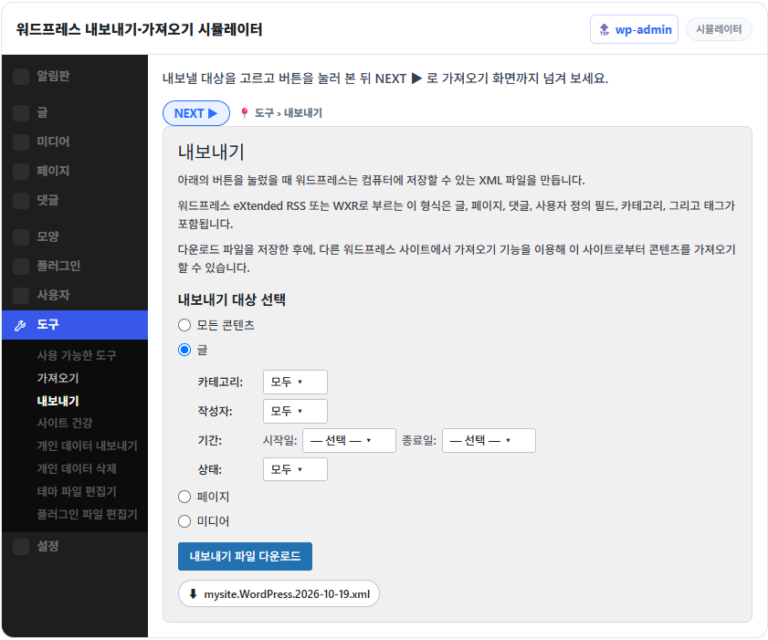
    Test environment RHEL family|AlmaLinux 9.8|WordPress 7.1.3|PHP 8.3|WordPress Importer 0.9.6|Checked 2026-10-19 With the WordPress export feature, you can download posts, pages, comments, custom fields and categories as a single XML file in WXR format from the Tools › Export menu in the admin screen. On a WordPress 7.1.3 site, I exported a test post, deleted it and uploaded the file again with the importer: the test post came back with the same post ID…

  • All-in-One WP Migration: Export, Import and File Size Limits of the WordPress Migration Plugin

    All-in-One WP Migration is a WordPress migration plugin that exports the database and files into a single backup file and restores the same site once you upload that file to a new server. I installed version 7.112 on a WordPress 7.1.3 site, created an export file, and imported it back into the same site up to the completion window. 1️⃣ What a WordPress migration plugin does: how it differs from manual migration With a plugin, you don't connect to the server; the move takes two steps in the admin screen, export and…

  • WordPress Site Health: Checking Your Site Status | How to Read Critical Issues and Recommended Improvements

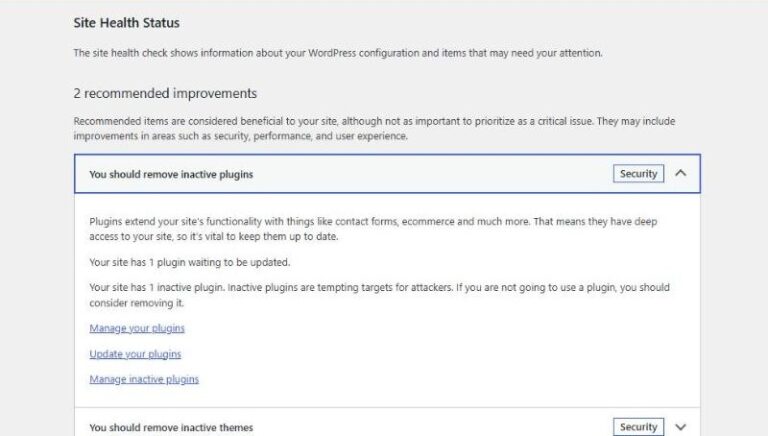
    WordPress Site Health is a feature under the Tools menu of the admin area that automatically checks items such as the PHP version, HTTPS and update status. I ran the 28 default checks on a WordPress 7.1.3 site and went through the causes and fixes for the items that came up as critical issues and recommended improvements. 1️⃣ The WordPress Site Health screen: the Status and Info tabs Opening [Tools › Site Health] shows the [Status] and [Info] tabs…

  • How to Make a WordPress Website: From Choosing a Domain and Hosting to Publishing Your First Page

    To make a WordPress website, you go through registering a domain, signing up for hosting, installing WordPress, choosing a theme and publishing your first page, in that order. This guide sets out the criteria and costs to decide at each step for anyone opening a site for the first time. The screens I went through myself in the WordPress 7.1.3 admin area, from choosing a theme to publishing the first page, are recreated in a simulator. 1️⃣ Steps to make a WordPress website Before installing WordPress, get the domain and hosting ready. The domain is the address visitors…

End of content

End of content