
WP Security: wp-admin Security | Change the Login URL, Limit Login Attempts, XML-RPC
wp-admin security means the settings that block brute-force attacks coming in through the WordPress admin screen and login screen. After checking the access logs of a Nginx + Apache server running several WordPress sites, automated requests kept arriving at xmlrpc.php even after the login URL was changed, so I added a server-level rate limit as well.
1️⃣ Why wp-admin and wp-login.php get attacked
The fact that the WordPress admin URL is public knowledge is a weakness, but stronger security can make up for it. Every WordPress site uses the same /wp-admin/ and [wp-login.php], and opening /wp-admin/ while logged out takes you to the [wp-login.php] login screen.
Attacks come in as brute force, entering usernames and passwords on this login screen over and over. That is why wp-admin security is first about stopping login attempts, not hiding the URL.
2️⃣ What changing the login URL does and does not do
Changing the login URL with a security plugin makes the default [wp-login.php] return a 404, so automated attacks hammering the default URL never reach the login screen. You have to tell the new URL separately to everyone with an admin account.
This method takes little effort, but if you forget the new URL you cannot get into the admin screen and have to rename that plugin's folder via FTP or a file manager to deactivate it. On a site managed by several people, it is best to record the URL in one place.
3️⃣ Limiting login attempts and two-factor authentication
Even after changing the login URL, once the new URL leaks the attempts to guess passwords continue. WordPress core has no limit on failed logins, so no matter how many wrong passwords are entered, the same login screen opens again.
A login attempt limit plugin blocks an IP for a set time once it exceeds the allowed number of tries, and two-factor authentication asks for a code from the authenticator app on your phone even when the password is correct. When you turn on two-factor authentication, also keep backup codes for when you lose your phone.
4️⃣ Closing xmlrpc.php
[xmlrpc.php] is a second entrance that takes a username and password without going through the login screen, and with the [system.multicall] method it can test several passwords in one request.
The access logs of a Nginx + Apache server running several WordPress sites showed 2,250 POST requests to [xmlrpc.php] between midnight and 9:50 a.m. on October 13. The requests came from 22 IPs, and their User-Agent posed as Jetpack and WordPress.com.
If you do not use the WordPress mobile app or Jetpack, block [xmlrpc.php] requests in the Nginx configuration or use the XML-RPC off setting of a security plugin.
# Inside the server block — deny xmlrpc.php requests
location = /xmlrpc.php {
    deny all;
}
With this setting, GET and POST requests to [xmlrpc.php] all end in 403 without reaching PHP. A security plugin's XML-RPC off option only rejects requests that need a login while the file keeps responding, so to cut PHP executions too, blocking in Nginx is the better fit.
5️⃣ Blocking at the server: admin IP restriction and rate limiting
If you only manage the site from a fixed IP, allowing [wp-login.php] and /wp-admin/ only for that IP in Nginx is the most reliable method. It does not suit setups where your home or office IP changes often.
Blocking all of /wp-admin/ may seem enough, but visitor-facing features such as search or a shopping cart often send requests to [admin-ajax.php], so that file has to stay open.
# Inside the server block — above the PHP location
location = /wp-login.php {
    allow 203.0.113.10;   # Your fixed admin IP
    deny all;
    # Copy the settings of your PHP location below this line
}
Opening [wp-login.php] from an IP other than the allowed one returns a 403, while the allowed IP gets the login screen. Inside the location you have to copy the site's PHP handling settings (fastcgi_pass and so on) as they are for the login screen to run normally.
If you cannot fix your IP, you can put a rate limit on PHP requests from visitors who are not logged in; the process of limiting them to 30 per minute so automated requests cannot hog server resources is covered in the php-fpm max_children warning article.
# http block — count only requests without a login cookie, per IP
map $http_cookie $php_anon_key {
    default                 $binary_remote_addr;
    "~*wordpress_logged_in" "";
}
limit_req_zone $php_anon_key zone=php_anon:10m rate=30r/m;

# Inside the PHP location
limit_req zone=php_anon burst=60 nodelay;
limit_req_status 429;
When a single logged-out IP sends PHP requests in a row, up to the 61st are handled and after that 429 is returned; requests with a login cookie are not counted. If page caching answers without going through PHP, normal visitors viewing pages never hit this limit.

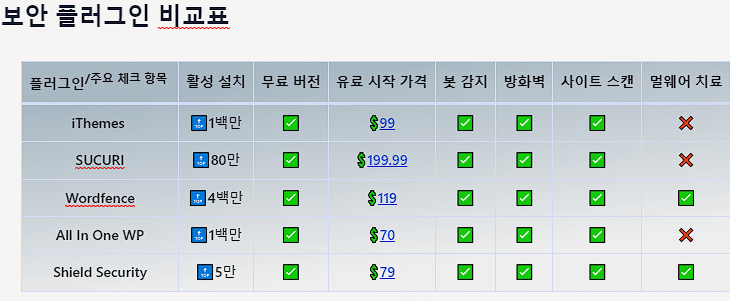 Security plugin
WordPress Security Plugins: Best 5
A comparison table of five leading security plugins.
Security plugin
WordPress Security Plugins: Best 5
A comparison table of five leading security plugins.
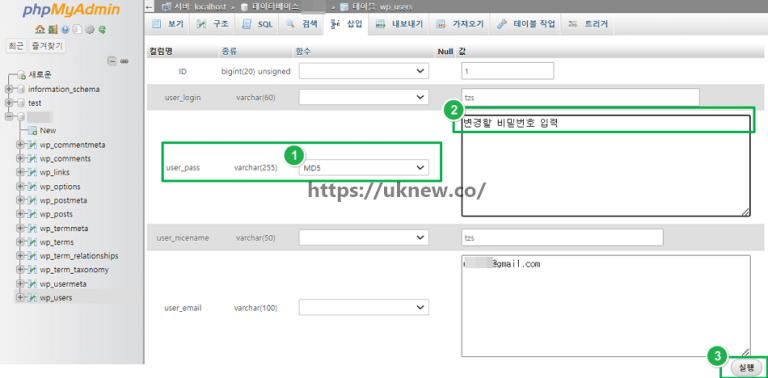 Login
Reset a lost admin password
How to change your password in your profile and how to reset it when you forget it.
Login
Reset a lost admin password
How to change your password in your profile and how to reset it when you forget it.
 Tools
Random Password Generator
A tool that creates 6–30 character passwords mixing uppercase, lowercase, numbers and special characters.
Tools
Random Password Generator
A tool that creates 6–30 character passwords mixing uppercase, lowercase, numbers and special characters.
ℹ️ Affiliate Disclosure
This site's content contains affiliate links. When a visitor buys a product or service through one of them, the site receives a commission from the seller. The amount the buyer pays(it goes down during event discounts ↓)does not go up. Posted prices, discounts, and stock reflect the time of writing and may differ, so confirm with the seller before buying. Products are chosen and reviewed by our own standards, and commissions do not affect the order or content of reviews.