
WordPress XML-RPC: 3 Ways to Disable It & How to Identify xmlrpc.php Attacks | Jetpack Exception
If the access log of your WordPress website shows hundreds of xmlrpc.php requests in a row from the same IP, it is a password-guessing attack aimed at WordPress XML-RPC. I sorted one day's 8,624 access-log entries on a Nginx + Apache server running several WordPress sites, applied the three ways of disabling it myself and checked the response codes, to work out at which layer you have to block it before even PHP stops running.
XML-RPC is a protocol that exchanges XML documents over HTTP to call WordPress functions remotely. Since WordPress 3.5 there has been no on/off switch for it in the settings screen, so it runs enabled from the moment of installation.
1️⃣ What xmlrpc.php does and who uses it
Since the REST API arrived it is easy to think of [xmlrpc.php] as a file nobody uses any more, but Jetpack still connects your site to WordPress.com through it. Jetpack's official documentation states that it depends on the XML-RPC connection, and on hosts that block XML-RPC by default the Jetpack connection itself fails. It is like an office that still keeps one fax number around.
As of WordPress 7.1 this file accepts 77 methods: 50 in the wp family that handle posts, media and comments, 23 from the old blogging protocols (MetaWeblog, MovableType, Blogger), 2 pingback methods and 2 demo methods for testing.
The wp family logs in with the username and password carried in the request body, so it never passes through the login screen. Writing and editing posts, uploading media and managing comments all belong to this family, and the 23 old blogging-protocol methods are kept so that other blogging tools can exchange posts the same way.
demo.sayHello is a test call built into WordPress XML-RPC. Send it and it returns just one word, [Hello!]; since it needs no login, it is used to check whether XML-RPC is working. Its sibling demo.addTwoNumbers adds two numbers and returns the sum.
All of them respond only to an XML body sent by POST; open the URL in a browser and you get a 405 with the message [XML-RPC server accepts POST requests only.].
Pingbacks are this file's job too. When you publish a post, a pingback goes to the xmlrpc.php of every site you linked in the body, and the receiving server opens the sending URL itself to check that the link really exists.
2️⃣ xmlrpc.php attacks as seen in the access log
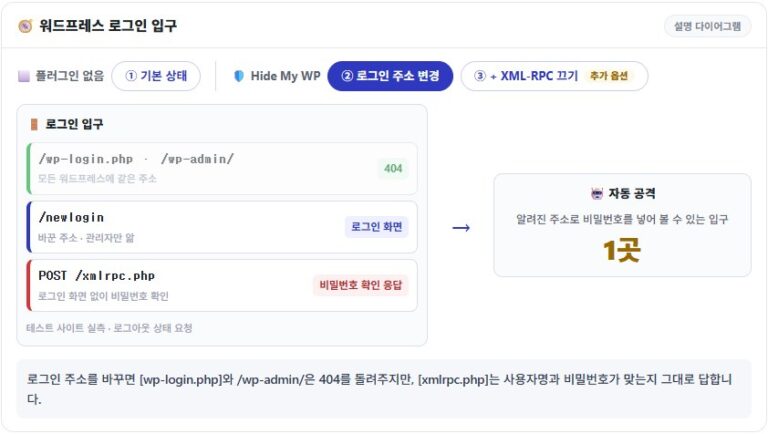
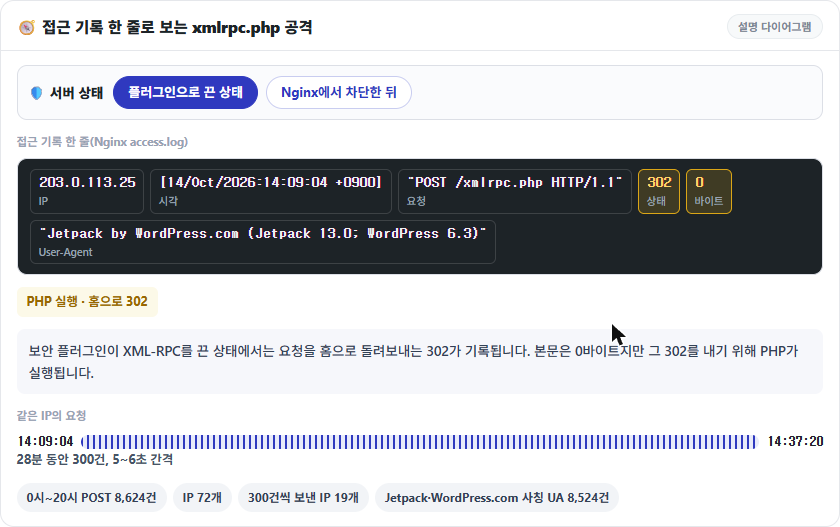
Password guessing does not go through the login screen; it comes in through [xmlrpc.php]. In the access log of a Nginx + Apache server running several WordPress sites, from midnight to 8 p.m. on October 14 there were 8,624 POST /xmlrpc.php requests from 72 IPs, and 19 of those IPs sent exactly 300 each.
One IP sent 300 requests in 28 minutes, from 14:09 to 14:37, at a steady 5–6 second interval to the end. 8,524 requests arrived with Jetpack or WordPress.com in the User-Agent, and the same IP rotated through several values imitating the real Jetpack format, such as [Jetpack by WordPress.com (Jetpack 13.0; WordPress 6.3)].
Until 2 p.m. that day the security plugin's XML-RPC off setting sent these requests back to the home page with a 302; after 2 p.m., once blocked in Nginx, they ended in 403. A 302 means PHP ran for every request even though the body was 0 bytes; a 403 is a response that never touched PHP.
3️⃣ system.multicall and password guessing
Many explanations say [system.multicall] lets one request test hundreds of passwords, but once a login fails inside a request, WordPress stops checking the passwords of the remaining calls. Only the first call goes through wp_authenticate; the rest are answered with the same error, [Incorrect username or password.], without being checked.
Because a response still comes back for every call, one request carrying 100 wrong passwords gets 100 errors in a 23 KB response within 0.12 seconds. If the correct password sits later in the same request, it is rejected along with the earlier failure; if it comes first, only that call succeeds. The password is compared once, but parsing the XML and loading WordPress repeat on every request, so the server load of this attack comes from the number of requests, not from the login checks.
4️⃣ 3 ways to disable XML-RPC and their response codes
Even with XML-RPC turned off in a plugin, [xmlrpc.php] requests still reach PHP. With the filter in place I sent a request carrying 100 calls and still got HTTP 200 with 100 errors (24 KB). The methods split into three according to the layer that rejects the request, and each has a different response code.
1. Turn it off in code with the xmlrpc_enabled filter
Add one add_filter line to your theme's functions.php that returns false for the [xmlrpc_enabled] filter. In this state, calls that need a login are refused with the error [XML-RPC services are disabled on this site.] and HTTP 405, but the test call demo.sayHello, which needs no login, still answers with 200.
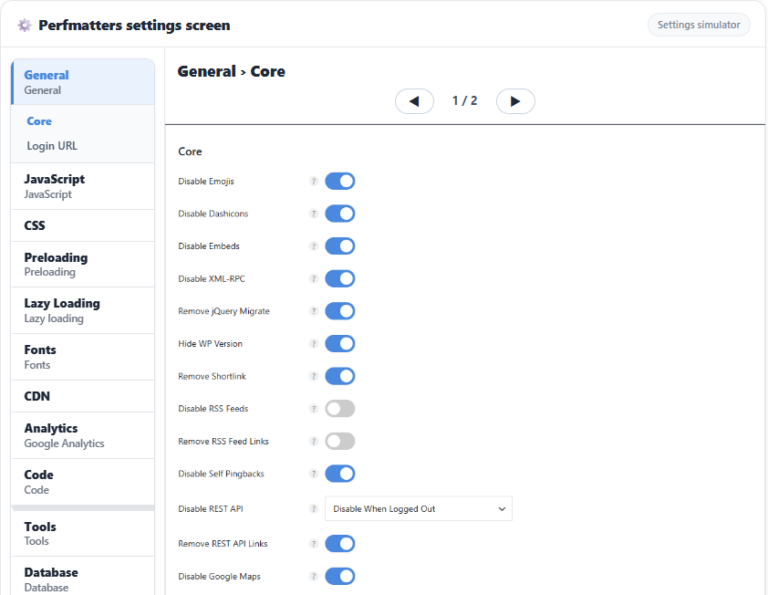
2. Turn it off in plugin settings: Perfmatters · Hide My WP
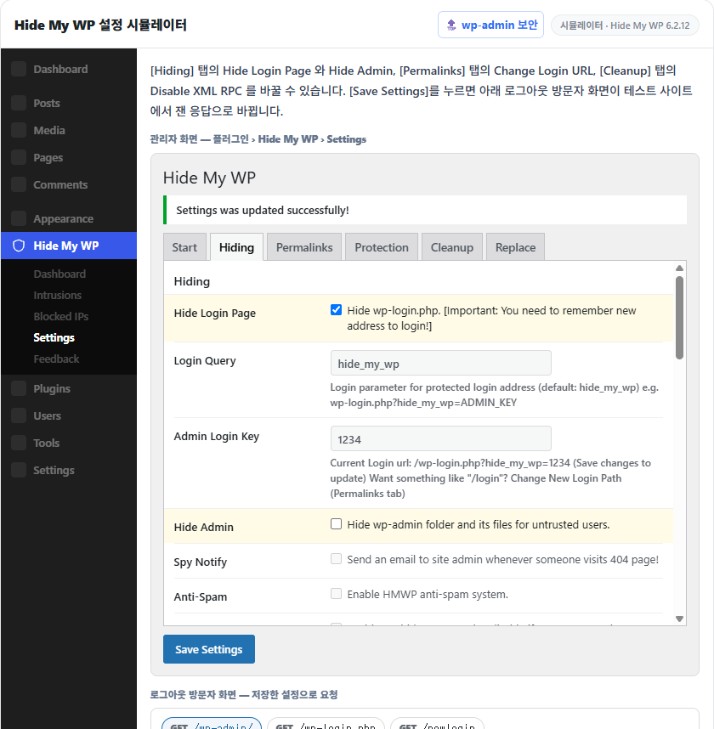
This is the way of disabling it with a Disable XML-RPC setting in a plugin such as Perfmatters or Hide My WP. Hide My WP uses the same filter approach as above, so its responses are the same, but Perfmatters adds to the filter by ending direct [xmlrpc.php] requests with a 403 and removing the pingback header and pingback link, so once it is off both GET and POST answer 403. To produce that 403, however, WordPress still runs up to the init stage, so the response takes 0.13–0.15 seconds, the same as when it is open, and the PHP load remains.
3. Block it at the web server: Nginx · Apache
Whether Nginx or Apache, the request is refused before PHP, so unlike the plugin methods WordPress never runs.
# Nginx — inside the server block, above the PHP location
location = /xmlrpc.php {
    deny all;
}
This location block goes above the PHP location, and Nginx refuses requests that match [xmlrpc.php] exactly on the spot. After adding it, test the configuration and reload for it to take effect.
nginx -tnginx: the configuration file /etc/nginx/nginx.conf syntax is ok
nginx: configuration file /etc/nginx/nginx.conf test is successfulsystemctl reload nginxFrom the reload on, GET and POST end in 403 without reaching PHP; the response body is the 153-byte Nginx default 403 page and the response takes 0.02 seconds.
# Apache — .htaccess in the site root (Apache 2.4)
<Files xmlrpc.php>
    Require all denied
</Files>
On a server that runs only Apache, put the Files directive above into the .htaccess in the site root and it applies immediately; the Apache default 403 page (199 bytes) comes back in the same 0.02 seconds.
curl -s -o /dev/null -w '%{http_code}' -X POST https://example.com/xmlrpc.php -d '<methodCall><methodName>demo.sayHello</methodName></methodCall>'403The command above sends the test call demo.sayHello by POST and checks the response code; after blocking at the web server it returns 403. Leave out the [-o /dev/null] and [-w] options and you see the body: [Hello!] means it is open, and a site turned off by the filter alone gives the same answer, so you have to send a login call as well to confirm the 405.
5️⃣ When you should not turn it off, and the alternatives
Blocking it entirely at the web server has the biggest effect, but it does not suit sites connected to WordPress.com through Jetpack. Jetpack depends on the XML-RPC connection, and on hosts that block XML-RPC by default, such as WP Engine, you have to open an exception following Jetpack's guidance before it connects. The same goes for sites that want to receive pingbacks.
Such sites narrow it down by allowing only the IP list Jetpack publishes (jetpack.com/ips-v4.txt) and denying the rest. Inside the Nginx location block, add one allow line per IP range and finish with deny all.
If you cannot block it completely, what remains is a per-minute limit on requests that are not logged in. The setup is the same as the Nginx rate-limit section in the post wp-admin Security , and since it counts only requests without a login cookie, it does not affect logged-in admin work.
🔢 FAQ & Recommended Content




ℹ️ Affiliate Disclosure
This site's content contains affiliate links. When a visitor buys a product or service through one of them, the site receives a commission from the seller. The amount the buyer pays(it goes down during event discounts ↓)does not go up. Posted prices, discounts, and stock reflect the time of writing and may differ, so confirm with the seller before buying. Products are chosen and reviewed by our own standards, and commissions do not affect the order or content of reviews.