
Cloudways SSL Setup
I set up Cloudways SSL on the subdomain cw.testpilotweb.com with a Let’s Encrypt certificate, and it took about 1 minute 40 seconds from clicking the install button to completion. The certificate is not issued unless the domain points to the server IP, so first complete the Cloudways domain connection.
1️⃣ Cloudways SSL Setup
In the application’s left menu, click [SSL Certificate], and the SSL Management screen opens.

Choose [Let’s Encrypt] from the list, enter the email address for expiry notices in [Email Address] and the domain to apply SSL to in [Domain Name], then click [Install Certificate]. To add more domains, click [+ Add Domain].
Choose Custom SSL from the list only if you have a separately purchased certificate; Let’s Encrypt applies HTTPS at no extra cost. To use one certificate for all subdomains, check [Apply Wildcard], which adds a verification step where you add a CNAME record to the DNS.
2️⃣ Wildcard SSL
Currently, DNS and records are set up at Namecheap, so I will add the CNAME record at Namecheap. If you are requesting a non-wildcard SSL, simply uncheck the wildcard option and request SSL. The rest of the process is the same.
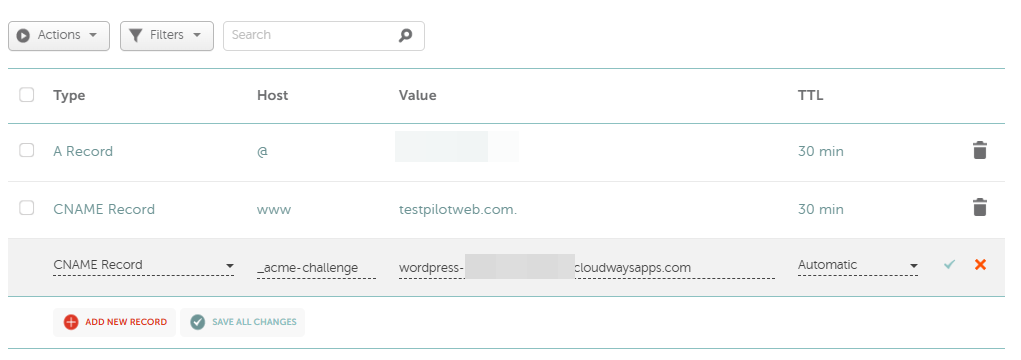
At first I expected the TTL to apply right away, but it took about 2–5 minutes. When clicking the DNS verification button in Cloudways shows that the CNAME verification is complete, click Install Certificate.
3️⃣ Installing the Let’s Encrypt Certificate and Auto-Renewal
Clicking [Install Certificate] shows the [Please wait while Let’s Encrypt certificate installs…] screen, and the installation-complete notice appeared about 1 minute 40 seconds later.

The expiry date (8th January, 2027) appears at the top of the screen, 90 days from issuance. [Auto Renewal], which is on right after installation, renews the certificate automatically before it expires with no extra setup.
[Renew Now] renews immediately and extends the expiry date by 90 days, and [Revoke] revokes the certificate.
The setting that redirects visitors from HTTP to HTTPS is in the [General] tab of [Application Settings]: [HTTPS Redirection], and it was already on in the new application.

Setup is complete when an http address opens as https in the browser and a padlock appears in the address bar.
ℹ️ Affiliate Disclosure
This site's content contains affiliate links. When a visitor buys a product or service through one of them, the site receives a commission from the seller. The amount the buyer pays(it goes down during event discounts ↓)does not go up. Posted prices, discounts, and stock reflect the time of writing and may differ, so confirm with the seller before buying. Products are chosen and reviewed by our own standards, and commissions do not affect the order or content of reviews.