
Website Cache & Server-Side Cache: How Caching Works in WordPress
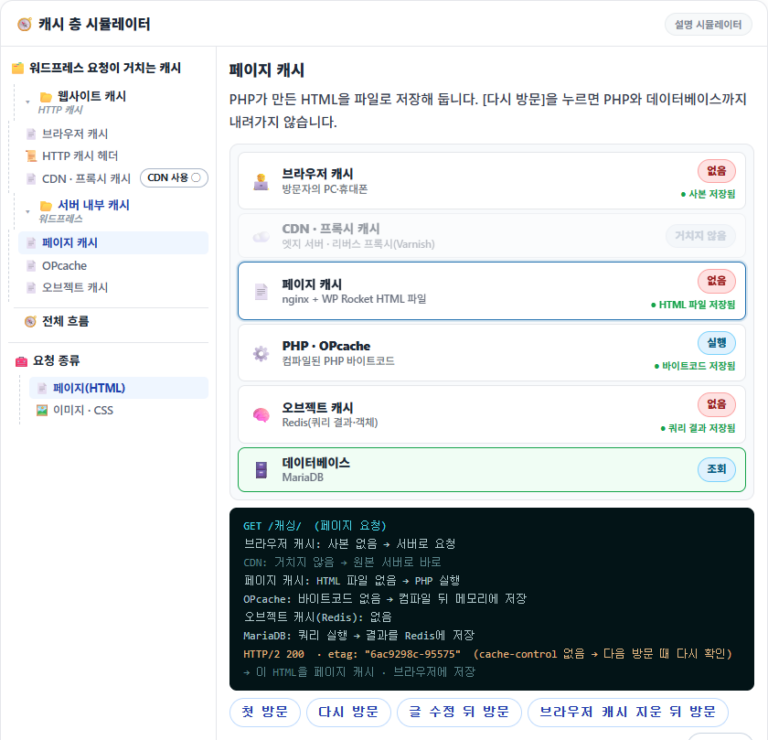
Checking website cache and server-side cache on a server running Nginx + Apache, WordPress page requests went down in order from the browser through CDN, page cache, OPcache and Redis, and stopped at the layer that had a copy. Page requests that came straight to the origin server got the HTML file built by WP Rocket directly from nginx and never went down to PHP or the database.
Ⅰ. WordPress Cache Structure
In computing, a cache is a technique for temporarily storing data so it can be accessed quickly, and on the web it works on the same principle and contributes greatly to performance.
Caching stores data so that when visitors open a website, the server doesn't have to build everything again each time; stored data loads quickly and page load time drops. This lowers server load and improves the user experience.
The caches used for WordPress requests fall into two branches: website cache and server-side cache. The HTTP caching standard, as MDN describes it, classifies a cache stored only in one visitor's browser as a private cache and CDN and proxy caches shared by many visitors as a shared cache; this post groups the two as website cache.
Page cache, OPcache and object cache are caches attached to the process of running WordPress inside the server. The HTTP standard has no category for them, and the official WordPress documentation, in its Advanced Administration Handbook, explains them as caching plugins (page cache), object cache and server cache (opcode caches such as OPcache).
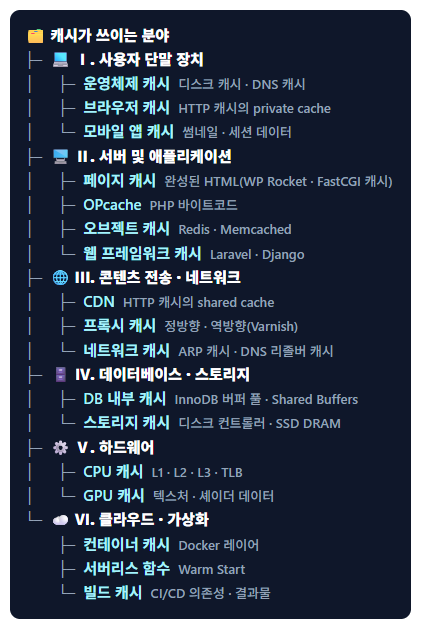
The full range of fields where caching is used is covered in the Cache: Definition and All Fields Where Caching Is Used post, and the four branches of performance optimization, including caching, in the Web Performance Optimization: Structure and Definition post.
In the simulator below, choose a cache in the left tree and press a chip to see which layer the request stops at. The first layer WordPress site owners turn on with a caching plugin is the page cache.
| Layer | Stored in | What it stores | Nginx + Apache example |
|---|---|---|---|
| Browser cache | Visitor's device | HTML · CSS · JS · images · fonts | CSS · images 7 days |
| CDN · proxy cache | In front of the server (edge · reverse proxy) | Copies of pages · static files | Bunny CDN |
| Page cache | Server disk · memory | HTML built by PHP | WP Rocket + nginx |
| OPcache | Server memory | PHP bytecode | PHP 8.3, JIT off |
| Object cache | Server memory | Query results · objects | Redis |
Ⅱ. Website Cache
Website cache is the cache where, once the server says how to store a response through its response headers, the visitor's browser and CDNs or proxies store a copy as instructed. Typical headers are [Cache-Control], [ETag] and [Expires], and once the storage period is over, a conditional request ([304 Not Modified]) checks whether it has changed.
1️⃣ Browser Cache
Browser cache is the HTTP cache stored in the visitor's web browser. It keeps HTML, CSS, JavaScript, images and fonts, and when the same resource is requested again, it either doesn't go to the server at all or only checks whether it has changed.
The storage period is set by the server, not the visitor. The Nginx + Apache server below tells browsers to keep CSS and images for 7 days, and answers HTML pages without a period, so they're checked again on every visit.
If-None-Match: "6ab12775-2ee8"cache-control: max-age=604800 expires: Sat, 17 Oct 2026 03:21:00 GMT etag: "6ab12775-2ee8"
etag: "6ac9298c-95575"
last-modified: Fri, 09 Oct 2026 17:51:08 GMT
2️⃣ CDN · Proxy Cache
CDN and proxy caches sit between visitors and the origin server and are shared by many visitors. A forward proxy sits in front on the visitor's side, as in a corporate network, while reverse proxies and CDNs sit in front of the server and answer with a stored copy in place of the origin server.
A typical reverse proxy is Varnish Cache, and CDNs such as Bunny CDN and Akamai follow the same structure. With geo DNS, visitors in the origin server's region can connect straight to the origin server, while visitors in other regions get responses from a nearby CDN edge (e.g., Bunny CDN) that stores even the HTML.
The structure and benefits of a CDN are covered in the What Is a CDN? Reasons to Use a CDN and 5 Benefits post.
Ⅲ. Server-Side Cache
Server-side cache is the cache attached to the process in which WordPress builds a page after the request reaches the origin server. A server built with Nginx + Apache handles requests in the order below, and once an earlier step finds a copy, the later steps are skipped.
Cloudways and ScalaHosting let you choose an Nginx + Apache setup as an option. On Cloudways you pick, per application, either the Hybrid stack (Nginx + Apache) or the Lightning stack (Nginx only), and on ScalaHosting you can turn on a setting in SPanel that puts Nginx in front of Apache.
| Cache | What it stores | When it's stored |
|---|---|---|
| 1️⃣ Page Cache | Finished HTML page | 🅑 ⑤ WP Rocket saves it as a file when responding |
| 2️⃣ OPcache | Compiled PHP code (bytecode) | 🅑 ② When a PHP file first runs |
| 3️⃣ Object Cache | Pieces of data such as query results and options | 🅑 ③ When WordPress first fetches the data |
1️⃣ Page Cache
Page cache is also called full-page cache, and since what it stores is HTML, it's sometimes called HTML cache. It saves the whole web page built by PHP as a static HTML file, then sends that file for the same page request without running PHP. This is case 🅐 in the processing order above.
It's stored in server memory (RAM) or on disk (HDD/SSD): memory is fast but costly and limited in size, while disk has plenty of room but is relatively slow.
| Type | Example | How it stores and responds |
|---|---|---|
| Caching plugin | WP Rocket · WP Super Cache · W3 Total Cache · Cache Enabler | WordPress saves the page as an HTML file, and the web server sends that file. |
| Web server cache | Nginx FastCGI Cache · LiteSpeed Cache | The web server stores the PHP response itself and sends it for the next request. |
| Reverse proxy cache | Varnish | A cache server placed in front of the web server stores the page and responds. |
With Nginx + Apache, nginx reads the HTML file built by WP Rocket directly and sends it, and the response header gets [x-rocket-nginx-serving-file: HIT]. The steps to turn on and configure page caching with WP Rocket are in the WP Rocket Setup Guide post.
2️⃣ OPcache
OPcache stores PHP code precompiled into bytecode in memory, so running the same file again skips the PHP parser. It has been built in since PHP 5.5, and APC and XCache, used in the past, don't support PHP 7 and are no longer used. This is step ② of 🅑 in the processing order above.
| Type | Status | Description |
|---|---|---|
| Zend OPcache | Built in since PHP 5.5 | The standard opcode cache in use today, turned on with [opcache.enable=1]. |
| OPcache JIT | Included in OPcache since PHP 8 | Converts bytecode once more into machine code to run it; switched on and off with [opcache.jit]. |
| APC | Discontinued | The opcode cache used before OPcache; its data cache feature carried on in APCu. |
| XCache | Discontinued | Doesn't support PHP 7. |
| WinCache | For Windows (IIS) servers | An opcode cache the official WordPress documentation lists alongside OPcache. |
OPcache is turned on with the PHP setting [opcache.enable=1], and JIT, added in PHP 8, can be turned off separately with [opcache.jit=disable]. Installation and setup are covered in the Zend OPcache: Concept, Installation and Configuration article.
3️⃣ Object Cache
Object cache stores database query results or computed objects in a memory store such as Redis or Memcached. By default WordPress remembers objects only within a single request; you need to attach a store like Redis for results to remain after the request ends. This is step ③ of 🅑 in the processing order above.
| Type | Category | Persists after the request? | Description |
|---|---|---|---|
| WP_Object_Cache | WordPress default | No | A built-in cache that remembers only within a single request. |
| Redis | Object cache | Yes | A separate memory store, connected through the Redis Object Cache plugin's drop-in. |
| Memcached | Object cache | Yes | A separate memory store. |
| APCu | Object cache | Yes (within the same server) | Stores in shared memory used by PHP. |
| file | Object cache | Yes | Stores as files on disk. |
| InnoDB buffer pool | The database's own cache · not an object cache | Yes | MySQL and MariaDB keep table data and indexes in memory. |
| Query cache | The database's own cache · not an object cache | — | Removed in MySQL 8.0; still in MariaDB but off by default. |
WordPress connects to Redis through the drop-in file ([object-cache.php]) that the Redis Object Cache plugin adds. The installation steps are in the Installing and Configuring Redis Cache for WordPress article.
🔢 FAQ & Recommended Content







ℹ️ Affiliate Disclosure
This site's content contains affiliate links. When a visitor buys a product or service through one of them, the site receives a commission from the seller. The amount the buyer pays(it goes down during event discounts ↓)does not go up. Posted prices, discounts, and stock reflect the time of writing and may differ, so confirm with the seller before buying. Products are chosen and reviewed by our own standards, and commissions do not affect the order or content of reviews.