
BEST WordPress Hosting Comparison: Top 7 Hosting Picks for 2026
 Editor's Picks
Flexible Scalability
Managed VPS
Editor's Picks
Flexible Scalability
Managed VPS
Flexible managed hosting that lets you choose and manage your own cloud provider. You can add CPU and RAM immediately as needed, making it ideal for handling traffic growth.
View the pricing page
Prices may change.
 First month $0
Premium Managed
Dedicated Container
First month $0
Premium Managed
Dedicated Container
Premium managed WordPress hosting. We guarantee fast performance with a high-performance CDN and edge caching, and our experts are on hand 24/7 to resolve even plugin errors.
View the pricing page
Prices may change.
 Free SPanel
15-sec chat response
Managed VPS
Free SPanel
15-sec chat response
Managed VPS
ScalaHosting is a managed cloud VPS service that uses its own control panel, SPanel. With experts managing the servers 24/7 and an average chat response time of 15 seconds, it’s a great option for those moving up from shared hosting who don’t have server expertise.
View the pricing page
Prices may change.
We ranked seven WordPress hosting providers based on five criteria: stability, speed, convenience, support, and price. We’ve listed the initial payment amount alongside the renewal price and refund policy. While we earn commissions from some links, the rankings are determined solely by the scores.
On this page, we compare seven WordPress hosting providers, analyzing factors such as customer support (chat and tickets), server stability, speed, server location, and price. The best hosting option for you may vary depending on your intended use and budget, so we’ll guide you toward the optimal choice tailored to your specific needs—whether you’re running a blog, a small online store, or a large-scale e-commerce site.
In addition, we’ve conducted our own tests on top-tier hosting services and compiled a comprehensive comparison of their pros and cons, real user reviews, and available additional features—all presented in a way that makes it easy for everyone, from beginners to experts, to make an informed decision.
 Automattic's Direct Lineage
Free CDN, 28 PoPs
WP Cloud
Automattic's Direct Lineage
Free CDN, 28 PoPs
WP Cloud
Pressable is a managed hosting service operated directly by Automattic, the creator of WordPress and WooCommerce. It offers enterprise-grade infrastructure and expert support from the creators of WordPress.
View the pricing page
Prices may change.
 Value for the money
Starting at $3.99 per month
LiteSpeed Shared
Value for the money
Starting at $3.99 per month
LiteSpeed Shared
A popular hosting service with excellent value. From LiteSpeed-based shared hosting to managed WordPress, prices start at $3.99 per month when you sign up for a one-year shared hosting plan.
View the pricing page
Prices may change.
 Unlimited visitors
Free CDN, 43 PoPs
Managed WP
Unlimited visitors
Free CDN, 43 PoPs
Managed WP
A Bulgarian company that has specialized exclusively in managed WordPress since 2013. It runs its own CDN (XDN) with 43 nodes on LiteSpeed Enterprise servers, and there are no visitor limits on any of its plans.
View the pricing page
Prices may change.
 Best Value Picks
45-Day Money-Back Guarantee
LiteSpeed Shared
Best Value Picks
45-Day Money-Back Guarantee
LiteSpeed Shared
ChemiCloud is a cost-effective, cPanel-based WordPress hosting service. It lowers the barrier to entry with 24/7 human support (no AI chatbots), a free domain, and a 45-day money-back guarantee.
View the pricing page
Prices may change.
“This corner is for the Homo Faber, the maker who masters tools.”
 ① WP Rocket: Caching Plugin, Speed UP
5M+ sites · 14-day refund · Allowed on managed hosts like Kinsta
① WP Rocket: Caching Plugin, Speed UP
5M+ sites · 14-day refund · Allowed on managed hosts like Kinsta
 ② Image Optimization IMAGIFY: WebP, AVIF
1M+ active installs · Free 20MB a month, about 200 images · Originals kept & restorable
② Image Optimization IMAGIFY: WebP, AVIF
1M+ active installs · Free 20MB a month, about 200 images · Originals kept & restorable
 ③ Perfmatters: WordPress Optimization and Script Control
I. Criteria for Choosing WordPress Hosting
With WordPress hosting, what you end up checking first is not the first-payment price but whether your site stays up and loads fast. The five scores on the cards above were assigned in the order below.
① Stability — The baseline is server uptime of 99.9% or higher, and we also check that it isn’t weak on security.
② Speed — Server speed affects how long visitors stay and how you rank in search engines. Even on shared hosting, a minimum level of speed has to be guaranteed.
③ Convenience — Ease of use, including the management dashboard (UI); it has to be met together with the two conditions above.
④ Support — 24/7 technical support by ticket and chat is a must. If your site is down because of a server failure and the staff have gone home so you can only reach them at 9 a.m. the next day, that hosting is not one to use.
⑤ Price — Prices are compared only among hosts that meet the four conditions above.
II. WordPress Hosting Comparison
1️⃣ Cloudways
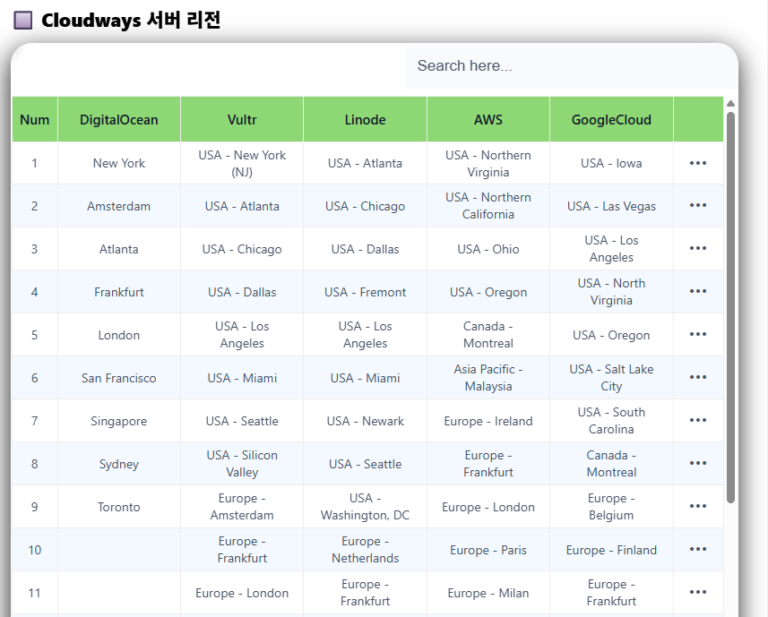
Cloudways runs on the data centers of major cloud infrastructure providers such as Amazon Web Services (AWS), Google Cloud Platform (GCP), DigitalOcean, Linode, and Vultr, offering more than 65 server locations worldwide.
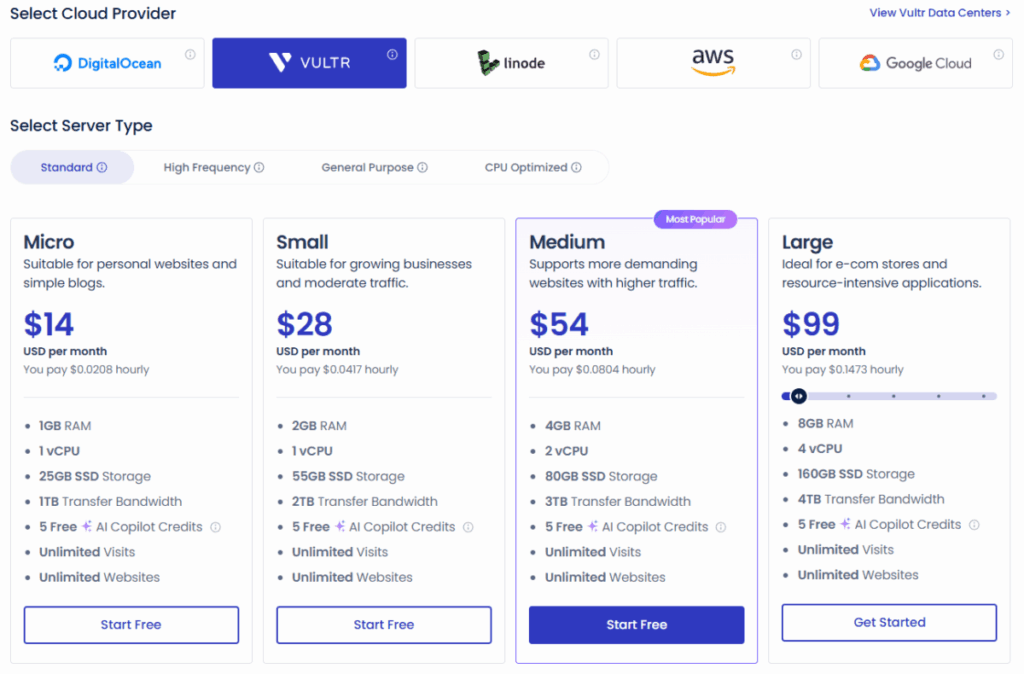
Cloudways offers Redis caching for free and supports the latest web server technologies—such as LiteSpeed, Nginx, and PHP-FPM—as well as its proprietary caching plugin, Breeze Cache, enabling fast processing of both static and dynamic content. It also provides a stable and reliable WordPress operating environment, including features such as account isolation, automatic backups, free SSL, and security monitoring.
Users can directly select their server infrastructure provider, location, and resources, and can flexibly adjust CPU, RAM, storage, and other specifications as needed, enabling them to handle increased traffic or site expansion. This makes Cloudways a hosting option that lets a wide range of users—from beginners to experts—tune performance to their own needs.
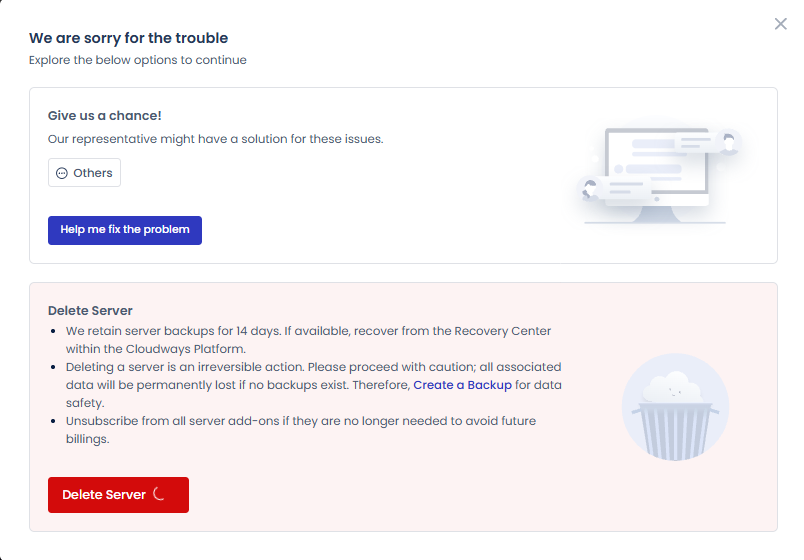
Since billing is calculated on an hourly basis, you can set up a server for just a few days to test it out and then delete it. Backups of deleted servers are retained for 14 days, so even if you delete a server by mistake, you can restore it within that period.
The $11 on the card covers the server only. CDN ($4.99/month), email, and malware protection are paid add-ons, so with those the real monthly cost goes above $20.
If you want a server in South Korea when signing up for a service on Cloudways, you can start with Vultr.
|
Infrastructure Provider |
Availability of Korean Servers |
|---|---|
|
AWS |
Yes (Seoul Region) |
|
Google Cloud (GCP) |
Yes (Seoul Region) |
|
Vultr |
Yes (Seoul Region) |
|
DigitalOcean |
No |
|
Linode |
No |
2️⃣ Kinsta
Kinsta is a managed WordPress hosting provider that delivers high performance through speed and stability, and its own server-level caching system. Because the server handles page caching, separate caching plugins are not recommended — with one exception: WP Rocket. Kinsta partners with WP Rocket, so once installed only its page-caching feature is switched off automatically; everything else — file optimization, lazy loading, Delay JS — works as usual. Its cache-clear button is also wired to Kinsta's server cache.
Kinsta is on an enterprise-level contract with Cloudflare, so it includes advanced caching, security, and DDoS protection—including HTTP/3—at no extra cost. This goes beyond Cloudflare's Free and Pro plans: it delivers both static and dynamic content quickly to users worldwide and integrates tightly with Kinsta's server cache.
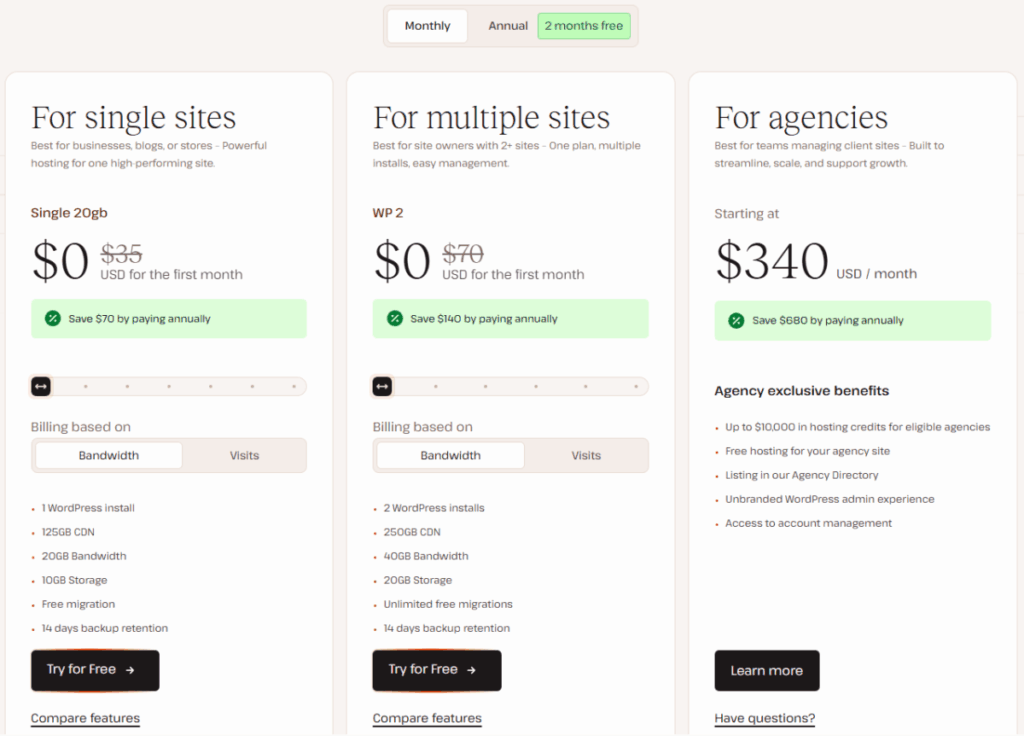
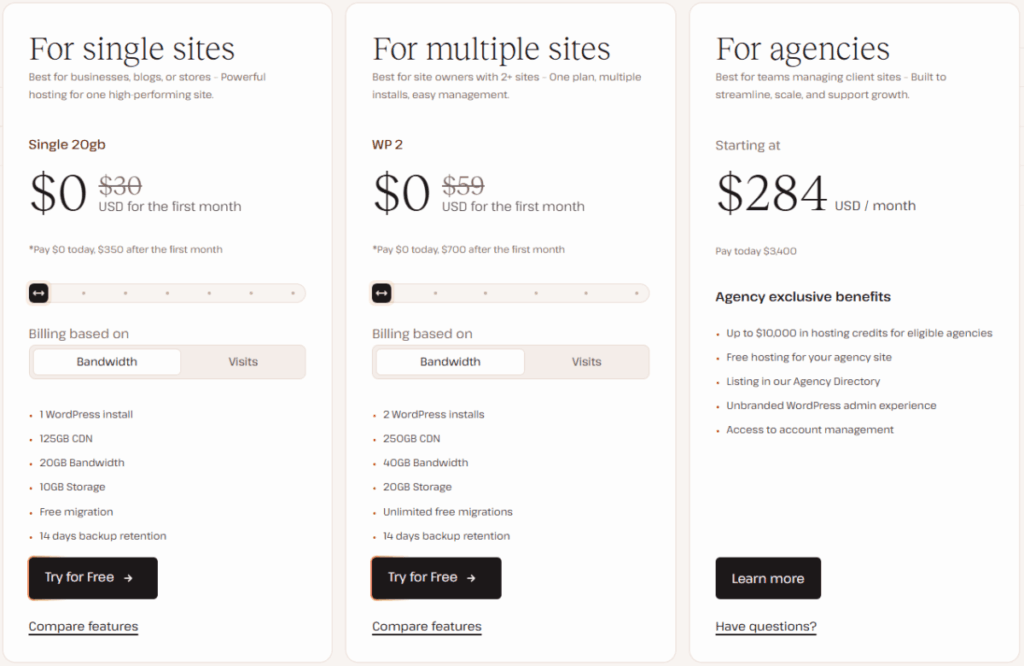
As such, Kinsta offers excellent value for the price, since it includes the features of a standard caching plugin (approximately $35) and the Cloudflare Pro plan ($25 per month) as standard. Additionally, you can cancel if you're not satisfied after the 1-month free trial, so you can test the performance yourself without any upfront commitment.
Kinsta is committed to guaranteeing resources as per-site performance rather than per plan, so, like typical shared hosting, it does not disclose specific server specs (such as CPU or RAM) for individual sites.
Kinsta's data centers are moving from Google Cloud to Oracle Cloud (OCI) in 2026, and new sites are placed in one of the 30 OCI locations listed below. If you click on Kinsta on the “Find the Right Hosting for You” map above, those same 30 locations will be marked with pins.
- North America 6: Ashburn (Virginia) · Chicago · Phoenix · San Jose · Toronto · Montreal
- Latin America 4: São Paulo · Santiago · Bogotá · Monterrey
- Europe 8: London · Paris · Amsterdam · Frankfurt · Zurich · Milan · Madrid · Stockholm
- Middle East and Africa 4: Jerusalem · Dubai · Riyadh · Johannesburg
- Asia and Oceania 8: Seoul · Tokyo · Osaka · Singapore · Batam · Mumbai · Sydney · Melbourne
3️⃣ ScalaHosting
ScalaHosting is a hosting provider that specializes in managed cloud VPS. Its biggest selling point is SPanel, a control panel developed in-house. It is provided free of charge—without any cPanel licensing fees—and allows you to manage WordPress (staging and cloning), security, and CDN connections all from a single screen. It’s the ideal choice for site owners who find shared hosting too limiting but don’t feel confident managing a server on their own.
1. Infrastructure and Performance
Based on NVMe SSDs and 10 Gbps networking, it guarantees 99.9% uptime. For security, the AI-powered SShield automatically blocks brute-force attacks and anomalous behavior, and off-site automatic backups, a dedicated IP address, and free SSL are included as standard. Support features 24/7 expert chat with an average response time of 15 seconds, and free migration with no downtime is included. Its data centers are built around its own infrastructure in the U.S. (Dallas, New York, Seattle) and Europe (Sofia), with additional cloud partner regions available.
2. Price
- Managed Cloud VPS: Starting at $29.95 per month (promotional price; $54.95 upon renewal)
- 4 basic builds + customizable CPU and RAM configurations
- WordPress Cloud Plans also feature the same infrastructure and pricing structure
- Unlimited Refund Guarantee (Anytime Money-back)
Since this plan offers a significant discount at the start but includes a potential increase in the renewal rate, we recommend comparing plans based on the renewal rate if you’re planning for the long term.
4️⃣ Pressable
Pressable is a managed WordPress hosting service operated directly by Automattic, the company behind WordPress, WooCommerce, and Jetpack. The fact that the organization that contributes the most to WordPress Core also manages the servers is a unique selling point that other hosting providers cannot match. For WooCommerce store owners, the mere fact that the plugin developer and the hosting provider are the same company alleviates compatibility concerns.
1. Infrastructure and Performance
All plans are allocated 5 PHP workers (5 vCPUs) per site, and auto-scaling is used to handle traffic spikes. Stability is ensured through edge caching and a geo-redundant cloud architecture, and backups are performed twice—once hourly and once daily. Security is provided by Jetpack Security (equivalent to $239 per year), which is included free with all plans, eliminating the need for separate security plugin costs.
2. Price
- Signature 1: $20.83 per month with an annual payment plan (1 site · 30,000 visits · 20 GB)
- Signature 3: Monthly $50.00 (5 sites · 75,000 visits · 35 GB)
- The premium plan supports up to 100 sites and 2 million visits
- 30-Day Money-Back Guarantee, Free Migration, and Professional Email Included
- The 100% Uptime Guarantee (SLA) applies to the Premium Plan ($350 and up)
If you're starting with just one blog, the Signature 1 plan is sufficient; if you're an agency, you can choose a plan based on the number of sites.
5️⃣ Hostinger
Hostinger is a WordPress hosting service that offers excellent value for the price, making it particularly well-suited for small blogs and personal websites. All plans include the LiteSpeed web server, LSCache, free SSL, a CDN, and daily backups, enabling stable and fast WordPress performance even in environments with limited resources.
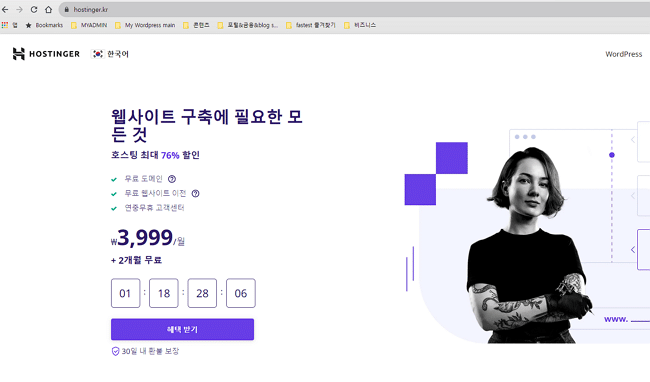
Hostinger's managed WordPress hosting is shared hosting. It is the most affordable hosting service for small blogs and personal websites.
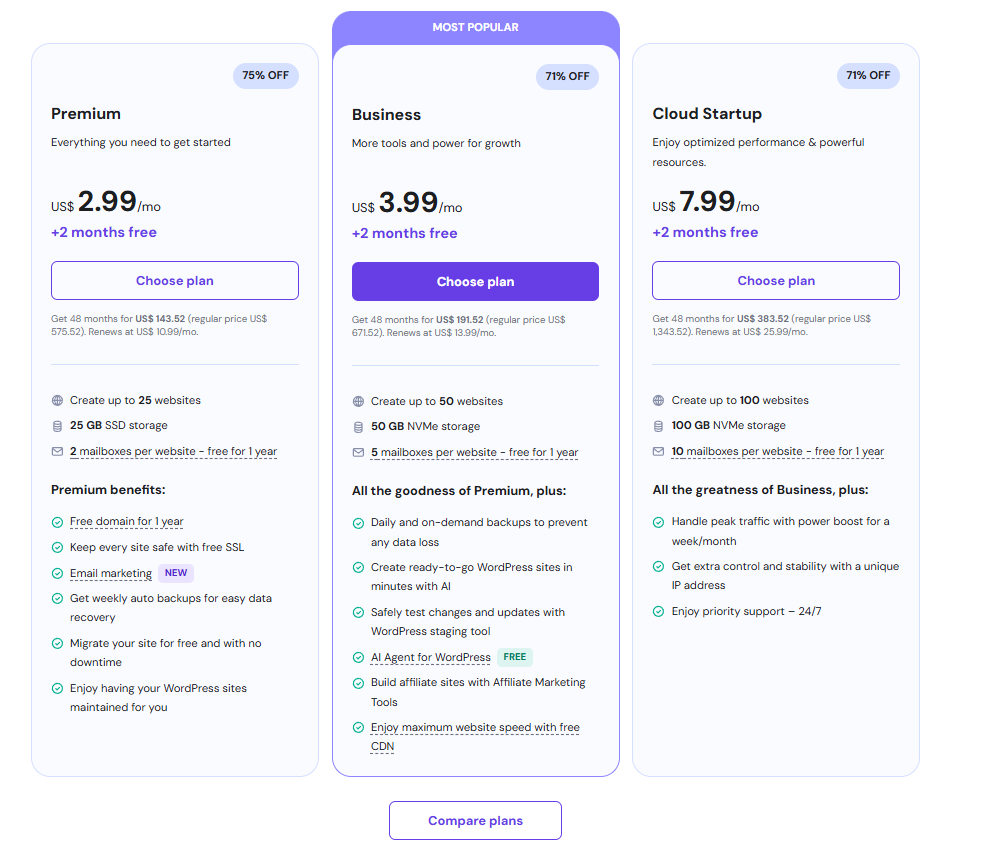
Hostinger also offers Cloud Hosting as an additional option with full WordPress support. The Startup plan gives you 2 CPUs and 3 GB of RAM for $8.99/month on a 24-month term. A 48-month plan offers an even lower rate of $7.99, but since committing to a 4-year contract can be a financial burden, we recommend the 24-month or 1-year plans, even if the discount is smaller.
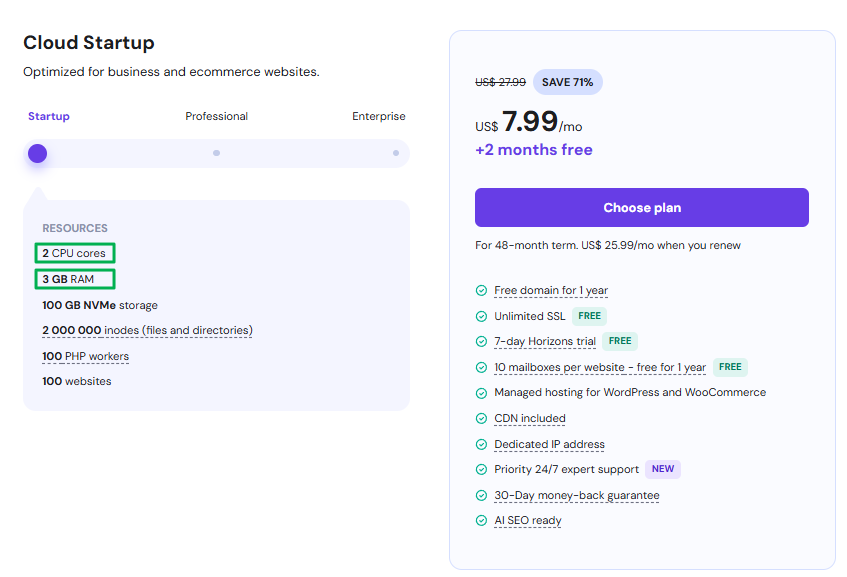
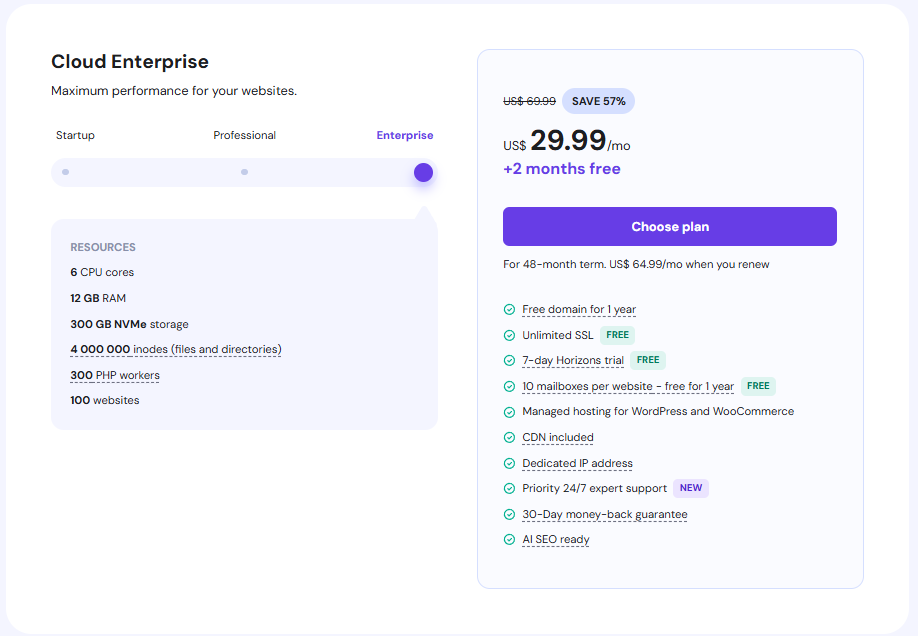
Coupons are automatically applied at checkout. Even if you start with a monthly payment plan based on server specifications, you can still use the server at a low cost, which helps reduce the financial burden for small-scale WordPress websites—such as company introduction sites or personal blogs—when starting a business.
As of September 2026, Hostinger operates 14 web and cloud hosting data centers: Boston, Asheville, and Phoenix in the U.S.; São Paulo in Brazil; Manchester in the U.K.; Paris in France; Amsterdam in the Netherlands; Frankfurt and Düsseldorf in Germany; Vilnius in Lithuania; Mumbai, India; Singapore; Jakarta, Indonesia; and Kuala Lumpur, Malaysia (the image above is from October 2025 and does not include Malaysia, as it had not yet been added at that time).
6️⃣ WPX
WPX is a Bulgarian company that has specialized exclusively in managed WordPress hosting since 2013. It runs LiteSpeed Enterprise servers on its own cloud infrastructure and includes its proprietary CDN (XDN), with 43 points of presence, as a standard feature across all plans. Since it first made a name for itself among English-speaking affiliate bloggers, it is less well-known in Korea.
1. Infrastructure and Performance
The web server is LiteSpeed Enterprise and supports HTTP/3. The Redis object cache can be enabled or disabled in the hosting panel. OPcache and SSD storage are included in all plans.
There are three data centers: Chicago, London, and Sydney. If most visitors are in Asia, the original server in Sydney is the closest, and XDN—with hubs in Seoul, Tokyo, Hong Kong, and Singapore—covers the remaining distance. If you click on WPX on the “Find the Right Hosting for You” map above, the three locations will be marked with pins.
What sets it apart from other managed hosting providers is that there are no limits on the number of visitors. While Kinsta and Pressable categorize their plans based on monthly visitor counts, WPX categorizes them based on the number of sites, storage capacity, and bandwidth. Even if traffic spikes, you won’t be charged any overage fees.
Backups run automatically every day and are stored on a separate server for 28 days. Malware scanning and removal, DDoS protection, staging, and free migration assistance are included in all plans.
2. Price
- Starter: $14.99 per month with annual payment ($17.99 per month with monthly payment · 1 site · 10GB · 100GB bandwidth · 0.5 cores · 3GB RAM)
- Business: $24.99 per month with annual billing ($29.99 per month with monthly billing · 5 sites · 20GB · 200GB bandwidth · 1 core · 5GB RAM · email included)
- Professional: $49.99 per month with annual billing ($59.99 per month with monthly billing · 15 sites · 40GB · 400GB bandwidth · 2 cores · 15GB RAM)
- Elite: $99.99 per month with annual payment ($119.99 per month with monthly payment · 35 sites)
- Annual billing: 2 months free · 2–5-year prepaid plans: 5–20 months free · 30-day money-back guarantee on all plans
If you plan to host two or more websites, or if your site is expected to see an increase in traffic, you should start by looking at the Business plan. The Starter plan offers 0.5 cores per site, so it’s intended for running a single, lightweight blog.
7️⃣ ChemiCloud
ChemiCloud is highly regarded for its low prices and customer support. All WordPress hosting plans include LiteSpeed Web Server and LSCache, so pages load quickly for everyday visits where the cache does the work. Response can slow down when many visitors arrive at once, so it suits sites without heavy traffic.
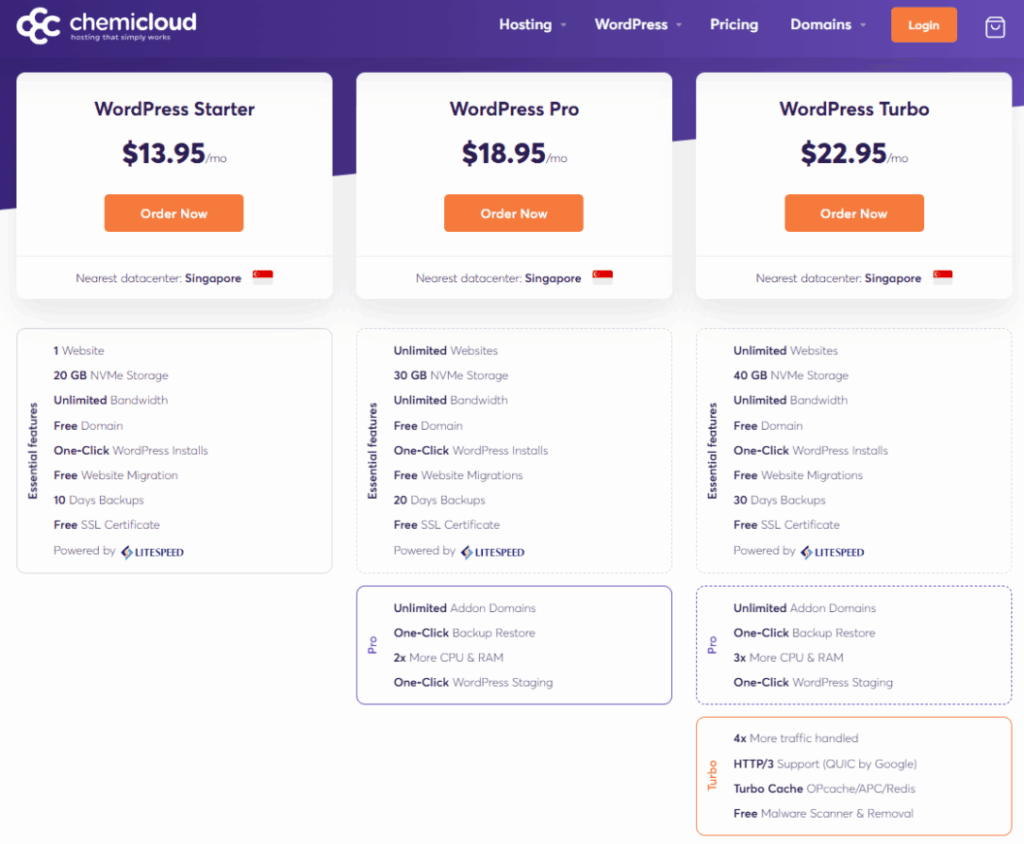
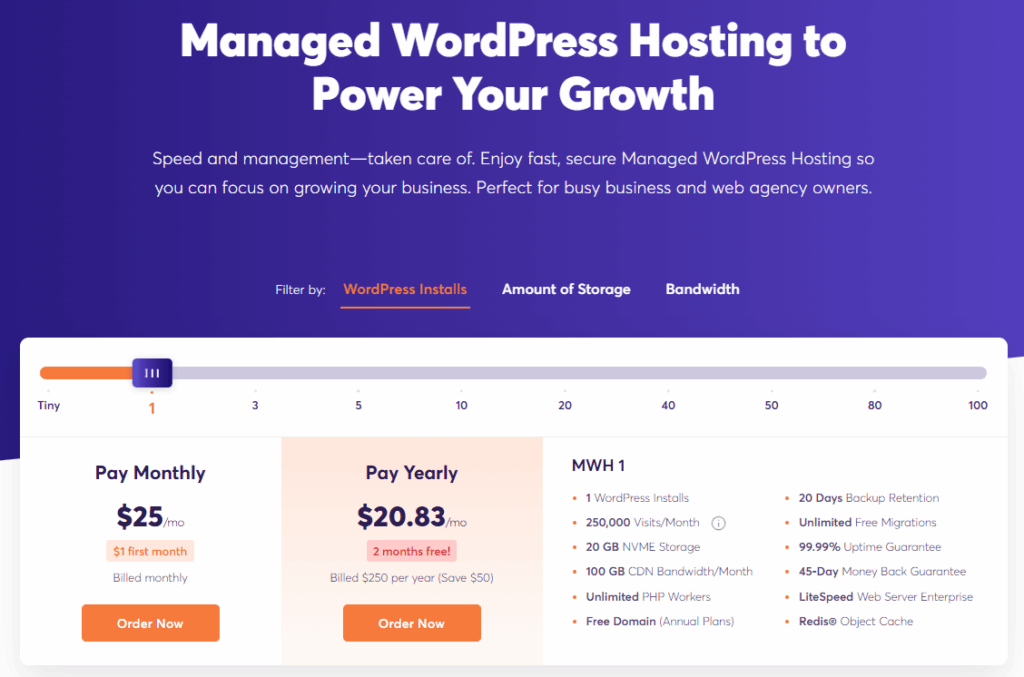
You can view two plans: WordPress Hosting and Managed WordPress Hosting. Korean users who need service from a server in Korea can select the "Korea" server when choosing a WordPress Hosting plan.
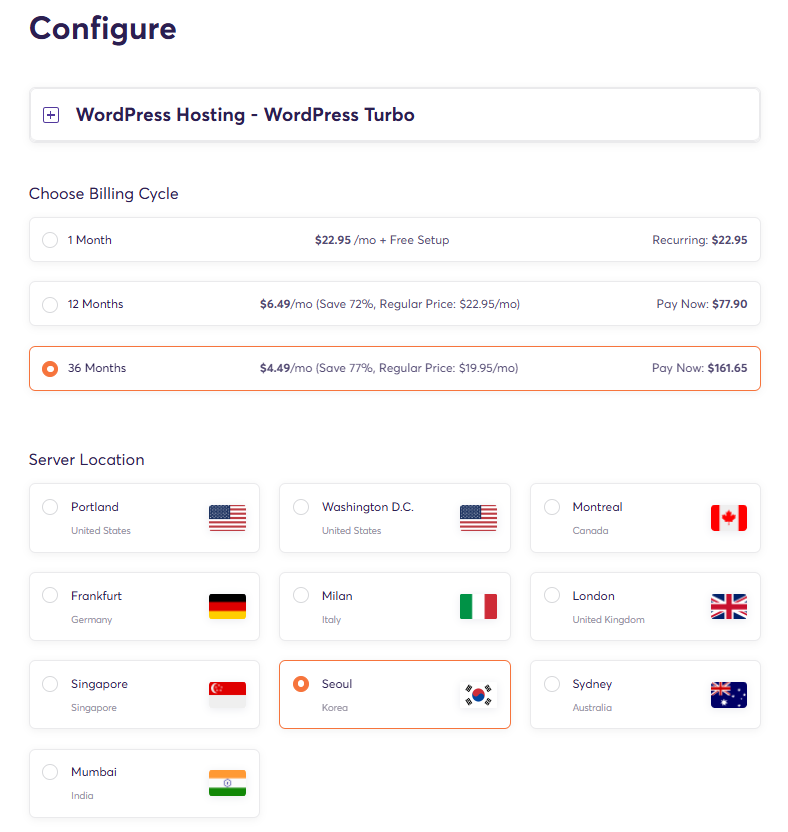
ChemiCloud stands out for its excellent 24/7 live chat support and a beginner-friendly, intuitive cPanel management interface. For WordPress hosting, you can choose from 9 server locations (3 in North America, 2 in Europe, 3 in Asia, and 1 in Oceania); simply select the one closest to the region where your visitors are concentrated.
- LiteSpeed + LSCache Base Caching
- Cloudflare CDN Offered for free
- Security and Backup Features Pre-installed
- Free Domain Transfer and Registration Support
- 24-hour live chat and ticket support
Like FastComet, ChemiCloud offers a very well-balanced set of features for the price and is rated as a great option for personal blogs and small sites.
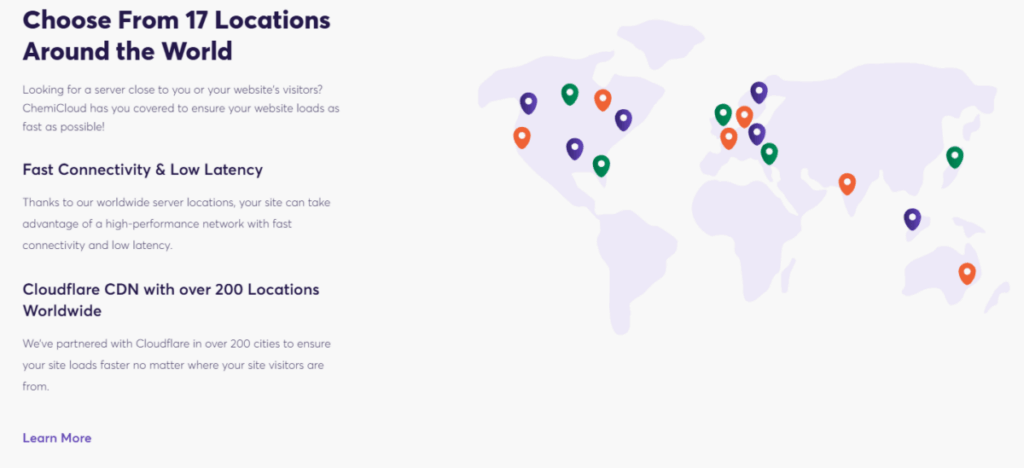
ChemiCloud's data centers number 16 in total, but only the 9 listed below are available on WordPress hosting plans (the other 7 are for Cloud VPS only).
- North America 3: Portland · Ashburn (Virginia) · Montreal
- Europe 2: London · Frankfurt
- Asia 3: Singapore · Seoul · Mumbai
- Oceania 1: Sydney
III. WordPress Hosting Comparison Chart
1️⃣ Resource Isolation, VPS, and Shared Hosting
Of the seven providers, Hostinger and ChemiCloud are the only two that offer shared hosting as their standard plan; both use CloudLinux to isolate resources between accounts. The remaining five providers use container, cloud, or VPS-based hosting rather than shared hosting, offering a structure that is much less susceptible to resource interference from neighboring sites.
|
Hosting |
Basic Plan: Shared Hosting or Not |
Resource Isolation |
|---|---|---|
|
Cloudways |
No |
Cloud VPS/Containers |
|
Kinsta |
No |
Container Isolation |
|
ScalaHosting |
No (Focus: Managed VPS) |
Dedicated VPS (Dedicated Resources) |
|
Pressable |
No |
Managed Cloud (5 PHP workers guaranteed per site) |
|
Hostinger |
Yes |
CloudLinux Isolation |
|
WPX |
No |
Managed Cloud (LiteSpeed Enterprise · Plans Based on Number of Sites) |
|
ChemiCloud |
Yes |
CloudLinux Isolation |
2️⃣ Comprehensive WordPress Hosting Comparison Chart
We provide comparison charts for each WordPress hosting service. Our stability ratings are based on criteria such as server uptime and the server’s ability to maintain consistent speed as visitor traffic increases. We’ve also assigned simple ratings based on whether support is provided by engineers or general customer service representatives.(Even if a general customer service representative handles the initial call, all calls are assigned to an engineer.) Stability affects the server's sustained performance.
- HTTP/2
- Nginx+Apache Stack
- OpCache
- Memcache
- APC
- Redis
- Check RAM and CPU Information by Product
- Cloudflare Enterprise
- HTTP/3
- Nginx + PHP-FPM + Basic Memcache included; Redis (additional charge) + Custom cache
- NVMe SSD + 10 Gbps Network
- LiteSpeed Web Server
- SPanel (Free In-House Panel)
- SShield AI Security
- Includes a dedicated IP address
- 5 PHP workers per site (5 vCPUs)
- Autoscaling
- Edge Caching
- Geographically Redundant Cloud
- Includes Jetpack Security
- LiteSpeed + LSCache
- HTTP/3
- Self-Managed Admin Page
- LiteSpeed Enterprise
- HTTP/3
- Redis Object Cache (Enabled in the panel)
- OPcache
- SSD Storage
- In-house CDN XDN with 43 nodes
- PHP 8
- LiteSpeed + LSCache from the Turbo plan up
- HTTP/3
- cPanel
- OPcache
- Memcache
- APC
- JavaScript Bundling
- Mod Expires
- Gzip
- Check RAM and CPU Information by Product
- Choice of cloud providers (DigitalOcean, Vultr, Linode, AWS, Google Cloud)
- Flexible CPU/RAM, Redis
- Using the Breeze Cache
- Using a Self-Managed Cache
- WP Rocket allowed (only page caching is switched off automatically)
- The Most Powerful Origin Server Performance
- Offers superior dynamic performance, making it ideal for e-commerce and other applications
- All products available through Cloudflare Enterprise
- Zero cPanel License Fees with SPanel
- Free, Non-Disruptive Migration
- Supports an average response time of 15 seconds
- Custom CPU/RAM configurations available
- Operated directly by Automattic, the developer of WordPress and WooCommerce
- Includes all Jetpack Security plans (equivalent to $239/year)
- Hourly + Daily Dual Backups
- 100% Uptime SLA (Premium Plan)
- Affordable and reliable even in environments with limited resources
- Unlimited visitors for all plans
- Three data centers (Chicago, London, Sydney)
- Plans Based on Number of Sites (1, 5, 15, 35)
- Basics of Malware Removal and DDoS Defense
- Staging · Free Moving Services
- Option to select the Korea (Seoul) server, 24-hour live chat
- Cloudways Dashboard: Detailed Control by Server
- MyKinsta Dashboard – Clean, modern design and intuitive
- SPanel All-in-One Management (WordPress Manager, Security, CDN)
- In-House Integrated Dashboard (Site, Collaborators, and Backup Management)
- Intuitive for Administrators, Startup-Friendly
- Custom Control Panel (No cPanel) · One-Click Installation
- Staging · Redis Toggle · Email (Business and above)
- Using cPanel
- Chat + Tickets
- 24/7 coverage (chat switches to a ticket if unsolved in 15 min)
- Free tier: first ticket reply in 12 h, 3 h if urgent
- Plugin and theme fixes need the paid add-on
- Chat + Tickets
- 24/7 human support in 8 languages
- Chat + Tickets
- 24-Hour Support (Average Response Time: 15 Seconds)
- Chat + Tickets
- 24-Hour Support from WordPress Experts
- Chat + Tickets
- 24-hour support
- Chat + Tickets
- 24/7 support · Fixed For You: they'll even fix plugin errors
- Chat + Tickets
- 24-Hour Direct Engineer Support
- First ticket reply in 10 minutes
- Customized Performance Required
- Sites with High Traffic Fluctuations
- High-Traffic Sites
- WooCommerce
- Graduates of Shared Hosting
- Resource-intensive site
- Agency
- WooCommerce Store
- A Growing Brand
- Personal blogs, small websites, cost-sensitive
- Monetized Blogs · Affiliate Marketing
- Small Business
- An agency that operates multiple websites
- Personal Blog
- Small sites
- Sites that need a server in Korea
- 3-Day Free Trial
- Pay for the number of days used
- First Month: $0 (30 days free)
- 2 months free with annual billing
- Introductory promotional price ($54.95 upon renewal)
- 4 Builds + Custom Configurations
- Starting at $20.83 per month for annual payment plans
- Includes Jetpack Security for free
- Affordable hosting rates, starting at $3.99 when you pay for a year
- VPS hosting is also affordably priced relative to its specifications
- 2 months free with an annual subscription
- Pay in advance for 2–5 years and get 5–20 months free
- 79% off the first month on monthly billing (code SAVE79)
- 77% off on a 1-year term, 84% on 3 years
- Free domain for the first year when you sign up for a 36-month plan
These are hosting providers for which no articles have been found indicating that they were hacked upon direct verification, as they have strengthened their security by implementing firewalls on their servers. The overall scores for the five categories—stability, speed, convenience, technical support, and price—can be found in the hosting provider recommendation cards ranked 1st through 7th within the content.
IV. WordPress Hosting Comparison: Categorized by User Type
The seven criteria for comparing WordPress hosting providers include five main evaluation categories—reliability, performance, ease of use, technical support, and price—as well as additional detailed criteria.
The detailed comparison of the seven hosting providers presented earlier was based on five key criteria: reliability, performance, ease of use, technical support, and price. To help you choose the best hosting option based on your specific needs and budget, we have divided them into three groups and provide a comprehensive evaluation.
1️⃣ Premium Performance and Enterprise Managed Groups
Beyond simply isolating server resources, the companies in this group provide top-tier performance and stability through enterprise-grade CDNs, advanced caching, and round-the-clock management by expert engineers. They are ideal for users dealing with high traffic volumes, critical business websites, or those who don’t want to spend time managing servers.
- Kinsta: By integrating container isolation infrastructure (currently transitioning from Google Cloud to Oracle Cloud in 2026) with Cloudflare Enterprise, it receives top ratings for reliability and performance. It comes with a self-managed cache out of the box, so even novice users can experience top speeds without any special configuration.
- WPX: A managed host that includes LiteSpeed Enterprise servers and its own 43-PoP CDN on every plan. Plans are split only by number of sites, with no visitor limits, so it suits monetized blogs with traffic spikes and small agencies running multiple sites.
- Pressable: This is a managed hosting service operated directly by Automattic, the company behind WordPress and WooCommerce. Jetpack Security (valued at $239 per year) is included in all plans, and it offers hourly and daily dual backups. For WooCommerce stores, the greatest advantage is the assurance of compatibility that comes from having the plugin developer and the hosting provider be the same company.
2️⃣ Flexibility and Cloud Control Groups
This group is geared toward users who want direct control over their infrastructure choices and resource scalability. It is ideal for situations where traffic fluctuates significantly or when users have outgrown the limitations of shared hosting and need dedicated resources.
- Cloudways: You can choose your infrastructure directly from DigitalOcean, Vultr, Linode, AWS, or Google Cloud to maximize flexibility and scalability. You can add CPU and RAM as needed, access advanced performance options such as Redis, and choose from the widest range of server locations. Additionally, having a basic understanding of server infrastructure allows you to get even more out of it.
- ScalaHosting: This managed cloud VPS comes with the SPanel control panel included at no additional cost, allowing you to secure dedicated resources without paying for a cPanel license. It offers SShield AI security and free, seamless migration, along with a 30-day full refund guarantee and pro-rated refunds for any unused time thereafter, so you can get started with no risk.
3️⃣ Best Value and Beginner-Friendly Groups
This group is geared toward users who want to get started with WordPress at the lowest possible cost. Since both Hostinger and ChemiCloud are powered by LiteSpeed Web Server, even their budget plans offer guaranteed baseline performance.
- Hostinger: Using LiteSpeed technology, this plan offers decent speed at the lowest price point. It is ideal for users—such as those running small blogs or personal websites—who want to minimize their initial costs. Since features like the advanced Redis Object Cache are available only on higher-tier cloud hosting plans, you’ll need to make do with the basic LSCache performance initially.
- ChemiCloud: It comes standard with LiteSpeed Web Server and cPanel, and scores particularly high for the quality of its 24/7 live chat support—which does not rely on AI chatbots. It offers the option to select a server in Korea, making it attractive to users in Korea, and with a 45-day money-back guarantee and a 99.99% uptime guarantee, it’s the option with the lowest barrier to entry.
V. Guide to Choosing the Right Hosting Service Based on Your Needs
VI. FAQs and Recommended Content












ℹ️ Affiliate Disclosure
This site's content contains affiliate links. When a visitor buys a product or service through one of them, the site receives a commission from the seller. The amount the buyer pays(it goes down during event discounts ↓)does not go up. Posted prices, discounts, and stock reflect the time of writing and may differ, so confirm with the seller before buying. Products are chosen and reviewed by our own standards, and commissions do not affect the order or content of reviews.