
uknew [You Knew]
“Uknew Says You knew!” Where everyday life meets IT.
uknew: WordPress, servers, the web and apps — IT notes and tools in one place.
“We few, we happy few, we band of brothers.“

WordPress: Concepts and Features | Why Use WordPress?
WordPress is a free, open-source content management system (CMS). It was originally developed for publishing blogs, but over time it has grown into a platform that supports internet forums and many types of websites. Its theme and plugin system—the foundation of WordPress—makes it possible to build almost any kind of website, including media galleries, membership sites, learning management systems (LMS) and online stores built with WooCommerce and more. The reason to use a content management system (CMS) is that even non-developers can easily build a website and manage...



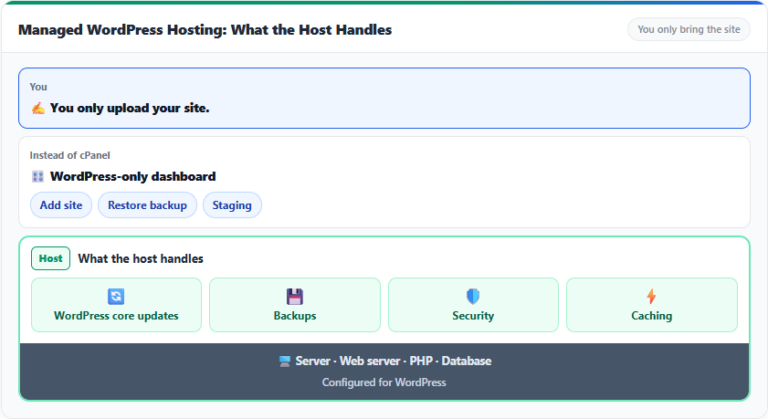
WordPressWordPress hosting guide →


HostingHosting comparison TOP 7 →


Linux · CLILinux command index →


Server ToolsAll Web Tools →


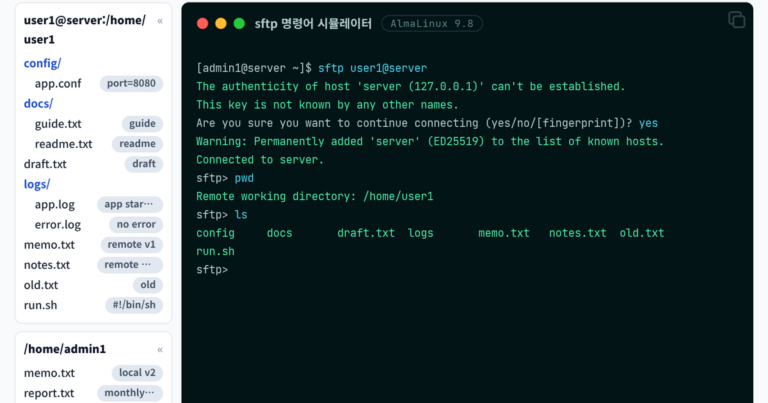
sftp Command: Connecting, Transferring Files with put and get, and Using Batch Mode
The sftp command is OpenSSH's file transfer program for exchanging files with a server connected over SSH; after connecting, you move between remote folders at the sftp> prompt, uploading with put and fetching with get. On an AlmaLinux 9 test server, connecting with key authentication, exchanging files and folders, and also running a -b batch file showed that a file with the same name was overwritten without asking and that a batch stopped on the spot when a command in the middle failed, ending with exit code 1…
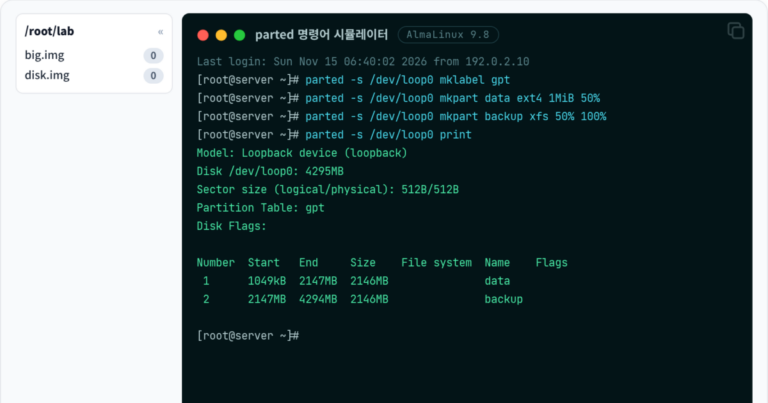
parted Command: Creating GPT Partitions and Using mkpart and resizepart
The parted command is a Linux command that creates a partition table on a disk and creates, deletes or resizes partitions. On an AlmaLinux 9 test server, a GPT partition table and 2 partitions were created on a 4 GiB practice disk and taken through deletion and extension, and on a 3 TiB disk, a partition that could not be created with MBR was created by changing to GPT. The commands below were run under the root account of an AlmaLinux 9 test server, and the output is exactly as received from GNU Parted…

fdisk Command: Creating and Deleting MBR Partitions and Checking with fdisk -l
The fdisk command is a Linux command that checks a disk's partition table and creates or deletes partitions. On a 1 GiB practice image file, an MBR partition table was created and split into two primary partitions, an extended partition and two logical partitions inside it, then saved with w, and fdisk -l confirmed that five partitions had been written. In the fdisk -l output of the server disk below, the disk name, size, model and identifier…

findmnt Command: Checking the Mount Tree and Verifying fstab with the verify Option
findmnt 명령어는 지금 마운트된 파일 시스템을 트리로 출력하고, 장치나 경로, 형식으로 마운트를 찾거나 fstab 파일을 검사하는 리눅스 명령어입니다. Debian 12 서버에서 마운트 트리와 디스크 용량을 확인한 뒤 일부러 틀린 줄을 넣은 시험용 fstab 파일을 –verify로 검사했고, 재부팅 전에 없는 마운트 지점과 장치를 오류 3건으로 찾아냈습니다. 아래 출력은 Debian 12 서버의 일반 사용자 계정에서…
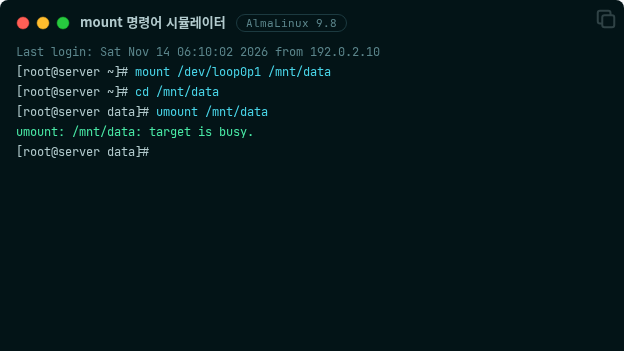
mount Command: Mounting Disks and Image Files, Unmounting with umount, and Fixing target is busy
The mount command is a Linux command that attaches the file system of a disk partition or an image file to a directory, and umount is used to detach it. On an AlmaLinux 9 test server, a partition of a practice image was mounted, switched to read-only and unmounted, and the target is busy error that appeared while unmounting was solved by finding the process in use with fuser. The output below is exactly the result of running the commands under the root account of an AlmaLinux 9 test server with a 2 GiB…

alias 명령어: 별칭 만들기와 unalias 삭제, ~/.bashrc 영구 설정
alias 명령어는 자주 입력하는 명령에 짧은 이름을 붙여, 그 이름만 입력해도 원래 명령이 실행되게 하는 bash 내장 명령입니다. AlmaLinux 9 서버에서 별칭을 만들고 지워 본 결과, 별칭은 만든 셸 안에서만 유지되었고 ~/.bashrc에 한 줄을 더하자 새로 연 셸에서도 그대로 남았습니다. 아래 출력은 AlmaLinux 9.8 서버의 root 계정에서 실행한 결과이고, Debian 12 서버에서는 일반…

diff Command: File Comparison, the diff -u Patch Format, and Options
The diff command is a Linux command that compares two files line by line and prints only the lines that differ. Comparing an old file and a new file that imitate a web server configuration with diff showed the three changed places as the three lines 2,3c2,3, 5d4, and 6a6, and the patch file saved with the -u option listed the same changes with minus and plus signs. The file names and contents in the output below and the working folder /root/work are example…

id Command: Checking UID and Groups, whoami, groups, and Supplementary Groups
To check the UID and groups of the current account on a Linux server, use the id command; use whoami when you need only the account name and groups when you need only the group names. Running the three commands in turn on AlmaLinux 9 and Debian 12 servers and comparing the output showed that id -un and whoami printed the same account name, and groups printed the group list of id with only the names left. The output below was produced on an AlmaLinux 9.8 server under the root account and…

man Command: Usage and Options, Section Numbers, and man -k Search
To check how a command or a configuration file is used on a Linux server, open its manual page with the man command, and when you don't know the name, search the short descriptions with man -k. Looking up the passwd page on AlmaLinux 9 and Debian 12 servers showed that Debian 12 had both a section 1 command page and a section 5 file format page, while AlmaLinux 9 had no section 5 page. The output below was produced on an AlmaLinux 9.8 server…