
Linux Commands: 15 Categories and Understanding the System
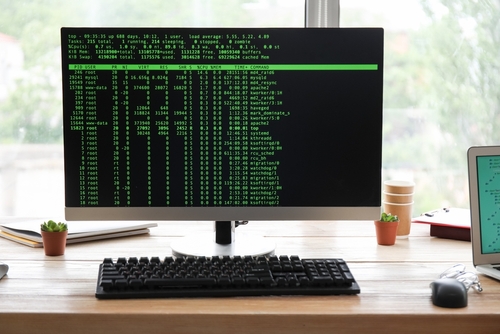
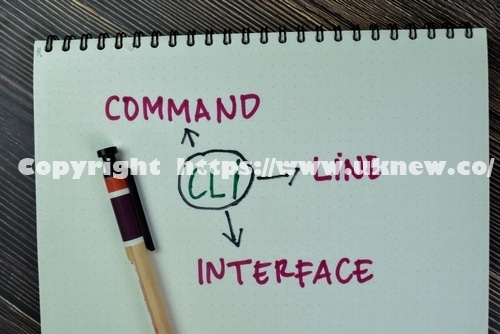
The Linux command-line interface (CLI) is a text-based user interface for interacting with computer programs and the operating system. Linux commands work almost the same across Unix-like operating systems, and you type them to create, edit, copy and move files and to manage the whole server.
Commands are sorted into categories, but please note that some placements may be off.
✅ Linux Command Categories [15]
Pick a category from the left menu or type a command name in the search box. Commands in blue have a how-to post and open in a new tab.
✅ Types of Linux Commands Explained
Directory commands
Directory commands are used to check where you are and move between folders. cd moves you, pwd shows the current path, ls and tree show what's inside a folder, mkdir creates a folder and rmdir removes it.
File management commands
File management commands copy, move, delete and create files. cp copies, mv moves or renames, rm deletes, and touch creates an empty file. ln creates links, and file and stat show a file's type and details.
Permission · ownership commands
Permission and ownership commands decide who can read, write and run a file. chmod changes permissions, chown and chgrp change the owner and group, and umask sets the default permissions for new files.
On servers with SELinux enabled, sestatus shows its status and setenforce switches the mode.
Disk · mount commands
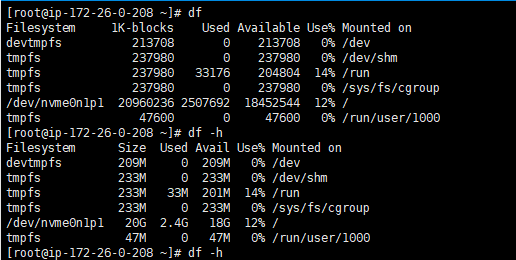
Disk and mount commands check disk space and split disks into partitions that are attached as file systems. df shows overall disk usage and du shows usage per folder; gdisk and fdisk create partitions, mkfs creates a file system, and mount attaches it.
A file system is the way data is stored. These are the four file systems most used on Linux.
Package commands
Package commands install, update and remove programs. RHEL-based systems (AlmaLinux, Rocky Linux) use dnf and yum, Ubuntu and Debian use apt, and rpm and dpkg show information about installed packages.
Process · job scheduling commands
A process is a running program, and each process gets its own number (PID). ps lists processes, top shows them in real time, kill ends them, and systemctl starts and stops services.
To run a command at a set time, use crontab and at.
System info · settings commands
System information commands check the CPU, memory, kernel version and how long the server has been up. uname shows the kernel version, free shows memory, uptime shows uptime and load average, and timedatectl and localectl change the time zone and language.
Read logs with journalctl and clean up accumulated log files with logrotate.
User · group commands
Linux is a multi-user operating system where many users can log in at once, and users are managed in groups. useradd and passwd create accounts, usermod and userdel change or delete them, and commands that need root privileges are run with sudo.
Check who is logged in right now with who and w.
Text viewing · editing commands
Text commands print file contents and filter out only the lines you need. cat, less, head and tail show contents, vi edits them, grep finds text, and sort and uniq sort lines and remove duplicates. Most are chained to other commands with a pipe (|).
Search commands
Search commands find where files and executables are. find searches folders directly by name, size and modification date, while which, whereis and locate look in the executable path or in a prebuilt list.
grep, which searches for text inside files, is listed under Text viewing · editing.
Compression · archive commands
Archiving bundles several files into one, and compression makes files smaller. tar bundles files, gzip, bzip2 and xz compress them, and the most common form does both at once: [tar -czf].
For files shared with Windows, use zip and unzip.
Network commands
Network commands check IP addresses and connection status and exchange files with other servers. ip and nmtui configure the network, ping and traceroute test connections, and host, nslookup and dig look up DNS.
Remote access is done with ssh, file transfer with rsync, scp and wget, and the firewall is managed with iptables and firewall-cmd.
Shell commands
The shell is the program that passes the commands you type to the operating system to run, and a shell script lists commands in a file and runs them in order. Commands often used in scripts are echo, printf, test and export.
Multiple commands·Wildcards·Redirection and other shell symbols are grouped here too.
DBMS · SQL commands
DBMS commands work with MariaDB and MySQL databases from the shell. mysql connects, mysqldump makes backups, and mariadb-check checks and repairs tables.
Once connected, SQL statements such as SELECT, INSERT and GRANT handle data and permissions.
Development commands
Development commands are used for compilation, which turns source code into executable files. gcc compiles, make runs the build steps automatically, and gdb traces errors.
✅ Understanding and Defining the Linux Command System
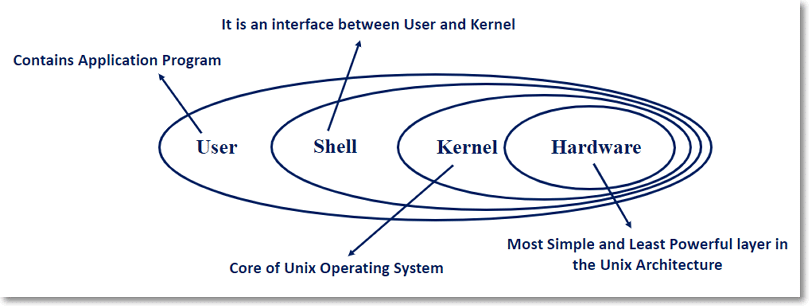
When you type a Linux command into the shell, the shell passes it to the kernel, where it is turned into a language the machine understands. Through the shell, the command reaches resources such as the CPU, memory, I/O and network to get the work done.
ℹ️ Affiliate Disclosure
This site's content contains affiliate links. When a visitor buys a product or service through one of them, the site receives a commission from the seller. The amount the buyer pays(it goes down during event discounts ↓)does not go up. Posted prices, discounts, and stock reflect the time of writing and may differ, so confirm with the seller before buying. Products are chosen and reviewed by our own standards, and commissions do not affect the order or content of reviews.