
nslookup Command: Usage and Options, Record Lookups and Choosing a DNS Server
The nslookup command is a lookup tool that asks a DNS server about a domain name and returns its IP addresses and DNS records such as MX, NS and TXT. When we looked up the records of example.com by type on an AlmaLinux 9 server and switched the DNS server being queried, the same domain gave different results depending on which server we asked: the Non-authoritative answer line at the top of the response disappeared, or the ANY lookup returned something different.
The output below was produced as root on an AlmaLinux 9.8 server. The DNS server address configured on the server has been replaced with the example value 192.0.2.53, and package version numbers have also been replaced with example values.
1️⃣ How to use the nslookup command
The basic form is [nslookup -option name DNS-server], and both the options and the DNS server can be left out. If you give only a name, nslookup asks the DNS server configured on the server for that name's address.
nslookup example.comServer: 192.0.2.53
Address: 192.0.2.53#53
Non-authoritative answer:
Name: example.com
Address: 172.66.147.243
Name: example.com
Address: 104.20.23.154
Name: example.com
Address: 2606:4700:10::6814:179a
Name: example.com
Address: 2606:4700:10::ac42:93f3The Server and Address lines at the top show the DNS server that received the query, and the #53 at the end is the DNS port number. When no record type is given, nslookup looks up the A record (IPv4) and then the AAAA record (IPv6), so two IPv4 addresses were followed by two IPv6 addresses.
Non-authoritative answer means that the reply came from a DNS server holding the value in its cache, not from the server that manages the records of example.com directly. Right after a record is changed, the value shown can therefore differ from the real one.
2️⃣ nslookup options
Options are written with a hyphen in front of their name.
-type is the same option as -query or the short form -q. Asking 8.8.8.8 with -q=mx returned the same single mail server line as -type=mx.
nslookup -q=mx google.com 8.8.8.8Server: 8.8.8.8
Address: 8.8.8.8#53
Non-authoritative answer:
google.com mail exchanger = 10 smtp.google.com.
Authoritative answers can be found from:-timeout and -retry set how long to wait for a DNS server that does not answer. 192.0.2.1 is an address reserved for documentation, so no server answers there.
nslookup -timeout=2 -retry=1 example.com 192.0.2.1;; connection timed out; no servers could be reachedWith -timeout=2 -retry=1, nslookup printed the [connection timed out] line after 2 seconds and stopped. With -retry=2 it took 4 seconds, and without either option it took 15 seconds. To keep a script from hanging on a server that does not answer, lower both values.
Adding -debug prints the question and answer sections of the response packet as they are.
nslookup -debug example.com 8.8.8.8Server: 8.8.8.8
Address: 8.8.8.8#53
------------
QUESTIONS:
example.com, type = A, class = IN
ANSWERS:
-> example.com
internet address = 104.20.23.154
ttl = 300
-> example.com
internet address = 172.66.147.243
ttl = 300
AUTHORITY RECORDS:
ADDITIONAL RECORDS:
------------
Non-authoritative answer:
Name: example.com
Address: 104.20.23.154
Name: example.com
Address: 172.66.147.243
------------
QUESTIONS:
example.com, type = AAAA, class = IN
ANSWERS:
-> example.com
has AAAA address 2606:4700:10::6814:179a
ttl = 300
-> example.com
has AAAA address 2606:4700:10::ac42:93f3
ttl = 300
AUTHORITY RECORDS:
ADDITIONAL RECORDS:
------------
Name: example.com
Address: 2606:4700:10::6814:179a
Name: example.com
Address: 2606:4700:10::ac42:93f3Each record gained a ttl = 300 that the default output does not show. It means the DNS server that received this answer may keep the record in its cache for up to 300 seconds.
-norecurse asks the DNS server to answer only with what it already holds instead of looking it up through other servers. Asking the same 8.8.8.8 without the option returned four addresses, but with -norecurse the query ended with [SERVFAIL].
nslookup -norecurse example.com 8.8.8.8Server: 8.8.8.8
Address: 8.8.8.8#53
** server can't find example.com: SERVFAIL| Option | Copy | Description |
|---|---|---|
| -type= | Sets the record type to look up; if omitted, A and then AAAA | |
| -q= | Same option as -type, sets the record type to look up | |
| -timeout= | Wait time for the first query's answer (seconds) | |
| -retry= | Number of times a query is sent when there is no answer | |
| -debug | Prints the question and answer of the response packet, including TTL | |
| -norecurse | Asks only for the values that server holds, without going through other servers |
| Option | Copy | Description |
|---|---|---|
| -query= | Same option as -type, sets the record type to look up | |
| -port= | Sets the port to query, 53 by default | |
| -version | Print the version and exit |
3️⃣ nslookup record lookups (MX, NS, TXT, SOA)
Put a record type after -type= to look up only that record. The value can be written in upper or lower case.
| -type= value | Information it holds |
|---|---|
| A · AAAA | IPv4 address, IPv6 address |
| MX | Server that receives mail, and its priority |
| NS | Name servers that manage the domain's records |
| TXT | Text values such as SPF |
| SOA | Zone's primary name server, admin mail, serial number, refresh intervals |
| CNAME | Alias that points to another name |
| PTR | Host name linked to an IP address (reverse) |
| ANY | Requests all records of that name at once |
Mail servers are checked with the MX record.
nslookup -type=mx google.comServer: 192.0.2.53
Address: 192.0.2.53#53
Non-authoritative answer:
google.com mail exchanger = 10 smtp.google.com.
Authoritative answers can be found from:The 10 after mail exchanger is the priority. When there are several mail servers, the sending side tries delivery starting from the server with the lowest number. The same lookup on example.com returned [mail exchanger = 0 .], and an MX with only a single dot means this domain does not accept mail.
The [Authoritative answers can be found from:] at the end of the MX lookup is a header line that shows, below it, the authoritative name server information included in the response. In the MX, NS and TXT lookups in this article the response did not include that information, so nothing appeared below the header line.
The NS record holds the name servers that manage the domain's records directly.
nslookup -type=ns example.comServer: 192.0.2.53
Address: 192.0.2.53#53
Non-authoritative answer:
example.com nameserver = hera.ns.cloudflare.com.
example.com nameserver = elliott.ns.cloudflare.com.
Authoritative answers can be found from:example.com had two name servers. These two servers are the authoritative name servers for example.com.
A TXT record can hold text values in no fixed format.
nslookup -type=txt example.comServer: 192.0.2.53
Address: 192.0.2.53#53
Non-authoritative answer:
example.com text = "_k2n1y4vw3qtb4skdx9e7dxt97qrmmq9"
example.com text = "v=spf1 -all"
Authoritative answers can be found from:v=spf1 -all is an SPF value saying that no server may send mail under this domain name. When a domain has several TXT records, they appear one per line like this.
The SOA record holds the basic information of the zone.
nslookup -type=soa example.comServer: 192.0.2.53
Address: 192.0.2.53#53
Non-authoritative answer:
example.com
origin = elliott.ns.cloudflare.com
mail addr = dns.cloudflare.com
serial = 2418004112
refresh = 10000
retry = 2400
expire = 604800
minimum = 1800
Authoritative answers can be found from:origin is the primary name server, and mail addr is the administrator's mail address with the @ written as a dot. serial is a serial number that goes up each time the records change, and refresh, retry and expire are time values (in seconds) that secondary name servers use to sync records with the primary server. minimum is how long an answer for a missing record is kept in cache.
Aliases are checked with the CNAME record. Looking up www.github.com returned a single line saying it is an alias of github.com.
nslookup -type=cname www.github.comServer: 192.0.2.53
Address: 192.0.2.53#53
www.github.com canonical name = github.com.-type=any requests all records of that name at once. Asking the DNS server configured on the server returned the A, AAAA, MX and NS records together.
nslookup -type=any example.comServer: 192.0.2.53
Address: 192.0.2.53#53
Non-authoritative answer:
Name: example.com
Address: 172.66.147.243
Name: example.com
Address: 104.20.23.154
Name: example.com
Address: 2606:4700:10::6814:179a
Name: example.com
Address: 2606:4700:10::ac42:93f3
example.com mail exchanger = 0 .
example.com nameserver = hera.ns.cloudflare.com.
example.com nameserver = elliott.ns.cloudflare.com.
Authoritative answers can be found from:Sending the same lookup to 8.8.8.8 returned only a single [hinfo = “RFC8482”] line and a signature line.
nslookup -type=any example.com 8.8.8.8Server: 8.8.8.8
Address: 8.8.8.8#53
Non-authoritative answer:
example.com hinfo = "RFC8482" ""
example.com rdata_46 = HINFO 13 2 3600 20261029212708 20261027192708 34505 example.com. 2YBHcD7GmqHiW6E7e8Lx3z/gPoCsLbYw/Uegjy801hQ+4fYp5U7wKqc2 NXOONd8WS0xjgzfW5Dn0akDqdjltOw==
Authoritative answers can be found from:RFC 8482 is the document that lets servers answer an ANY query with a short reply instead of every record. So look up the records you need one type at a time.
4️⃣ Choosing a DNS server in nslookup
If you put a DNS server after the name, nslookup asks that server instead of the DNS server configured on the server.
nslookup example.com 8.8.8.8Server: 8.8.8.8
Address: 8.8.8.8#53
Non-authoritative answer:
Name: example.com
Address: 104.20.23.154
Name: example.com
Address: 172.66.147.243
Name: example.com
Address: 2606:4700:10::6814:179a
Name: example.com
Address: 2606:4700:10::ac42:93f3The Server line changed to 8.8.8.8, and the four addresses were the same as in the answer from the DNS server configured on the server. Use this form after changing name servers to check whether the new values have spread to each public DNS server.
If you give one of the name servers from the NS lookup as the DNS server, you ask the authoritative server directly.
nslookup example.com elliott.ns.cloudflare.comServer: elliott.ns.cloudflare.com
Address: 2606:4700:58::a29f:2ce4#53
Name: example.com
Address: 104.20.23.154
Name: example.com
Address: 172.66.147.243
Name: example.com
Address: 2606:4700:10::6814:179a
Name: example.com
Address: 2606:4700:10::ac42:93f3This time the Non-authoritative answer line disappeared. The value came straight from the server that manages the records, so it is the current value, not one passed through a cache. The Address right below the Server line showed the IPv6 address of this name server.
Looking up a name that does not exist returns [NXDOMAIN]. .invalid is a top-level domain reserved so that it is never actually used, so the answer said the name does not exist.
nslookup example.invalidServer: 192.0.2.53
Address: 192.0.2.53#53
** server can't find example.invalid: NXDOMAINBy contrast, no-such-host.example.com ended with [No answer] instead of NXDOMAIN. It means the queried record was not in the response, which is a different result from NXDOMAIN, where the name itself does not exist.
nslookup no-such-host.example.comServer: 192.0.2.53
Address: 192.0.2.53#53
Non-authoritative answer:
*** Can't find no-such-host.example.com: No answer5️⃣ nslookup reverse lookup
If you give an IP address instead of a name, nslookup looks up the PTR record and finds the host name linked to that address.
nslookup 8.8.8.88.8.8.8.in-addr.arpa name = dns.google.
Authoritative answers can be found from:8.8.8.8.in-addr.arpa is the name made by writing the IPv4 address backwards and adding in-addr.arpa. The value of this name's PTR record, dns.google., is the host name of 8.8.8.8.
In the reverse lookup the two Server lines at the top did not appear. Looking up the same address with nslookup 9.18 on a Debian 12 server gave the same shape.
6️⃣ nslookup interactive mode
Running nslookup without arguments enters interactive mode with a > prompt. When you look up several names and record types one after another, you do not have to type the whole command again each time.
nslookup> server 8.8.8.8
Default server: 8.8.8.8
Address: 8.8.8.8#53
> set type=mx
> google.com
Server:		8.8.8.8
Address:	8.8.8.8#53

Non-authoritative answer:
google.com	mail exchanger = 10 smtp.google.com.

Authoritative answers can be found from:
> set type=txt
> example.com
Server: 8.8.8.8
Address: 8.8.8.8#53
Non-authoritative answer:
example.com text = "_k2n1y4vw3qtb4skdx9e7dxt97qrmmq9"
example.com text = "v=spf1 -all"
Authoritative answers can be found from:
> exitChange the DNS server to query with server and set the record type with set type=, and from then on typing just a name looks it up with those settings. Typing exit returns you to the shell.
set all prints all current settings.
nslookup> set type=txt
> set all
Default server: 192.0.2.53
Address: 192.0.2.53#53
Set options:
novc nodebug nod2
search recurse
timeout = 0 retry = 3 port = 53 ndots = 1
querytype = txt class = IN
srchlist = example.internal
> exitquerytype had changed to txt, the value set earlier. retry = 3 and port = 53 are defaults that were not changed.
7️⃣ Installing nslookup on Linux and comparing it with dig and host
If running nslookup on Linux gives [command not found], install the BIND tools package. On the AlmaLinux server, nslookup came from the bind-utils package.
rpm -qf /usr/bin/nslookupbind-utils-9.16.20-30.el9_8.2.x86_64On the Debian 12 server it was the bind9-dnsutils package. The old name dnsutils remained as a transitional package that installs bind9-dnsutils.
dpkg -S /usr/bin/nslookupbind9-dnsutils: /usr/bin/nslookupOn RHEL-based systems, install the bind-utils package with the command below.
dnf install bind-utilsOn Debian-based systems, install the bind9-dnsutils package.
apt install bind9-dnsutilsThe same package also contains dig and host. All three commands query DNS, but their output looks different.
| Command | Output | Where to use it |
|---|---|---|
| nslookup | Server line + answer, interactive mode | Looking up several names and records in a row |
| dig | Every section of the response packet; only values with +short | Pulling just the values in a script |
| host | One sentence per record | Checking A, AAAA and MX at once |
host example.comexample.com has address 172.66.147.243
example.com has address 104.20.23.154
example.com has IPv6 address 2606:4700:10::6814:179a
example.com has IPv6 address 2606:4700:10::ac42:93f3
example.com mail is handled by 0 .Without any option, host looked up the A, AAAA and MX records at once and printed each as a one-line sentence. Adding +short to dig leaves only the IP addresses.
dig +short example.com104.20.23.154
172.66.147.243For pulling just the values in a script, dig +short is easier to handle, and for checking several names one after another, nslookup's interactive mode is more convenient.
🔲 nslookup command simulator
In the simulator below you can type nslookup yourself while changing the record type and DNS server.
🔢 FAQ & Recommended Content

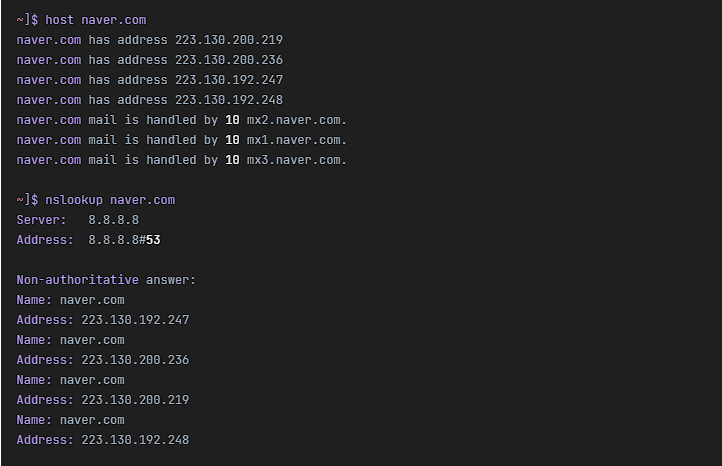 DNS lookup
Linux host command | DNS lookup command
An article on finding the IP address of a host name with the host command, and the host name of an IP address the other way round.

 Web lookup
Sites for Checking DNS Records and Measuring Nameserver Performance
An article on checking DNS record values from several regions with whatsmydns and comparing DNS server response speed with DNSPerf.
ℹ️ Affiliate Disclosure
This site's content contains affiliate links. When a visitor buys a product or service through one of them, the site receives a commission from the seller. The amount the buyer pays(it goes down during event discounts ↓)does not go up. Posted prices, discounts, and stock reflect the time of writing and may differ, so confirm with the seller before buying. Products are chosen and reviewed by our own standards, and commissions do not affect the order or content of reviews.