
Linux ls Command
The ls command, short for list, shows the files and directories on a Linux system. It also displays information such as the file type, size and creation date.
✅ Basic Usage of the ls Command
ls -options [file or directory]If you run ls without a [file or directory], it lists the current directory.
 testuser]# pwd
/home/testuser
 testuser]# ls
a  aa  aaa  a_sim  b  bb  bbb
testuser]# ✅ The ll Command (ls -l)
In Linux, the ll command is usually set up as a shortcut for ls -l through an alias (short name).
 usr]# grep -r 'alias ll' /etc
/etc/profile.d/colorls.csh:alias ll 'ls -l'
/etc/profile.d/colorls.csh:alias ll 'ls -l --color=auto'
/etc/profile.d/colorls.sh:  alias ll='ls -l' 2>/dev/null
/etc/profile.d/colorls.sh:alias ll='ls -l --color=auto' 2>/dev/null

 Ubuntu ~]# grep -r 'alias ll' /etc
/etc/skel/.bashrc:alias ll='ls -alF'
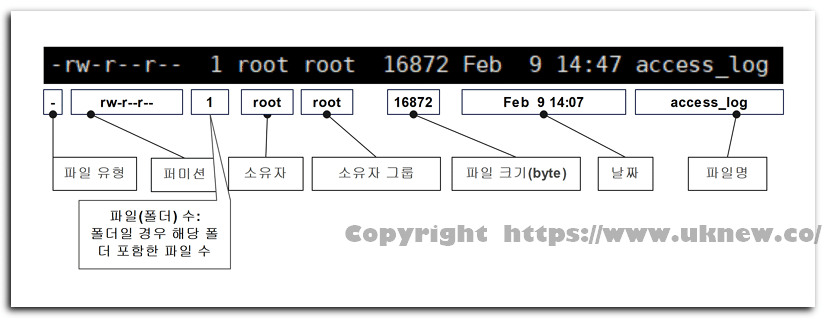
Checking file information with the ll command looks like this.
As an option of ls -l, it shows files in a list format with permissions, owner, size, modification time and more.
On servers where ll is not set up, you get the error [bash: ll: command not found]. The master account on Cloudways (Debian 12) is one example: the [.bashrc] file contains [#alias ll=’ls -l’] only as a comment.
Typing [alias ll=’ls -l’] makes it available right away, but the alias disappears when you log out. To use ll every time you connect, save the alias in the [.bash_aliases] file in your home folder.
echo "alias ll='ls -l'" >> ~/.bash_aliases[.bashrc] is set to read the [.bash_aliases] file if it exists, so ll works the next time you connect. Typing [type ll] confirms it with [ll is aliased to `ls -l’].
On Cloudways, the [.bashrc] file is locked with the immutable (i) attribute, so the master account cannot edit it, but it can create new files in the home folder.
✅ ls Command Options
| Option | Description | |
|---|---|---|
| -l= ll | Shows permissions · link count · owner · group · size · modification time on one line | |
| -a | --allShows hidden files (names starting with .) plus the current directory (.) and parent directory (..) | |
| -A | --almost-allShows hidden files but excludes . and .. | |
| -h | --human-readableWith -l, shows sizes in K · M · G units | |
| -t | Sorts by modification time (newest first) | |
| -r | --reverseReverses the sort order (with -lt, oldest first) | |
| -S | Sorts by file size (largest first) | |
| -R | --recursiveLists all subdirectories as well | |
| -d | --directoryShows the directory itself instead of its contents | |
| -F | --classifyAdds a type symbol after the name (directory / · executable * · symbolic link @) | |
| -1 | Shows one entry per line | |
| -i | --inodeShows the inode number of each file | |
| -n | --numeric-uid-gidUses the -l format but shows the owner and group as numeric IDs | |
| -b | --escapeShows non-printable special characters as backslash escapes |
You can type the options in the table into the simulator below and compare the results. The same directory already contains hidden files, files of different sizes, an executable and a symbolic link.
✅ Usage Examples
View all hidden files in list format.
 /]# ls -al
total 16777264
dr-xr-xr-x.  18 root root         283 Jun  7 19:12 .
dr-xr-xr-x.  18 root root         283 Jun  7 19:12 ..
dr-xr-xr-x.   2 root root           6 Mar 25  2022 afs
-rw-r--r--    1 root root           0 May 29  2024 .autorelabel # leading period
lrwxrwxrwx.   1 root root           7 Mar 25  2022 bin -> usr/bin
...
Apart from the current folder (.) and the parent folder (..), any name that starts with a period (.) is treated as a hidden file.
To list hidden files while leaving out the current and parent folders, use the uppercase -A option.
dr-xr-xr-x.   2 root root           6 Mar 25  2022 afs
-rw-r--r--    1 root root           0 May 29  2024 .autorelabel
lrwxrwxrwx.   1 root root           7 Mar 25  2022 bin -> usr/bin
...
🔲 Checking Directories and File Types: -d · -F
The -d option shows the directory name instead of what is inside it.
 home]# ls -d testuser/
testuser/
 home]# ls testuser/
a  aa  aaa  a_sim  b  bb  bbb
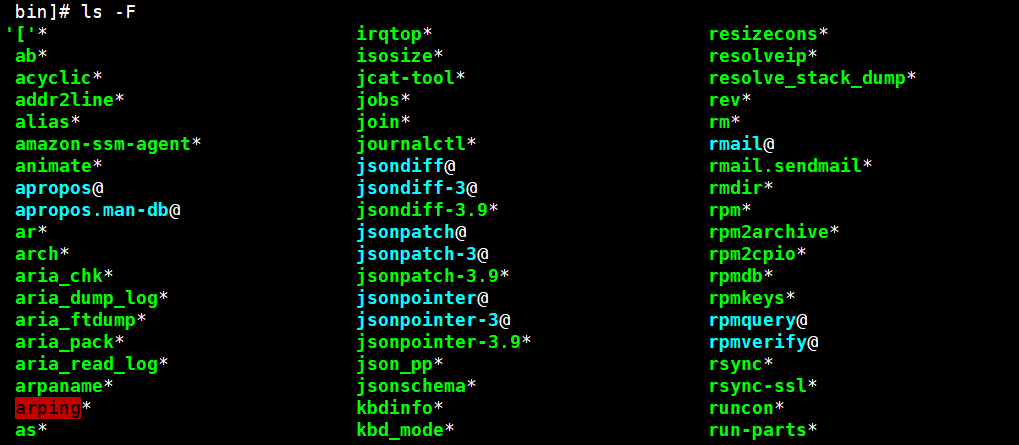
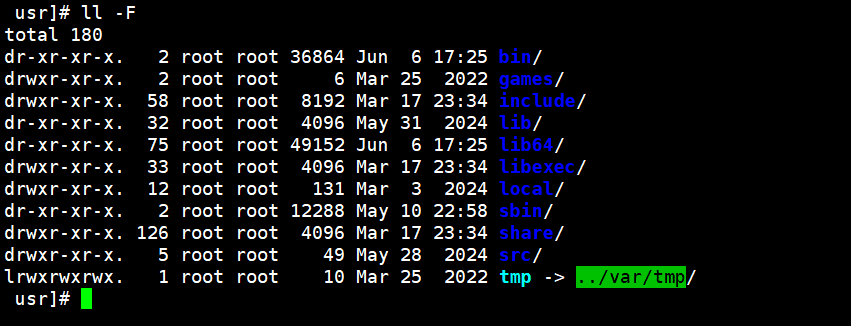
The -F option shows each file's type. Executables get a [*] after the name, and symbolic links get an [@].
ℹ️ Affiliate Disclosure
This site's content contains affiliate links. When a visitor buys a product or service through one of them, the site receives a commission from the seller. The amount the buyer pays(it goes down during event discounts ↓)does not go up. Posted prices, discounts, and stock reflect the time of writing and may differ, so confirm with the seller before buying. Products are chosen and reviewed by our own standards, and commissions do not affect the order or content of reviews.