
Linux rsync Command: Options and Usage Examples
If you re-copy an entire folder every time to keep two servers in step, the transfer is the full size even when only one file changed. The rsync commandis short for remote sync. It compares source and destination and sends only the files that differ, and it works the same way between local folders and between servers connected over SSH. This post covers basic usage, the options, and examples of the two connection methods: SSH and the rsync daemon.
The output in this post comes from rsync 3.2.7 on AlmaLinux 9.8. If rsync is not installed, install it with the package manager.
# RHEL family
dnf -y install rsync
# Debian family
apt -y install rsync✅ Basic Usage
The basic syntax is as follows.
rsync -options source destinationLike the cp command, write the source first and the destination after it. Adding a trailing slash [/] to the source puts only the contents of the folder into the destination; without it, the folder itself goes in.
~]# rsync -av www/ backup/
sending incremental file list
index.html
img/
img/logo.png
~]# rsync -av www backup/
sending incremental file list
www/
www/index.html
www/img/
www/img/logo.png
Run the same command again and the file list is empty, with the sent count down to a few hundred bytes. Files with the same size and modification time are skipped.
~]# rsync -av www/ backup/
sending incremental file list

sent 166 bytes  received 13 bytes  358.00 bytes/sec
total size is 3,015  speedup is 16.84
With -r alone and no -a, modification times are not preserved, so the next run sends the same files again. When syncing folders, use -a as the default.
The -n option shows only which files would change, without transferring anything, and the output ends with [(DRY RUN)]. For options that delete files on the destination, such as --delete, check with -n first and then run for real.
~]# rsync -avn --delete www/ backup/
sending incremental file list
deleting old.bak
index.html

sent 188 bytes  received 39 bytes  454.00 bytes/sec
total size is 3,013  speedup is 13.27 (DRY RUN)
✅ rsync Command Options & Simulator
| Option | Description | |
|---|---|---|
| -a | --archiveCopies subdirectories too and preserves permissions, owner, modification time and symbolic links (same as -rlptgoD) | |
| -v | --verbosePrints the name of each transferred file and the transfer totals | |
| -z | --compressCompresses file data during the transfer | |
| -r | --recursiveCopies subdirectories too (included in -a) | |
| -t | --timesPreserves modification times (included in -a). This is what decides which files are skipped on the next run | |
| -n | --dry-runShows only the files that would change, without transferring, and marks the end with (DRY RUN) | |
| -u | --updateSkips files that are newer on the destination | |
| -h | --human-readablePrints byte counts in K, M and G units | |
| -P | Same as --partial --progress. Shows progress per file and resumes interrupted transfers | |
| -i | --itemize-changesPrints what changed in each file as a code>f+++++++++ new file · >f.st...... size and time changed · *deleting deleted | |
| -e | --rsh=COMMANDSpecifies the remote shell-e 'ssh -p 2222 -i /root/.ssh/key.pem' | |
| --delete | Deletes files from the destination that no longer exist in the source (needs -r or -a) | |
| --exclude=PATTERN | Excludes files and directories matching the pattern--exclude '*.tmp' --exclude 'cache/' | |
| --include=PATTERN | Placed before --exclude, keeps only that pattern out of the exclusion | |
| --max-size=SIZE | Does not transfer files larger than the given size (--min-size for smaller files)--max-size=3M --min-size=10k | |
| --bwlimit=RATE | Limits transfer speed, in KiB/s | |
| --stats | Prints file count and transfer statistics |
✅ Connection Methods: SSH and the rsync Daemon
There are two ways to connect to a remote server. A single colon [:] after the host goes through SSH; a double colon [::] connects directly to the rsync daemon on port 873.
| Category | SSH method (:) | rsync daemon method (::) |
|---|---|---|
| Syntax | rsync -options user@host:/path /local/path | rsync -options host::module/path /local/path |
| Port | SSH port (22 by default) | 873 |
| Encryption | Encrypted by SSH | No encryption |
| Authentication | SSH key or password | hosts allow in rsyncd.conf; account and password optional |
| Server-side setup | None (works as soon as SSH access works) | Install rsync-daemon, /etc/rsyncd.conf, open port 873 |
| Purpose | Backup and deployment between servers (the default choice) | Mirroring on an internal network without handing out SSH accounts |
🔲 SSH Method
If you can reach the server over SSH, it works with no server-side setup. When the port differs or you use a key file, put the ssh command as is in the -e option.
# local → remote
rsync -avz /home/2server_data/ root@192.168.45.239:/home/1server_data/
# remote → local
rsync -avz root@192.168.45.239:/home/1server_data/html_Remote /home/2server_data
# SSH port and key file
rsync -avz -e 'ssh -p 2222 -i /root/.ssh/key.pem' root@192.168.45.239:/home/1server_data/ /home/2server_data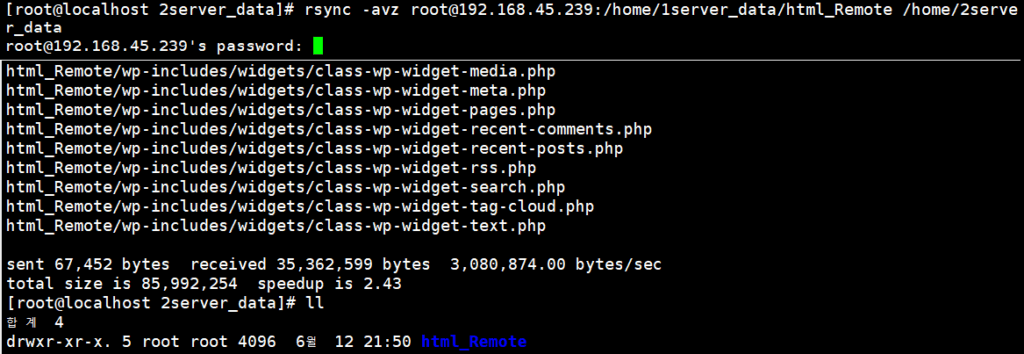
To leave out certain files or directories, add --exclude once per pattern, or group the patterns in braces and write them once.
rsync -avz --exclude 'html_Remote_Excertion' --exclude 'Exception_File' root@192.168.45.239:/home/1server_data/ /home/2server_data
rsync -avz --exclude={'html_Remote_excertion/*','Exception_File'} root@192.168.45.239:/home/1server_data/ /home/2server_data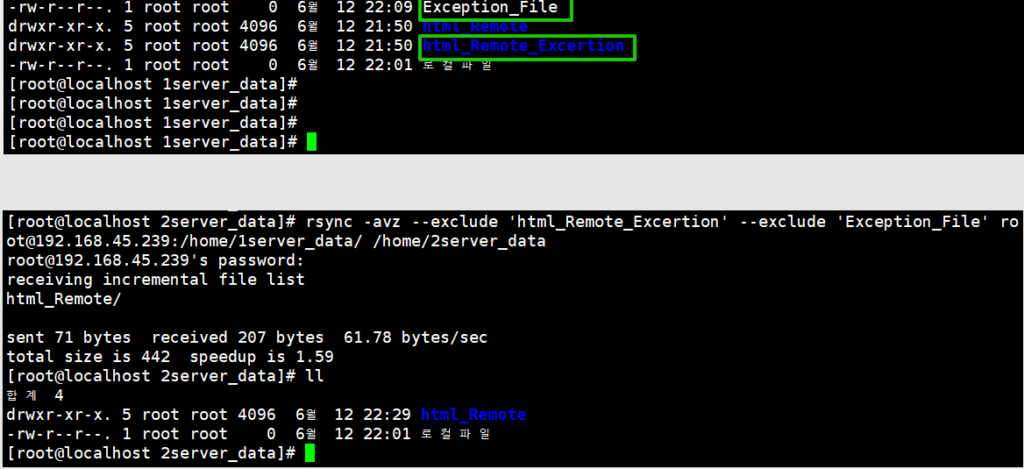
🔲 rsync Daemon Method
The rsync daemon allows access per module on port 873 without an SSH account. The traffic is not encrypted, so it is used between servers on the same internal network.
On AlmaLinux 9, install the rsync-daemon package and start the service. On servers that use firewalld, open port 873; on cloud servers, open it in the console firewall. The xinetd method used on RHEL 8 and earlier is gone in 9.
dnf -y install rsync-daemon
systemctl enable --now rsyncd
firewall-cmd --permanent --add-port=873/tcp
firewall-cmd --reload
In the configuration file [/etc/rsyncd.conf], set the module name, its path and the allowed hosts. With read only set to yes, remote clients can only pull from it.
[myhome]
path = /home
uid = root
gid = root
use chroot = yes
read only = yes
hosts allow = 192.168.45.182
max connections = 3
timeout = 30
From the remote side, a double colon alone after the host lists the modules; adding the module name lists the files inside it.
~]# rsync 192.168.45.239::
myhome
home
~]# rsync 192.168.45.239::myhome
drwxr-xr-x          4,096 2025/06/12 22:14:39 .
drwxr-xr-x          4,096 2025/06/12 22:21:10 1server_data
drwxr-xr-x          4,096 2025/06/12 22:14:39 2server_data
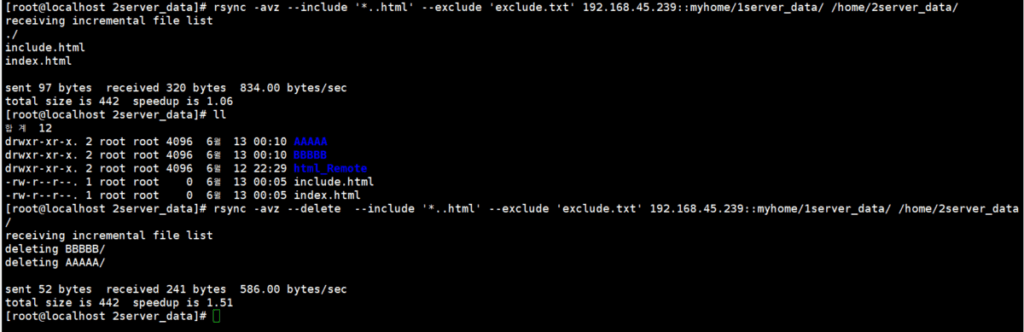
Copying uses the form [host::module/path]. --delete removes files from the destination that are not in the source, and --include keeps only the items placed before --exclude out of the exclusion.
~]# rsync -avz 192.168.45.239::myhome/1server_data/ /home/2server_data/
receiving incremental file list
./
Exception_File
html_Remote/
html_Remote_Excertion/

sent 58 bytes  received 332 bytes  780.00 bytes/sec
total size is 442  speedup is 1.13
~]# rsync -avz --delete 192.168.45.239::myhome/1server_data/ /home/2server_data/
~]# rsync -avz --include '*.html' --exclude 'exclude.txt' 192.168.45.239::myhome/1server_data/ /home/2server_data/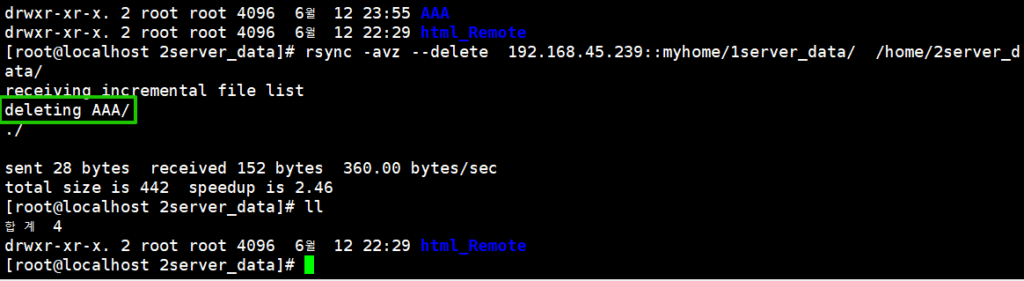
On a server with SELinux enabled, access to the module path may be blocked with [Permission denied (13)]. In the test it went through after turning SELinux off with [setenforce 0].
~]# rsync -avz 192.168.45.239::myhome/1server_data/ /home/2server_data/
receiving incremental file list
rsync: change_dir "/1server_data" (in myhome) failed: Permission denied (13)
sent 8 bytes  received 90 bytes  65.33 bytes/sec
total size is 0  speedup is 0.00
rsync error: some files/attrs were not transferred (see previous errors) (code 23) at main.c(1658) [Receiver=3.1.2]--bwlimit caps the transfer speed in KiB/s, and adding -P shows the progress of each file alongside. --max-size and --min-size transfer only files within the given size range.
rsync -avzP --bwlimit=100 192.168.45.239::myhome/1server_data/ /home/2server_data/
rsync -avz --max-size='3M' --min-size='10k' 192.168.45.239::myhome/1server_data/ /home/2server_data/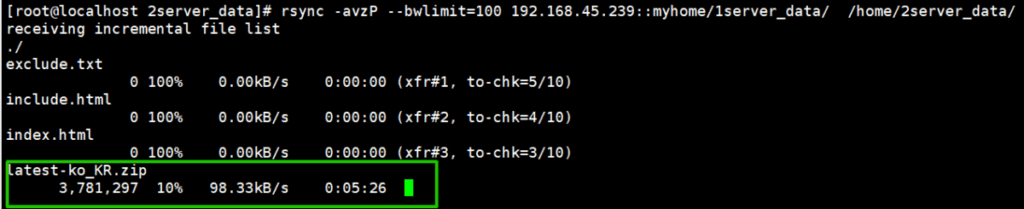
ℹ️ Affiliate Disclosure
This site's content contains affiliate links. When a visitor buys a product or service through one of them, the site receives a commission from the seller. The amount the buyer pays(it goes down during event discounts ↓)does not go up. Posted prices, discounts, and stock reflect the time of writing and may differ, so confirm with the seller before buying. Products are chosen and reviewed by our own standards, and commissions do not affect the order or content of reviews.