
What Is a CDN: CDN Meaning, Why Use It, and How to Connect WordPress
A CDN (Content Delivery Network) is a network that stores copies of the origin server's files on edge servers in many regions and responds to each visitor from the server closest to them. To see whether edge servers respond from cache, we checked the response headers of a public library delivery service such as jsDelivr, and the jQuery file was being served from a cached copy. We compared the two ways of connecting WordPress, rewriting file URLs and using a DNS proxy, based on official documentation.
1️⃣ CDN meaning: edge servers and the origin server
A POP (Point of Presence) is a data center that houses edge servers, and each visitor's request is routed to the nearest POP.
When an edge server receives a request, it responds right away if it has the file stored; if not, it fetches the file from the origin server, responds, and stores it on the edge server. CloudFront, the CDN from AWS, starts delivering to the visitor as soon as the first byte arrives from the origin server (per AWS official documentation).

Edge servers store only the files that visitors have requested, so even for the same file, the first request at each edge server goes all the way to the origin server.
Fetching files when a request comes in like this is called the pull method, and there is also a push method, where you upload files to the CDN in advance.
2️⃣ Why use a CDN: distance and origin server load
The farther apart the visitor and the server are, the longer the round-trip time (RTT) of each request. Opening a single page triggers requests for images, CSS, and JavaScript on top of the HTML, so when a nearby edge server responds, the round trip gets shorter for every request.
Requests answered by an edge server never reach the origin server, which also lowers the origin server's CPU usage and data transfer (bandwidth). When you connect DNS through the Cloudflare proxy, the origin server's IP is not exposed, and DDoS attacks are blocked at the CDN first (per Cloudflare official documentation).
For a site whose visitors are concentrated in the same region as the origin server, the benefit from distance is small. For such sites, the bigger benefits of a CDN are lower origin server load and less data transfer rather than faster response times.
3️⃣ Files that get cached: static files and HTML
By default, Cloudflare caches only static files such as images, CSS, and JavaScript, identified by file extension (per Cloudflare official documentation). Page HTML and JSON are excluded from default caching, so the origin server still responds to them even after you connect Cloudflare.
To cache HTML as well, you need to create a separate cache rule on the CDN. In that case, exclude pages whose content differs from person to person, such as those for logged-in users or shopping carts, from the rule so that visitors never see someone else's screen.
4️⃣ Connecting WordPress: file URL rewriting and DNS proxy
To connect a CDN to WordPress, you either change only the static file URLs to CDN URLs, or set your domain's DNS to the CDN proxy so that every request goes through the CDN.
| method | Where you connect it | Requests through the CDN | Origin server IP |
|---|---|---|---|
| File URL rewrite | Enter the CDN address (CNAME) in the cache plugin's CDN settings | Static files such as images, CSS, and JavaScript | Stays public |
| DNS proxy | Point the domain's DNS records to the CDN proxy | All HTTP and HTTPS requests to the site | Hidden behind the CDN |
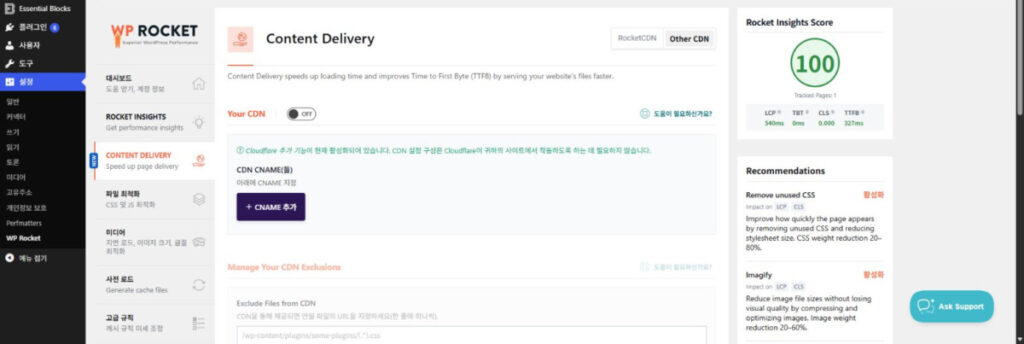
With the file URL rewrite method, cache plugins such as WP Rocket let you enter the address (CNAME) provided by your CDN provider in their CDN settings. Once entered, the image, CSS, and JavaScript URLs in the page HTML are changed to CDN URLs (per WP Rocket official documentation). The HTML itself is still served by the origin server.
With the DNS proxy method, your domain's DNS is managed by the CDN provider. Cloudflare also offers a way to connect the proxy without moving your nameservers, by adding only CNAME records at your existing DNS provider. This method is available only on Business plans and above (per Cloudflare official documentation).
5️⃣ Checking cache hits: the cf-cache-status and age headers
You can tell whether a CDN served a file from cache by its response headers. Below are the command we used to check the response headers of the jQuery file distributed by jsDelivr and its output.
curl -sI https://cdn.jsdelivr.net/npm/jquery@3.7.1/dist/jquery.min.js | grep -iE "^(cache-control|cf-cache-status|age|server):"cache-control: public, max-age=31536000, s-maxage=31536000, immutable
age: 45920
cf-cache-status: HIT
server: cloudflare[server: cloudflare] shows that a Cloudflare edge server sent this response, and [cf-cache-status: HIT], added by Cloudflare, means it was served from cache. [age: 45920] shows that this file has been in the cache for about 12 hours and 45 minutes. [max-age=31536000] is the origin server's instruction that the file may be stored for one year.
To see how far a request goes when the value is [MISS], [DYNAMIC], or [BYPASS] instead of [HIT], press the value buttons in the diagram below.
cf-cache-status: HITcf-cache-status: MISScf-cache-status: DYNAMICcf-cache-status: BYPASSCache-Control: no-store or private🔢 FAQ & Recommended Content

 Cache
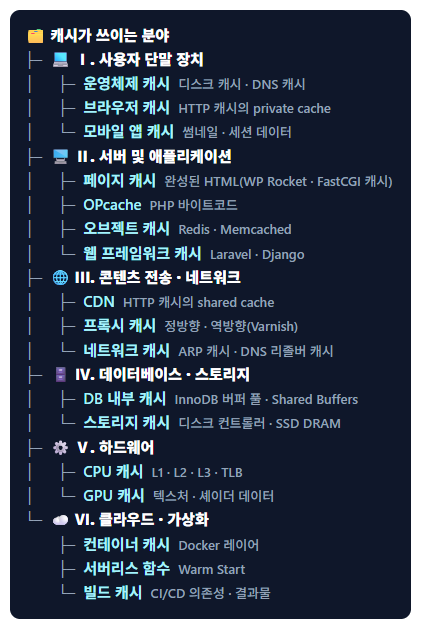
Cache: Definition and All Fields Where Caching Is Used
Sorts out the areas where caching is used, from the browser to inside the server, including CDN edge server caches.
Cache
Cache: Definition and All Fields Where Caching Is Used
Sorts out the areas where caching is used, from the browser to inside the server, including CDN edge server caches.
 Varnish
Installing and configuring Varnish Cache on Apache and Nginx
Shows how to install and configure the reverse proxy cache Varnish in front of Apache and Nginx.
Varnish
Installing and configuring Varnish Cache on Apache and Nginx
Shows how to install and configure the reverse proxy cache Varnish in front of Apache and Nginx.
 Cloudflare
 CDN Setup: Pro Plan
Connects Cloudflare to WordPress with the DNS proxy method, then covers the speed difference and settings between the Free and Pro plans.
Cloudflare
Cloudflare CDN Setup: Pro Plan
Connects Cloudflare to WordPress with the DNS proxy method, then covers the speed difference and settings between the Free and Pro plans.
ℹ️ Affiliate Disclosure
This site's content contains affiliate links. When a visitor buys a product or service through one of them, the site receives a commission from the seller. The amount the buyer pays(it goes down during event discounts ↓)does not go up. Posted prices, discounts, and stock reflect the time of writing and may differ, so confirm with the seller before buying. Products are chosen and reviewed by our own standards, and commissions do not affect the order or content of reviews.