
Cache: Definition and All Fields Where Caching Is Used
We organized the fields where caching is used, from hardware to the web, into a single tree following the classifications of Wikipedia, MDN and the official WordPress documentation. CPUs, operating systems, databases and browsers all use the same name, so "clearing the cache" removes different things depending on the layer.
A cache temporarily stores data that is used often or will be needed soon in storage faster than the original, and when the same request comes in, it answers with that copy instead of the original.
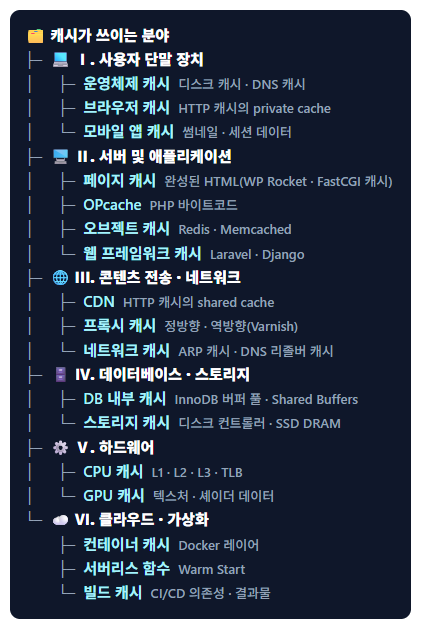
The English Wikipedia article Cache (computing) divides caches into hardware caches such as CPU and GPU caches and software caches such as disk, web, DNS and database caches. The tree below groups this classification by where each cache sits, and web caches follow MDN's private cache and shared cache classification.
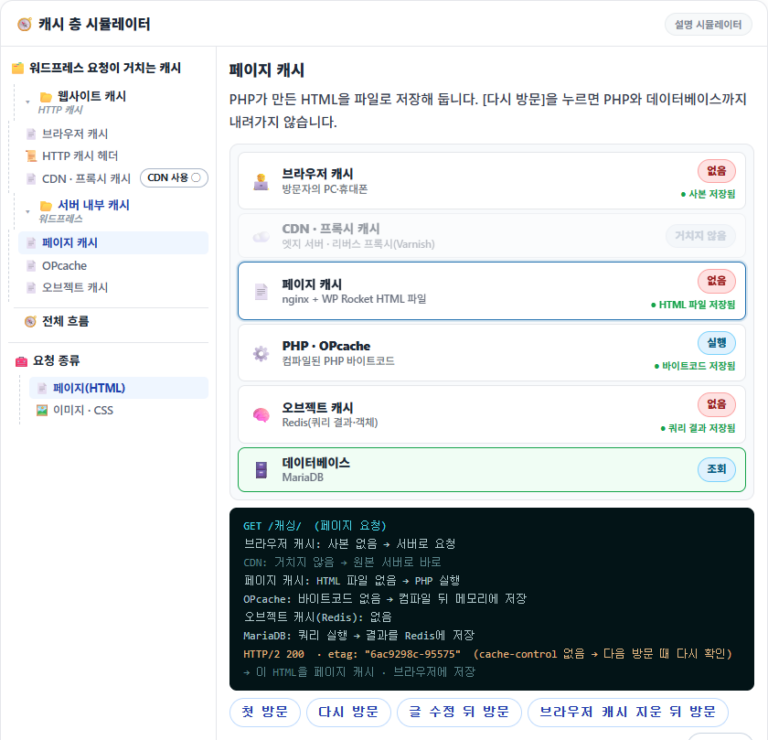
You can check with a simulator the order in which browser, CDN and server-side caches handle a single WordPress request in the Website Cache & Server-Side Cache: How Caching Works in WordPress post.
Ⅰ. User Devices
Caches on user devices such as personal computers and smartphones can be divided into OS cache, browser cache and mobile app cache.
The disk cache (page cache) keeps data read from disk in memory and is managed by the operating system kernel. The DNS cache stores recently looked-up domains and IP addresses.
When the same resource is requested again, it either doesn't go to the server or only checks whether it has changed. With a Service Worker (Cache API), a web app can open from stored resources even offline.
Apps that handle large content store downloaded data and recently viewed lists on the device so they don't download the same data again.
Ⅱ. Server and Application Cache
Server-side cache is the cache attached to the process of building a page after a request reaches the server. The official WordPress documentation explains it as caching plugins (page cache), object cache and server cache (opcode caches such as OPcache).
For the same page request, it sends the stored copy without running PHP. There are caching plugins and web server caches.
When the same file runs again, compilation is skipped. It has been built in since PHP 5.5.
It stores frequently used data in an in-memory store so the same query isn't repeated.
Web frameworks store rendered templates and query results in their own cache.
Ⅲ. Content Delivery / Network Infrastructure Cache
Network infrastructure caches answer with copies between visitors and the origin server, reducing physical distance and load on the origin server. In the HTTP caching standard, they are the shared cache used by many visitors.
Delivers content from the server closest to the visitor among servers spread around the world. Its structure and benefits are covered in the What Is a CDN? Reasons to Use a CDN and 5 Benefits article.
A forward proxy stores responses on the client side, as in a corporate network, and a reverse proxy stores them in front of the server.
Network devices store IP–MAC mappings in the ARP cache, and ISP and public DNS resolvers store lookup results for the record's TTL.
Ⅳ. Database and Storage System Cache
Because disk I/O is slow, databases and storage devices keep frequently read data in memory.
Keeps frequently read data and indexes in memory. The MySQL query cache was removed in 8.0; MariaDB still has it, but it is off by default.
Memory built into the hard disk controller and DRAM inside the SSD store data temporarily, reducing I/O latency.
Ⅴ. Hardware-Level Cache
Hardware caches are high-speed memory inside the CPU and GPU that process data faster than main memory (RAM).
L1 exists separately for each core and is split into an instruction cache and a data cache, while L3 is shared by all cores. The memory management unit (MMU) stores the results of translating virtual addresses to physical addresses in the TLB.
It raises GPU processing efficiency in games, 3D graphics and machine learning workloads.
Ⅵ. Cloud / Virtualization Cache
Cloud and virtualized environments reuse container images, function runtime environments and build outputs to shorten deployment and run times.
A Docker image consists of several layers, and layers that haven't changed are not rebuilt or downloaded again.
Keeps a finished invocation's runtime environment for a while and reuses it for the next call, reducing initialization time (Cold Start) (Warm Start).
Shortens repeated build times.
🔢 FAQ & Recommended Content







ℹ️ Affiliate Disclosure
This site's content contains affiliate links. When a visitor buys a product or service through one of them, the site receives a commission from the seller. The amount the buyer pays(it goes down during event discounts ↓)does not go up. Posted prices, discounts, and stock reflect the time of writing and may differ, so confirm with the seller before buying. Products are chosen and reviewed by our own standards, and commissions do not affect the order or content of reviews.