
wp-config.php Security: Hardening WordPress
While wp-config.php was open in vi, the swap copy (.swp) created in the same folder could be opened straight from a web address. We confirmed this on this site on 2026-09-13, and that copy contained the database password and every security key.
Work through the six checks below for wp-config.php security, from top to bottom.
1️⃣ What Happens When wp-config.php Is Exposed
wp-config.php holds the database name, user and password, plus eight security keys that encrypt login cookies.
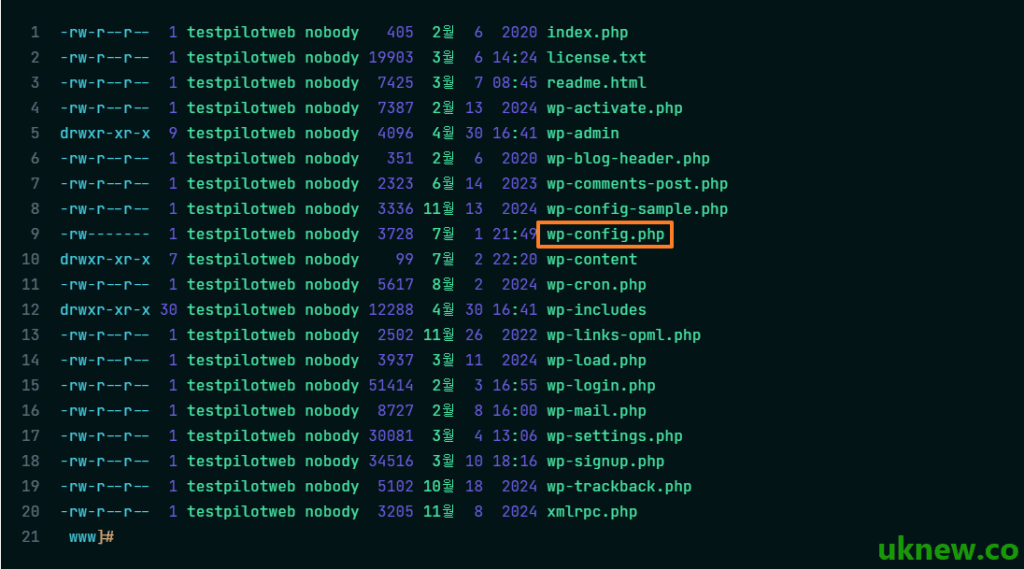
If this file is exposed, an attacker can connect to the database directly or forge login sessions with the security keys and take over admin rights.
2️⃣ Restrict File Permissions to 600
WordPress usually sets folders to 755 and files to 644, but wp-config.php is restricted to 600 so that only the owner can read and write it. Here is the command run on our test site, testpilotweb.com.
chmod 600 /home/testpilotweb/www/wp-config.php
stat -c '%a %U' /home/testpilotweb/www/wp-config.php
600 testpilotweb
On servers where PHP runs under a different account from the file owner, WordPress cannot read the file at 600 and the site will not open. On testpilotweb.com, PHP-FPM runs under the same account as the owner, so the site still opened normally after the change.
On shared hosting without SSH, set the same value from the permissions menu of an FTP client or the cPanel File Manager.
3️⃣ Block Access at the Web Server
If you cannot change permissions, or want a second layer, have the web server refuse requests for wp-config.php altogether.
🔲 Apache (.htaccess)
<Files wp-config.php>
    Require all denied
</Files>
The [order allow,deny] and [deny from all] lines common in older articles are Apache 2.2 syntax. On Apache 2.4 they only work when the compatibility module (mod_access_compat) is enabled.
🔲 nginx
nginx does not read .htaccess, so add a [location] rule to the server configuration; this site returns 403 the same way.
location ~* /wp-config(-sample)?\.php$ {
    deny all;
}
Escape the dot in the regex as [\.]. If you leave the dot as is, post URLs such as [/wp-config-php-basic-settings/] get blocked too; this site once had a post return 403 because of exactly that mistake.
4️⃣ Block Editor Swap Files and Backup Files
The [.swp] copy created while a file is open in vi and the [.bak] copy left before editing are not run as PHP; they are served as plain text.
nginx cuts off both kinds; [444] is an nginx-only code that closes the connection without a response.
location ~ \.sw[opx]$ { return 444; }
location ~* (\.(bak|orig|old|save)|_ori|\.bak\.[0-9]+)$ { return 444; }
5️⃣ Move It One Level Above the Web Root
WordPress looks for wp-config.php in the installation folder first and, if it is not there, loads it from the folder directly above. Moving the file one level outside [public_html] puts it out of reach of any web address.
However, if the folder above contains another WordPress install's [wp-settings.php], WordPress will not read the wp-config.php there. After moving it, check right away that the site and the admin screen still open.
6️⃣ Disable File Editing
This turns off the ‘Theme File Editor’ and ‘Plugin File Editor’ menus in the WordPress dashboard. Even if an attacker takes over an admin account, it blocks one of the most direct ways to inject malicious code through the browser.
define('DISALLOW_FILE_EDIT', true); 7️⃣ Delete wp-config-sample.php
wp-config-sample.php is an example file used during installation, so you can delete it once installation is done. It holds nothing sensitive, but it is a file attackers look for at its default path, so there is no reason to keep it.
The sample file's actual lines and what each one means are covered in the wp-config.php Basic Settings article. If you keep the file, the [(-sample)?] part of the nginx rule above blocks it as well.

ℹ️ Affiliate Disclosure
This site's content contains affiliate links. When a visitor buys a product or service through one of them, the site receives a commission from the seller. The amount the buyer pays(it goes down during event discounts ↓)does not go up. Posted prices, discounts, and stock reflect the time of writing and may differ, so confirm with the seller before buying. Products are chosen and reviewed by our own standards, and commissions do not affect the order or content of reviews.