
What Is Shared Hosting? CPU and RAM Isolation, Limits, and Pros and Cons (WordPress and All Websites)


Affiliate disclosure v3.1
Affiliate disclosure v3.2 (mobile)

Shared hosting is hosting where many websites share the CPU and RAM of a single server. This guide covers how isolation puts a resource limit on each account, what happens when you hit that limit, and when shared hosting fits WordPress and other websites, split into pros and cons.

Shared hosting means sharing a server with neighboring sites, so CPU and RAM isolation is what matters most. Here is what isolation can and cannot prevent, why the 508 error appears, the pros and cons of shared hosting, and when to move to a VPS.

1️⃣ How Shared Hosting Works: One Server, Many Accounts

A single shared hosting server holds anywhere from dozens to hundreds of Linux accounts. What you get is one of those accounts and your own folder under /home/username/.

Accounts are separated by files and permissions. From your account, you cannot open another account's folders, and each account gets its own databases.

But the resources that run your site all come from that one server. The web server that receives requests, the CPU and memory that run PHP, the database server, the disk, and even the network line and IP address are shared by every account.
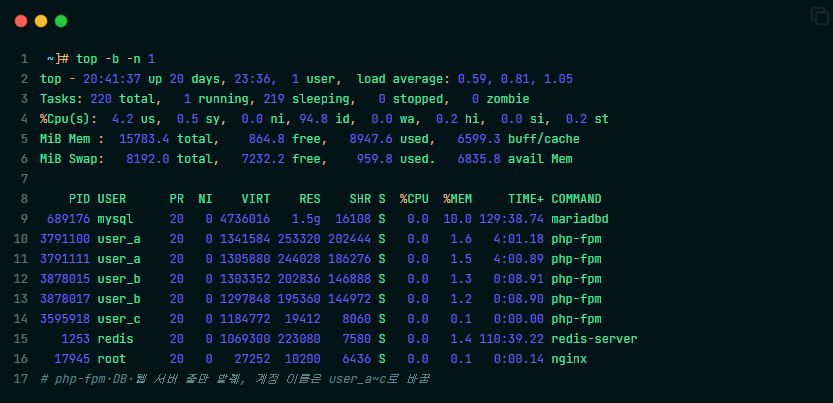
Shared hosting structure: top output from a Linux server where php-fpm processes from several accounts share the same CPU and memory

Linux servers show, through the top command, PHP processes (php-fpm) from several accounts listed together under the same CPU and memory.

Inside a Single Shared Hosting Server
Dozens to hundreds of Linux accounts
🖥️ One shared hosting serverLinux
SeparatedSeparated between accounts: files and permissions
user_aMy site
📁 /home/user_a/
🗄️ user_a_wp
user_b
📁 /home/user_b/
🗄️ user_b_wp
user_c
📁 /home/user_c/
🗄️ user_c_wp
Dozens to hundreds of accounts
🔒 From your account, you cannot open another account's folders. Each account also has its own databases.
▼ Every account uses the same resources ▼
SharedResources that run the site: all from one server
🌐Web server
⚙️CPU
🧠Memory
🗄️DB server
💽Disk
📶Network · IP

🔲 CloudLinux Shared Hosting

Many shared hosting providers in the global market run on CloudLinux, an operating system built for shared servers. Hostinger, Namecheap, and ChemiCloud are among them.

CloudLinux puts each account inside a partition called LVE and sets limits on CPU, memory, disk speed, and concurrent connections. When an account goes over a limit, only that account slows down or stops.

It works with many control panels, including cPanel, Plesk, and DirectAdmin. Some providers, like Hostinger, run it under their own panel (hPanel).

The limits are written as numbers in pricing tables or help docs. Hostinger's Web Single shared plan comes with 1 CPU core, 1 GB of memory, 6,144 KB/s of disk speed, and 20 PHP workers. The Unlimited plan in the same table has 2 CPU cores and 3 GB of memory.

Inside a CloudLinux Shared Hosting Server
Example figures: Hostinger Web Single
🖥️ One shared hosting serverCloudLinux
LVEA partition for each account: limits on CPU, memory, disk speed, and concurrent connections
user_aMy site
CPU1 core
Memory1 GB
Disk speed6,144 KB/s
PHP workers20
user_bOver limit
CPU1 core
Memory1 GB
Disk speed6,144 KB/s
PHP workers20
Only this account, which went over its limit, slows down or stops
user_c
CPU1 core
Memory1 GB
Disk speed6,144 KB/s
PHP workers20
Dozens to hundreds of accounts
Control panelWorks with many panels
cPanel Plesk DirectAdmin hPanel Hostinger's own panel
Limit figures are from Hostinger's official docs for the Web Single shared plan (2026-10-03). Every account gets the same limits.

🔲 Shared Hosting in Korea

I'm Korean, so I'd also like to cover shared hosting in Korea for readers there. Korean shared hosting plans are tiered by traffic and disk space, not by CPU and RAM.

None of the three Korean providers we checked publish the CPU and memory limit for a single account. Instead, some plans cap daily traffic and block the site once it is used up.

Korean shared hosting usually limits daily traffic and concurrent connections per account with Apache's mod_cband. Many providers don't split CPU and memory by account; every account shares the whole server.

How Korean Shared Hosting Plans Are Tiered
Sample pricing from a Korean provider
🖥️ One shared hosting serverLinux · Apache mod_cband
TierWhat sets the tiers: traffic and disk
Cheapest tier
Daily traffic1.6 GB
Disk700 MB
CPU · memoryNot disclosed
Middle tier
Daily traffic4 GB
Disk1.4 GB
CPU · memoryNot disclosed
Next tier
Daily traffic10 GB
Disk4 GB
CPU · memoryNot disclosed
⛔ Once the daily traffic is used up, the site is blocked.
SharedCPU · memory: not split by account; the whole server is shared
⚙️All CPU cores
🧠All memory
👥Every account together
Based on typical Korean providers' pricing tables (2026-10-03)

2️⃣ Shared Hosting vs. VPS, Cloud, and Dedicated Servers

The difference between shared hosting and a VPS comes down to limits versus guarantees. Shared hosting only sets a line you must not cross; a VPS gives you a fixed share of CPU and memory from the start.

How the server is divided: Shared · VPS · Cloud · Dedicated
Dark cells = your share
Shared hosting
How it's dividedOne server split across dozens to hundreds of accounts
Your share of resourcesOnly a limit, no guarantee
Server managementHosting provider
VPS
How it's dividedOne server split into a few parts by virtualization
Your share of resourcesCPU and memory fixed from the start
Server managementYou (the provider, if managed)
Cloud
How it's dividedCarved out of resources pooled from many servers
Your share of resourcesScale up or down as needed
Server managementYou or the provider
Dedicated server
How it's dividedOne whole server
Your share of resourcesThe entire server
Server managementYou
Hosting types explained in detail → WordPress Hosting: 5 Criteria for Stability and Speed

3️⃣ CPU and RAM Isolation: What It Prevents and What It Doesn't

CloudLinux partitions stop a neighboring account from hogging the CPU and memory. Even when a neighbor gets a traffic spike, that account only uses up to its own limit. A server without partitions can't even prevent this.

But a limit is not a guarantee. If a provider packs many accounts onto one server, everyone slows down when several accounts hit their limits at the same time.

If the server itself goes down, every account goes down with it, partitions or not. And because accounts share the IP address, your email can be blocked too if a neighbor sends spam and the IP gets blacklisted.

What partitions prevent and what they don't
A limit is not a guarantee
Situation
CloudLinux partitions
Server without partitions
A neighbor hogs CPU and memory
✅Prevented
⛔Not prevented
Several accounts hit their limits at once
⛔Not prevented
⛔Not prevented
The server itself goes down
⛔Not prevented
⛔Not prevented
Shared IP blacklisted for spam (email)
⛔Not prevented
⛔Not prevented

4️⃣ When You Hit a Limit: The 508 Error and Slowdowns

Each limit causes a different symptom. When you hit the CPU or disk speed limit, the site slows down.

When you go over the concurrent connection limit, visitors get the [508 Resource Limit Is Reached] error. When you go over the memory limit, processes are cut off and a 500 or 503 error appears.

On CloudLinux hosting, you can see which limit you hit on the Resource Usage page in cPanel, Plesk, or DirectAdmin. If the same error keeps coming back, check your cache plugin first.

A different symptom for each limit
Based on CloudLinux official docs
CPU SPEED
Loading…
The site slows down
Disk speed IO
Loading…
The site slows down
Connections EP
508Resource Limit Is Reached
Visitors get a 508 error
Memory PMEM
500 · 503Processes cut off
Processes are cut off: 500 · 503 errors
Resource UsageSee which limit you hit in cPanel, Plesk, or DirectAdmin

5️⃣ Pros and Cons of Shared Hosting: WordPress and Other Websites

Shared hosting has the lowest upfront cost. With a 1- to 3-year commitment, it starts at $2–7 a month, and the provider handles server management. In return, CPU and memory are capped. After the first term, most plans renew at $10–18 a month, close to the entry price of cloud hosting.

A site made only of HTML will rarely hit the limits. WordPress runs PHP and queries the database for every page, so turn on a cache plugin first.

If you're starting a small business site or a small blog on WordPress or a regular website and don't want to spend much, I recommend Hostinger or ChemiCloud, even if they cost a little more. If you want the lowest cost, go with Namecheap.

6 Shared Hosts: First Payment vs. Renewal Price
US dollars · per month
First payment (commitment)Renewal · regular price
Namecheap Stellar
30-day free trialcPanel
First $2.28 · billed yearlyRegular (monthly billing) $5.88
Bluehost Starter
30-day refundOwn dashboard
First $3.99 · 36 monthsRenewal $9.99
Hostinger Premium
30-day refundhPanel
First $2.99 · 48 monthsRenewal $10.99
ChemiCloud Starter
45-day refundcPanel
First $1.95 · 3 yearsRegular $11.95
GoDaddy Economy
30-day refundcPanel
First $6.99 · 1 yearRenewal $11.99
SiteGround StartUp
30-day refundSite Tools
First $2.99 · 12 monthsRenewal $17.99
Based on each provider's official pricing page (2026-10-03) · cheapest shared plan · first payment is the monthly equivalent when paying the full term upfront · Namecheap's first payment applies after the 30-day free trial · sorted by renewal price

Before choosing a host, I strongly recommend reading Reddit threads about providers like Bluehost and GoDaddy. If your site keeps going down while you're starting a small business, and visitors leave because the site is slow, you won't rank in SEO or AEO and your traffic will drop. I recommend Hostinger and ChemiCloud among shared hosts for their stability and speed, and if you need to start on a tight budget, Namecheap is the better choice. To be clear, I'm an affiliate of all three hosts, and they are rated better than the older providers for stability and speed.

6️⃣ When to Move to a VPS

Look at three things before you move.

If 508 or 503 errors keep coming back even with caching on, you're short on resources. If you hit the limits even on the highest shared tier, there's nowhere left to upgrade.

The end of your first term is another signal. At a renewal price of $10–18 a month, you can afford a managed cloud like Cloudways, which starts at $11 a month.

3 Signs It's Time to Move to a VPS
If any one applies
1Errors keep coming back even with caching on
You're short on resources.
508503
2Limits hit even on the highest shared tier
There's no higher tier left within shared hosting.
Top tier · limit reached
3When your first term ends
Your renewal price can pay for a managed cloud.
Shared renewal$10~18
Cloudways$11~
Compare managed cloud and VPS too → Top 7 WordPress Hosting

🔢 FAQ

The [Unlimited] in a plan's name only covers some items, such as the number of websites. Even Hostinger's Unlimited plan lists limits of 50 GB of disk, 600,000 files and folders (inodes), 2 CPU cores, and 3 GB of memory in its official table.

No. Google's John Mueller has said several times that it's normal for many sites to share an IP address and that a dedicated IP brings no SEO advantage. Where a shared IP matters is email, as covered in 3️⃣.

Hostinger, ChemiCloud, and Namecheap include free SSL with shared hosting and install it automatically. Namecheap says it's free for the first year. Among the three Korean providers we checked, only one included free SSL; the others sold it separately.

No. You move the site files and database, then point your domain to the new server. Some hosts migrate your site for free when you switch; ChemiCloud and Namecheap list free migration on their pricing pages.

ℹ️ Affiliate Disclosure
This site's content contains affiliate links. When a visitor buys a product or service through one of them, the site receives a commission from the seller. The amount the buyer pays(it goes down during event discounts ↓)does not go up. Posted prices, discounts, and stock reflect the time of writing and may differ, so confirm with the seller before buying. Products are chosen and reviewed by our own standards, and commissions do not affect the order or content of reviews.

Similar Posts

  • [SEO] 2023년에 워드프레스 전자책 및 SEO 전자책과 강의를 구매하면 안되는 이유

    2023년 티스토리의 운영 정책이 블로거들에게 안 좋은 방향으로 바뀌면서 많은 블로거들이 워드프레스 CMS 또는 구글블로거로 이전하는 경우가 많아졌다. 그동안 미뤄 왔던 워드프레스 사이트의 검색엔진최적화를 진행하게 되면서 SEO 전자책이 해외에는 있지만 국내에는 없기에 나와 있는 책을 우연히 구매하게 되었다. 구매한 SEO E북은 말도 안 될 정도로 빈약한 구성을 가진 걸 보고 놀랐다. 이런 높은…

  • [WP] 워드프레스 무차별 대입 공격(brute-force attack)을 막는 9가지 방법

    워드프레스 CMS로 만든 웹 사이트를 운영하게 되면, 관리자 주소는 https://www.domain.com/wp-admin이 됩니다. 무차별 대입 공격에 취약할 수 있는 이유는 관리자 페이지 주소 wp-admin 주소가 그대로 노출되기 때문입니다. 워드프레스를 포함한 웹 사이트의 관리자 주소가 admin과 같은 주소를 사용해서 무차별 대입 공격(brute-force attack)에 노출되는 것은 되도록 방지해야 합니다. 무차별 대입 공격(brute-force attack)이란? 웹 사이트나 컴퓨터 및…

  • [WP] 워드프레스 글 ID 및 카테고리 ID 확인 방법

    워드프레스 사이트를 관리할 때 글 ID를 확인해야 하는 경우가 있습니다. 작업 도중 워드프레스 글 ID는 좌측 하단에서 확인할 수 있습니다. 워드프레스 카테고리 ID 역시 카테고리 페이지에서 동일한 방법으로 확인할 수 있습니다. 메모장에 글 ID를 좀 더 큰 글자로 쉽게 확인하는 방법입니다. 워드프레스 글 ID 요소 검사로 확인하기 글이나 카테고리에 마우스를 올려 놓은 뒤…

  • [WP] 워드프레스 이미지 핫링크 차단 방법 4가지

    이미지 핫링크(Image hotlinking)는 웹사이트 성능에 부정적인 영향을 줍니다. Image hotlink란 무엇이며, 웹사이트에 어떤 부정적인 영향을 주는지, 그리고 어떤 사이트에서 내 사이트에 핫링크를 적용했는지 알아 보도록 하겠습니다. 1. 이미지 핫링크(Image hotlink)란? ‘이미지 핫링크’는 누군가 내 웹사이트에서 직접 이미지(를 포함한 미디어파일)를 링크하여 자신의 웹사이트에 이미지를 삽입하는 것입니다. 핫링크는 ‘무단 도용’이며, 내 사이트의 저작권을 허가 없이…

  • [WP] 워드프레스 vs 티스토리 더 나은 선택은?

    수익형 블로그라서 해서 한국에서는 티스토리를 많이 이용하고 있습니다. 티스토리의 가장 큰 장점은 구글 애드센스 광고를 블로그에 게재해서 수익을 올릴 수 있다는 장점이 있습니다. 하지만 티스토리 블로그는 너무 많은 문제를 가지고 있습니다. 앞으로도 절대 해결되지 않을 것이 99% 이상 기정 사실화 되었다고 할 수 있습니다. 워드프레스 vs 티스토리를 고민하는 분들이 2023년 이후 점점 늘어나고…

  • CDN이란? CDN 사용 이유와 이점 5가지

    CDN(Content delivery network:콘텐츠 전송 네트워크)은 콘텐츠를 효율적으로 전송하기 위해 여러 서버 위치에 데이터를 저장해서 제공하는 시스템입니다. HTML, CSS, 자바스크립트, 이미지 및 동영상 등의 콘텐츠를 신속하게 전달할 수 있습니다. CDN 사용 이유와 효과 1. 지리적 이점 원본 서버(Origin Server)와 떨어져 있어도(해외 등) 클라이언트가 웹 사이트에 접속했을 때 들어온 콘텐츠 요청은 가까운 CDN 서버에서 캐싱된…

Leave a Reply

Your email address will not be published. Required fields are marked *

Prove your humanity: 10   +   7   =