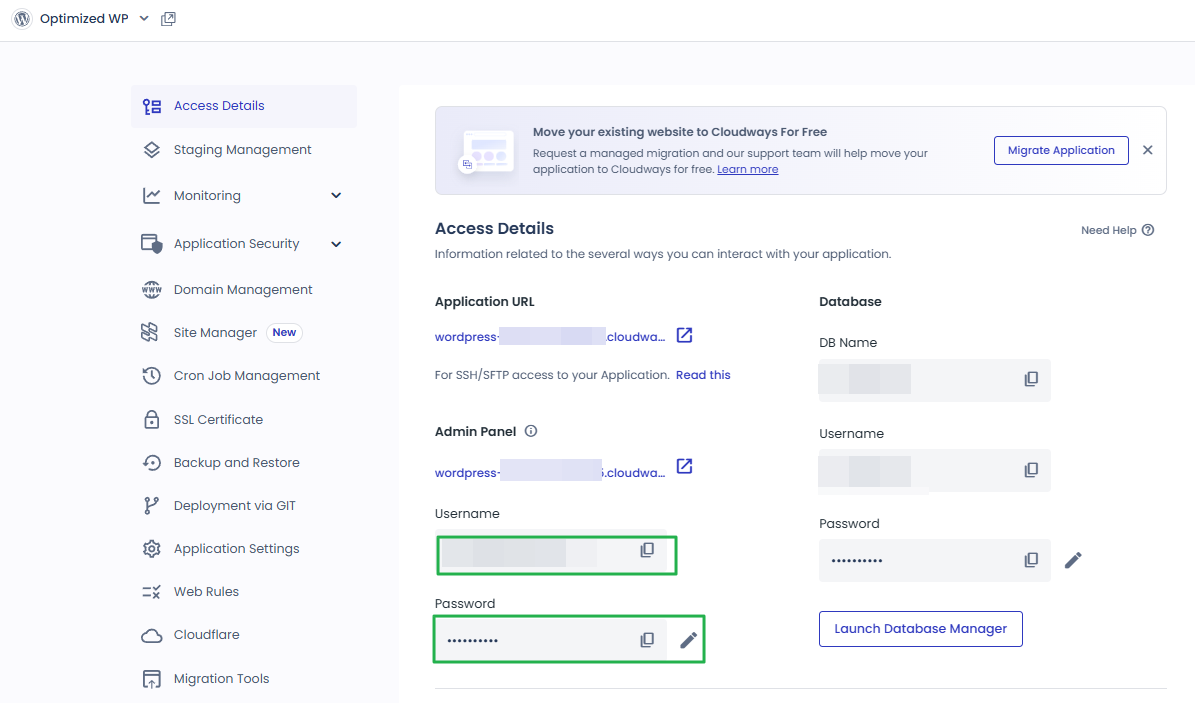
You have the Master credentials above to gain the access for SFTP or SSH (e.g using Putty) Alternatively, you can upload multiple SSH Public Keys to your Cloudways server to access it without password prompts.
SSH Public Keys
Or, launch SSH terminal in your browser by clicking the button below.
Launch SSH Terminal
unified.cloudways.com/apps/…/access_detail
CLOUDWAYSmy-server › my-app › Access Details
Application Credentials
You can create and use multiple Application credentials for SFTP or SSH access to this Application. More details
Public IP
203.0.113.24
SSH/SFTP Details
UsernamePasswordSSH
No data Available
app_user_a***********View SSH Keys⋮
App Credentials
Username
Enter Usernameapp_user_a
Password
Enter Password••••••••••
✓ You are all set!
คลิกช่องที่ไฮไลต์ในเมนูซ้ายหรือปุ่มบนหน้าจอ
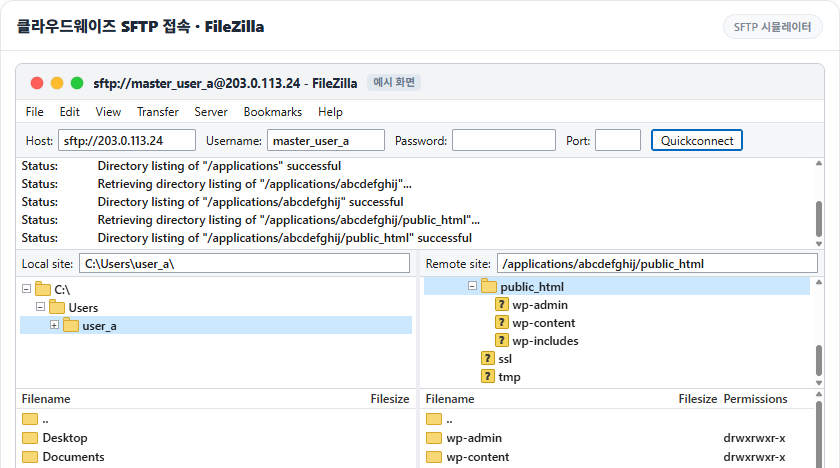
2️⃣ ตั้งค่าการเชื่อมต่อ SFTP ใน FileZilla
ถ้าเว้นช่อง Port ว่างใน Quickconnect ของ FileZilla แล้วใส่แค่ IP ใน Host จะพยายามเชื่อมต่อแบบ FTP ไม่ใช่ SFTP ที่ล็อกขึ้นแค่ [Connecting to IP เซิร์ฟเวอร์:21…] แล้วไม่ไปต่อ เพราะเซิร์ฟเวอร์ Cloudways ไม่ตอบที่พอร์ต 21
ใส่ Public IP ใน Host โดยเติม [sftp://] ข้างหน้า หรือใส่ 22 ในช่อง Port แล้ววาง Username และ Password จากข้อมูลรับรองหลักหรือข้อมูลรับรองของแอปพลิเคชัน เชื่อมต่อครั้งแรกจะมีหน้าต่าง [Unknown host key] ขึ้นมา ติ๊ก [Always trust this host, add this key to the cache] แล้วกด [OK] ครั้งต่อไปหน้าต่างนี้จะไม่ขึ้นอีก
Generating public/private ed25519 key pair.Enter file in which to save the key (/root/.ssh/id_ed25519): /root/.ssh/cloudways_ed25519Enter passphrase for '/root/.ssh/cloudways_ed25519' (empty for no passphrase): Enter same passphrase again: Your identification has been saved in /root/.ssh/cloudways_ed25519Your public key has been saved in /root/.ssh/cloudways_ed25519.pubThe key fingerprint is:SHA256:xxxxxxxxxxxxxxxxxxxxxxxxxxxxxxxxxxxxxxxxxxx my-keyThe key's randomart image is:+--[ED25519 256]--+| o. o*|| . .. .o.|| .. .o || .. o. . .+ o|| .o=S.o +o.E || ==*=o. o. || oo=oBo. || .+O+o || oB* |+----[SHA256]-----+
สร้างคีย์ด้วย [ssh-keygen -t ed25519] จะได้สองไฟล์ คือ Private Key และ Public Key [.pub] กด [SSH Public Keys] ใน [Master Credentials] ใส่ชื่อสำหรับแยกแยะใน [Label] และเนื้อหา Public Key ใน [SSH Key] แล้วกด [Submit]
You have the Master credentials above to gain the access for SFTP or SSH (e.g using Putty) Alternatively, you can upload multiple SSH Public Keys to your Cloudways server to access it without password prompts.
Or, launch SSH terminal in your browser by clicking the button below.
The authenticity of host '203.0.113.24 (203.0.113.24)' can't be established.ED25519 key fingerprint is SHA256:xxxxxxxxxxxxxxxxxxxxxxxxxxxxxxxxxxxxxxxxxxx.This key is not known by any other names.Are you sure you want to continue connecting (yes/no/[fingerprint])? yesWarning: Permanently added '203.0.113.24' (ED25519) to the list of known hosts.Linux 1234567.cloudwaysapps.com 6.1.0-53-amd64 #1 SMP PREEMPT_DYNAMIC Debian 6.1.187-1 (2026-09-07) x86_64******************************PLEASE NOTE********************************* If this a new instance, cloud-init may still be running and normal ** operations may not work as expected. ** ** Please use `cloud-init status' to check on the status of the instance ** provisioning ** ** Remove this message by editing /etc/motd **************************************************************************Last login: Sun Oct 11 02:13:08 2026 from 198.51.100.7master_user_a@1234567:~$
IP ที่เชื่อมต่อเซิร์ฟเวอร์ Cloudways ด้วย SSH·SFTP ได้ กำหนดที่ [Security] › [Shell Access] ของเซิร์ฟเวอร์ ค่าเริ่มต้นคือ [Allow all IP addresses, except those blocked by the Cloudways security system.] ซึ่งอนุญาตการเชื่อมต่อจากทุก IP และ IP ที่ใส่ข้อมูลรับรองผิดหลายครั้งจะถูกระบบความปลอดภัยของ Cloudways บล็อก
เลือก [Block all IP addresses, except those on the Whitelist.] แล้วในช่อง [Add IP to Whitelist] ให้ใส่ IP สาธารณะของพีซีที่จะใช้เชื่อมต่อ แล้วกด [Add] ตรวจดูว่า IP ที่เข้าไปในรายการถูกต้อง แล้วกด [Save Changes]
Manage Shell Access and whitelist your IP and/or IP subnets for SSH/SFTP and MySQL connections.
SSH/SFTPMySQL
Allow all IP addresses, except those blocked by the Cloudways security system.By default, allow all IP addresses and let the Cloudways security system blocks those that try to exploit SSH/SFTP on your server. In other instances, you can lock yourself out if you input the incorrect credentials several times. To avoid lockouts, you can whitelist your IPs.
Block all IP addresses, except those on the Whitelist.By default, block all IP addresses except those on the whitelist. To allow an IP to SSH/SFTP to your server, you will need to whitelist the IP first.
Whitelist IPAdd IP to Whitelist198.51.100.7
198.51.100.7
*To apply your changes, please click on the SAVE CHANGES button.
คลิกช่องที่ไฮไลต์ในเมนูซ้ายหรือปุ่มบนหน้าจอ
บนเซิร์ฟเวอร์ทดสอบ เมื่อใส่ IP ของพีซีเพียงเครื่องเดียวแล้วบันทึก พีซีที่อยู่ในรายการยังเชื่อมต่อได้ตามเดิม ส่วนเซิร์ฟเวอร์อื่นที่ไม่อยู่ในรายการขึ้น [ssh: connect to host IP เซิร์ฟเวอร์ port 22: Connection timed out]
เชื่อมต่อด้วย SSH แล้วย้ายไปที่โฟลเดอร์ [public_html] ของแอปพลิเคชันก่อนรัน ถ้าพิมพ์ [wp core version] ในโฟลเดอร์อื่น จะขึ้น [Error: This does not seem to be a WordPress installation.]