
RDR2 Map: Interactive Map of Red Dead Redemption 2
RDR2 Map covers the full map of Red Dead Redemption 2, marking 5,449 locations, including treasures, legendary animals, and fast travel points. Toggle categories on and off, or search by name. Only treasures, legendary animals, and fast travel points are shown at first.
1️⃣ How to Use the RDR2 Map
It offers the same features as other Red Dead Redemption 2 map sites. On the full map, which reflects the game’s map size of 75 km2, you can check any coordinates you want.
🔲 Turn Categories On and Off
Pick a group from the tabs above the map and its categories appear below. Click a category to show it on the map; click again to hide it. The number on each tab is how many categories in that group are on. “Reset” restores the starting view, and “Hide all” turns everything off.
🔲 Search by Name or Category
Type a category name in the search box to turn on the whole category; typing “Treasure” shows all 27 treasure spots. Location names use the game's English spelling, so enter them as “Valentine” or “Legendary Alligator”. Matches are outlined in red, and the map moves to them.
🔲 Zoom and Pan
Zoom with the mouse wheel or two fingers, and drag to move. At maximum zoom you can see individual buildings. Hover over a pin to see its name; click it to see its category and name.
2️⃣ 58 Categories in 7 Groups
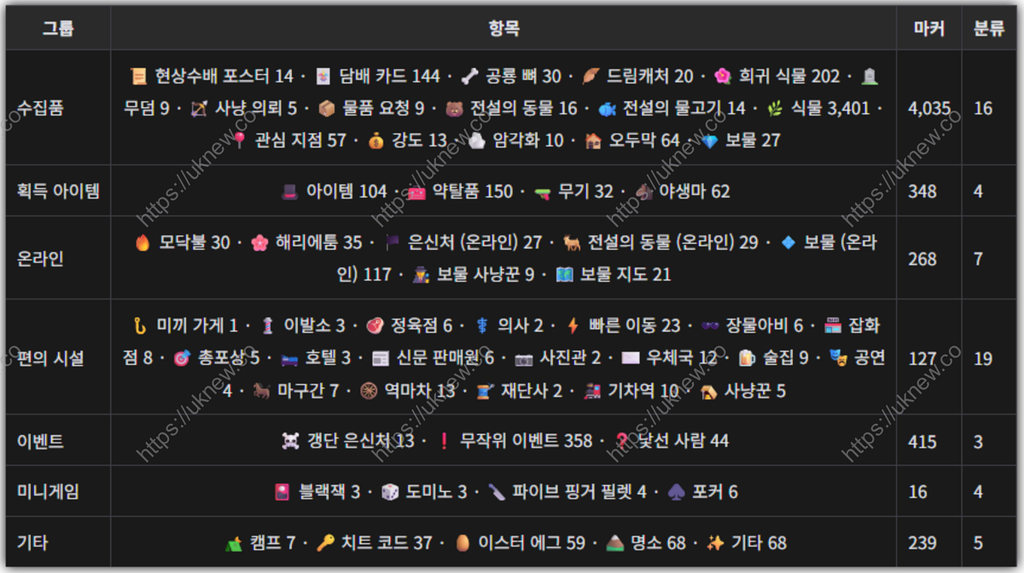
Plants (3,401 spots, 62% of everything) are off by default. Turning them on covers the map in pins, so zoom in first.
3️⃣ What Is Included and What Is Not
The map covers 51 Story Mode categories and 7 Online categories with fixed locations. The game no longer gets updates that move coordinates, so this map stays as it is.
ℹ️ Affiliate Disclosure
This site's content contains affiliate links. When a visitor buys a product or service through one of them, the site receives a commission from the seller. The amount the buyer pays(it goes down during event discounts ↓)does not go up. Posted prices, discounts, and stock reflect the time of writing and may differ, so confirm with the seller before buying. Products are chosen and reviewed by our own standards, and commissions do not affect the order or content of reviews.