Check your own IP and look up the location of any IP on one screen. It shows the results of three GeoIP databases side by side, and marks on a map how far apart they are.
My public IP address
Checking…
Leave it empty and look up to check your own IP again.
Location map
These are the values each database gives for where this address is, exactly as returned.
These values are recorded by the Internet address registries. They are registered facts, not estimates.
Shows how this address is connected on the internet.
These are the values of this browser right now, not of the IP you looked up.
Your public IP is the address that points to your connection on the internet. Even if several devices use the internet at home or in the office, the address seen from outside is usually just one, because the router communicates on behalf of the devices inside. So this address means your whole line, not a specific device.
The name of your ISP is shown next to the address. This is not an estimate; it is information registered with the address registry, so it is accurate.
If you turn on a VPN and refresh this page, the address changes. If it doesn’t, the VPN isn’t actually routing your traffic. Check twice, with it on and off.
Ⅱ. Look Up the Location of Any IP
Enter an IP address in the box to look it up. Leave it empty and look up to go back to your own IP.
A lookup shows three things together.
Location estimates show the answer of each of the three databases separately, without merging them. If the three name different cities, all three are shown as they are, and the distance between them is calculated. The map draws three pins and a circle around their range.
Registration Information is the record kept by the address registry: the block owner, block size, registration date, and abuse contact. These are registered facts, not estimates, so the screen keeps them apart from the location estimates.
Network shows how this address is connected on the internet. The AS number and hostname go here.
Private IPs can’t be looked up. Addresses starting with 192.168 or 10 are used only inside local networks, so there is no registered information on the internet. How to find such addresses is covered in the next section.
Ⅲ. Find Your Computer’s IP (Windows, Mac, Linux)
↪️ CMD, Terminal, Shell: How to Find Your IP Address
With a router there are two addresses. The public IP seen from outside can be checked with the tool above, but the internal address the router gave your computer can’t be seen from the web, because it exists only inside your computer and never goes out to the internet.
You need the internal IP in situations like these: setting up port forwarding on the router, finding a printer or NAS on the same network, or connecting to a specific PC in the office.
💻Find the IP inside your computer3 operating systems
STEP 1 · Open Command Prompt
Press the Windows key and R together, then type cmd. You can also type “Command Prompt” in the search box.
“IPv4 Address” is the value you’re looking for. On wireless it’s under the Wi-Fi adapter; on a wired connection, under the Ethernet adapter. You may see several adapters because virtual networks and unused devices are listed too. Skip any entry marked “Media disconnected”.
STEP 1 · Open Terminal
Press Command and Space to open Spotlight, then type Terminal.
STEP 2 · Enter the command
$ipconfig getifaddr en0
Sample output
192.168.0.64
It prints a single line. en0 is usually wireless. If you’re on a wired connection, try en1. If nothing appears, that interface isn’t connected. To see which interfaces are active at once, use ifconfig.
STEP 1 · Open Terminal
On a desktop, open the terminal app; on a server, type it as is once connected over SSH.
STEP 2 · Enter the command
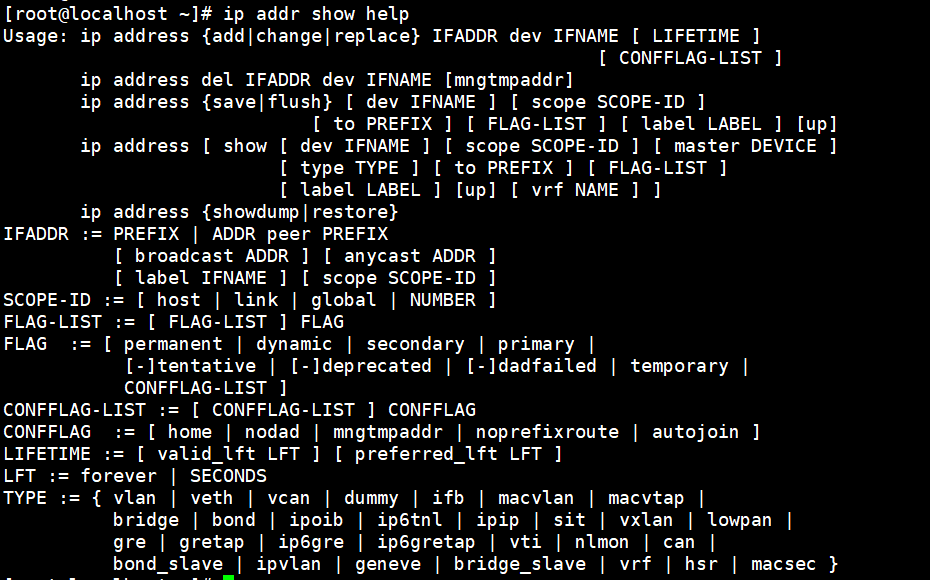
$ip addr show
Sample output
1: lo: LOOPBACK,UP,LOWER_UP mtu 65536
inet 127.0.0.1/8 scope host lo
2: eth0: BROADCAST,MULTICAST,UP,LOWER_UP mtu 1500
inet 192.168.0.64/24 brd 192.168.0.255 scope global eth0
The value after inet is the address. 127.0.0.1 points to the machine itself, so it doesn’t count. ifconfig, used on older distributions, often isn’t installed on current ones, so we use the ip command.
If the address shown here starts with 192.168 or 10, that’s normal. It’s a private IP range and doesn’t go out to the internet.
Ⅳ. Addresses Are Divided into Blocks from the Start
🔢How many IP addresses are there?32 bits · 4.3 billion
An address is 32 bits
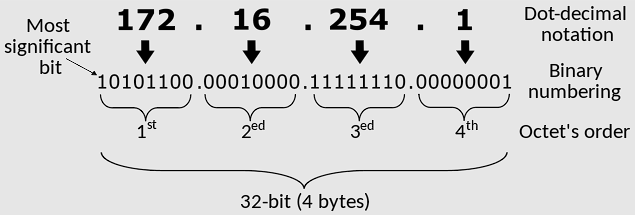
The 172.16.254.1 we see is a human-friendly notation; underneath it’s a binary number made of four 8-bit chunks.
Each chunk is called an octet. Each octet holds 0 to 255 in 8 bits, for 32 bits in total.
So the total number of possible addresses
Since the number of bits is fixed, the number of addresses is fixed too. That’s why IPv6 came along.
IPv4
32 bits
About 4.3 billion
Exactly 4,294,967,296. Many of them are reserved for special uses, so the number actually usable is smaller.
IPv6
128 bits
340 undecillion
That’s 2 to the 128th power, a number with 38 zeros, so there’s no need to worry about running out.
Each country’s share
Countries took them in the order they got on the internet. Latecomers got what was left.
0400M800M1.2B1.6B
United StatesPop. 340M1.6 billionAbout 1/3 of the total
South KoreaPop. 50MAbout 100 millionTwice the population
IndiaPop. 1.4BAbout 50 million1 per 28 people
North KoreaPop. 20M1,024175.45.176.0/22
/22 vs /11
All of North Korea received a /22, that is, 1,024 addresses. The block of KT (a South Korean ISP) alone, shown just below, is a /11: 2.09 million. A whole country is about 0.05% of one ISP.
Allocation as of: US May 2026; South Korea IPv6 adoption July 2026. Addresses are divided by country by the regional Internet registries, and each country’s registry divides them again among ISPs. In South Korea, KRNIC handles this under APNIC.
📍Results of looking up a single IP59.11.64.24 · measured Aug 2026
Registered facts
What the address registry has on record
In Asia, APNIC handles this, and in South Korea KRNIC does the hands-on work under it. These values are registered records, not estimates.
Business Owner
Korea Telecom
Registered block
59.0.0.0/11
Published
2008-09-04
Allocation type
ALLOCATED PORTABLE
59.0.0.02,097,152 addresses one of them59.31.255.255
Estimate
The city each of the three databases marked
There is no record of which of the 2.09 million addresses is used in which neighborhood, so each company fills the gap with connection logs and statistics.
DB-IP
Yongin-si (Suji-gu)
Block /24 · 256 addresses
MaxMind
Icheon-si
Block /20 · 4,096 addresses
IP2Location
Seongnam-si
Block /20 · 4,096 addresses
33km
This is the distance between the two farthest points: 40 minutes by car. Yet each site shows its own answer on a map as one exact point.
Accuracy
Where it’s right and where it goes wrong
Figures published by IP2Location comparing its own free and paid editions.
Country98%
City · free60%
City · paid80%
Neighborhood · buildingNone
UserNone
Neighborhoods, buildings, and users don’t show up from an IP. Your ISP knows which address it gave to which line, but that record isn’t disclosed without legal process.
Ⅴ. How to Hide Your IP
What an IP reveals is the country, the rough region, and the ISP. These are the ways to hide even that.
VPN is the most common. It routes you through a server in another country, so the address others see becomes that server’s. Since your whole country changes, it’s also used for region-locked services.
You can check right away with the tool above whether it’s working. When you turn on the VPN and refresh, both the address and the ISP should change. If nothing changes, it isn’t rerouting. This is common with free VPNs.
Switching to mobile data is another option. Turning off Wi-Fi connects you through your carrier’s network, which changes the address. It works without any tool when you need it briefly.
There are also proxies and Tor, but one only covers the browser and the other is too slow for everyday use.
Hiding your IP doesn’t make you anonymous. Your browser also leaks things like screen size, fonts, and time zone. And if you’re logged in, the IP means nothing anyway. A VPN changes your location; it doesn’t hide who you are.
VI. FAQs and Recommended Content
No. What shows up is the country, rough region, and ISP. Names and street addresses are held by the ISP, and that record is only disclosed through legal process. It isn’t information an individual can get from a lookup site.
That’s normal. Most home connections use dynamic IPs, so the address changes when you restart the router or after a while. To keep a fixed address, you have to request a static IP from your ISP, which usually costs extra.
Knowing the address doesn’t let anyone into your device. Routers and firewalls block connections that start from outside by default. But if you’ve opened port forwarding or run a server yourself, those ports are open and need managing.
If your line or router doesn’t use IPv6, no value is detected. Many home connections in South Korea still use only IPv4. Some setups also have equipment along the way convert traffic to IPv4.
The location databases are updated once a month. When an ISP reassigns its blocks, the values change accordingly. Rather than one being right, they are estimates from different points in time.
Organization networks often go out through the headquarters or a data center. In South Korea, for example, that’s why you show up in Seoul even when connecting from a regional office. The organization’s name may also appear instead of the ISP’s.
No. The location comes from databases downloaded to our server, and the registration data comes from asking the address registry. No signal at all is sent to the address being looked up.
Grouped by topic: how addresses are structured, how to handle them with commands, and other lookup tools.
ℹ️ Affiliate Disclosure This site's content contains affiliate links. When a visitor buys a product or service through one of them, the site receives a commission from the seller. The amount the buyer pays(it goes down during event discounts ↓)does not go up. Posted prices, discounts, and stock reflect the time of writing and may differ, so confirm with the seller before buying. Products are chosen and reviewed by our own standards, and commissions do not affect the order or content of reviews.