
4 Types of Monitor Cables (VGA, DVI, HDMI, DP) and USB-C
There are many types of monitor cables, but in everyday computer use they fall into four main types: VGA, DVI-I, HDMI and DP. A USB-C port can also carry the DP signal.
✅ 4 Main Types of Monitor Cables and USB-C

1️⃣ D-SUB Cable
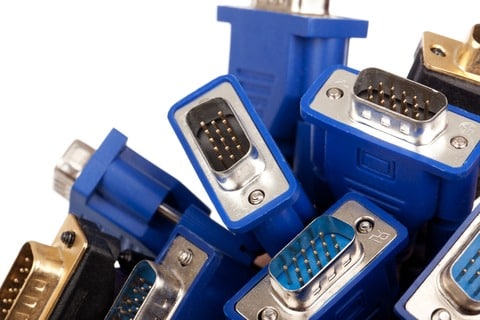
D-SUB cables are rarely used today, but some computers still have the port.
A D-SUB cable transmits video in analog form through a mini 15-pin connector that carries RGB signals. It is also commonly called a VGA cable or an RGB cable.
D-SUB cable ├─ Current use │ ├─ Rarely used today │ └─ Some computers still have the port │ ├─ Features │ ├─ Analog video transmission │ ├─ Mini 15-pin connector (SUB 15-pin) │ └─ Carries RGB signals │ ├─ Names │ ├─ D-SUB (D-subminiature) │ ├─ VGA cable │ └─ RGB cable │ └─ Resolution ├─ Base resolution: 640x480 (VGA standard) └─ Maximum in practice: 2048x1536 75Hz (depends on the hardware)
Source: Intel support article
2️⃣ DVI Cable
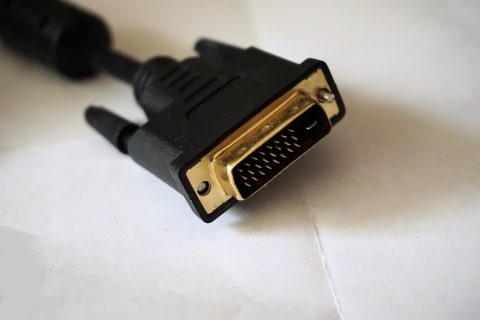
A DVI cable carries a digital video signal. DVI cables come in two kinds: DVI-D (digital only) and DVI-I (digital and analog).
By transfer speed, DVI is split into single link and dual link; single link supports up to 1920×1200 60Hz. To use 2560×1600, the graphics card, monitor, cable and any adapter must all be dual link.
| Link | Cable pins | Max resolution |
|---|---|---|
| Single link | 18-pin | 1920×1200 60Hz |
| Dual link | 24-pin | 2560×1600 |
Source: Dell support article · Intel support article
3️⃣ HDMI Cable
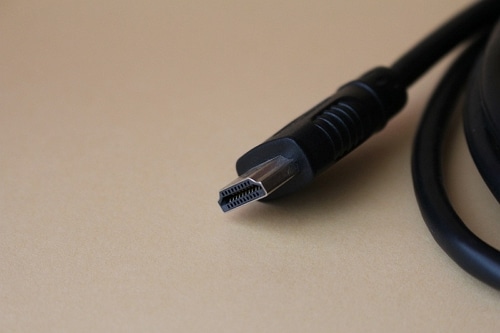
An HDMI cable is a digital connection that carries video and audio over a single cable, and it is the most common choice for TVs, monitors and game consoles. Cables with the same connector can have different bandwidth, so the official HDMI site advises choosing by cable name and certification label rather than by version number.
Up to 4K 60Hz, a Premium High Speed cable is enough. For a monitor at 4K 120Hz or higher, use an Ultra High Speed cable.
| Cable name | Bandwidth | Resolution · refresh rate |
|---|---|---|
| High Speed | 10.2Gbps | 1080p · 4K 30Hz |
| Premium High Speed | 18Gbps | 4K 60Hz |
| Ultra High Speed | 48Gbps | 4K 120Hz · 8K 60Hz |
| Ultra96 | 96Gbps | 4K 240Hz · 8K 60Hz |
Source: Official HDMI cable guide
4️⃣ DP Cable
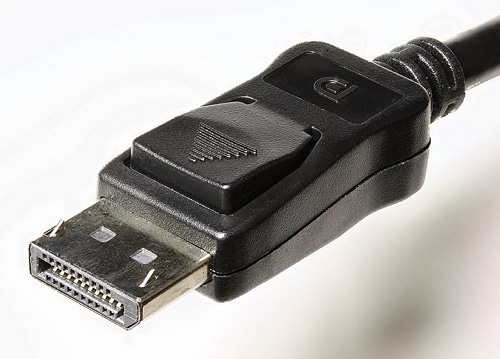
A DP cable is a digital connection created to replace DVI and VGA, and it is mainly used to connect a graphics card to a monitor. Cables with the same connector can have different transfer speeds depending on certification, and you can check the grade by the VESA certification logo on the cable (DP8K, DP54, DP80).
Up to 4K 60Hz, a standard certified DP cable is enough; to connect a graphics card and monitor that support UHBR speeds, use a DP54 or DP80 cable. Under VESA certification, passive cables can be up to 2m for DP54 and 1m for DP80.
| Cable name | Transfer speed | Resolution · refresh rate |
|---|---|---|
| Standard certified DP | HBR2 | 4K 60Hz |
| DP8K | HBR3 · DSC | 8K |
| DP54 (formerly DP40) | UHBR13.5 · 54Gbps | 8K 120Hz |
| DP80 | UHBR20 · 80Gbps | 10K 60Hz (uncompressed) |
Source: How to choose a DisplayPort cable · VESA DP40 · DP80 announcement · VESA DP54 announcement · DisplayPort FAQ
5️⃣ USB-C Cable
A USB-C cable sends video through a USB Type-C port, using a method VESA defined as the DisplayPort Alt Mode standard. Video, USB data and charging power can travel over the same cable at the same time.
If the monitor has a USB-C input, use a full-featured USB-C cable. A monitor with only a DisplayPort input connects through a USB-C to DP adapter cable, and VESA recommends a DP-certified adapter cable.
| Monitor input | Cable to use |
|---|---|
| USB-C | Full-featured USB-C cable |
| DisplayPort | USB-C to DP adapter cable |
| HDMI · DVI · VGA | USB-C adapter · adapter cable |
Source: DisplayPort over USB-C FAQ
✅ When the Monitor and the PC Graphics Card Ports Don't Match
If you need to check monitor cable compatibility while using a computer and monitor, first confirm a model that supports your graphics card's resolution, then consider a DVI to HDMI or HDMI to DVI cable or adapter.
✅ Monitors and Resolution
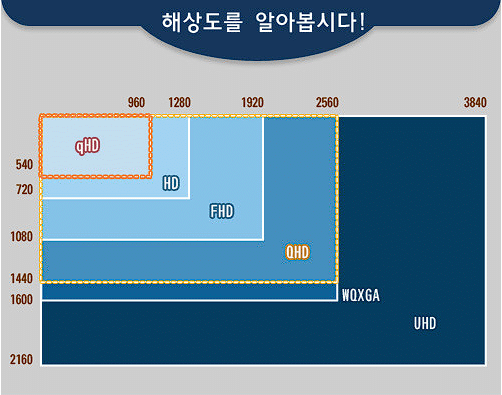
What is resolution? Resolution means how many pixels make up the screen of a display such as a TV or monitor.
ℹ️ Affiliate Disclosure
This site's content contains affiliate links. When a visitor buys a product or service through one of them, the site receives a commission from the seller. The amount the buyer pays(it goes down during event discounts ↓)does not go up. Posted prices, discounts, and stock reflect the time of writing and may differ, so confirm with the seller before buying. Products are chosen and reviewed by our own standards, and commissions do not affect the order or content of reviews.