Claude MCP Linux Server Connection: SSH Setup

Affiliate disclosure v3.1
Affiliate disclosure v3.2 (mobile)

Even when you hand Linux server work to Claude, your SSH key file never leaves your PC. Claude MCP Linux server connection links Claude to your Linux server's terminal and files over SSH. This guide covers what travels and what doesn't, then walks through the setup steps.

Claude MCP(Model Context Protocol) is the standard Claude uses to connect to external tools and data, and an MCP serveris a program that provides features according to that standard. The concept and Claude Desktop connector setup are covered in the Claude MCP basics article.

Ⅰ. What Is a Claude MCP Linux Server?

When you attach MCP to Claude Desktop, Claude reads files on your PC and runs tasks. A Claude MCP Linux server connection moves that target to a remote Linux server over SSH: commands run on the server, and only the results come back to Claude.

Nothing new needs to be opened on the server. You use the same SSH and key as always; the only change is that Claude, not a person, types the commands. What Claude can run and see is set by the permissions of the login account.

Highlight Anthropic server path Anthropic servers Highlight conversation path Conversation My PC Highlight Claude Desktop Claude Desktop Highlight MCP server program MCP server program Highlight key file path Key file (.pem) Never leaves the PC SSH Highlight command direction Command Highlight output direction Output Linux server Highlight Linux server Runs the command Sends back only the result
Click a box or arrow to highlight only that part. No line leaves the PC from the key file box. On narrow screens, swipe the diagram sideways.
What travels
One command line written by Claude
The output that command produced on the server
Both are conversation content, so they pass through Anthropic's servers. If the data on your server is sensitive, consider this first.
What doesn't travel
The contents of the key file (.pem)
The SSH connection is made by the MCP server program running on your PC. That program reads the key and uses it only for authentication; Claude never receives or sees it.
All of the server's files
Only the parts a command reads go out as output; directories are never copied wholesale.
One direction only There is no path for the server to start talking to Claude. A reply comes back only when a request goes out.

Ⅱ. Claude MCP Linux Setup

Setup takes four steps, from an SSH connection test to checking connection errors. You need ⓐ the Claude Desktop app, ⓑ server access details (host address, account, port) and a key file (.pem), and ⓒ Node.js to run the MCP server package on your PC.

You can view steps 1️⃣–4️⃣ all at once in the simulator or check them in the table of contents.
🤖 Claude Desktop · SSH MCP Settings simulator
1️⃣ SSH Connection Test
To register the server in Claude, test the SSH connection from your PC and prepare what you need.
~]#
ⓐ Claude Desktop app The app where MCP runs. Registration works only in the app, not on the web.
ⓑ Server access details Host address · account · port and key file (.pem)
ⓒ Node.js Runs the MCP server package on your PC.
2️⃣ Register · Settings · Developer
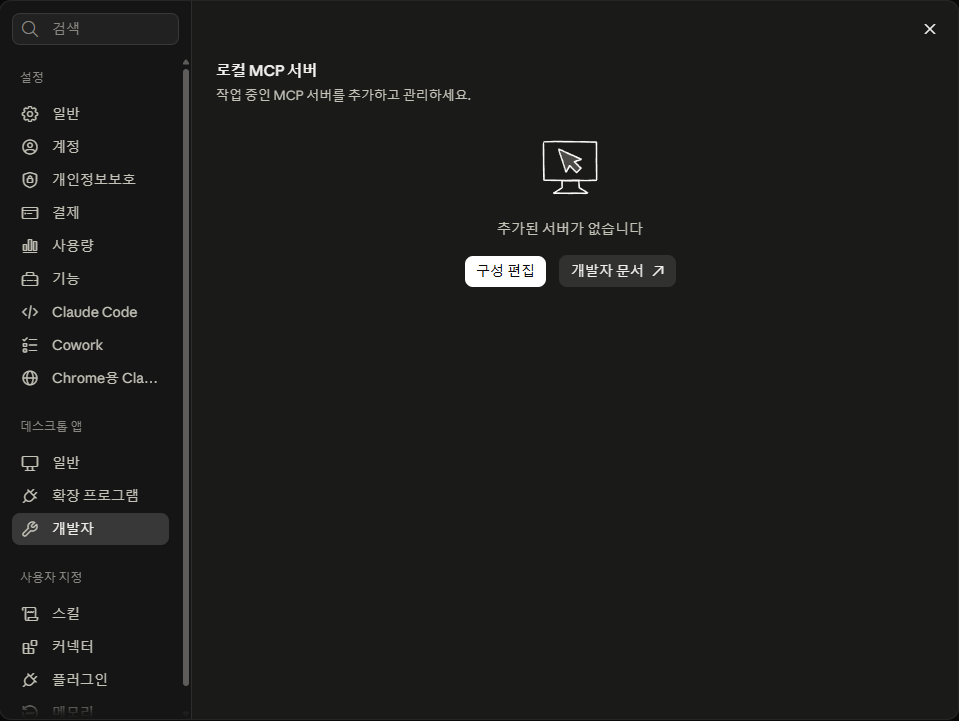
Launch the Claude app, go to Settings · Developerand click [Edit Config]. Registration works only in the app, not on the web.
Local MCP server entry on the Claude app's Settings › Developer screen
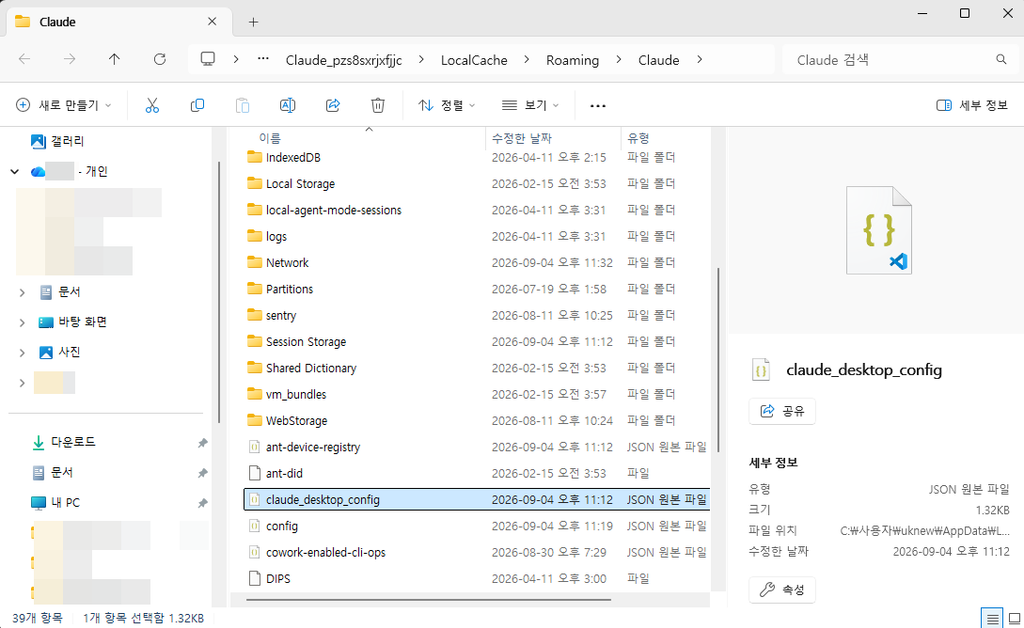
2️⃣ Register · Config file folder
The folder containing claude_desktop_config.json opens.
Folder containing claude_desktop_config.json
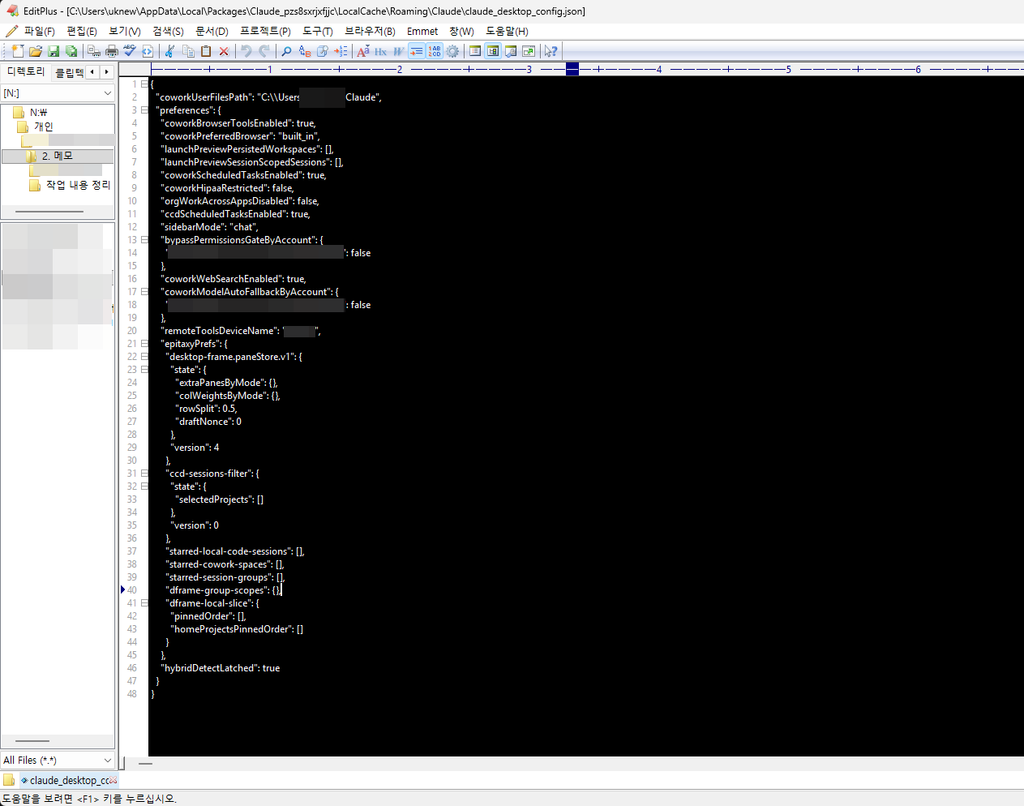
2️⃣ Register · Open the config file
Open the file in a text editor such as Notepad or EditPlus and check its contents.
claude_desktop_config.json opened in a text editor
2️⃣ Register · Paste the entry
On line 47, after } type a comma (,), paste the entry below, and press Ctrl + Sto save.
    "ssh-mcp-server": {
      "command": "cmd",
      "args": [
        "/c",
        "npx",
        "-y",
        "@fangjunjie/ssh-mcp-server",
        "--host",
        "your-server-IP",
        "--port",
        "22",
        "--username",
        "root",
        "--privateKey",
        "C:\\path-to-key\\mykey.pem"
      ]
    }
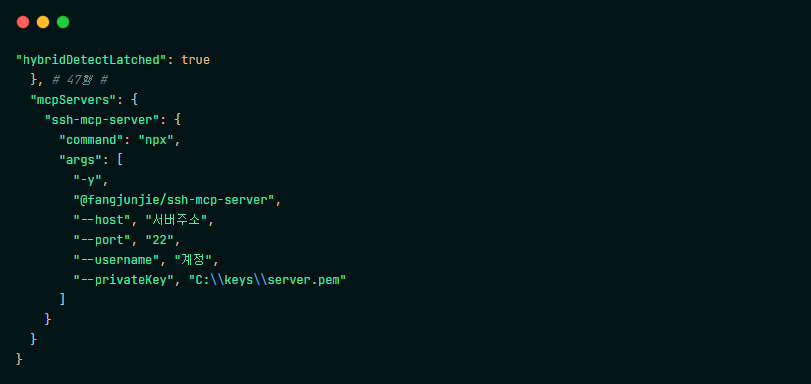
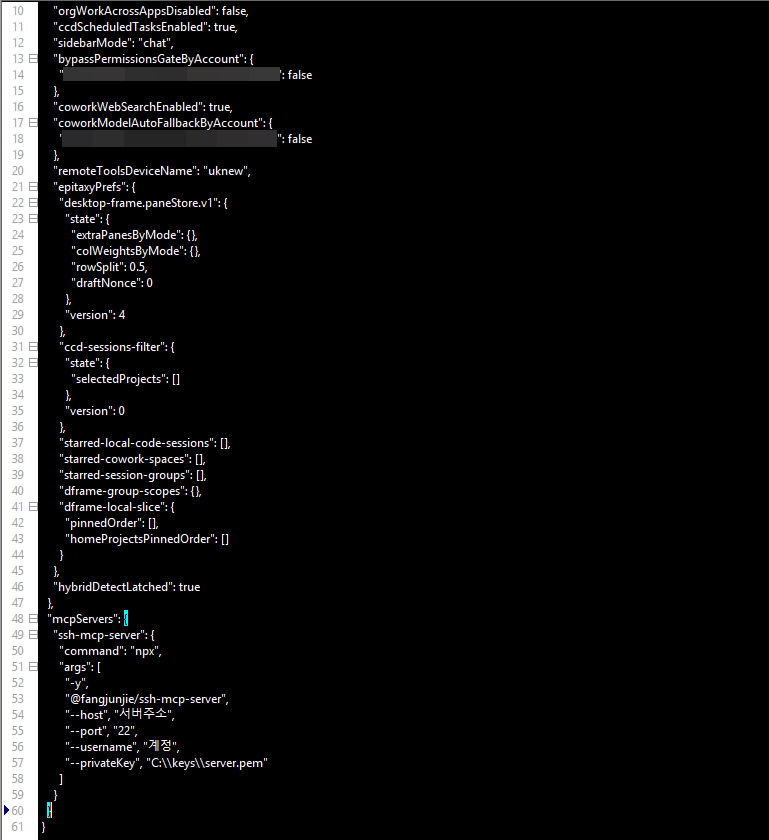
Write each backslash twice. On macOS or Linux, put npx directly in command and leave out /c.
1 / 2
Where to edit claude_desktop_config.json claude_desktop_config.json edited in EditPlus
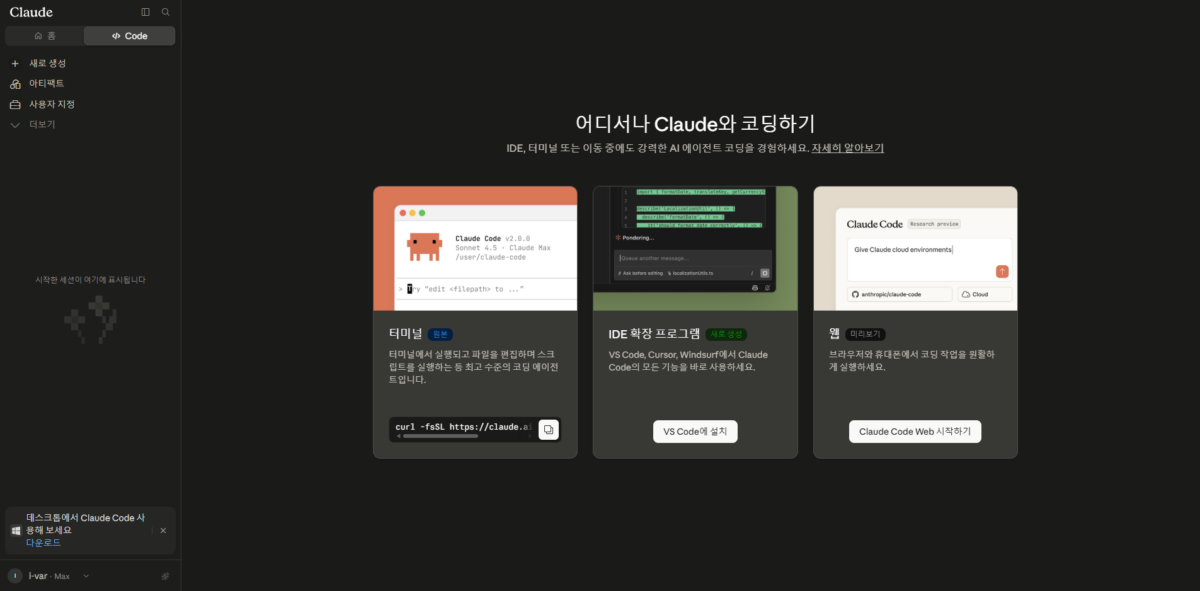
3️⃣ First run · Setup complete
Restart the Claude app. If nothing changes on screen, force-quit it in Task Manager and launch it again.
Screen after Claude MCP Linux setup is complete
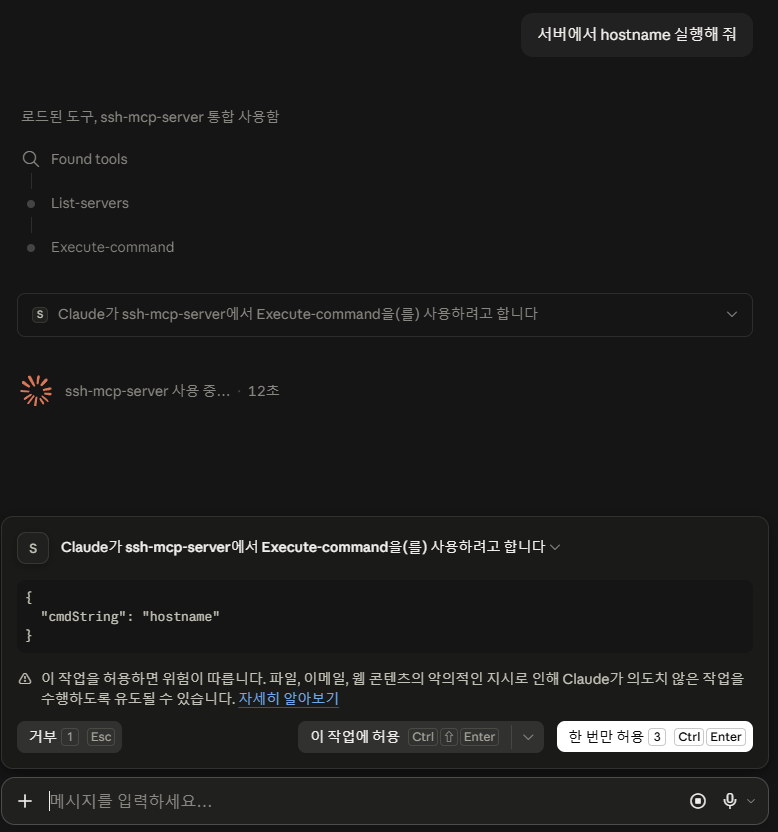
3️⃣ First run · Run hostname
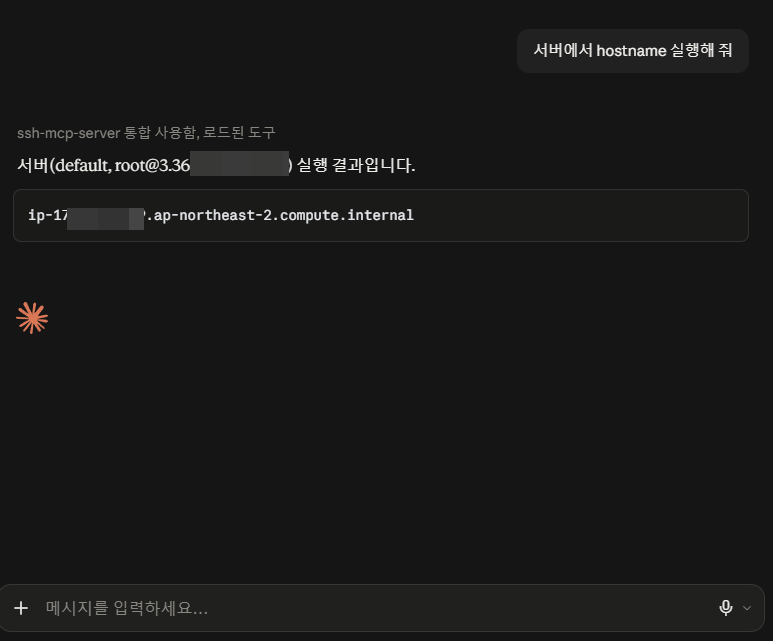
A screen where Claude was asked to run the hostname command.
1 / 2
Running the hostname command through SSH MCP Server 1 Running the hostname command through SSH MCP Server 2
4️⃣ Error check · Log: Node.js not installed
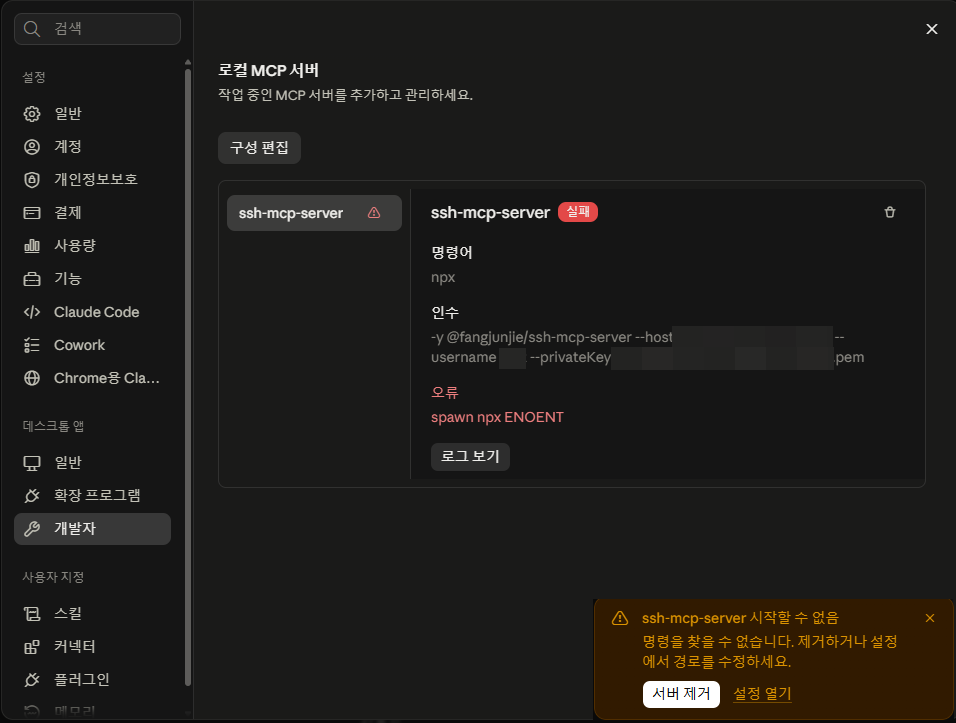
Checking with [View logs] showed the error was caused by a missing Node.js folder (C:\Program Files\nodejs).
SSH MCP Server connection error log
4️⃣ Error check · Installing Node.js
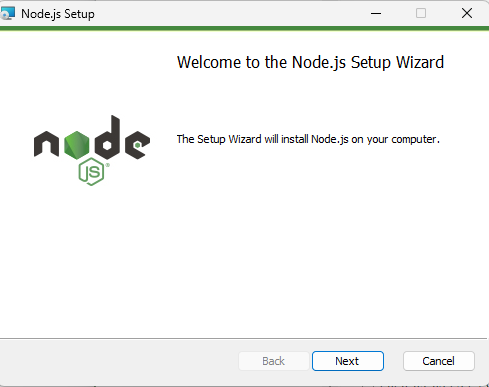
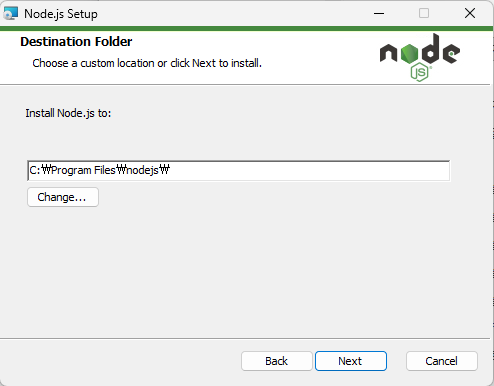
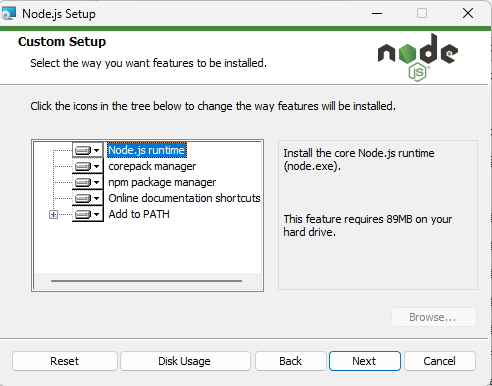
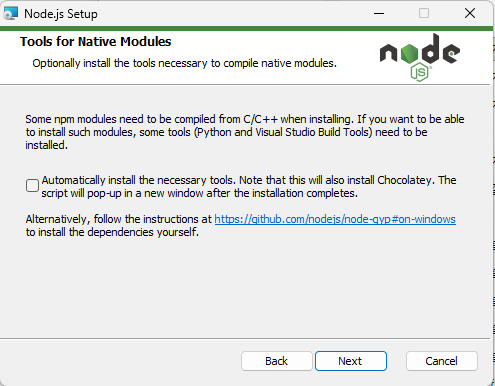
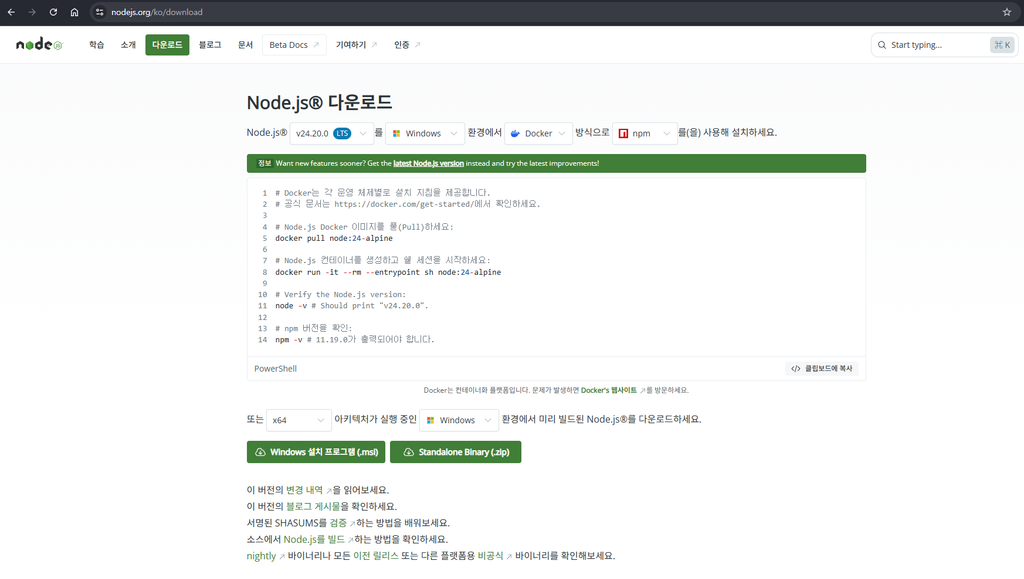
Download and install the Windows .msi file. On the 5th screen, leave it unchecked and click Nextto continue. It asks about C/C++ compile tools, which the SSH MCP package doesn't need; checking it also installs Chocolatey and Visual Studio build tools.
1 / 5
Node.js for Windows download screen Installing Node.js for Windows 1 Installing Node.js for Windows 2: install path Installing Node.js for Windows 3 Installing Node.js for Windows 4: additional tools
Download the Windows .msi file from the official download page.
Node.js download page
4️⃣ Error check · Server not connected · CMD
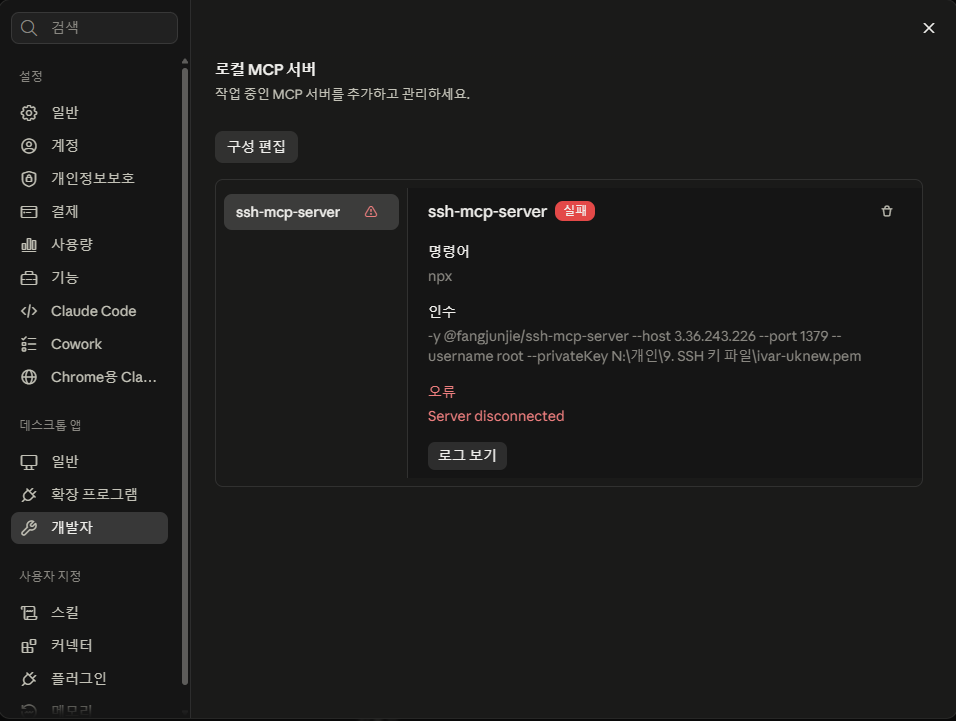
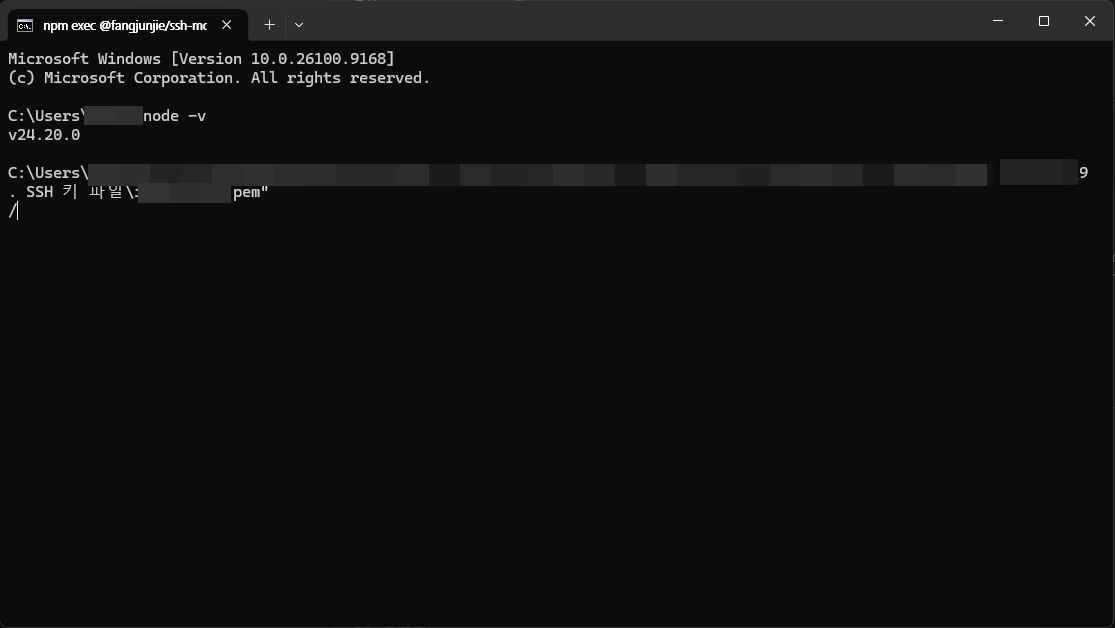
After installing Node.js, quit Claude completely, including the background process, and relaunch it; the log then changes to «not connected». Enter commands in a CMD window to find the cause.
1 / 2
SSH MCP Server not-connected log Troubleshooting commands entered in a CMD window
The four steps explained in the article below are gathered here. Click the left menu to explore, and click a screenshot to enlarge it.
Claude MCP Linux setup screen

1️⃣ SSH Connection Test

To register the server in Claude, test the SSH connection from your PC and prepare what you need.

 ~]# 

2️⃣ Register the SSH MCP Server

SSH MCP Server can only be registered in the app, not on the web. Launch the Claude app and go to [Settings › Developer].

Claude MCP Linux Server Connection: SSH Setup

Click [Edit Config].

Claude MCP Linux Server Connection: SSH Setup

The folder containing claude_desktop_config.json opens.

Claude MCP Linux setup 1 - claude_desktop_config.json file

Open the file in a text editor such as Notepad or EditPlus and check its contents.

Claude MCP Linux Server Connection: SSH Setup

On line 47 in the image, type a comma after [}] (,) and paste the entry.

The entry to paste is below. Replace [--host] with the server address, [--port] with the SSH port (default 22), [--username] with the login account, and [--privateKey] with the full path of the key file (.pem).

    "ssh-mcp-server": {
      "command": "cmd",
      "args": [
        "/c",
        "npx",
        "-y",
        "@fangjunjie/ssh-mcp-server",
        "--host",
        "your-server-IP",
        "--port",
        "22",
        "--username",
        "root",
        "--privateKey",
        "C:\\path-to-key\\mykey.pem"
      ]
    }

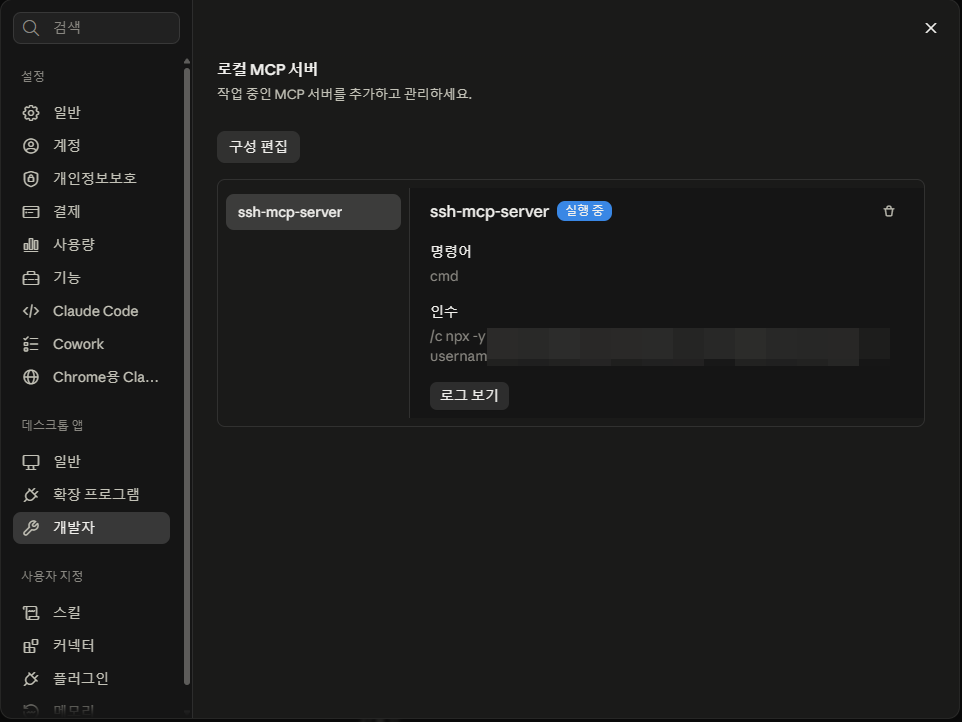
On Windows, set commandto cmd instead of npx and put /c as the first item in args. On macOS or Linux, put npx directly in command and leave out /c.

If the file has no mcpServers entry, there is nowhere to paste. In that case, make the whole file look like this.

{
  "mcpServers": {
    "ssh-mcp-server": {
      "command": "cmd",
      "args": [
        "/c",
        "npx",
        "-y",
        "@fangjunjie/ssh-mcp-server",
        "--host",
        "your-server-IP",
        "--port",
        "22",
        "--username",
        "root",
        "--privateKey",
        "C:\\path-to-key\\mykey.pem"
      ]
    }
  }
}
Claude MCP Linux setup 2 - editing claude_desktop_config.json (EditPlus)

When you're done, press Ctrl + S to save.

3️⃣ Tool Permissions and First Run

Restart the Claude app.If nothing changes on screen, force-quit it in Task Manager and launch it again; if an error appears, see step 4️⃣.

Claude MCP Linux Setup 'Complete'

I asked Claude to run the hostname command as a simple test.

Claude MCP Linux - running hostname with SSH MCP Server 1
Claude MCP Linux - running hostname with SSH MCP Server 2

4️⃣ Connection Error: Node.js Not Installed

Claude MCP Linux Server Connection: SSH Setup

Checking with [View logs] showed the error occurred because the Node.js folder (C:\Program Files\nodejs) was not installed.

To install Node.js, open https://nodejs.org/ko/downloadin your browser.
Claude MCP Linux Server Connection: SSH Setup

Download the Windows .msi file and install it.

Installing Node.js for Windows 1
Claude MCP Linux Server Connection: SSH Setup
Installing Node.js for Windows 4

Leave it unchecked and click Next. It asks whether to install C/C++ compile tools as well; the SSH MCP package doesn't need them, and checking it also installs Chocolatey and Visual Studio build tools.

Quit Claude completely, including the background process, and launch it again.

Claude MCP Linux Server Connection: SSH Setup

Checking the log again, the message had changed to "not connected".

SSH MCP Server connection error 3 - commands entered in CMD

Enter troubleshooting commands in a CMD window to find the cause.

From this point on, Claude itself can help you solve it, so I recommend checking the error directly and fixing it with Claude's help.

Ⅲ. FAQ
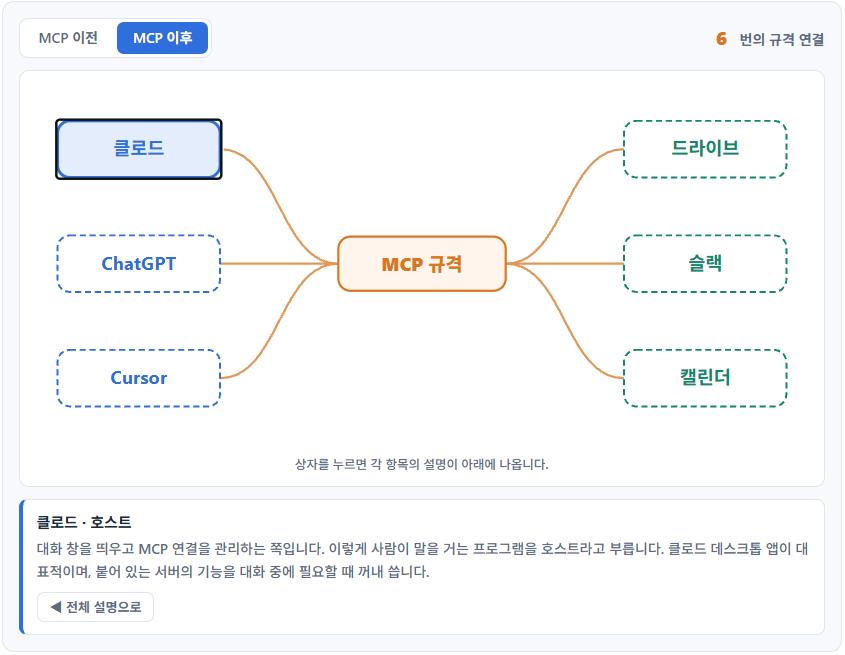
No, it doesn't. SSH MCP Server is a program that runs inside your PC, and the connection only works when Claude launches that program directly. A browser can't run programs on your PC, and the only things you can attach on the web are remote services with an internet address.

A permission prompt appears before a command runs, showing the exact command to be executed. Nothing runs unless you allow it. What it can run is also limited to the login account's permissions. The SSH MCP package has a [--whitelist] option, so you can make it reject every command except those matching the regular expressions you specify.

Set the login account to one the server allows. On AWS-style images the default account is ec2-user, and on Ubuntu images it is ubuntu. These accounts have sudo rights, so for tasks that need admin rights, ask Claude to prefix the command with sudo. To log in as root directly, you need to change both the server's sshd settings and the root account's key file.

🤖 Claude articles 3 articles · 3 tools
🗂️ Claude
📋 MCP basics 📄 Linux server connection
📄 Three tools compared
🛠️ Whois Domain Lookup 🛠️ IP lookup 🛠️ UTF-8 converter

ℹ️ Affiliate Disclosure
This site's content contains affiliate links. When a visitor buys a product or service through one of them, the site receives a commission from the seller. The amount the buyer pays(it goes down during event discounts ↓)does not go up. Posted prices, discounts, and stock reflect the time of writing and may differ, so confirm with the seller before buying. Products are chosen and reviewed by our own standards, and commissions do not affect the order or content of reviews.

Leave a Reply

Your email address will not be published. Required fields are marked *

Prove your humanity: 3   +   6   =