
How to Check CPU in Linux: Commands for RAM, Disk, and OS Info


The number of CPU cores in Linux comes up instantly with one line: [nproc]. The table below lists the commands for checking Linux CPU and Linux RAM capacity, plus disk and OS information, in the order you are most likely to use them.
|
Command |
What it shows |
|---|---|
|
nproc |
Number of usable CPUs (logical cores) |
|
lscpu |
CPU model, sockets, cores, threads |
|
free -h |
Total, used, and free RAM |
|
df -h |
Disk usage per file system |
|
lsblk |
Disk and partition layout |
|
cat /etc/os-release |
Distribution name and version |
|
uname -r |
Kernel version |
$ nproc
4

$ lscpu
CPU(s):                4
Model name:            Intel(R) Xeon(R) Platinum 8259CL CPU @ 2.50GHz
Thread(s) per core:    2
Core(s) per socket:    2
Socket(s):             1

$ free -h
               total        used        free      shared  buff/cache   available
Mem:            15Gi       8.8Gi       916Mi       338Mi       6.3Gi       6.6Gi
Swap:          8.0Gi       1.3Gi       6.7Gi
This is output from a server that uknew.co runs itself (AWS Lightsail, AlmaLinux 9), taken on 2026-10-05. CPU(s) 4 comes from 2 cores with 2 threads per core, the same case as the Hyper-Threading section below.
✅ Commands to Check CPU Information in Linux
1. cat /proc/cpuinfo
cat /proc/cpuinfo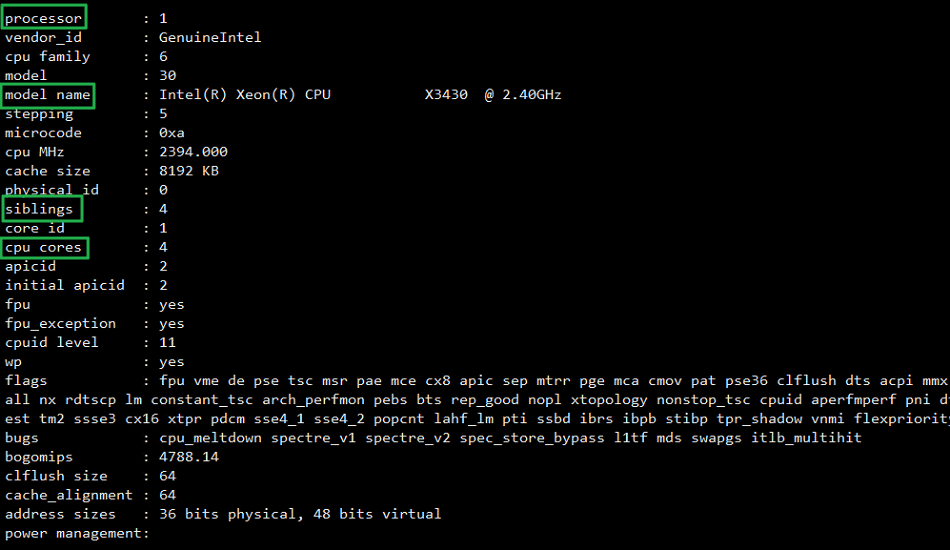
📖 Expand: what each /proc/cpuinfo field means
2. Count All CPUs and Physical CPUs
If you only need the number of cores, [nproc] is the shortest. To count physical CPUs and cores separately, count /proc/cpuinfo as below.
# Total CPU cores: confirms 4 (virtual) CPU cores in total
~]# grep -c processor /proc/cpuinfo
4
# Number of physical CPUs
~]# grep -c ^processor /proc/cpuinfo
1
# Cores per CPU
grep -c ^processor /proc/cpuinfo | wc -l
4
3. Hyper-Threading: how to check
If siblings is twice the number of CPU cores, Hyper-Threading is enabled.
~]# cat /proc/cpuinfo | egrep 'siblings|cpu cores' | head -2
siblings : 4
cpu cores : 4
##
~]# cat /proc/cpuinfo | egrep 'siblings|cpu cores' | head -2
siblings : 2
cpu cores : 1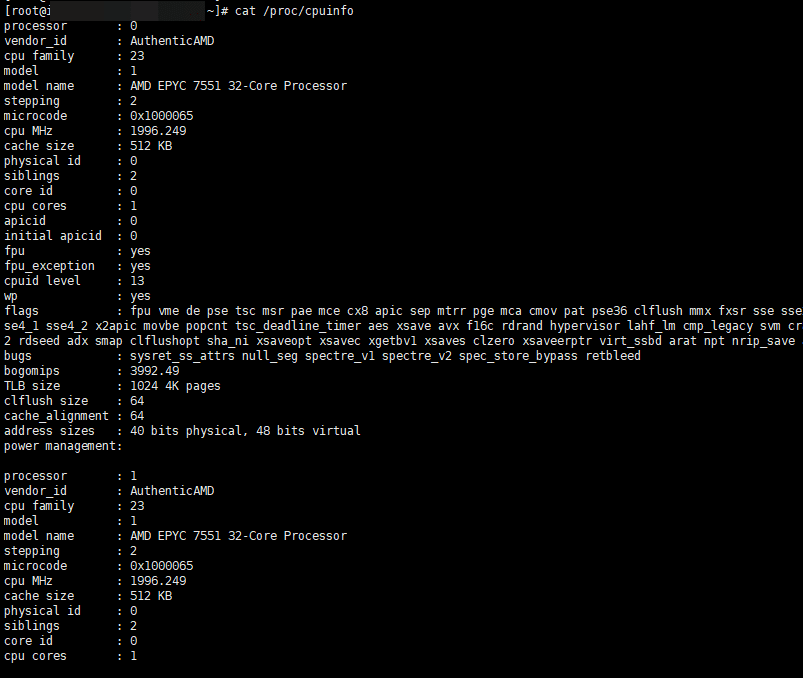
4. The lscpu Command
The lscpu command shows CPU information in a simple summary.
~]# lscpu
Architecture:            x86_64
  CPU op-mode(s):        32-bit, 64-bit
  Address sizes:         40 bits physical, 48 bits virtual
  Byte Order:            Little Endian
CPU(s):                  2
  On-line CPU(s) list:   0,1
Vendor ID:               AuthenticAMD
  BIOS Vendor ID:        QEMU
  Model name:            AMD EPYC 7551 32-Core Processor
    BIOS Model name:     pc-i440fx-4.2
    CPU family:          23
    Model:               1
    Thread(s) per core:  2
    Core(s) per socket:  1
    Socket(s):           1
    Stepping:            2
    BogoMIPS:            3992.49
    Flags:               fpu vme de pse tsc msr pae mce cx8 apic sep mtrr pge mca cmov pat pse36 clflush mmx fxsr sse sse2 ht syscall nx mmxext fxsr_opt pdpe1gb rdtscp lm rep_good nopl cpuid extd_apicid
                          tsc_known_freq pni pclmulqdq ssse3 fma cx16 sse4_1 sse4_2 x2apic movbe popcnt tsc_deadline_timer aes xsave avx f16c rdrand hypervisor lahf_lm cmp_legacy svm cr8_legacy abm sse4
                         a misalignsse 3dnowprefetch osvw topoext perfctr_core ssbd ibpb vmmcall fsgsbase tsc_adjust bmi1 avx2 smep bmi2 rdseed adx smap clflushopt sha_ni xsaveopt xsavec xgetbv1 xsaves
                         clzero xsaveerptr virt_ssbd arat npt nrip_save arch_capabilities
Virtualization features:
  Virtualization:        AMD-V
  Hypervisor vendor:     KVM
  Virtualization type:   full
Caches (sum of all):
  L1d:                   64 KiB (1 instance)
  L1i:                   64 KiB (1 instance)
  L2:                    512 KiB (1 instance)
  L3:                    16 MiB (1 instance)
NUMA:
  NUMA node(s):          1
  NUMA node0 CPU(s):     0,1
Vulnerabilities:
  Itlb multihit:         Not affected
  L1tf:                  Not affected
  Mds:                   Not affected
  Meltdown:              Not affected
  Mmio stale data:       Not affected
  Retbleed:              Mitigation; untrained return thunk; SMT vulnerable
  Spec store bypass:     Mitigation; Speculative Store Bypass disabled via prctl
  Spectre v1:            Mitigation; usercopy/swapgs barriers and __user pointer sanitization
  Spectre v2:            Mitigation; Retpolines, IBPB conditional, STIBP disabled, RSB filling, PBRSB-eIBRS Not affected
  Srbds:                 Not affected
  Tsx async abort:       Not affected
✅ Check RAM Capacity in Linux
1. cat /proc/meminfo
cat /proc/meminfo shows Linux RAM capacity (current memory usage).
cat /proc/meminfo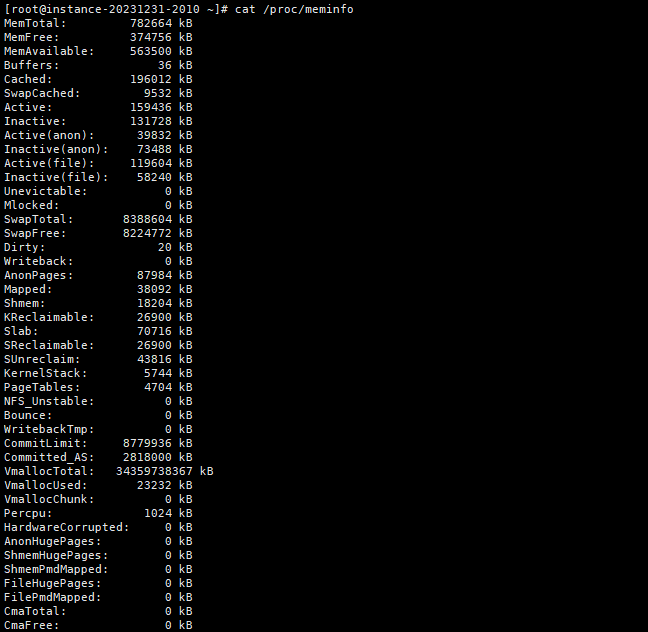
2. Using the free Command
The free command shows Linux RAM capacity in a more readable form, and the -h option makes it easier still.
~]# free -h
               total        used        free      shared  buff/cache   available
Mem:           764Mi       208Mi       370Mi        17Mi       217Mi       555Mi
Swap:          8.0Gi       159Mi       7.8Gi
~]# free -h
  total        used        free      shared  buff/cache   available
Mem:          5.8Gi       3.1Gi       754Mi        35Mi       1.9Gi       2.4Gi
Swap:         5.9Gi       808Mi       5.1Gi
✅ Check Disk Usage: df -h
The df -h command shows total disk usage.
~]# df -h
Filesystem              Size  Used Avail Use% Mounted on
devtmpfs                4.0M     0  4.0M   0% /dev
tmpfs                   383M     0  383M   0% /dev/shm
tmpfs                   153M   20M  134M  13% /run
/dev/mapper/rocky-root  119G   11G  109G  10% /
/dev/sda2               994M  275M  720M  28% /boot
/dev/sda1                99M  7.0M   92M   8% /boot/efi
tmpfs                    77M     0   77M   0% /run/user/1000
~]#
Use [lsblk] to see how disks and partitions are laid out. Adding [-e7] drops loop devices such as snaps, leaving only the real disks. To create new partitions, see the gdisk command guide.
$ lsblk -e7
NAME        MAJ:MIN RM   SIZE RO TYPE MOUNTPOINTS
nvme0n1     259:0    0   320G  0 disk
├─nvme0n1p1 259:1    0     1M  0 part
├─nvme0n1p2 259:2    0   200M  0 part /boot/efi
├─nvme0n1p3 259:3    0     1G  0 part /boot
└─nvme0n1p4 259:4    0 318.8G  0 part /
✅ Check Other Server Information
## Check the server model
dmidecode -s system-product-name
## Check the server model in more detail
dmidecode | grep "Product Name:"

# OS type and version (short)
~]# cat /etc/redhat-release
Rocky Linux release 9.3 (Blue Onyx)

# OS type and version (/etc/*release*)
~]# cat /etc/*release*
NAME="Rocky Linux"
VERSION="9.3 (Blue Onyx)"
ID="rocky"
ID_LIKE="rhel centos fedora"
VERSION_ID="9.3"
PLATFORM_ID="platform:el9"
PRETTY_NAME="Rocky Linux 9.3 (Blue Onyx)"
ANSI_COLOR="0;32"
LOGO="fedora-logo-icon"
CPE_NAME="cpe:/o:rocky:rocky:9::baseos"
HOME_URL="https://rockylinux.org/"
BUG_REPORT_URL="https://bugs.rockylinux.org/"
SUPPORT_END="2032-05-31"
ROCKY_SUPPORT_PRODUCT="Rocky-Linux-9"
ROCKY_SUPPORT_PRODUCT_VERSION="9.3"
REDHAT_SUPPORT_PRODUCT="Rocky Linux"
REDHAT_SUPPORT_PRODUCT_VERSION="9.3"
Rocky Linux release 9.3 (Blue Onyx)
Rocky Linux release 9.3 (Blue Onyx)
Derived from Red Hat Enterprise Linux 9.3
Rocky Linux release 9.3 (Blue Onyx)
cpe:/o:rocky:rocky:9::baseos


# OS type and version (rpm command)
~]# rpm -qa | grep release
rocky-release-cloud-9-1.el9.noarch
epel-release-9-7.el9.noarch
rocky-release-9.3-1.2.el9.noarch
remi-release-9.3-2.el9.remi.noarch

## Check the OS version (/proc/version)
~]# cat /proc/version
Linux version 5.14.0-162.12.1.el9_1.0.2.x86_64 (mockbuild@dal1-prod-builder001.bld.equ.rockylinux.org) (gcc (GCC) 11.3.1 20220421 (Red Hat 11.3.1-2), GNU ld version 2.35.2-24.el9) #1 SMP PREEMPT_DYNAMIC Mon Jan 30 22:14:42 UTC 2023

## Check the CPU model
cat /proc/cpuinfo | grep nameℹ️ Affiliate Disclosure
This site's content contains affiliate links. When a visitor buys a product or service through one of them, the site receives a commission from the seller. The amount the buyer pays(it goes down during event discounts ↓)does not go up. Posted prices, discounts, and stock reflect the time of writing and may differ, so confirm with the seller before buying. Products are chosen and reviewed by our own standards, and commissions do not affect the order or content of reviews.