I don't want to live a life with only voices.
  • What Is Varnish Cache: Varnish Cache Server Installation and Basic Configuration

    테스트 환경 RHEL 계열|AlmaLinux 9.8|root 계정|2026-10-16 확인 Varnish Cache는 웹 서버 앞에서 HTTP 응답을 메모리에 저장해 두었다가, 같은 요청에는 원본 서버를 거치지 않고 응답하는 리버스 프록시 캐시입니다. AlmaLinux 9.8 서버의 Varnish 6.6.2를 워드프레스 앞에 두자 max-age=0 때문에 페이지가 캐시되지 않아, VCL에서 보관 시간을 지정해 해결했습니다. 어떤 요청을 캐시하고 얼마 동안 보관할지는 VCL(Varnish Configuration…

  • Zend OPcache Explained: Installation, php.ini Settings and Disabling JIT

    테스트 환경 RHEL 계열|AlmaLinux 9.8|root 계정|2026-10-16 확인 Zend OPcache는 PHP 스크립트를 바이트코드로 컴파일해 공유 메모리에 저장하고, 같은 파일을 다시 실행할 때 컴파일을 건너뛰게 하는 PHP 확장입니다. PHP 8.3을 사용하는 워드프레스 서버에서 JIT을 활성화한 뒤 전 페이지에 500 오류가 나자, OPcache는 그대로 두고 JIT만 비활성화해 복구했습니다. PHP 5.5부터는 OPcache가 PHP에 기본으로 포함되어 배포됩니다. 1️⃣…

  • What is PHP-FPM | Installing and configuring PHP-FPM

    테스트 환경 RHEL 계열|AlmaLinux 9.8|Apache 2.4 + PHP-FPM 8.3|root 계정|2026-10-26 확인 PHP-FPM은 웹 서버가 넘긴 PHP 요청을 미리 띄워 둔 워커 프로세스가 받아 처리하는 FastCGI 프로세스 관리자입니다. Apache가 운영되고 있는 AlmaLinux 9 서버에서 설치 여부와 사이트 계정별 풀·소켓 설정을 확인하고, 설정 검사와 상태 확인까지 실제 출력으로 정리했습니다. Apache는 mod_php로 PHP를 직접 실행할 수도…

  • gdisk Command: How to Partition a Disk in Linux

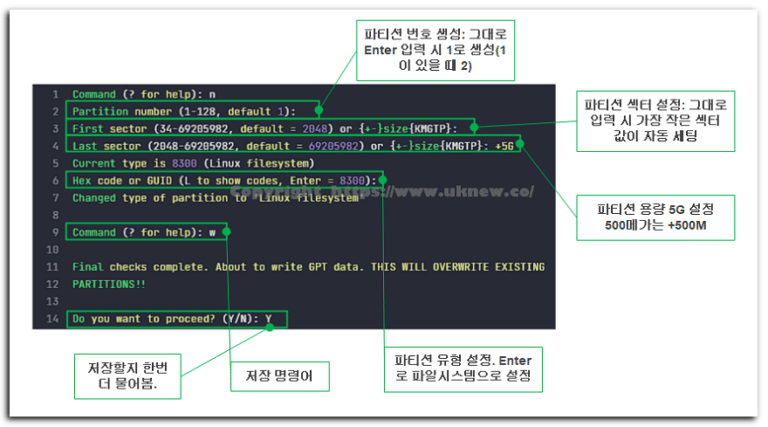
    Test environment RHEL family|AlmaLinux 9.8|root account|Checked 2026-10-05 Disk · mount commands gdisk To set up Linux partitions (create, modify, delete), you use the fdisk command or the gdisk command. This article covers editing partition information with gdisk. Before mounting, partition setup proceeds in the following order. Until you save and exit, your partition changes are not applied to the disk. gdisk Simulator Practice disk…

  • Linux vi Commands: Vim's 3 Modes and Visual Mode

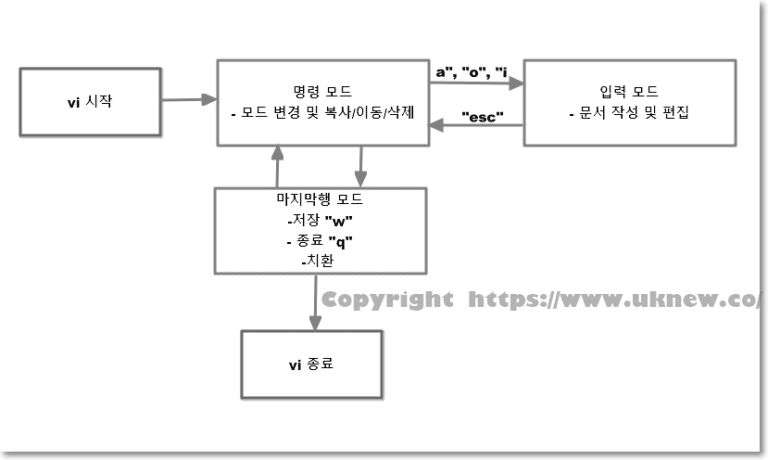
    Test environment RHEL family|AlmaLinux 9.8|root account|Checked 2026-10-07 Text viewing · editing commands vi·vim Opening vi and finding that nothing you type appears, or closing the window because you can't figure out how to get out — almost everyone who touches a server for the first time goes through this once. The Linux vi command has separate command and input modes, so once you know which mode you are in, the rest comes down to a few keys. In this post…

  • Linux which, whereis, locate: 3 Commands to Find a File's Location (Path)

    Test environment RHEL family|AlmaLinux 9.8|root account|Checked 2026-10-07 Search commands which·whereis·locate Sometimes you need to edit httpd.conf but don't know where the file is, or a command with the same name exists in two places and you're not sure which one runs. The Linux which command finds the file that actually runs, the Linux whereis command finds the executable plus config folders and manuals, and the locate command finds every path containing the name. This post compares the three…

  • What Is an Expired Domain? | Buying a Domain Back

    Buying an expired domain for SEO comes up often on YouTube and English-language sites, and more and more people are starting blogs with WordPress, Ghost CMS and similar platforms. ✅ What is an expired domain? An expired domain is a domain whose ownership was lost because the renewal fee was not paid after registration; in Korea it is called a "nakjang" domain. In English-speaking countries it is called ‘expired…

  • Linux Commands: 15 Categories and Understanding the System

    The Linux command-line interface (CLI) is a text-based user interface for interacting with computer programs and the operating system. Linux commands work almost the same across Unix-like operating systems, and you type them to create, edit, copy and move files and to manage the whole server. Commands are sorted into categories, but please note that some placements may be off. ✅ Linux Command Categories [15]…

  • How to Check CPU in Linux: Commands for RAM, Disk, and OS Info

    Test environment RHEL family|AlmaLinux 9.8|root account|Checked 2026-10-05 System info · settings commands nproc·lscpu·free·df·lsblk·uname The number of CPU cores in Linux comes up instantly with one line: [nproc]. The table below lists the commands for checking Linux CPU and Linux RAM capacity, plus disk and OS information, in the order you are most likely to use them. This is the output from running it on an AlmaLinux 9 server on 2026-10-05. [CPU(s)] is the number of cores multiplied by the threads per core, the same case as in…

  • Deleting a WordPress Plugin: How to Clean Up the Database Data It Leaves Behind

    Deleting a WordPress plugin takes one button in the admin screen, but the tables and settings the plugin created often stay in the database. This site, too, still has 8 tables and 38 option rows left by an ad plugin and a comment plugin it removed long ago, as of 2026-10-09. This guide goes in order, from deleting a plugin in the admin screen to cleaning up the shortcodes, folders and database data it leaves behind. 1️⃣ Deleting a Plugin in the Admin Screen From [Plugins] > [Installed Plugins], first…

End of content

End of content