
W3 Total Cache Plugin: How to Configure It for Optimization


A WordPress site inevitably gets slower as you install plugins. That is why a cache plugin has become one of the must-have WordPress plugins. With more than 1 million active installs of the free version and a rating of 4.4 stars, the W3 Total Cache (W3TC) plugin is one of the most widely used plugins.
Because cache settings can break some features of other plugins you use, if you are new to WordPress you can use a plugin that is simple to set up, such as Cache Enabler or WP Super cache.
If you need detailed cache settings and control, you can use the W3 Total Cache plugin, which offers powerful features even in its free version.
Ⅰ. Installing W3 Total Cache and the setup guide
Search for W3 Total Cache, then install and activate the plugin.
- Welcome
- Page Cache
- Database Cache
- Object Cache
- Image Converter
- Lazy Load
- More Caching Options
AcceptDecline
After the first installation, going to the [Dashboard] page takes you automatically to the [Setup Guide], because nothing has been configured yet.
In the setup guide you can configure ① page cache, ② database cache, ③ object cache, ④ browser cache, ⑤ image optimization, ⑥ lazy load and ⑦ other caching options.
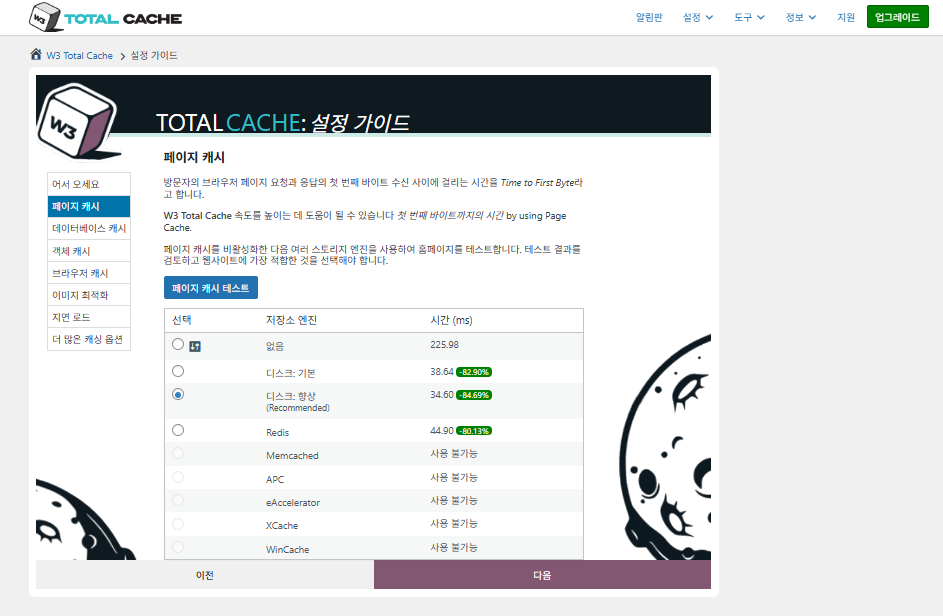
For page cache, W3TC's default recommendation is Disk: [Enhanced]. As the table shows, Disk: Enhanced is about 10.3ms faster than Disk: Basic, which is about 17.8% better performance in terms of TTFB.
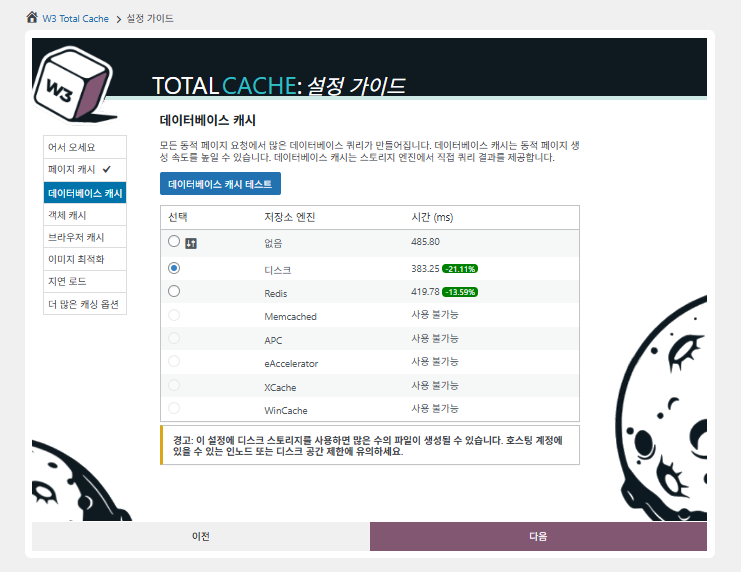
For the database cache, select disk cache.
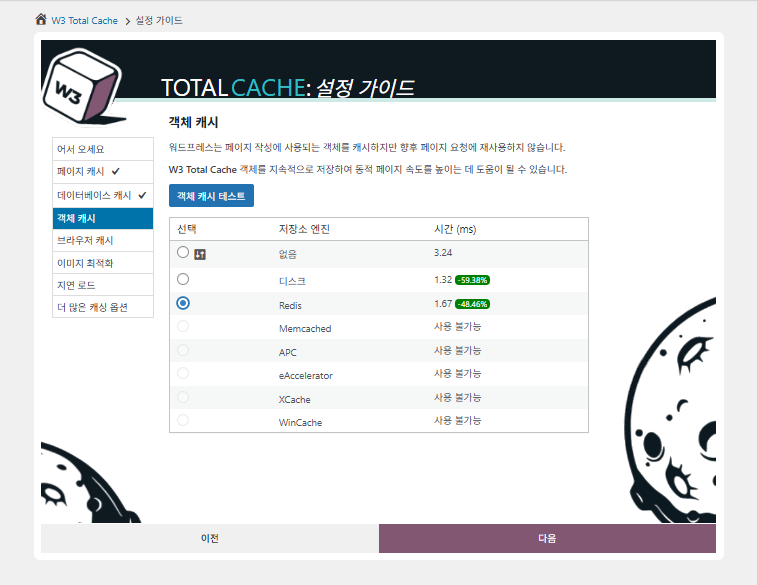
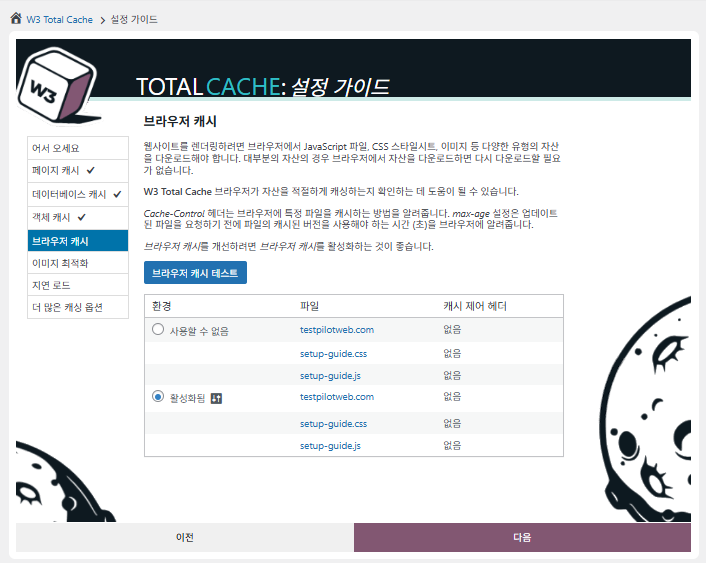
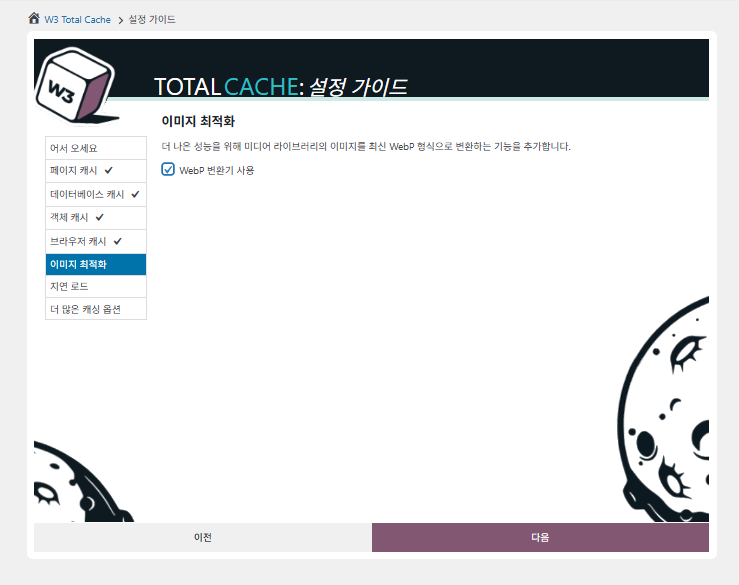
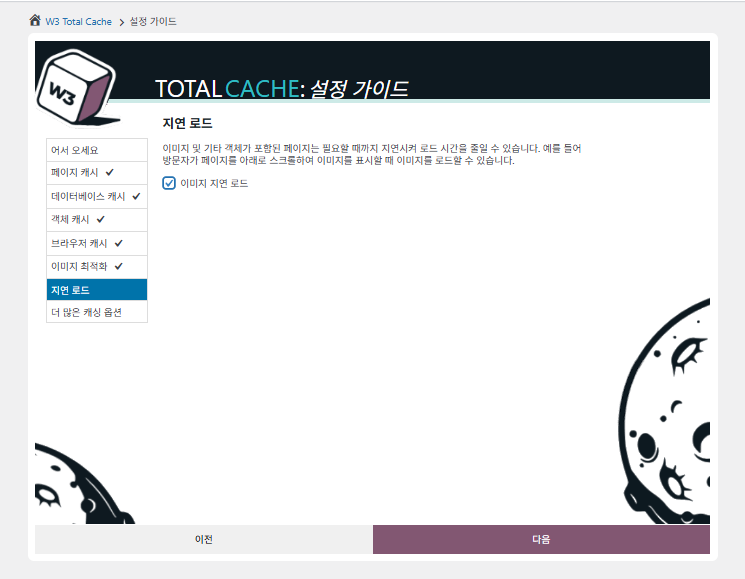
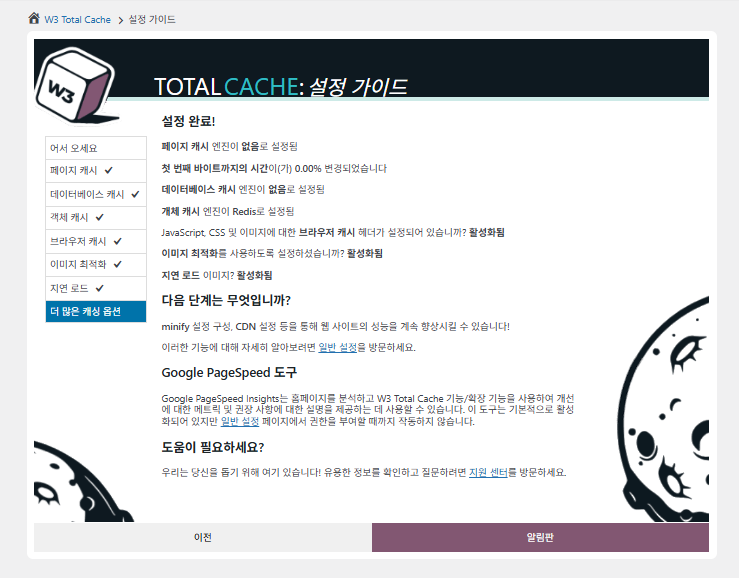
The settings made in the guide are now reflected on the dashboard.
Click the [Settings] tab at the top right to configure everything from [General Settings] to page cache and more.
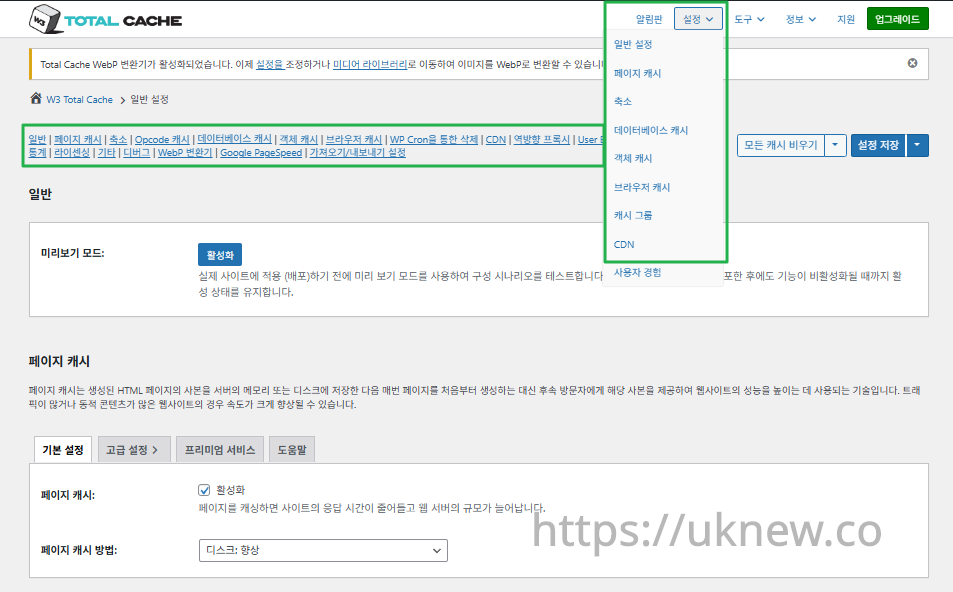
ⓐ The [page settings] in the left admin menu and ⓑ the [Settings] tab at the top right each lead to page cache, Minify and other advanced settings. If you go to each page from the top center of the General Settings tab, you can see everything for page cache and Minify, from the general settings to the Advanced settings.
Ⅱ. W3 Total Cache cache settings
This is the General Settings tab within the W3TC settings.
_branch_match_id
_bta_c
_bta_tid
_ga
_gl
_ke
adgroupid
adid
age-verified
ao_noptimize
campaignid
campid
click_id
cn-reloaded
customid
dicbo
dm_i
ef_id
epik
fb_action_ids
fb_action_types
fb_source
fbclid
gclid
gclsrc
gdffi
gdfms
gdftrk
hsa_acc
hsa_ad
hsa_cam
hsa_grp
hsa_kw
hsa_mt
hsa_net
hsa_src
hsa_tgt
hsa_ver
igshid
li_fat_id
matomo_campaign
matomo_cid
matomo_content
matomo_group
matomo_keyword
matomo_medium
matomo_placement
matomo_source
mc_cid
mc_eid
mkcid
mkevt
mkrid
mkwid
msclkid
mtm_campaign
mtm_cid
mtm_content
mtm_group
mtm_keyword
mtm_medium
mtm_placement
mtm_source
pcrid
piwik_campaign
piwik_keyword
piwik_kwd
pk_campaign
pk_cid
pk_content
pk_keyword
pk_kwd
pk_medium
pk_source
pp
redirect_log_mongo_id
redirect_mongo_id
ref
s_kwcid
sb_referer_host
si
sscid
tblci
toolid
trk_contact
trk_module
trk_msg
trk_sid
ttclid
twclid
usqp
utm_campaign
utm_content
utm_expid
utm_id
utm_medium
utm_source
utm_term
wbraid
index\.php
wp-links-opml.php
wp-locations.php
([a-z0-9_\-]+)?sitemap\.xsl
[a-z0-9_\-]+-sitemap([0-9]+)?\.xml(\.gz)?
Content-Type
X-Pingback
P3P
Link
- Enable HTTP compression in the “HTML” section on Browser Cache Settings tab.
RSPEAK_
mfunc
- Enable HTTP compression in the “Cascading Style Sheets & JavaScript” section on Browser Cache Settings tab.
- The TTL of page cache files is set via the “Expires header lifetime” field in the “Cascading Style Sheets & JavaScript” section on Browser Cache Settings tab.
wp_rg_
_wp_session_
_wc_session_
^\s*delete\b
^\s*update\b
^\s*replace\b
^\s*create\b
^\s*alter\b
^\s*show\b
^\s*set\b
\bautoload\s+=\s+’yes’
\bsql_calc_found_rows\b
\bfound_rows\(\)
DOING_CRON
DONOTCACHEDB
SHORTINIT
XMLRPC_REQUEST
plugins
[a-z0-9_\-]*sitemap[a-z0-9_\.\-]*\.(xml|xsl|html)(\.gz)?
1️⃣ Preview mode
Before deploying actual cache changes, you can turn on preview mode to test for errors in advance.

[Preview]: click it to test while previewing the changes, and if all is well, click [Deploy] to apply them to the site.
2️⃣ Page cache
The guide already set the basic setting to [Disk: Enhanced]. You can change it later if, for example, a server move means the server uses a different cache.
If a single (non-multisite) site also uses subdomains, you can set up caching for alias domains as well.
|
Server spec level |
Update interval (sec) |
Pages per interval |
Description |
|---|---|---|---|
|
Low-spec server (1 vCPU / 1 GB or less) |
1800 s (30 min) |
5 |
Avoid CPU spikes while building the cache: use a generous interval and keep the page count minimal |
|
Mid-range server (2 vCPU / 2–4 GB) |
900 s (15 min) |
10 |
Keeping the default is recommended; handles some concurrency |
|
High-performance server (4 vCPU / 8 GB or more) |
300 s (5 min) |
20~30 |
Prepares the cache quickly; good for high-traffic sites |
REST API is the interface WordPress provides for exchanging data with the outside world; it lets you request or manipulate content in JSON format via URLs. Through it, mobile apps, external web apps, the block editor and more can sync with or edit WordPress content in real time.
The REST API serves not only administrators but also ordinary users' requests, enabling efficient data exchange that makes the site more flexible and extensible.
|
Option |
Description |
Recommended |
|---|---|---|
|
Late initialization |
Allows WordPress functions to be called for fragment caching. |
⚠️ Only when you need advanced caching |
|
Late caching |
Delays cache key generation until after user filters, allowing finer cache control |
⚠️ Only when overriding keys |
|
Compatibility mode |
Gives up some optimizations for hosting compatibility (about 20% slower) |
✅ Recommended when you hit hosting errors |
|
Charset |
Fixes UTF-8 encoding issues |
✅ Recommended if strange characters appear |
|
Reject HEAD requests |
Prevents HEAD requests from creating empty caches |
✅ Prevents unexpected blank pages |
|
Maximum lifetime of cache objects |
How long cached items are kept (sec) |
⏱ Higher for low traffic, lower for high traffic |
|
Garbage collection interval |
How often expired cache data is removed (sec) |
⏱ Shorter the more traffic you have |
|
Comment cookie lifetime |
Adjusts the cookie TTL when someone comments (default 1800 s) |
✅ Useful for reducing logged-in user traffic |
3️⃣ Minify
In HTML, CSS and JS files, Minify removes unnecessary whitespace, comments and line breaks, to reduce file size and improve loading speed. This process does not change functionality but makes the code leaner , so the browser can parse it faster.
|
Option |
Description |
Recommended |
|---|---|---|
|
Auto |
W3TC detects and minifies HTML, CSS and JS files automatically. |
✅ Suits most users |
|
Manual |
Only applies once you enter the paths of the files to minify yourself. |
⚠️ Only for advanced users who need precise control |
|
Option |
Description |
Best environment |
|---|---|---|
|
Disk |
Stores minified files on the server disk |
✅ Typical shared hosting; the default |
|
APC / APCu |
Stores in memory using PHP's opcode cache |
✅ Performs well on dedicated/virtual servers |
|
eAccelerator |
An old PHP opcode cache |
⚠️ Only relevant on old servers |
|
XCache |
One of PHP's caching mechanisms (rarely used) |
❌ Not recommended (outdated) |
|
WinCache |
PHP cache for Windows servers |
✅ IIS/Windows servers only |
|
Memcached |
Stored on distributed cache servers |
✅ Multi-server, cluster setups |
|
Redis |
Caches minified files in a fast key-value store |
✅ High-performance VPS / multi-server setups |
|
Option |
Description |
Features |
|---|---|---|
|
Minify (default) |
W3TC's built-in HTML minifier |
Very stable and compatible with most sites |
|
HTML Tidy |
Cleans up the HTML structure while minifying |
Includes structure correction → risk of breaking the layout |
| Option | Description | Features | Choosing a JS minifier |
|---|---|---|---|
| JSMin (default) | Simple, fast JS minifier: removes basic whitespace and comments | Very stable, low risk of conflicts | ✅ Speed/stability first; typical WordPress sites |
| Google Closure Compiler (web service) | Google's advanced JS optimizer: compresses via the Google API | Accurate, but an external server call is required → can be slow | ⚠️ External API use is OK; precise optimization first |
| Google Closure Compiler (local Java) | Runs the same engine in the server's Java environment instead | Advanced optimization possible, Java must be installed | ✅ Java can be installed; when you want advanced optimization |
| Narcissus | A classic compressor that parses and regenerates JS | An old approach, practically unsupported | — |
| YUI Compressor | JS/CSS compressor developed by Yahoo; can keep preserved comments | Old but still stable | — |
| Closure (needs testing) | — | — | ⚠️ Lots of modern JS (ES6+) |
| Option | Description |
|---|---|
| ✅ Minify (default) | Fast and stable; suits most WordPress sites |
| ⚠️ CSS Tidy | Tidies structure and fixes syntax; styles may break → needs testing |
| ⚠️ YUI Compressor (PHP) | Old compression logic, no longer updated → legacy sites only |
| ⚠️ YUI Compressor (Java) | Needs Java; precise compression, but no support for modern CSS syntax |
The guide already set the basic setting to [Disk: Enhanced]. You can change it later if, for example, a server move means the server uses a different cache.
|
Item |
Description |
|---|---|
|
Rewrite URL structure |
Uses clean URL structures for CSS/JS links. If disabled, they are output as GET-parameter-based URLs such as [?ver=xxx]. |
|
For logged-in users, |
Logged-in users see the original files, not the minified ones. Useful while debugging or developing. |
|
Minimize error notifications |
Notifies you if an error occurs while building the minify cache. If disabled, no warning is shown. |
|
Item |
Description |
|---|---|
|
HTML minify settings |
Compresses HTML documents to reduce their size by removing whitespace, indentation and so on. |
|
Inline CSS minification |
Compresses the CSS code inside [<style>] tags. |
|
Inline JS minification |
Compresses the JS code inside [<script>] tags. |
|
Don't minify feeds |
Leaves RSS/Atom feeds (XML) unminified, exactly as they are. |
|
Remove line breaks |
Removes line break characters in the HTML → smaller file size |
|
Example |
Purpose |
|---|---|
|
google_ad_ |
Protects Google AdSense ad script comments |
|
RSPEAK_ |
Protects screen reader/accessibility code comments |
|
mfunc |
Protects W3TC's [<!– mfunc –>] fragment cache comments |
|
Minify method |
Description |
Recommended for |
|---|---|---|
|
Combine & Minify |
Combines several JS files into one and compresses them at the same time |
✅ Most effective in typical cases |
|
Combine Only |
Bundles files into one without compressing them |
⚠️ When JS conflicts are a concern: avoids errors caused by compression |
|
Minify Only |
Keeps the number of files and compresses each one individually |
⚠️ On HTTP/2 + when JS errors occur |
|
Minify engine settings |
Description |
|---|---|
|
Embed location: before [</head>] |
Inserts the JS inside [<head>] (runs before the page loads) |
|
Embed location: after [<body>] |
Inserts the JS at the very bottom of the page (runs after rendering) |
|
Embed type (Blocking / Non-blocking) |
Whether JS execution pauses page rendering |
|
Item |
Description |
Recommended setting |
|---|---|---|
|
Enable HTTP/2 Push |
The server pushes JS files before the browser requests them |
✅ Can improve performance on HTTP/2 |
|
Caveats |
If W3TC's Page Cache uses [Disk: Enhanced] with NGINX, HTTP/2 Push ❌ does not work |
✅ Works best with Apache + HTTP/2 |
|
Minify method |
Description |
Recommended for |
|---|---|---|
|
Combine & Minify |
Merges CSS files, then compresses them |
✅ General use |
|
Combine only |
Bundles files without compressing |
⚠️ If CSS conflicts are a concern |
|
Minify only |
Compresses only, no merging |
✅ Suits HTTP/2 servers |
|
Minify engine settings |
Description |
Applies when |
|---|---|---|
|
Remove preserved comments(Preserved comment removal) |
Removes license notes and preserved comments inside CSS files to reduce their size. |
⚠️ Applies only with [Combine & Minify] or [Minify only] (※ not with [Combine only]) |
|
Remove line breaks(Line break removal) |
Deletes line break characters from CSS to produce a more compact file (slightly smaller) |
⚠️ Works only with [Combine & Minify] or [Minify only] (※ ignored with [Combine only]) |
|
@import handling |
Description |
Recommended setting |
|---|---|---|
|
None |
Leaves [@import] CSS calls as they are |
❌ Not recommended (blocks rendering) |
|
Bubble |
Moves [@import] to the top of the CSS file |
⚠️ Limited effect |
|
Process |
Includes [@import] calls in the merge |
✅ Recommended (improves performance) |
|
Advanced item |
Description |
Recommended setting |
|---|---|---|
|
Update interval for external files(Update interval for external files) |
How often W3TC re-downloads/minifies CSS/JS files from CDNs and external URLs (in seconds) |
✅ Keep the default [86400] s (24 hours) ※ if external files change often, consider [21600] (6 hours) |
|
Garbage collection interval(Garbage collection interval) |
How often expired cache files are deleted (applies to disk cache) |
✅ [43200–86400] s recommended (can be lower with heavy traffic) ※ an upper limit (2592000 s) can be set in [wp-config.php] |
|
Never minify the following pages(Never minify the following pages) |
Enter the URLs to always exclude from minification (relative paths, without queries) |
✅ Add admin, login page, AJAX URLs, etc. as needed. Example: [wp-login.php], [wp-admin/], [my-custom-endpoint/] |
|
JS files to never minify |
Specify JS files that throw errors when minified |
⚠️ Add problem JS files when you find them. Example: [plugins/some-script.js] |
|
CSS files to never minify |
Lets you make exceptions when CSS conflicts occur |
⚠️ Make an exception for CSS that breaks the layout. Example: [themes/mytheme/style.css] |
|
Rejected user agents |
Doesn't serve minified files to specific user agents (crawlers, bots, etc.) |
✅ Specify only the bots that need to bypass the cache. Example: [Lighthouse], [GTmetrix], [Chrome-Lighthouse], etc. |
|
Include external files/libraries(Include external files/libraries) |
Manually adds external CDN scripts to the combine list |
⚠️ Only when you want to minify/merge external JS/CDN files. Example: [ajax.googleapis.com/…/jquery.min.js] |
|
Allow regular expressions |
Lets you match with regex when file name patterns vary |
✅ Useful when external scripts often change by version number. Example: [cdn.example.com/js/lib-\d+\.js] |
# EX:
#JS files to never minify:
plugins/some-plugin/assets/js/legacy-script.js
wp-includes/js/jquery/jquery.js

#CSS to never minify:
themes/mytheme/style.css
# EX:
#Rejected user agents:
Lighthouse
Chrome-Lighthouse
GTmetrix|
Item |
Description |
Recommended setting |
|---|---|---|
|
Use WP-Cron event(Enable WP-Cron event) |
To purge/refresh the page cache automatically on a schedule, schedule a WP-Cron job |
✅ Enabling recommended (keep the default) |
|
Start time(Start time) |
When WP-Cron first runs (e.g. 12:00 am) |
✅ A low-load time (e.g. between midnight and 3 a.m.) |
|
Interval(Interval) |
WP-Cron cache purge frequency Settings |
✅ Twice daily or hourly (high-traffic sites) |
|
System cron alternative |
Instead of WP-Cron, you can run the [wp w3tc flush_posts] command from a real OS-level cron |
Recommended on high-performance servers (more accurate and efficient than WP-Cron) |
4️⃣ Opcode cache
For opcode cache, the opcode cache installed on the server is applied automatically; if none is installed, it is set to disabled.
5️⃣ Database cache and object cache: Memcached·Redis
|
Option |
Description |
Recommended environment |
|---|---|---|
|
Disk |
Stores cache data on the server disk |
✅ Shared hosting / basic setups |
|
Memcached |
Network-based distributed cache; fast |
✅ Multi-server / cluster |
Typical WordPress sites often use only one of Memcached or Redis for the database cache, but in W3 Total Cache you can split them up: ⓐ one for the database cache and ⓑ the other for the object cache.
📌 Typical WordPress Site
├─ Database Cache
│   └─ Memcached or Redis · only one use
└─ Object Cache
    └─ the same Cache engine shared is common

📌 W3 Total Cache (W3TC)
├─ Database Cache
│   └─ Memcached use (example)
└─ Object Cache
    └─ Redis use (example)

🛠️ Applied strategy
└─ Cache engine by role — Separated Applied possible
    ├─ Server resource distribution
    ├─ Cache bottleneck reduction
    └─ Performance Optimization flexibility secured
In W3 Total Cache's settings, by default the database cache is set to Memcached and the object cache to Redis.
|
Item |
Description |
Recommendation or note |
|---|---|---|
|
Maximum lifetime of cache objects |
Natural expiry time of unchanged cache items (sec) |
[180 s] (default); too high wastes memory |
|
Garbage collection interval |
How often expired cache data is deleted (sec) |
[3600 s] (1 hour); lower it under heavy use |
|
Never cache the |
Paths to exclude from caching (regex allowed) |
Excluding dynamic pages such as login, cart and search is recommended |
|
Ignored query stems |
Queries with a matching prefix are not cached |
Session/temporary data such as [gdsr_], [wp_rg_] |
|
Reject queries (Query Rejects) |
Excludes queries containing specific keywords/patterns (regex) |
[insert], [update], [autoload], [found_rows()], etc. |
|
Reject Constants |
Disables the DB cache when the listed WP constants are defined |
[DOING_CRON], [XMLRPC_REQUEST], etc. |
|
Enable for WP-CLI |
Whether to use the cache when WP-CLI runs too |
✅ Faster when enabled (be careful in test environments) |
|
Option |
Description |
Recommended environment |
|---|---|---|
|
Disk |
Stores cache data on the server disk |
✅ Shared hosting / basic setups |
|
Redis |
Fast key-value cache; works well with PHP-FPM |
✅ High-performance servers / VPS |
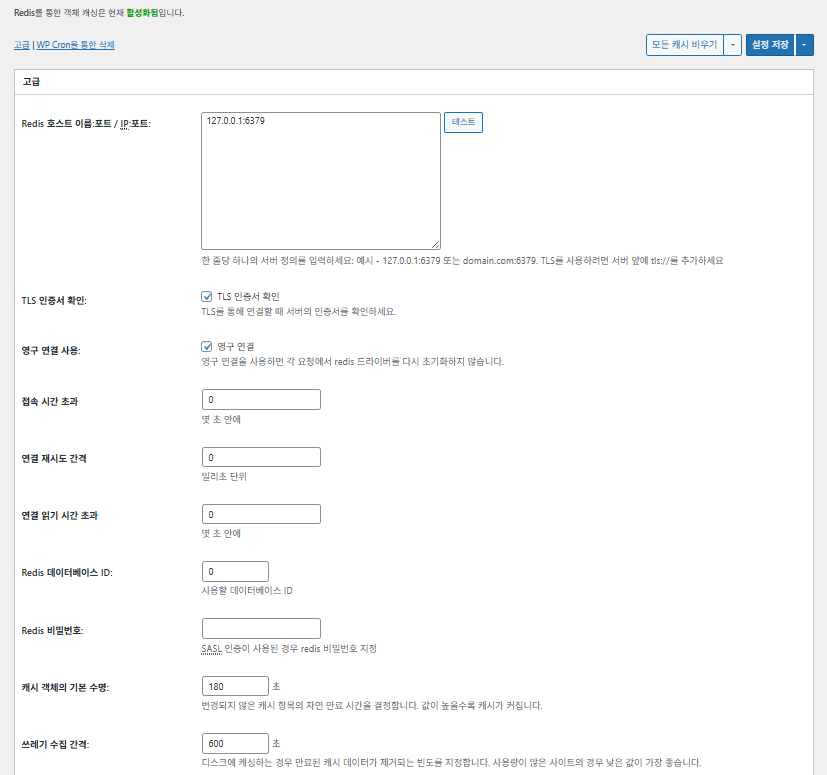
|
Item |
Description |
|---|---|
|
Redis host/IP |
Format [127.0.0.1:6379]. For TLS, use the [tls://] prefix |
|
Verify TLS certificate |
Checks certificate validity when using TLS (optional) |
|
Use persistent connections |
Reuses Redis connections for better performance |
|
Connection timeout |
Maximum time allowed to connect to Redis (sec) |
|
Connection retry interval |
Wait before retrying after a failure (ms) |
|
Connection read timeout |
Maximum time to wait for a response (sec) |
|
Redis DB ID |
Database number within Redis (default [0]) |
|
Redis password |
Password or SASL authentication input |
|
Default cache lifetime |
Default time cache items are kept (sec). Default 180 s |
|
Garbage collection interval |
How often expired cache is deleted. Default 600 s |
|
Global groups |
Groups shared in network mode (for multisite) |
|
Non-persistent groups |
Groups excluded from caching, e.g. [counts], [plugins] |
|
Cache wp-admin requests |
Applies the cache to the admin area too (⚠️ test first) |
|
Store transients in database |
Keeps temporary values in the DB even while an external cache is used |
|
Enable WP-CLI |
Allows the cache for WP-CLI commands as well |
6️⃣ Browser cache
Browser caching stores static files such as images, CSS and JS on the visitor's device, greatly cutting loading time on repeat visits. This improves page response speed and the user experience.
Most of these settings focus on cache control and reducing server load. On sites with heavy traffic or where static resource optimization matters, it is fine to enable many of them.
| Item | General | CSS and JS | HTML and XML | Media and other files |
|---|---|---|---|---|
| Set [Last-Modified] header | Includes the file's last-modified date to allow 304 responses | ✅ Enable in most cases | ✅ Suits most servers | ✅ Works with most CDN/browser caches |
| Set [Expires] header | Makes the browser cache files for a set period | ✅ Default 31536000 s (1 year), recommended | ✅ Default [3600 s (1 hour)] | ✅ [31536000 s] (1 year) by default → suits static files |
| ⏱️ Set the Expires lifetime | — | ⏱️ e.g. [31536000 s = 1 year] · can be shortened when used with a CDN | — | — |
| Set [Cache-Control] header | Controls the caching strategy by adding pragma and cache-control headers | ✅ [“public, max-age=31536000”] recommended | ✅ Set to e.g. [“public, max-age=3600”] | ✅ [“public, max-age=31536000”] recommended |
| ✅ Cache control policy | — | ✅ Use a policy that includes [max-age] · [“public, max-age=EXPIRES_SECONDS”] is used by default | — | — |
| Set [ETag] | Provides an entity tag that identifies the file – for detecting changes | ✅ Effective when used within the same server | ✅ If caches aren't shared between servers, use is recommended | ✅ Useful when running a single server |
| Set W3TC header | Adds a header that shows whether a file was optimized by W3TC | 🔖 Not required; for analysis | 🔖 Not required (for debugging) | 🔖 Optional |
| gzip compression | Compression that shrinks text files (widely compatible) | ✅ Supported on most servers | ✅ Supported by most servers | ✅ No effect on images |
| brotli compression | Higher compression ratio than gzip (supported browsers only) | ✅ Requires Apache/Nginx configuration | ✅ Enable the Apache/nginx module | ✅ Applies only to supported browsers |
| Prevent caching of objects after settings change | Adds a query string to invalidate the old cache | ✅ Recommended if settings change often | — | ✅ File changes take effect immediately |
| Remove query strings | Removes [?] from static resources to improve cacheability | ⚠️ Only needed with some CDNs/proxies | — | ✅ Can be applied to versioned files |
| Remove cookies | Removes the [Set-Cookie] header from static resource responses | ✅ Check it in most cases | — | ✅ Images and the like don't need cookies |
| Don't let WordPress handle 404s | The web server handles 404s for static files → less load on WP | — | — | — |
| 404 exception URI list | Specifies URI patterns that WP should still handle (e.g. sitemap, robots.txt) | — | — | — |
| Rewrite object URL structure | Generates unique URIs to bypass caches (e.g. [ver=xxxx]) | — | — | — |
Ⅲ. W3 Total Cache extra features
Purging the cache via WP Cron is a global setting.
{wp_content_dir}/gallery/*
{wp_content_dir}/uploads/avatars/*
{plugins_dir}/wordpress-seo/css/xml-sitemap.xsl
{plugins_dir}/wp-minify/min*
{plugins_dir}/*.js
{plugins_dir}/*.css
{plugins_dir}/*.gif
{plugins_dir}/*.jpg
{plugins_dir}/*.png
{uploads_dir}/imagerotator.swf
{plugins_dir}/wp-fb-autoconnect/facebook-platform/channel.html
- You can use placeholders {wp_content_dir}, {plugins_dir}, {uploads_dir} instead of writing folder paths (wp-content, wp-content/plugins, wp-content/uploads).
- If using Amazon Web Services or Self-Hosted CDN types, enable HTTP compression in the “Media & Other Files” section on Browser Cache Settings tab.
data-bgposition=
data-envira-src=
data-large_image=
data-lazy-original=
data-lazy-src=
data-lazyload=
data-lazysrc=
data-no-lazy=
data-src=
data-srcset=
fullurl=
lazy-slider-img=
loading=”eager”
no-lazy
rev-slidebg
skip-lazy
soliloquy-image
swatch-img
w3-total-cache
woocommerce/assets/images/placeholder.png
wpcf7_captcha
1️⃣ CDN
You can configure this after signing up with a CDN provider.
|
Option |
Description |
|---|---|
|
✅ Host attachments |
Uploads attachments such as images in [wp-content/uploads] to the CDN |
|
✅ Host wp-includes files |
Includes WordPress core static files (js/css, etc.) in the CDN |
|
✅ Host theme files |
Includes the active theme's static files (css/js/images, etc.) in the CDN |
|
✅ Host minified CSS/JS files |
Serves the CSS/JS files minified by W3TC from the CDN |
|
✅ Host custom files |
Pushes paths or file names you specify to the CDN |
|
⚠️ Force overwrite of existing files |
For forcing a re-upload when changes aren't detected automatically |
|
Item |
Description |
|---|---|
|
Only purge CDN manually |
Removes files from the CDN only when you click the manual purge button |
|
Disable CDN on SSL pages |
Doesn't use CDN URLs on HTTPS pages |
|
Use CDN links in the admin |
Shows CDN URLs for media in the admin screens too |
|
Add CORS header |
Adds a response header that allows CORS |
|
Disable CDN by role |
Doesn't apply the CDN for selected user roles (e.g. only administrators use the origin) |
|
Page exclusion list |
Excludes the specified paths from the CDN (regex allowed) |
|
Automatically upload minified files |
Uploads minified files to the CDN automatically (Push) |
|
Export changed files automatically |
Uploads automatically when file changes are detected |
|
Auto-upload interval |
Upload interval after changes are detected (default 3600 s) |
|
Re-transfer interval / limit |
Retry interval after failures and a limit on files processed |
|
wp-includes files to upload |
Specifies which core file types go to the CDN |
|
Theme file types to upload |
Specifies theme-related file types such as CSS/JS/fonts |
|
File types to import |
Sets conditions for automatically downloading externally linked files |
|
Custom file list |
Specifies individual file paths to send to the CDN (templates, external plugins, etc.) |
|
Rejected user agents |
Specifies bots/user agents to block from CDN files |
|
Rejected file paths |
Specifies file paths to keep off the CDN, such as CAPTCHAs and special paths |
|
Set cookie domain |
Specifies a domain to stop cookies being sent when using a subdomain CDN |
2️⃣ Reverse proxy
The description uses Varnish and Nginx as examples, but since Nginx is configured on the server, apply this in the W3 Total Cache plugin only if you use Varnish.
3️⃣ User experience: lazy load
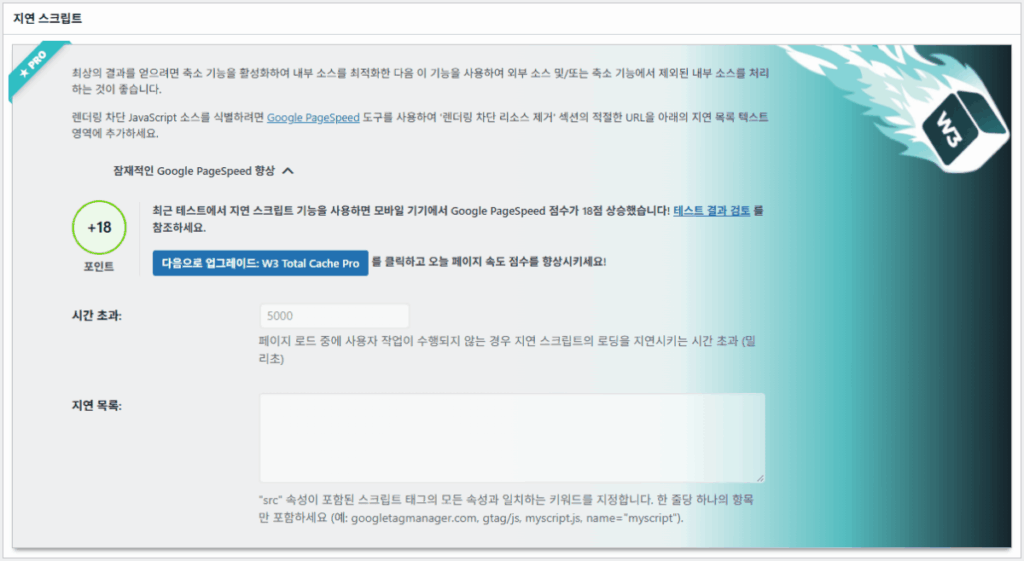
In the advanced settings, more than 50% of the features are available only in the premium version.
|
Item |
Description |
When to use it |
|---|---|---|
|
✅ Process HTML image tags |
[<img>] tags get the lazy attribute |
For lazy loading ordinary content images |
|
✅ Process background images |
Applies lazy loading to CSS [background-image] |
For design-heavy sites with many background images |
| Exclude words | Example |
|---|---|
| Lazy exclusion attributes | [data-src], [data-lazy-src], [data-no-lazy], [loading=”eager”], etc. |
| Lazy exclusion classes | [no-lazy], [skip-lazy], [lazy-slider-img], [rev-slidebg], etc. |
| Plugins/sliders | [soliloquy-image], [envira], [w3-total-cache], [wpcf7_captcha], etc. |
| WooCommerce | [swatch-img], [woocommerce/…/placeholder.png], etc. |
The lazy loading “threshold” sets how far below the browser viewport (screen) images and background elements start loading in advance. For example, with 100px, an element loads when the user scrolls within 100 pixels of it; too small a value delays image loading so users may see blank areas, so 100–300px is usually appropriate.
Next are the script embed methods.
|
Embed method |
Description |
Location or attribute |
|---|---|---|
|
Asynchronous (Async) |
Runs in parallel with page loading and doesn't block rendering |
[<script async>] |
|
Synchronous (in the head) |
Runs first in the [<head>] area and can temporarily block rendering (in the head) |
[<head>] or [<script>] |
|
Inline |
Inserts the script directly into the HTML document so it runs without a separate request |
Inserted inside [<script>code</script>] |

4️⃣ WebP converter


Ⅳ. W3 Total Cache overall review
W3 Total Cache's interface (UI) isn't bad, but it is clearly inconvenient. Many developers and professional users point out the same thing. Compared with modern plugins such as WP Rocket or FlyingPress, it can keep up on site performance, but the user experience (UX) falls short.
Having lots of features is a strength, but for beginners the structure can feel overly complex. In particular, with frequent jumps between menus and many detailed options, even experienced developers and site administrators can make configuration mistakes. Naturally you won't remember every setting, but in use it is an advanced caching plugin that allows fine-grained tuning.
With over 1 million installs of the free version, it's hard to dismiss it as simply an old plugin — in practice, few cache plugins can match its range and richness of features.
| Item | Rating (⭐) | Assessment |
|---|---|---|
| 🎛️ Interface | ⭐⭐⭐ | Many menus and a complex structure; a barrier for new users. The UI feels dated |
| ⚙️ Range of features | ⭐⭐⭐⭐⭐ | Cache, CDN, Redis and almost every other feature; it's hard to find something missing |
| 🛠️ Fine-tuning flexibility | ⭐⭐⭐⭐ | Almost everything can be fine-tuned; watch for conflicts between settings |
| 🚀 Performance gains | ⭐⭐⭐⭐⭐ | Excellent performance once optimized; object/browser cache make a big difference |
| 🧩 Compatibility | ⭐⭐⭐ | May conflict with some hosts, themes and plugins. |
| 📄 Documentation and guides | ⭐⭐⭐⭐⭐ | Extensive official documentation |
| 💡 User recommendation | ⭐⭐⭐⭐(4.5) | Recommended for advanced users; beginners may prefer WP Rocket, Cache Enabler, etc. |
| 📊 Overall rating | ⭐⭐⭐⭐(4.5) | A powerful, feature-focused plugin. There is a learning curve; consider your skill level |
Ⅴ. Performance test
After configuring the plugin, the final speed test showed a more noticeable speed improvement than typical cache plugins.
ℹ️ Affiliate Disclosure
This site's content contains affiliate links. When a visitor buys a product or service through one of them, the site receives a commission from the seller. The amount the buyer pays(it goes down during event discounts ↓)does not go up. Posted prices, discounts, and stock reflect the time of writing and may differ, so confirm with the seller before buying. Products are chosen and reviewed by our own standards, and commissions do not affect the order or content of reviews.