
Cloudways vs Hostinger: Pricing, Server Structure and WordPress Installation Time Compared
In October 2026, a Cloudways vs Hostinger comparison was run with test accounts at both providers: Hostinger had the lower first-term monthly price, while Cloudways offered a wider choice of servers.
Cloudways is managed cloud hosting that puts a control panel on top of servers from cloud providers, while Hostinger is web hosting on servers the company runs itself. That is why even the billing method differs.
1️⃣ Cloudways vs Hostinger
When you create a server on Cloudways, you choose one of five cloud providers: DigitalOcean, Vultr, Linode, AWS and Google Cloud. You can run several applications such as WordPress on that one server, and you are billed per server.
Hostinger web hosting works by buying a plan on servers that Hostinger runs and adding sites within that plan. Server size is set by the plan's disk, RAM and CPU limits, and the server location can be moved to another data center in hPanel.
| Item | Cloudways | Hostinger |
|---|---|---|
| Server | Choice of five cloud providers | Servers run by Hostinger |
| Billing basis | Server size · hours running | Plan · term length |
| Number of sites | As many as server resources allow (no limit on applications) | Unlimited plan: [Addons/Websites] Unlimited ([Plan details] screen) |
| Web server | Choice of Lightning (Nginx) · Hybrid (Nginx + Apache) | LiteSpeed |
| Management screen | Cloudways Platform (server menu · application menu) | hPanel (per-site menu) |
The table is based on both providers' official pricing pages and control panels, checked on October 19, 2026 for Cloudways and October 26, 2026 for Hostinger.
2️⃣ Cloudways vs Hostinger price comparison
🔲 Cloudways pricing table
Cloudways pricing is set as an hourly rate for each server size. On the official pricing page on October 19, 2026, a 1GB server on DigitalOcean Premium and Vultr cost $0.0208 per hour, capped at $14 per month. Usage is billed afterward, on an invoice issued in the first week of the following month.
🔲 Hostinger pricing table
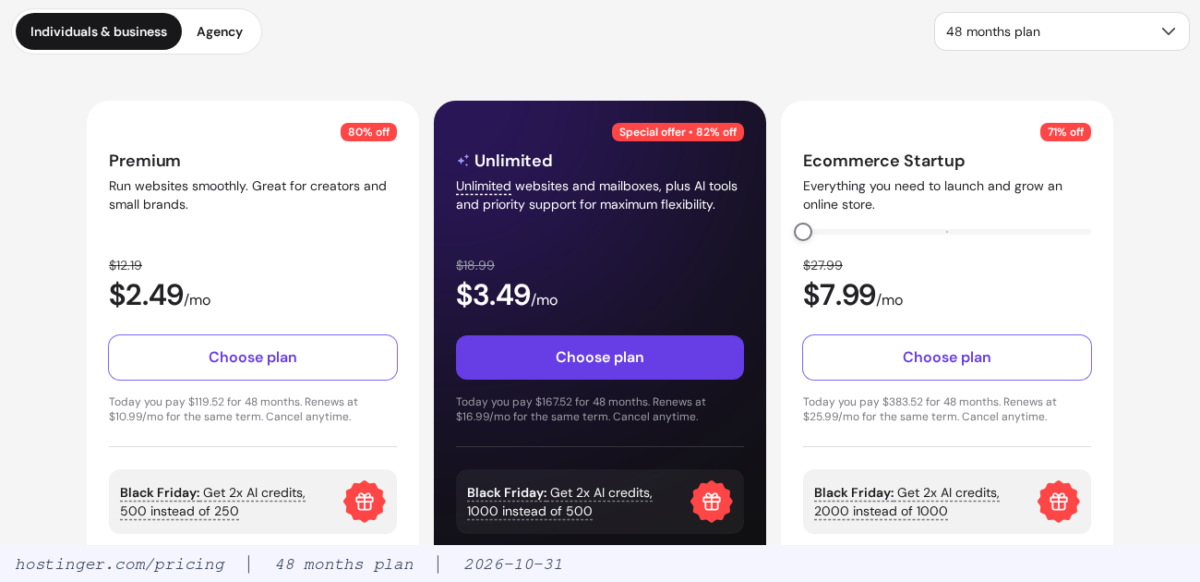
Hostinger's monthly rate falls the longer the term, and the full amount for the term is charged at once in the first payment. When the term ends, Premium renews at $10.99 per month and Unlimited at $16.99 per month.
Discount rates differ by plan and can change when a promotion ends, so Hostinger's 48-month pricing page from October 31, 2026 is shown as it was. On this page, Ecommerce Startup has the same price as Cloud Startup in the October 27 table.
🔲 First payment and renewal price comparison
| Item | Cloudways (1GB server) | Hostinger(Premium · Unlimited) |
|---|---|---|
| Lowest monthly price | $11(DigitalOcean Basic) · Premium·Vultr $14 | $2.49 · $3.49 (48-month term) |
| First payment | Billed next month for the hours used | $119.52 · $167.52 (48 months) |
| Using it for one month only | $14 if left on all month | $12.19 · $18.99 (1-month term) |
| Renewal | Same hourly rate | $10.99 · $16.99 per month |
| Term | None · billing stops when you delete the server | 1 · 12 · 24 · 48 months |
Prices in the table exclude tax and are based on the official pricing pages (in dollars) on October 19, 2026 for Cloudways and October 27, 2026 for Hostinger.
Cloudways' actual invoices were also calculated at the hourly rate. The test account ran servers for 1,768 hours from July to October 18, 2026. Server charges of $36.83 plus $2.50 for offsite backups came to $39.33, and the October portion is the expected charge (excluding tax).
With a term of 12 months or more, Hostinger Premium and Unlimited have a low first-term monthly price of $2.49–4.99. After renewal, Premium costs $10.99 per month, close to the $14 per month of a 1GB Cloudways server.
3️⃣ Control panel comparison
On the Cloudways Platform, [Flexible] in the left menu is split into the [Servers] and [Applications] tabs. Opening a server shows 8 server menus, and opening an application shows 14 application menus.


Server menus hold items that apply to the whole server, such as PHP and MySQL settings, server size and backup frequency. Application menus hold items that apply to a single site, such as the domain, SSL and staging. Even for backups, you set the frequency in the server's [Backups] and restore in the application's [Backup and Restore].
hPanel shows the site list under your plan on [Home], and clicking [Manage site] on a site's row takes you to that site's menu.

The site menu is divided into the WordPress, Hosting Plan, Performance, Security, Files, Databases and Advanced groups. Unlike Cloudways, there is no separate server menu. The server location and the disk, RAM and CPU limits are checked under [Hosting Plan › Plan Details].

The pencil icon next to [Server Location] on the [Plan details] screen moves the server location to another data center. The window that opens says a transfer can be started only once every 30 days.
4️⃣ WordPress installation comparison
Cloudways installs WordPress on the same screen where you create the server. On the [+ Add Server] screen in [Flexible], choose Optimized WordPress and enter the application and server names. Then choose the stack, cloud provider, database, server size and location, and click [Launch Now].

On a Vultr 1GB server on October 9, 2026, the first WordPress access was logged about 8 minutes after [Launch Now] was clicked. This time includes creating the new server. To add WordPress to an existing server, use [+ Add Application] on the [Applications] tab; the screen says adding takes about 2 minutes.
On Hostinger, if you have a plan, choose [WordPress] from [Create site] on the [Websites] screen. Then set the domain and admin details and install with [Build from scratch]. On October 27, 2026, the new site took 2 minutes 52 seconds from the first click to the WordPress admin screen, of which the installation step took about 1 minute 10 seconds.

The installation screen shows progress in the order Installing WordPress, Adding your domain, Wrapping things up. When the installation finishes, you go to the WordPress admin without logging in.

| Item | Cloudways | Hostinger |
|---|---|---|
| Starting menu | [+ Add Server] (new server) · [+ Add Application] (existing server) | [Websites › Create site] |
| What you choose | App type · stack · cloud provider · database · server size and location | Domain (temporary address allowed) · admin details |
| Time taken | New server about 8 minutes (based on first access log) · existing server about 2 minutes (on-screen notice) | 2 minutes 52 seconds (from first click to admin screen) |
| Installed cache plugin | Breeze | LiteSpeed Cache (active) |
5️⃣ Data centers and server stack
This compares what the two providers' official documents state, as of October 26, 2026.
On Cloudways, you choose the server location from the data centers of five cloud providers. Data centers in Italy are AWS Milan and Google Cloud Milan and Turin. Among the web and cloud hosting data centers listed in Hostinger's official documents, those in Europe are France, Germany, Lithuania, Netherlands and United Kingdom. Italy is not on this list.
Hostinger's other regions are Asia (India, Indonesia, Malaysia), North America (USA) and South America (Brazil). The same official document says its CDN also runs from additional points such as Johannesburg, Japan and Sydney. The hPanel server transfer list on October 26, 2026 also included Singapore, and the Hostinger pins on the map below are the 14 locations on that list.
On Cloudways, you choose the web server: the Lightning stack, which uses only Nginx, or the Hybrid stack with Nginx + Apache. On its official pricing page, Hostinger lists LiteSpeed servers and NVMe storage.
For uptime, Hostinger's hosting agreement guarantees 99.9% per month, and if it is not met, you can request 5% of that month's hosting fee as credit. Cloudways shows a 99.99% uptime SLA on its home page, but we could not find a contract document with compensation terms on its official site.
6️⃣ Feature comparison
| Features | Cloudways | Hostinger |
|---|---|---|
| Backups | Set time · frequency · retention in the server's [Backups] · offsite backups as a separate line on the invoice | [Files › Backups] daily automatic · manual once every 24 hours |
| Staging | Application [Staging Management] | Site [WordPress › Staging] |
| Cache | Breeze plugin · Varnish · Redis (free) | LiteSpeed Cache plugin · server cache [Cache Manager] |
| CDN | Cloudflare Enterprise paid add-on (from $4.99 per domain per month) | Hostinger CDN responses right after installation |
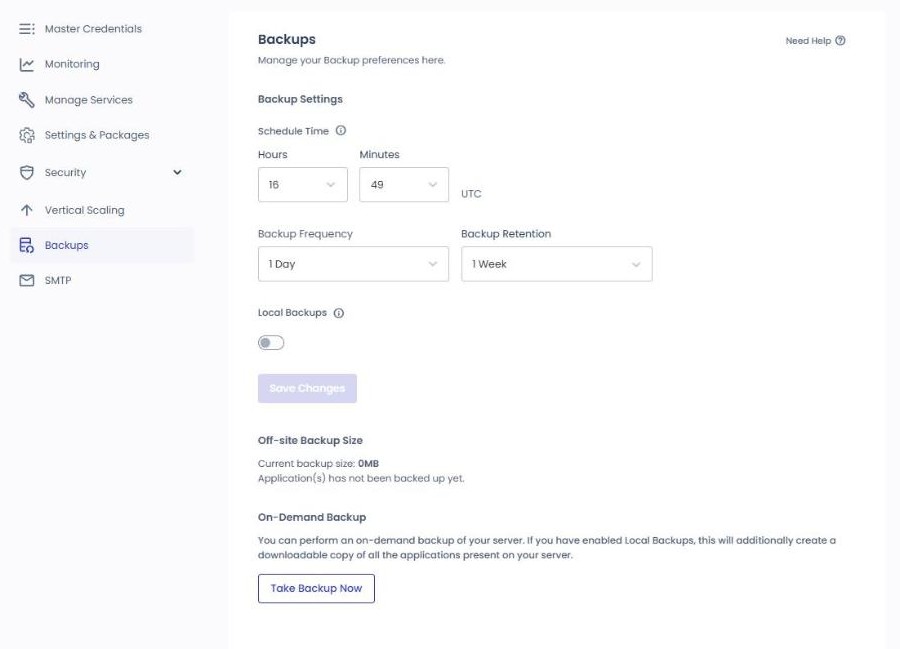
For backups, Cloudways sets the backup time, frequency and retention in the server's [Backups], and the new server screen was set to once a day with 1 week of retention. On the test server on October 13, 2026, an instant application backup took about 30 seconds and a full restore about 1 minute 30 seconds.
Hostinger's [Files › Backups] has backups created automatically every day and manual backups that can be created once every 24 hours. Restores are done on the [Restore and download] tab of the same screen.

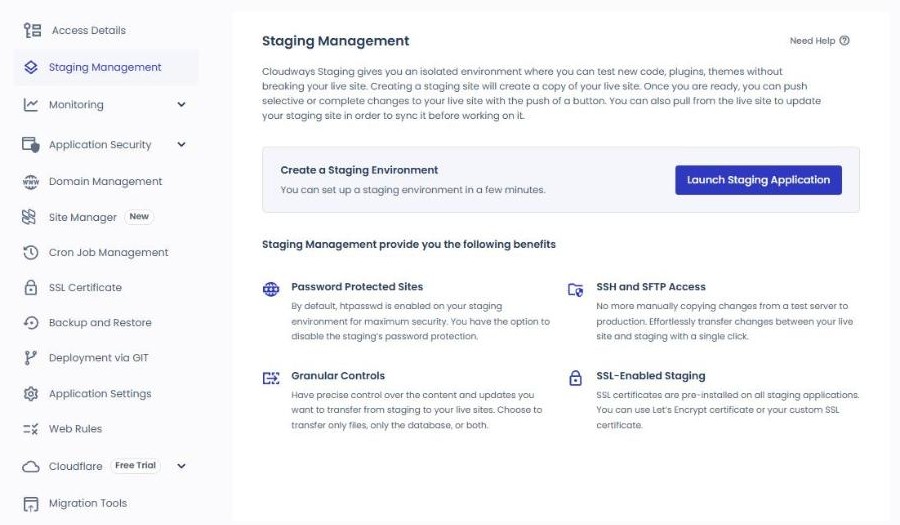
On Cloudways, you create staging with [Launch Staging Application] in the application's [Staging Management].
On Hostinger, you create staging with [Create staging] in the site menu's [WordPress › Staging]. The screen notes that it cannot be used with WordPress Multisite.

For caching, Cloudways WordPress comes with the Breeze plugin installed, and Varnish and Redis are also available. Hostinger WordPress has the LiteSpeed Cache plugin active. The server cache is turned on or off in hPanel [Advanced › Cache Manager].

Both test sites created on Hostinger recorded [server: hcdn] in the response header right after installation, so they went through Hostinger CDN. Cloudways adds Cloudflare Enterprise as its CDN through a paid add-on starting at $4.99 per domain per month.
7️⃣ How to choose
Cloudways suits operators who pick the server location, cloud provider and stack themselves, and who create and delete servers by the hour to test things. You can also choose Cloudways if you need a data center in Italy or want to run several WordPress sites on one server with different stacks.
Hostinger has a low first-term price, and in hPanel everything from adding a site to installing WordPress takes under 3 minutes, so it suits operators who want to start a site without configuring a server. On the other hand, you need to budget for the monthly price after renewal, and since the server location can be moved only once every 30 days, it does not suit sites that need to change data centers often.
🔢 FAQ & Recommended Content

 Speed
Fast WordPress Hosting 2026
We compared the speed of 8 hosts with benchmarks.


ℹ️ Affiliate Disclosure
This site's content contains affiliate links. When a visitor buys a product or service through one of them, the site receives a commission from the seller. The amount the buyer pays(it goes down during event discounts ↓)does not go up. Posted prices, discounts, and stock reflect the time of writing and may differ, so confirm with the seller before buying. Products are chosen and reviewed by our own standards, and commissions do not affect the order or content of reviews.