
Zend OPcache Explained: Installation, php.ini Settings and Disabling JIT
Zend OPcache is a PHP extension that compiles PHP scripts to bytecode and stores it in shared memory, so the compile step is skipped the next time the same file runs. After enabling JIT on a WordPress server running PHP 8.3 caused a 500 error on every page, the server was recovered by leaving OPcache on and disabling only JIT.
Since PHP 5.5, OPcache has shipped with PHP by default.
1️⃣ Zend OPcache concept: bytecode caching
Every time a request arrives, a PHP script goes through three steps: reading the file, compiling it to bytecode, and executing it. When OPcache is running, the first two steps drop out from the second request for the same file onward, and only execution remains.
The shared memory where OPcache stores bytecode is used by all PHP-FPM workers together. If several sites are connected to the same PHP-FPM, the scripts of those sites are also stored in one shared memory.
What OPcache stores is compiled PHP code, so PHP execution and database queries still happen every time a page is opened. Skipping PHP execution altogether by storing finished HTML is the job of a page cache.
2️⃣ Checking the PHP OPcache installation
You can check whether OPcache is installed in the last line of the [php -v] output.
php -vPHP 8.3.22 (cli) (built: Jun 3 2025 17:17:57) (NTS gcc x86_64)
Copyright (c) The PHP Group
Zend Engine v4.3.22, Copyright (c) Zend Technologies
with Zend OPcache v8.3.22, Copyright (c), by Zend TechnologiesIf the last line is missing, install it with dnf. The package name is usually php-opcache; if several PHP versions were installed side by side from the Remi repository, a version is attached, as in php83-php-opcache.
dnf -y install php-opcacheThe php-opcache package from the Remi repository loads the extension through the [zend_extension=opcache] line in [/etc/php.d/10-opcache.ini]. After installing, restart PHP-FPM so that OPcache also applies to web requests.
3️⃣ OPcache settings: php.ini values
OPcache settings can go in two places: the [opcache] section of [/etc/php.ini] and [/etc/php.d/10-opcache.ini].
php --iniConfiguration File (php.ini) Path: /etc
Loaded Configuration File: /etc/php.ini
Scan for additional .ini files in: /etc/php.d
Additional .ini files parsed: /etc/php.d/10-opcache.ini,Files in the php.d folder are read after php.ini, so if the same entry is set in both places, the php.d value applies.
The table below shows the PHP 8.3 defaults and the values applied on the WordPress server that was checked.
| Item | PHP 8.3 default | Applied value | Meaning |
|---|---|---|---|
| opcache.enable | 1 | 1 | Turns OPcache on |
| opcache.enable_cli | 0 | 1 | Also used by command-line PHP (wp-cli and others) |
| opcache.memory_consumption | 128 | 1024 | Shared memory that stores bytecode (MB) |
| opcache.interned_strings_buffer | 8 | 16 | Memory that stores each identical string only once (MB) |
| opcache.max_accelerated_files | 10000 | 10000 | Upper limit on the number of keys that can be cached (the real limit is a prime number at or above this value: 16229 for 10000) |
| opcache.max_wasted_percentage | 5 | 10 | If memory runs short and wasted space exceeds this percentage, the cache is cleared and restarted |
| opcache.validate_timestamps | 1 | 1 | Checks whether files have changed |
| opcache.revalidate_freq | 2 | 60 | How often file changes are checked (seconds) |
| opcache.jit | tracing | disable | JIT mode (the default is disable from PHP 8.4) |
| opcache.jit_buffer_size | 0 | 0 | JIT memory; 0 means JIT does not run (the default is 64M from PHP 8.4) |
The values placed in the [opcache] section of [/etc/php.ini] are shown below. The memory size is set to match the server memory, and [opcache.max_accelerated_files] to match the number of WordPress files.
[opcache]
opcache.enable=1
opcache.enable_cli=1
opcache.memory_consumption=1024
opcache.interned_strings_buffer=16
opcache.max_accelerated_files=10000
opcache.max_wasted_percentage=10
opcache.validate_timestamps=1
opcache.revalidate_freq=60
If a [zend_extension] line is added to php.ini again, the extension is loaded twice and a [Cannot load Zend OPcache] warning is printed.
With [opcache.revalidate_freq] at 60, old code can keep running for up to 60 seconds after a PHP file is edited.
On a WordPress server where PHP files change often, keep [opcache.validate_timestamps] at 1 so that file changes are checked. The 0 that the Symfony documentation recommends for production servers suits servers where PHP files change only when a new version is deployed.
Even with [opcache.validate_timestamps] set to 0, WordPress itself clears the cache of changed files when an update is made from the admin screen. But if you update with wp-cli or edit files over SSH, the old code keeps running until PHP-FPM is restarted.
4️⃣ Disabling OPcache JIT
PHP 8's JIT speeds up CPU-heavy work, so its effect is small in an application like WordPress that handles web requests. The WordPress benchmark in the PHP JIT RFC shows the same: 326 requests per second with JIT enabled and 315 with JIT disabled.
JIT was enabled on a WordPress server running PHP 8.3.22 with [opcache.jit=tracing] and [opcache.jit_buffer_size=128M]. Three days later, on a day when a rush of requests made the PHP-FPM workers restart several times, a 500 error occurred on every page.
The error log contained the message [Allowed memory size of 1073741824 bytes exhausted]. The [tried to allocate 4295229440 bytes] that follows it records an attempt to allocate 4GB at once under a PHP memory limit of 1GB. After JIT was disabled, the same requests were handled normally.
JIT is disabled by putting the two lines below in [/etc/php.d/10-opcache.ini]. Even if JIT settings remain in [/etc/php.ini], the values in this file apply.
opcache.jit=disable
opcache.jit_buffer_size=0
In PHP 8.3 the default of [opcache.jit_buffer_size] is 0, so JIT does not run unless it is set separately. From PHP 8.4, the default of [opcache.jit] is also disable.
5️⃣ Applying and verifying the settings
Changed settings take effect only after PHP-FPM is restarted.
systemctl restart php-fpmAfter the restart, the OPcache shared memory is emptied and allocated again with the new settings.
php -i | grep -E '^opcache\.(enable|memory_consumption|revalidate_freq|validate_timestamps|jit) 'opcache.enable => On => On
opcache.jit => disable => disable
opcache.memory_consumption => 1024 => 1024
opcache.revalidate_freq => 60 => 60
opcache.validate_timestamps => On => OnThe values printed by [php -i] are the settings of command-line PHP. On RHEL-family systems PHP-FPM reads the same [/etc/php.ini] and [/etc/php.d] files, so the values are the same.
Calling [opcache_get_status()] on the command line shows 0 cached scripts. Command-line PHP creates new shared memory on every run, so PHP-FPM's usage is checked by putting the file below in the web document folder and opening it in a browser.
<?php
header('Content-Type: text/plain');
$s = opcache_get_status(false);
print_r($s['memory_usage']);
print_r($s['opcache_statistics']);
print_r($s['interned_strings_usage']);
var_dump($s['cache_full']);
If [cache_full] is true, the shared memory or the keys are full. Delete this file right after checking.
On a server where three WordPress sites use the same PHP-FPM, 317MB of the 1024MB of shared memory was in use. There were 3,366 to 4,222 cached scripts per site, 11,358 in total.
OPcache stores scripts under their real path, and for files loaded through a relative path it creates one more key with the working directory attached, so the number of keys becomes larger than the number of scripts. With 11,358 scripts, the keys filled the limit of 16,229, and the 16MB string buffer also had no free space left.
When the keys are full, new scripts are not cached and are compiled on every request. In 5 minutes 21 seconds, cache misses rose from 18,408 to 36,027, but the number of cached scripts stayed at 11,358.
On a server that runs several WordPress sites or many plugins, set [opcache.max_accelerated_files] generously so that the key limit does not fill up. Setting it to 20000 gives an actual key limit of 32,531. If the string buffer is full, increase [opcache.interned_strings_buffer] as well.
🔢 FAQ & Recommended Content

 Cache
Cache: Definition and All Fields Where Caching Is Used
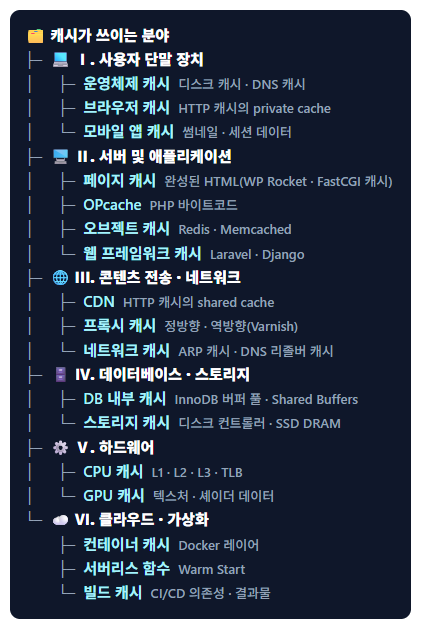
A guide that breaks down where caches are used, including OPcache, which stores compiled PHP code, and the page cache, which stores finished HTML.
Cache
Cache: Definition and All Fields Where Caching Is Used
A guide that breaks down where caches are used, including OPcache, which stores compiled PHP code, and the page cache, which stores finished HTML.
 PHP-FPM
php-fpm max_children warning: find the cause in the logs before adding workers
A guide to finding, from the logs, the cause of the warning that appears when all the PHP-FPM workers sharing OPcache's shared memory are busy.
PHP-FPM
php-fpm max_children warning: find the cause in the logs before adding workers
A guide to finding, from the logs, the cause of the warning that appears when all the PHP-FPM workers sharing OPcache's shared memory are busy.
 PHP-FPM
What is PHP-FPM | Installing and configuring PHP-FPM
A guide to installing PHP-FPM, inside which OPcache runs, setting up the www.conf pool, and restarting it.
PHP-FPM
What is PHP-FPM | Installing and configuring PHP-FPM
A guide to installing PHP-FPM, inside which OPcache runs, setting up the www.conf pool, and restarting it.
ℹ️ Affiliate Disclosure
This site's content contains affiliate links. When a visitor buys a product or service through one of them, the site receives a commission from the seller. The amount the buyer pays(it goes down during event discounts ↓)does not go up. Posted prices, discounts, and stock reflect the time of writing and may differ, so confirm with the seller before buying. Products are chosen and reviewed by our own standards, and commissions do not affect the order or content of reviews.