
[WP] Gzip vs Brotli Compression: The Difference Between the Two Compression Algorithms
To make websites, including those built with the WordPress CMS, faster, it is useful to set up data compression on the server. This lets the data transferred between the web server and the browser load faster and speeds up the website as a whole. It is one of the factors website administrators think about most. Gzip compression is widely used, and on many web servers there is a growing shift from gzip to Brotli compression.
1️⃣ What Is Compression?
Site URL: when you open it, a conversation begins between the browser and the server. At this point the browser tells the server whether it can undo content compression (Compression) and which compression algorithms it uses. This helps the browser decompress the data correctly when the server sends it compressed. So with a server and browser that support compression algorithms, your website loads even faster.
When a web browser connects to a server, it sends headers such as gzip or Brotli compression. Data compressed with one of the two is delivered to the browser, and compressed data loads faster than uncompressed data.
Content-encoding: gzip
Content-encoding: br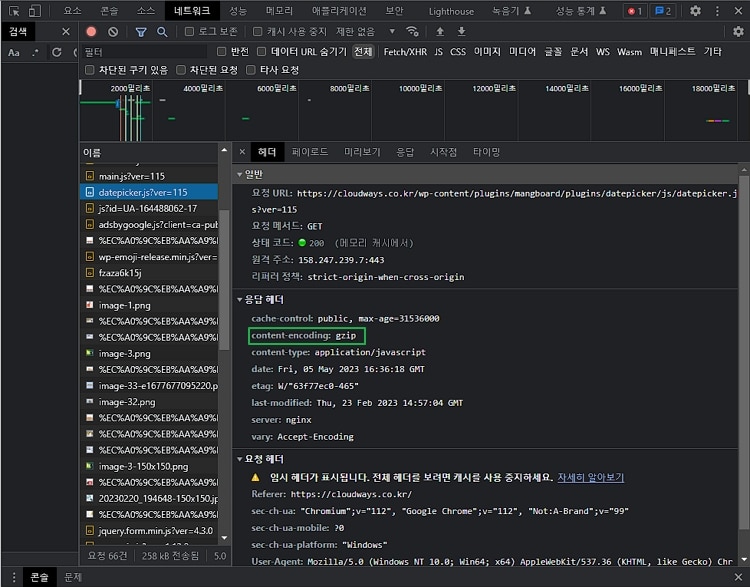
Checking Gzip compression 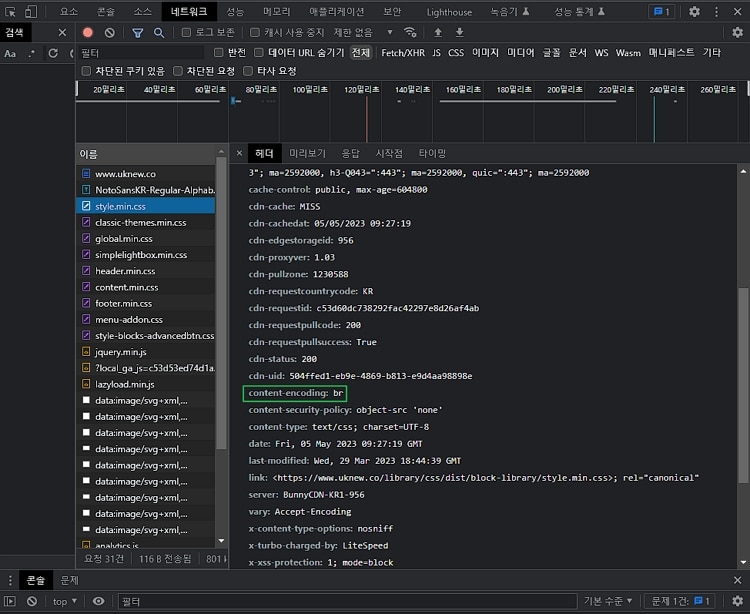
Checking Brotli compression
The files that get compressed are mainly text:
· HTML
· CSS
· JavaScript
2️⃣ What Is Gzip Compression?
The common compression algorithms used by web hosts are Gzip and Brotli. Gzip's beta came out in 1992, and version 1.0 was released in 1993. In general, Gzip is one of the standard ways to compress data sent over the internet. It is based on DEFLATE, an early compression algorithm, and takes its name from gzip, a file compression program developed earlier for Unix.

DEFLATE combines the LZ77 (Lempel-Ziv 1977) algorithm with Huffman coding. LZ77 searches for repeated data, finds matching strings and replaces them with codes. Huffman coding uses how often each character appears to assign the shortest bit codes.
Gzip compresses data with DEFLATE and, using the ‘Accept-Encoding: gzip’ header in HTTP requests and responses, compresses only when the client supports Gzip. This compression helps websites load faster.
3️⃣ What Is Brotli Compression?
Brotli was developed in 2013 by Google engineers Jyrki Alakuijala and Zoltán Szabadka.

Gzip was originally meant for compressing files, but it was adapted for use on the web as well. Brotli, on the other hand, was developed for use on the web from the start. So with Brotli, the web server can compress content before sending it to the browser. Because it is compressed before being streamed to the browser, it is a better, more advanced approach.
Brotli uses the same two core techniques as GZIP compression: LZ77 and Huffman coding.
4️⃣ Gzip Compression vs Brotli Compression
Gzip compresses (& decompresses) data with the DEFLATE method, while Brotli uses its own format, which adds context modeling to LZ77 and Huffman coding.
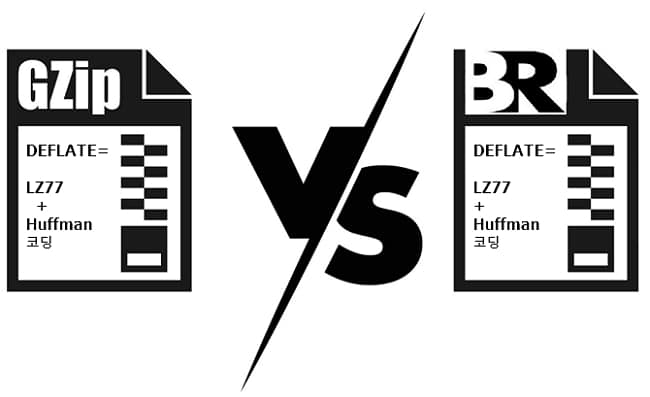
- Gzip compresses faster than Brotli.
- Brotli was designed specifically for the web.
- Brotli offers a better compression ratio (that is, smaller compressed files) at every compression level.
- Compared with Gzip, Brotli compresses these three file types better: by 21% for HTML, 17% for CSS and 14% for JavaScript.
More and more web servers prefer Brotli over Gzip. Because Brotli is designed to compress streams on the fly, its overall front-end decompression is said to be up to 64% faster than Gzip's.
RFC 1952, published in May 1996, explains that the Gzip format uses the DEFLATE compression method and includes a CRC value for detecting data corruption. The CRC-32 value and size of the original data are written at the end of the compressed data.
RFC 7932, published in July 2016, states that Brotli compresses by combining the LZ77 algorithm with Huffman coding. On top of that, it uses the previous two bytes of the uncompressed data as context to select Huffman codes, and instead of repeated strings it can also refer to words in a static dictionary of 122,784 bytes.
The two formats appear in the response header as [Content-Encoding: gzip] and [Content-Encoding: br]. The [br] value was registered as an HTTP content coding in RFC 7932.
| Item | Gzip | Brotli |
|---|---|---|
| Specification | RFC 1952 · May 1996 | RFC 7932 · July 2016 |
| Compression method | DEFLATE (LZ77 and Huffman coding) | LZ77 and Huffman coding · previous-two-byte context · 122,784-byte static dictionary |
| Response header | Content-Encoding: gzip | Content-Encoding: br |
5️⃣ Gzip and Brotli Compression Measured: An Nginx + Apache Server
On a WordPress server running Nginx and Apache together, the responses for one post, WordPress's default block CSS file and the jQuery file were compared, changing only the request header. Requests with only gzip in [Accept-Encoding], with only br, and with no header were sent with curl from the same server.
for ae in gzip br ''; do echo == ${ae:-none}; curl -s -o /dev/null -D - -w 'size: %{size_download}\n' -H Accept-Encoding:$ae https://example.com/hello-world/ | grep -i -E '^(content-encoding|size)'; done== gzip
content-encoding: gzip
size: 21390
== br
content-encoding: br
size: 20190
== none
size: 90833The HTML of one post was compressed to 21,390 bytes for the gzip request and 20,190 bytes for the br request, and the request without the header got the uncompressed 90,833 bytes. The br response was 1,200 bytes (5.6%) smaller than gzip.
for f in wp-includes/css/dist/block-library/style.min.css wp-includes/js/jquery/jquery.min.js; do for ae in gzip br ''; do echo == ${f##*/} ${ae:-none}; curl -s -o /dev/null -D - -w 'size: %{size_download}\n' -H Accept-Encoding:$ae https://example.com/$f | grep -i -E '^(content-encoding|size)'; done; done== style.min.css gzip
content-encoding: gzip
size: 19655
== style.min.css br
size: 140829
== style.min.css none
size: 140829
== jquery.min.js gzip
content-encoding: gzip
size: 30633
== jquery.min.js br
size: 87553
== jquery.min.js none
size: 87553For the gzip request, the CSS file was compressed to 19,655 bytes and the jQuery file to 30,633 bytes. With only br requested or with no header, the server returned the originals of 140,829 bytes and 87,553 bytes as they were, without a [Content-Encoding] header.
nginx -V 2>&1 | grep -c brotli0httpd -M 2>/dev/null | grep -E 'brotli|deflate' deflate_module (shared)
brotli_module (shared)Static files such as CSS and JS are served and compressed by Nginx directly, and since Nginx in this setup has no Brotli module, it compresses only with gzip.
For HTML, WordPress answers the request that Nginx passes to Apache, and Apache compresses it. Apache has both the Brotli module and the [mod_deflate] module, which handles Gzip compression.
for f in hello-world/ wp-includes/css/dist/block-library/style.min.css wp-includes/js/jquery/jquery.min.js; do echo == $f; curl -s -o /dev/null -D - -w 'size: %{size_download}\n' -H 'Accept-Encoding: gzip, deflate, br, zstd' https://example.com/$f | grep -i -E '^(content-encoding|size)'; done== hello-world/
content-encoding: gzip
size: 21390
== wp-includes/css/dist/block-library/style.min.css
content-encoding: gzip
size: 19655
== wp-includes/js/jquery/jquery.min.js
content-encoding: gzip
size: 30633Having a Brotli module on the server does not mean the browser receives Brotli-compressed responses. When the request used [gzip, deflate, br, zstd], the same value Edge 155 sends, Apache also compressed the HTML with gzip, and all three files came back in gzip.
Even when br was placed before gzip or marked as preferred, as in [br;q=1.0, gzip;q=0.5], the HTML came back in gzip. When the same post and the two files were opened in Edge, they were all delivered in gzip as well.
Time to first byte is the median of curl's [time_starttransfer] values, measured 40 times each with the request order shuffled; each request opened a new connection, so the TLS connection time is included. For HTML, the uncompressed response took 22.7ms, gzip 26.3ms, br 26.5ms and the browser-like request 25.0ms. CSS and JS took 18–21ms with or without compression.
The compression speed of Gzip and Brotli was not measured here but compared using public sources. RFC 7932 states that Brotli compresses with a significantly higher compression ratio than the gzip program and decompresses much faster than current LZMA implementations. In the Brotli repository, Google explains that Brotli is similar in speed to deflate but offers denser compression.
In 2015, Cloudflare tested both methods on 10,655 HTML, CSS and JavaScript files. Brotli at its highest quality produced results 1.19 times smaller on average than zlib at its highest quality, but it compressed at 0.5MB per second, far slower than the 41.9MB of zlib level 9. Brotli level 4 had a compression ratio similar to zlib level 8 and was slightly faster on average overall, but 1.48 times slower when looking only at files smaller than 64KB.
We have looked at optimizing a website by compressing files such as HTML, CSS and JavaScript. To speed up a website, file compression and Image optimization can be called essential.
🔢 FAQ & Recommended Content
ℹ️ Affiliate Disclosure
This site's content contains affiliate links. When a visitor buys a product or service through one of them, the site receives a commission from the seller. The amount the buyer pays(it goes down during event discounts ↓)does not go up. Posted prices, discounts, and stock reflect the time of writing and may differ, so confirm with the seller before buying. Products are chosen and reviewed by our own standards, and commissions do not affect the order or content of reviews.