
nginx njs: Installing the Module, Setting js_set, and Applying a Reload to Create JavaScript Variables
nginx njs is an official nginx module that handles requests or creates variable values with JavaScript functions inside the nginx configuration. On a server with an Nginx + Apache setup, to fix the letter case of request URLs, which nginx configuration alone cannot change, the njs module was installed in the same version as the installed nginx, and a variable created with js_set was put into the cache file path and applied with a reload, without a restart.
The example function is a one-liner that lowercases the percent-encoding of Korean URLs, and building variables by reading headers or argument values from the request object works the same way.
1️⃣ What Is nginx njs: A Module That Extends nginx With JavaScript
njs is not a standalone JavaScript runtime like Node.js: it has no startup script or event loop of its own, and code runs only when nginx calls a function named in its configuration, after which processing returns to nginx.
The points where nginx calls JavaScript functions are fixed: the HTTP request and response processing phases, the TCP/UDP session processing phases, variable value calculation, and periodic timers. A function reads the URL, headers and arguments from the request object nginx passes in, and returns the result as a response or a variable value.
On the HTTP side, [js_import] loads a script file, [js_set] creates a variable value, [js_content] creates the response body, and [js_header_filter] and [js_body_filter] modify the response headers and body. This setup used two directives: [js_import] and [js_set].
The njs module's default engine implements ECMAScript 5.1 (strict mode) plus some ECMAScript 6 and later features. String handling at the level of regex replacement and functions works within that scope.
2️⃣ When You Need njs: Variable Values nginx Configuration Alone Cannot Change
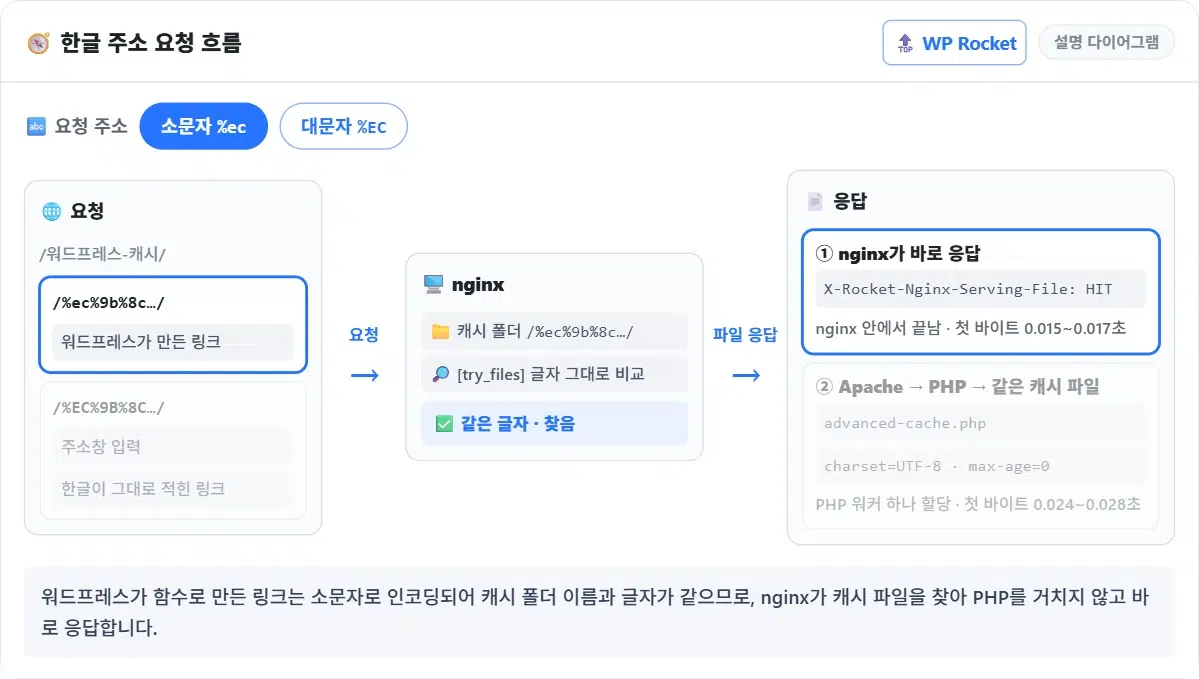
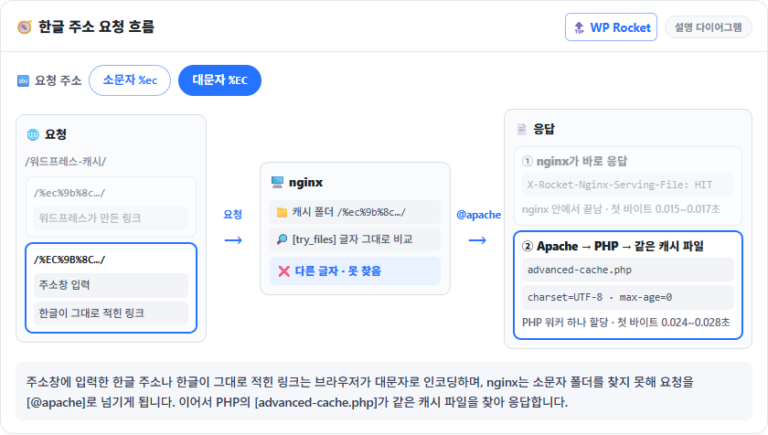
The WordPress plugin WP Rocket names the cache folders of posts with Korean URLs in lowercase percent-encoding, while browsers request the same URL encoded in uppercase. A WordPress site runs on this server.
If nginx builds the cache file path from the request URL as is, the letter case does not match, the file is not found, and the request goes on to Apache and PHP.
nginx configuration alone cannot lowercase this value. [map] only picks one of the values you set and cannot transform strings, and before installation neither the [nginx -V] output nor the modules folder showed a perl or lua module.
If only a few URLs need changing, a [map] lookup table can handle it, but you have to rebuild the table and reload every time a new post appears. When every URL needs its own value converted by the same rule, a single [js_set] function also covers new posts, tags and category URLs.
The perl module's [perl_set] can be used in the same place, and the repository has a package matched to nginx, but the official nginx documentation describes the perl module as experimental.
3️⃣ Installing nginx njs: In the Same Version as the Installed nginx
Installing by the package name alone looks like it would only add njs, but the latest njs in the repository requires the latest nginx, so nginx gets upgraded too. In the pre-install check, the install command without a version showed a plan to move nginx from 1.28.0 to 1.30.6.
So start by checking the nginx version that is installed now.
rpm -q nginxnginx-1.28.0-1.el9.ngx.x86_64The repository has a separate njs package matched to each nginx version; in the version number, the part before + is the nginx version and the part after it is the njs version.
dnf list --showduplicates nginx-module-njs | grep '1.28.0+'nginx-module-njs.x86_64 1:1.28.0+0.9.4-1.el9.ngx @nginx-stable
nginx-module-njs.x86_64 1:1.28.0+0.8.10-1.el9.ngx nginx-stable
nginx-module-njs.x86_64 1:1.28.0+0.9.0-1.el9.ngx nginx-stable
nginx-module-njs.x86_64 1:1.28.0+0.9.1-1.el9.ngx nginx-stable
nginx-module-njs.x86_64 1:1.28.0+0.9.2-1.el9.ngx nginx-stable
nginx-module-njs.x86_64 1:1.28.0+0.9.3-1.el9.ngx nginx-stable
nginx-module-njs.x86_64 1:1.28.0+0.9.4-1.el9.ngx nginx-stableSix versions, 0.8.10 through 0.9.4, are matched to nginx 1.28.0, and the top @nginx-stable line is the one already installed. Install the newest of them, 0.9.4, spelling out the full version number.
dnf install nginx-module-njs-1:1.28.0+0.9.4-1.el9.ngxYou can check with rpm which nginx version the installed package requires.
rpm -q --requires nginx-module-njs | grep nginxnginx-r1.28.0rpm -ql nginx-module-njs | grep -v build-id/usr/bin/njs
/usr/lib64/nginx/modules/ngx_http_js_module-debug.so
/usr/lib64/nginx/modules/ngx_http_js_module.so
/usr/lib64/nginx/modules/ngx_stream_js_module-debug.so
/usr/lib64/nginx/modules/ngx_stream_js_module.so
/usr/share/doc/nginx-module-njs
/usr/share/doc/nginx-module-njs/CHANGES
/usr/share/doc/nginx-module-njs/COPYRIGHTThe installed files are the HTTP module, the stream module that handles TCP/UDP, a debug version of each, and the njs command-line tool. This setup loads only one file, the HTTP module [ngx_http_js_module.so].
4️⃣ Setting Up js_set: From Loading the Module to the Cache File Path
Installing the package does not make nginx load the module automatically; nginx.conf needs a [load_module] line at the very top. According to the official documentation, [load_module] is a main-context directive, so it goes outside the events and http blocks.
# top of /etc/nginx/nginx.conf (outside the events and http blocks)
load_module modules/ngx_http_js_module.so;
The conversion function lives in a .js file separate from the config files, and the nginx configuration imports the function exported with export default on the last line.
// /etc/nginx/njs/rocket.js — lowercase only the percent-encoding %XX
function lc(r) {
    return r.variables.request_uri.replace(/%[0-9A-F]{2}/g, function (m) { return m.toLowerCase(); });
}
export default { lc };
The function reads the [request_uri] variable from the request object r and lowercases only the two characters after each percent sign where they are uppercase, then returns the result. Latin letters are left as they are, so English URLs with uppercase letters do not change; this matches the rule WP Rocket uses to name cache folders.
# inside the http block (a .conf file in conf.d)
js_import rkt from /etc/nginx/njs/rocket.js;
js_set $rocket_uri rkt.lc;
In [js_import], rkt is the name used to call functions inside the module, and [js_set] turns that function's result into the [$rocket_uri] variable. According to the official documentation, the function runs when the variable is first referenced in a request and supports synchronous processing only.
# server block — $request_uri in the cache file path becomes $rocket_uri
set $rocket_file '/wp-content/cache/wp-rocket/example.com${rocket_uri}index$rocket_mobile-https.html';
The only change is this one line that builds the cache file path; the checks that exclude login cookies, queries and POST requests from the cache stay as they are.
5️⃣ Applying and Checking: Error Log and Response Headers After a Reload
Run the configuration test first, and reload if it passes.
nginx -tnginx: the configuration file /etc/nginx/nginx.conf syntax is ok
nginx: configuration file /etc/nginx/nginx.conf test is successfulsystemctl reload nginxThe new [load_module] line took effect with a reload, without a restart. The error log recorded a line for initializing the njs virtual machine, and there were no JavaScript errors.
grep 'js vm init' /var/log/nginx/error.log | head -12026/10/17 18:21:35 [notice] 27992#27992: js vm init njs: 0000559FDF6D0E00The njs at the end of the line is the name of the engine in use. The same line is also logged when you test the configuration with [nginx -t], so match it against the time of the reload.
curl -sI 'https://example.com/-/' | grep -i 'x-rocket\|content-type'content-type: text/html
x-rocket-nginx-serving-file: HITEven for a Korean URL encoded in uppercase, the header showing that nginx served the cache file was present. Requests with queries or login cookies and POST requests still went to PHP without that header after the change.
6️⃣ Rolling Back njs and Updating nginx
To roll back, change [$rocket_uri] in the cache file path back to [$request_uri], remove the [js_import]/[js_set] config file and the [load_module] line, then run the configuration test and reload.
# server block — back to the original variable
set $rocket_file '/wp-content/cache/wp-rocket/example.com${request_uri}index$rocket_mobile-https.html';
You can leave the package installed: without the [load_module] line nginx does not load it, so remove the package only when you want it gone completely.
dnf remove nginx-module-njsWhen you update nginx, the njs package must move up with it to the version matched to the new nginx. Before updating, check with [dnf list --showduplicates] that the repository has the njs match for the new nginx version.
🔢 FAQ & Recommended Content











ℹ️ Affiliate Disclosure
This site's content contains affiliate links. When a visitor buys a product or service through one of them, the site receives a commission from the seller. The amount the buyer pays(it goes down during event discounts ↓)does not go up. Posted prices, discounts, and stock reflect the time of writing and may differ, so confirm with the seller before buying. Products are chosen and reviewed by our own standards, and commissions do not affect the order or content of reviews.