WP Rocket With Perfmatters: How to Set Up Optimization Features

Affiliate disclosure v3.1
Affiliate disclosure v3.2 (mobile)

WP Rocket With Perfmatters. Both are plugins that speed up WordPress. WP Rocket is a cache plugin that handles page caching and file optimization, and Perfmatters is an optimization plugin that turns off unnecessary WordPress features and scripts.

The two plugins share features such as lazy loading and delaying JavaScript execution, so turning them on in both runs the same job twice. For each overlapping feature, we laid out which side to turn on or off using the settings screens of both plugins.

1️⃣ How WP Rocket and Perfmatters Work Together

  • ↪️ Cache plugins and optimization plugins

WP Rocketis a cache plugin. It saves the first-opened page as an HTML file and sends that file to the next visitor without running WordPress again.

Perfmattersis an optimization plugin without page caching. It turns off default WordPress features such as emojis and embeds, plus plugin scripts a page does not use, and its official site says it is built to work with cache plugins.

So on the first visit, WordPressbuilds the page, Perfmatters trims it, and WP Rocket saves it as an HTML file; from the next visit, that file is served.

The order in which WP Rocket and Perfmatters work
First visit and next visit
First visit
WordPress builds the page
→
Perfmatters Turns off emojis, embeds and unused plugin scripts
→
WP Rocket Saves it as an HTML file
Next visit
WP Rocket Sends the saved file
Does not run WordPress again

2️⃣ WP Rocket With Perfmatters

  • ↪️ Use overlapping features on one side only

Features that exist in both plugins are turned on in one only, left to whichever does them better. WP Rocket handles JavaScript, lazy loading, image dimensions, Google Fonts, database cleanup and CDN; Perfmatters handles CSS, Heartbeat and link preloading.

Perfmatters builds unused CSS right on your server and can keep it as a separate file, which helps repeat visits, and it lets you choose the Heartbeat interval yourself. For link preloading, keep the Perfmatters side, which uses WordPress's built-in speculative loading; for delaying JavaScript execution, WP Rocket, with one-click exclusions and safe mode, breaks sites less.

However, if your server specs are low or you change the design often, it is better to leave Remove Unused CSS to WP Rocket. WP Rocket builds used CSS on an external server and clears it automatically along with the cache when posts or the theme change.

WP Rocket basic settings, you only need to turn off four settings in WP Rocket: [Minify CSS files], [Optimize CSS delivery], [Enable link preloading] and [Control Heartbeat].

3️⃣WP Rocket With Perfmatters Settings

⚙️ WP Rocket settingsWhen used with Perfmatters
Dashboard
My AccountMy Account
Rocket AnalyticsRocket AnalyticsNot applied
Shares anonymous data with the WP Rocket team.
Rocket Insights
SettingsSettings
Performance MonitoringPerformance monitoringNot applied
When on, it runs performance checks automatically at the interval you set.
Content Delivery
RocketCDN
RocketCDN FreeRocketCDN FreeNot applied
Delivers three pages you pick through the CDN.
Other CDN
Your CDNUse another CDNNot applied
Turn on to connect another CDN's CNAME.
Exclude Files from CDNFiles to exclude from the CDNLeft empty
File Optimization
CSS FilesCSS files
Minify CSS filesMinify CSS filesHandled by Perfmatters
Perfmatters [Minify CSS] handles CSS.
Excluded CSS FilesExcluded CSS filesLeft empty
Optimize CSS DeliveryOptimize CSS deliveryHandled by Perfmatters
Perfmatters [Remove Unused CSS] handles removing unused CSS.
JavaScript FilesJavaScript files
Minify JavaScript filesMinify JavaScript filesDefault
Removes whitespace and comments to reduce file size.
Combine JavaScript filesCombine JavaScript filesNot applied
Left off because it is not recommended with HTTP/2. The same applies to HTTP/3.
Excluded JavaScript FilesExcluded JavaScript filesLeft empty
Load JavaScript deferredLoad JavaScript deferredApplied
Defers render-blocking JavaScript until after HTML parsing.
Excluded JavaScript FilesExcluded JavaScript filesLeft empty
Delay JavaScript executionDelay JavaScript executionApplied
Does not load JavaScript until the visitor scrolls or clicks.
One-click exclusionsOne-click exclusionsLeft empty
Excluded JavaScript FilesExcluded JavaScript filesLeft empty
Safe Mode for Delay JavaScript ExecutionSafe mode for delayed JavaScript executionNot applied
Excludes all of the site's own scripts from delay.
Media
LazyLoadDeferred loading
Enable for imagesEnable for imagesApplied
Images not on screen load when you scroll to them.
Enable for CSS background imagesEnable for CSS background imagesApplied
Also loads CSS background images when they come into view.
Enable for iframes and videosEnable for iframes and videosApplied
Loads iframes and videos when they come into view.
Replace YouTube iframe with preview imageReplace YouTube iframe with preview imageApplied
Shows YouTube videos as a preview image first.
Excluded images or iframesExcluded images or iframesLeft empty
Image DimensionsImage dimensions
Add missing image dimensionsAdd missing image dimensionsApplied
Fills in missing width and height attributes on images to reduce layout shift.
FontsFonts
Preload fontsFonts (preload)Applied
Loads fonts used on the first screen first.
Self-host Google FontsSelf-host Google FontsApplied
Downloads Google Fonts to your server and serves them from there.
Preload
Preload CacheCache preload
Activate PreloadingActivate preloadingApplied
Enables cache preloading. This is the most basic setting every cache plugin aims for.
Exclude URLsExclude URLsLeft empty
Preload LinksLink preloading
Enable link preloadingEnable link preloadingHandled by Perfmatters
Perfmatters [Speculative Loading] handles link preloading.
Advanced Rules
Cache LifespanCache lifespan
10 Hours
Clear cache afterClear cache afterDefault
Deletes cache files older than this.
Never Cache URL(s)Never cache URL(s)
Never Cache URL(s)Never cache URL(s)Left empty
Never Cache CookiesNever cache cookies
Never Cache CookiesNever cache cookiesLeft empty
Never Cache User Agent(s)Never cache user agent(s)
Never Cache User Agent(s)Never cache user agent(s)Left empty
Always Purge URL(s)Always purge URL(s)
Always Purge URL(s)Always purge URL(s)Left empty
Cache Query String(s)Cache query string(s)
Cache Query String(s)Cache query string(s)Left empty
Database
Post CleanupPost cleanup — applies to revisions, auto drafts and trashed posts.
RevisionsRevisionsApplied
Auto DraftsAuto draftsApplied
Trashed PostsTrashed postsApplied
Comments CleanupComment cleanup — deletes spam and deleted comments.
Spam CommentsSpam commentsApplied
Trashed CommentsDeleted commentsApplied
Transients CleanupTransients cleanup — clears all transients stored in the DB.
All transientsAll transientsApplied
Database CleanupDatabase cleanup
Optimize TablesOptimize tablesApplied
“Reduces database table overhead.” This is like removing unneeded paper and clips and keeping only the key information neatly organized, so you can use more cabinet space and find the document you want faster.
Automatic CleanupAutomatic cleanup
Schedule Automatic CleanupSchedule automatic cleanupApplied
Runs the cleanup items above automatically at the interval you set.
Daily
FrequencyFrequency
Heartbeat
Heartbeat
Control HeartbeatControl HeartbeatHandled by Perfmatters
Perfmatters [Disable Heartbeat] handles Heartbeat.
Add-ons
One-click Rocket Add-onsOne-click Rocket add-ons
User CacheUser cacheNot applied
Creates a separate cache file for each logged-in user.
VarnishNot applied
Turn on when your server has Varnish.
WebP CompatibilityWebP compatibilityNot applied
No need to turn on if you use a plugin that serves WebP directly.
Rocket Add-onsRocket add-ons
CloudflareNot applied
Connects your account when you use Cloudflare.
SucuriNot applied
Syncs the cache when you use the Sucuri firewall.
Image Optimization
This tab has no settings.
Tools
This tab has no settings.
Tutorials
This tab has no settings.
Our Plugins
This tab has no settings.
⚙️ Perfmatters settingsWhen used with WP Rocket
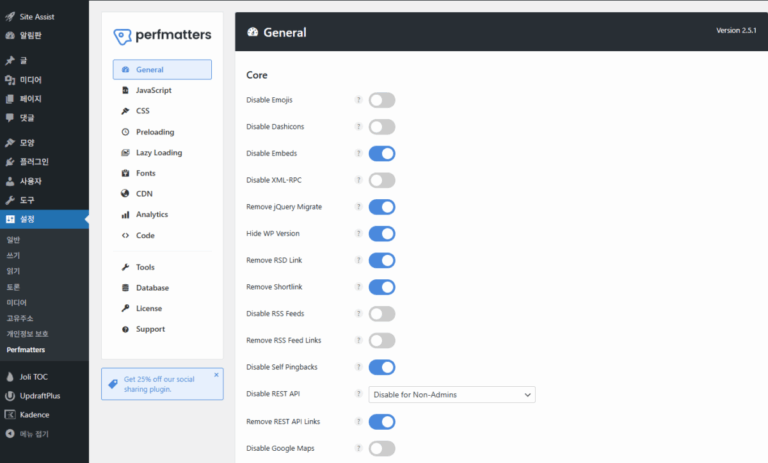
General
CoreBasic features
Disable EmojisDisable emojisApplied
Disable DashiconsDisable DashiconsApplied
Disable EmbedsDisable embedsApplied
Disable XML-RPCDisable XML-RPCApplied
When on, the [Remove RSD Link] row below disappears from the screen.
Remove jQuery MigrateRemove jQuery MigrateApplied
Hide WP VersionHide WordPress versionApplied
Remove ShortlinkRemove shortlinkApplied
Disable RSS FeedsDisable RSS feedsNot applied
Turn on if you do not provide RSS feeds to other sites.
Remove RSS Feed LinksRemove RSS feed linksNot applied
Turn on only when [Disable RSS Feeds] is on.
Disable Self-PingbacksDisable self pingbacksApplied
Disable When Logged Out
Disable REST APIDisable REST APIApplied
With several authors, choose [Disable When Logged Out]; if you run the site alone, [Disable for Non-Admins].
Remove REST API LinksRemove REST API linksApplied
Disable Google MapsDisable Google MapsApplied
Disable Password MeterDisable password strength meterApplied
Disable CommentsDisable commentsApplied
Turn on only if you do not use comments.
Add a Blank FaviconAdd blank faviconNot applied
Leave it off if you have already set a favicon.
Remove Global StylesRemove global stylesApplied
Separate Styles Inline (Default)
Block Style BehaviorBlock styles behaviorDefault
Loads CSS only for blocks on the page.
Only Allow When Editing Posts/Pages
Disable HeartbeatDisable HeartbeatApplied
Uses Heartbeat only when editing posts and pages. Turn off WP Rocket [Control Heartbeat].
60 Seconds
Heartbeat FrequencyHeartbeat frequencyApplied
Reduces the signal sent from the editor to once every 60 seconds.
Default
Limit Post RevisionsLimit post revisionsDefault
WP Rocket [Database] deletes revisions daily.
1 Minute (Default)
Autosave IntervalAutosave intervalDefault
Login URLLogin URL
Custom Login URLChange login URLApplied
If you do not use another plugin that hides the login URL, enter a new URL.
Message (Default)
Disabled BehaviorWhen the old URL is accessedDefault
JavaScript
Defer
Defer JavascriptLoad JavaScript deferredHandled by WP Rocket
WP Rocket handles this, so leave it off.
Delay
Delay JavaScriptDelay JavaScript executionHandled by WP Rocket
WP Rocket handles this, so leave it off.
Minify
Minify JavaScriptMinify JavaScriptHandled by WP Rocket
WP Rocket handles this, so leave it off.
CSS(CSS)
Unused CSSUnused CSS
Remove Unused CSSRemove unused CSSApplied
Picks out only the CSS each page uses, right on your server. Turn off WP Rocket [Optimize CSS delivery].
File
CSS Method UsedUsed CSS methodApplied
Keeps used CSS in a separate file so repeat visits use the browser cache.
Delay (Default)
Stylesheet BehaviorOriginal stylesheet handlingDefault
Loads the original CSS when the visitor interacts.
Minify
Minify CSSMinify CSSApplied
Turn off WP Rocket [Minify CSS files].
Preloading
PreloadPreload
2
Preload Critical ImagesPreload critical imagesApplied
Choose how many images appear on the first screen (usually 2–3). WP Rocket does not have this feature.
PreloadPreloadLeft empty
Cloudflare Early HintsCloudflare Early HintsNot applied
Turn on only if you use Cloudflare.
Fetch PriorityFetch priorityLeft empty
Speculative LoadingSpeculative loading
Auto (Default)
ModeModeDefault
Uses WordPress's built-in speculative loading as is. Turn off WP Rocket [Enable link preloading].
ConnectionConnection
PreconnectPreconnectLeft empty
Leave empty when used with a cache plugin.
DNS PrefetchDNS prefetchLeft empty
Leave empty when used with a cache plugin.
Lazy Loading
Lazy LoadingLazy loading
ImagesImagesHandled by WP Rocket
WP Rocket handles this, so leave it off.
iFrames and Videosiframes and videosHandled by WP Rocket
WP Rocket handles this, so leave it off.
YouTube Preview ThumbnailsYouTube previewHandled by WP Rocket
WP Rocket handles this, so leave it off.
Add Image DimensionsAdd image dimensionsHandled by WP Rocket
WP Rocket handles this, so leave it off.
CSS Background ImagesCSS background images
Background ImagesBackground imagesHandled by WP Rocket
WP Rocket handles this, so leave it off.
Lazy ElementsLazy elements
ElementsLazy elementsApplied
Cache plugins do not have this feature, so turn it on even when used together.
Element SelectorsElement selectorsLeft empty
Fonts
Google FontsGoogle Fonts
Local Google FontsSelf-host Google FontsHandled by WP Rocket
WP Rocket handles this, so leave it off.
Disable Google FontsDisable Google FontsNot applied
When on, theme fonts change to the default font.
CDN(CDN)
CDN
Enable CDN RewriteCDN rewriteHandled by WP Rocket
If you use a CDN, connect it in WP Rocket [Other CDN].
Analytics
Google Analytics
Enable Local AnalyticsLocal analyticsNot applied
If another plugin already connects Google Analytics, leave it off.
Code
CodeCode
Add Header CodeHeader codeLeft empty
Add Body CodeBody codeLeft empty
Add Footer CodeFooter codeLeft empty
Tools
PluginPlugin
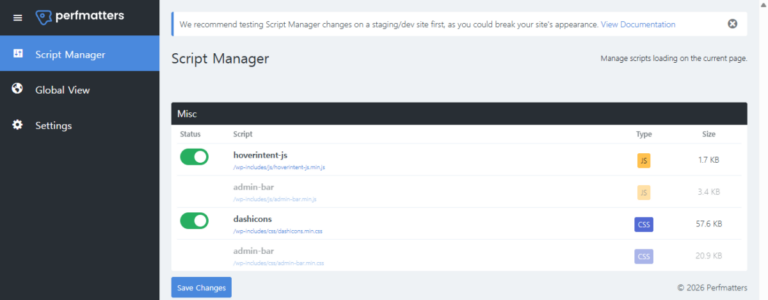
Script ManagerScript ManagerApplied
Turns off plugin scripts a page does not use.
Show Advanced OptionsShow advanced optionsApplied
Disable for Logged In UsersDisable for logged-in usersNot applied
Hide Admin Bar MenuHide admin bar menuNot applied
Safe ModeSafe modeNot applied
Accessibility ModeAccessibility modeNot applied
SettingsSettings
Clean UninstallClean up settings on uninstallNot applied
Database
DatabaseDatabase
Post RevisionsRevisionsHandled by WP Rocket
Post Auto-DraftsAuto draftsHandled by WP Rocket
Trashed PostsTrashed postsHandled by WP Rocket
Spam CommentsSpam commentsHandled by WP Rocket
Trashed CommentsTrashed commentsHandled by WP Rocket
Expired TransientsExpired transientsHandled by WP Rocket
All TransientsAll transientsHandled by WP Rocket
TablesOptimize tablesHandled by WP Rocket
Disabled
Scheduled OptimizationScheduled optimizationHandled by WP Rocket
WP Rocket [Schedule Automatic Cleanup] cleans up daily.
Features in both plugins
Where to turn it on
Features
WP Rocket
Perfmatters
CSS
Minify CSS
WP RocketMinify CSS filesOff
PerfmattersMinify CSSOn
Remove unused CSS
WP RocketOptimize CSS DeliveryOff
PerfmattersRemove Unused CSSOn
JavaScript
Minify JavaScript
WP RocketMinify JavaScript filesOn
PerfmattersMinify JavaScriptOff
Load JavaScript deferred
WP RocketLoad JavaScript deferredOn
PerfmattersDefer JavascriptOff
Delay JavaScript execution
WP RocketDelay JavaScript executionOn
PerfmattersDelay JavaScriptOff
Deferred loading
Images
WP RocketEnable for imagesOn
PerfmattersImagesOff
CSS background images
WP RocketEnable for CSS background imagesOn
PerfmattersBackground ImagesOff
iframes and videos
WP RocketEnable for iframes and videosOn
PerfmattersiFrames and VideosOff
YouTube preview image
WP RocketReplace YouTube iframe with preview imageOn
PerfmattersYouTube Preview ThumbnailsOff
Image dimensions
Add missing image dimensions
WP RocketAdd missing image dimensionsOn
PerfmattersAdd Image DimensionsOff
Google Fonts
Self-host Google Fonts
WP RocketSelf-host Google FontsOn
PerfmattersLocal Google FontsOff
Link preloading
Link preloading
WP RocketEnable link preloadingOff
PerfmattersSpeculative Loading › ModeDefault
Heartbeat
Reduce Heartbeat
WP RocketControl HeartbeatOff
PerfmattersDisable HeartbeatOn
Database cleanup
Automatic cleanup
WP RocketSchedule Automatic CleanupOn
PerfmattersScheduled OptimizationOff
CDN
CDN rewrite
WP RocketOther CDNWhen using a CDN
PerfmattersEnable CDN RewriteOff

4️⃣ Order: Save, Clear Cache, Check

After changing settings, save and clear the cache in the order below.

Save and clear cache
5 steps
1
PerfmattersWhen you finish the settings, click [Save Changes].
2
WP RocketAfter turning off the four settings, click [Save Changes].
3
PerfmattersIn the CSS menu, click [Clear Used CSS].
4
WP RocketIn the admin bar, click [WP Rocket] → [Clear and Preload Cache].
5
CheckOpen the page in a logged-out (incognito) window and check that nothing looks broken. If something is broken, put that CSS file in Perfmatters [Excluded Stylesheets]and start again from step 3.

🔢 FAQ & Recommended Content

Perfmatters has no page cache, so it cannot save pages as HTML files.

If your host provides a server cache, you can use that cache with Perfmatters alone; if not, add a cache plugin such as WP Rocket.

Yes. Perfmatters is built to work with cache plugins, and its official documentation has separate recommended settings for use with LiteSpeed Cache and WP Fastest Cache.

Whichever cache plugin you use, turn on features that exist in both plugins on one side only.

Both are paid and billed yearly. For one site, WP Rocket Single is $59.95 a year and Perfmatters Personal is $29.95 a year (checked 2026-10-04).

Discount options are covered in the WP Rocket settings guide and the Perfmatters guide.

🧭 WP Rocket and Perfmatters related posts 6 posts · 3 tools
🗂️ WordPress
📋 WP Rocket settings guide 📄 Perfmatters guide 📄 WP Rocket MCP Server
📄 WP Rocket speed test 📄 Cache and optimization plugins 📄 Speed improvement case
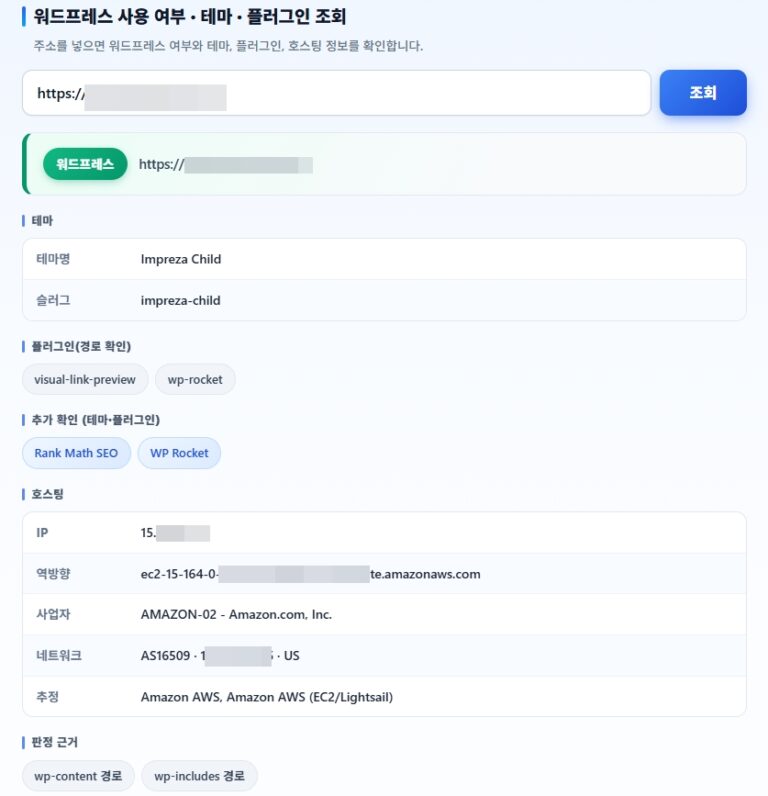
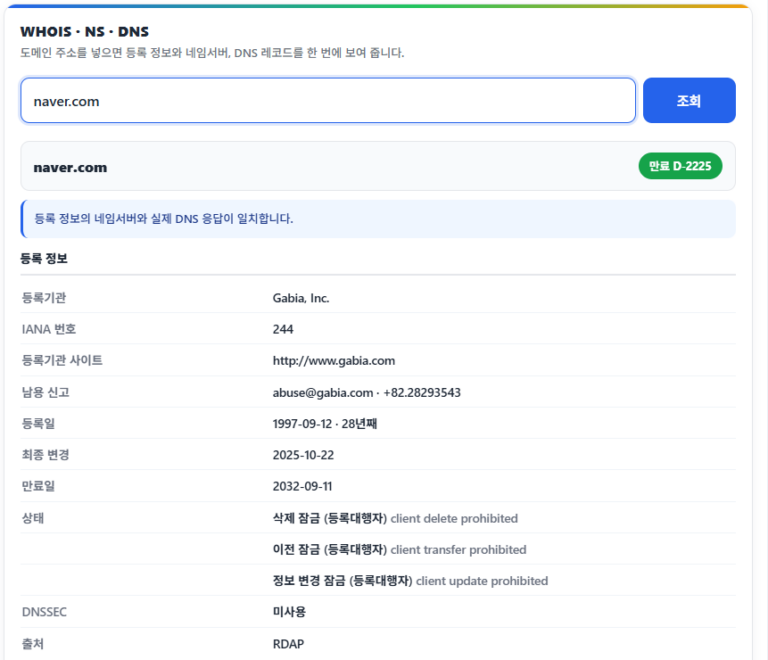
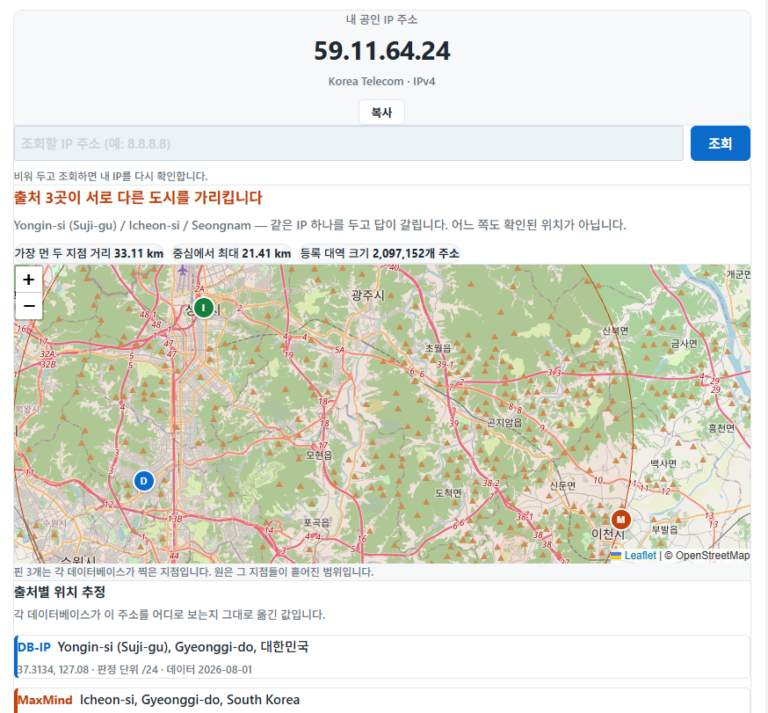
🛠️ WordPress Detection 🛠️ Whois Domain Lookup 🛠️ Check My IP Address

ℹ️ Affiliate Disclosure
This site's content contains affiliate links. When a visitor buys a product or service through one of them, the site receives a commission from the seller. The amount the buyer pays(it goes down during event discounts ↓)does not go up. Posted prices, discounts, and stock reflect the time of writing and may differ, so confirm with the seller before buying. Products are chosen and reviewed by our own standards, and commissions do not affect the order or content of reviews.

Similar Posts

  • 워드프레스 Redis Cache 설치 및 설정

    Redis Cache는 비관계형 데이터베이스 관리 시스템으로, 오픈 소스 기반으로 개발된 Remote Dictionary Server의 약자입니다. 이 시스템은 키-값 구조의 비정형 데이터를 저장하고 관리합니다. ✅ Redis Cache 설치 ✅ Redis Cache 설정 🔲 redis.conf 설정 🔲 wp-config.php 설정 🔲 redis Service 설정 ✅ Redis Object Cache Plugin 설치 및 확인 아래 화면처럼 플러그인 설치 후…

  • [WP] 테마포레스트(themeforest)란?

    테마포레스트(themeforest)는 HTML 템플릿, 워드프레스 및 다른 CMS 등의 플랫폼에서 고객이 22$, 39$, 66$ 등과 같이 테마 및 플러그인을 구매할 수 있는 마켓플레이스입니다. 결제는 신용카드 or 페이팔 결제가 가능합니다. 1. 테마포레스트에서 테마 및 플러그인 찾는 방법 themeforest는 Envato Market로 알려져 있기도 하며, 워드프레스 유료 테마 및 플러그인을 판매하기도 합니다. 많이 알려진 avada 테마도 themeforest에서…

  • 워드프레스 번역 플러그인 5가지 비교

    워드프레스는 전 세계에서 가장 인기 있는 CMS 중 하나로, 우커머스를 통한 쇼핑몰부터 기업 웹사이트, 블로그까지 다양한 형태로 사용되고 있습니다. 워드프레스에서는 다양한 번역 플러그인이 존재하며, 워드프레스 번역 플러그인은 손 쉽게 다국어 사이트를 만들 수 있습니다. 그 중에 주목할 만한 5개의 플러그인을 비교하여, 차후 운영하는 이 웹사이트가 워드프레스 번역 플러그인을 사용한다면, 어느 플러그인을 사용해야 할…

  • [WP] 워드프레스 vs 티스토리 더 나은 선택은?

    수익형 블로그라서 해서 한국에서는 티스토리를 많이 이용하고 있습니다. 티스토리의 가장 큰 장점은 구글 애드센스 광고를 블로그에 게재해서 수익을 올릴 수 있다는 장점이 있습니다. 하지만 티스토리 블로그는 너무 많은 문제를 가지고 있습니다. 앞으로도 절대 해결되지 않을 것이 99% 이상 기정 사실화 되었다고 할 수 있습니다. 워드프레스 vs 티스토리를 고민하는 분들이 2023년 이후 점점 늘어나고…

  • MainWP Dashboard 플러그인

    워드프레스 웹 사이트가 2개 이상일 경우 보다 수월한 관리가 필요할 수 있습니다. 2~3개의 워드프레스 웹 사이트를 효율적으로 관리할 수 있는 MainWP Dashboard 플러그인은 서로 다른 독립적인 사이트를 한번에 관리할 수 있는 기능입니다. 서로 다른 호스트 및 서버에 있는 다른 워드프레스 사이트를 연결한 후 완전히 제어할 수 있는 플러그인입니다. 600,000개가 넘는 워드프레스 웹사이트가 10,000개의…

  • [SEO] 2023년에 워드프레스 전자책 및 SEO 전자책과 강의를 구매하면 안되는 이유

    2023년 티스토리의 운영 정책이 블로거들에게 안 좋은 방향으로 바뀌면서 많은 블로거들이 워드프레스 CMS 또는 구글블로거로 이전하는 경우가 많아졌다. 그동안 미뤄 왔던 워드프레스 사이트의 검색엔진최적화를 진행하게 되면서 SEO 전자책이 해외에는 있지만 국내에는 없기에 나와 있는 책을 우연히 구매하게 되었다. 구매한 SEO E북은 말도 안 될 정도로 빈약한 구성을 가진 걸 보고 놀랐다. 이런 높은…

Leave a Reply

Your email address will not be published. Required fields are marked *

Prove your humanity: 0   +   2   =