Turn on WP Rocket MCP Server and AI tools such as Claude clear the cache and change settings instead of you opening the admin screen. MCP is a connection standard that lets AI tools work with programs directly, and this guide covers how to connect and disconnect with an application password and the 12 abilities it opens.
WP Rocket MCP Server sits at the top of the [Settings → WP Rocket → Tools] tab, labeled [Connect your AI tool to WP Rocket]. There is no on/off switch, and the [How to set up MCP] button opens the help docs.
It has been included in every license since WP Rocket 3.23 (July 9, 2026), and the MCP server opens whenever WP Rocket is active. It registers 12 abilities with the Abilities API, part of WordPress core since 6.9, and the MCP Adapter is bundled in the plugin, so there is nothing else to install.
2️⃣ How to Connect WP Rocket MCP Server
The simplest way is an OAuth connection that adds your site to Claude as a custom connector; it needs only WordPress admin approval, with no password or config file. The steps are the same in claude.ai on the web and in Claude Desktop.
In Claude [Customize → Connectors], click [Add → Add custom connector].
Enter your site name as the name and [https://your-domain/wp-json/mcp/mcp-oauth-server] as the MCP server URL, then click [Continue].
Connection method
Address
OAuth connection
https://your-domain/wp-json/mcp/mcp-oauth-serverMCP server URL field of the custom connector
Application password
https://your-domain/wp-json/mcp/mcp-adapter-default-serverWP_API_URL value in the config file
Replace [your-domain] with your site address. For an OAuth connection you only need the first address; when you approve, WordPress creates an application password named [Claude] automatically. The second address is for the Claude Desktop config file method below.
Leave the authentication method at the detected default, click [Add], then click [Connect].
Click [Allow] on the WordPress authorization screen. If you are not logged in as an admin, log in first.
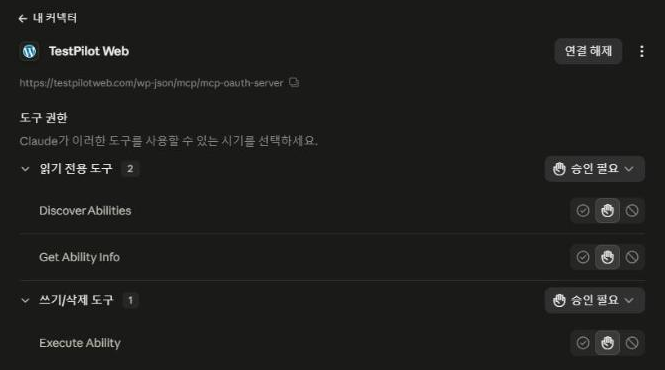
Once connected, the connector screen shows three tools, all set to [Needs approval] by default. A free account can create only one custom connector, so only one site can be connected; multiple sites require a Pro or Max account.
When you ask in a new chat which MCP tools are available on your site, Claude first asks [Deny · Always allow · Allow once] before using a tool.
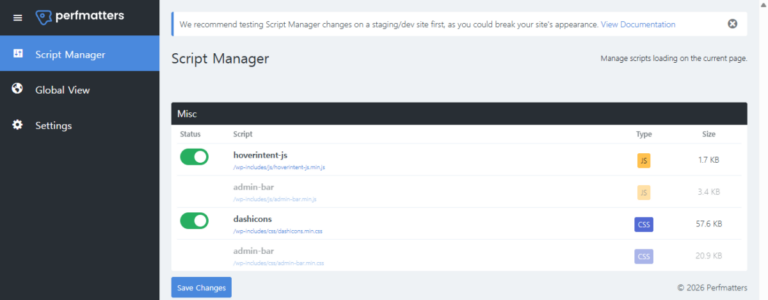
While connecting, an error like the image below appeared,
and our analysis found that it is caused by a REST API setting.
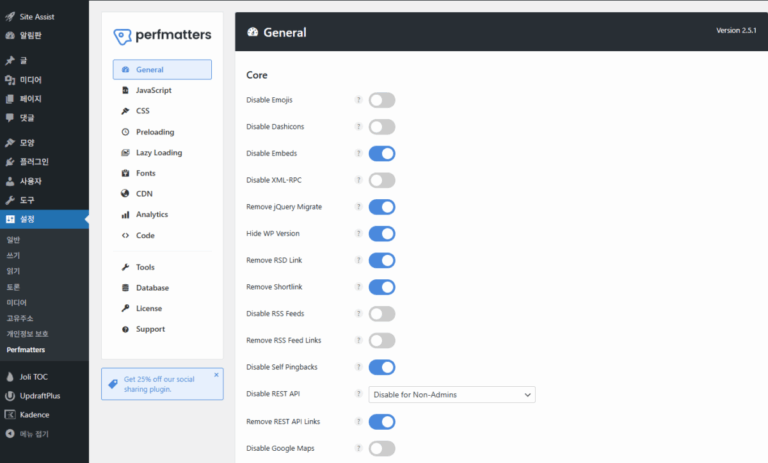
On sites where Perfmatters has [Disable REST API] set to [Disable When Logged Out], the connector shows no tools even after approval and connection, and soon changes to [Connection problem]. Perfmatters treats Claude's requests as a logged-out visitor and blocks them before MCP can check the token.
In [Perfmatters → Code], create a new PHP snippet, paste the code below without the [<?php] line, and save it with the snippet turned on. The code exempts only the MCP address, so every other REST API restriction stays in place.
⚙️ Perfmatters settings screenNew code snippet
perfmatters
⚙General
JSJavaScript
✎CSS
◷Preloading
▣Lazy Loading
AFonts
◍CDN
▥Analytics
</>Code①
🔧Tools
☰Database
🔑License
?Support
<> Code
All Snippets / MCP REST API exception
ActiveSave Snippet④
Name②
MCP REST API exception
Location
Everywhere⌄
Type
PHPJSCSSHTML
Code③
<?php
1// Let WP Rocket MCP (OAuth) requests through the Perfmatters REST API restriction
②Enter a name and leave [Location] as [Everywhere] and [Type] as [PHP].
③Use [Copy] on this screen to grab the code and paste it into the code box below the [<?php] line.
④Turn the switch to [Active] and click [Save Snippet].
After saving, click [Reconnect] on the Claude connector screen and the three tools appear.
This fix for the WP Rocket MCP Server REST API error is for Perfmatters users, but if you already use Claude and another plugin's REST API setting causes the same error message, you can use this code as a reference, ask Claude to adapt it, and apply a version that fits your own WordPress site.
In Claude Desktop you can also connect with an application password. Create a password in WordPress [Users → Profile → Application Passwords], and in Claude Desktop [Settings → Developer], add the entry below to the config file, then reopen the app.
On Windows you need Node.js because the npx command must run. To disconnect, just revoke that application password.
3️⃣ What AI Tools Can Do
WP Rocket's 12 abilities run through the three MCP tools Claude sees ([Discover Abilities], [Get Ability Info], [Execute Ability]), and they fall into three groups: settings, cache and Rocket Insights.
🤖 12 WP Rocket MCP abilities6 read · 6 change
⚙️ Settings2
Read setting valuesRead
wp-rocket/get-options
Change a setting valueChange
wp-rocket/set-option
🗂️ Cache4
Clear the entire site cacheChange
wp-rocket/clear-website-cache
Clear the cache for given URLsChange
wp-rocket/clear-url-cache
Check a URL's cache statusRead
wp-rocket/get-cache-status
Preload progress and estimated remaining URLsRead
wp-rocket/get-cache-health
📊 Rocket Insights6
Read Rocket Insights scoresRead
wp-rocket/get-insights-scores
Read one page's Rocket Insights scoreRead
wp-rocket/get-page-insights-score
Read Rocket Insights recommendationsRead
wp-rocket/get-recommendations
Add a page to test in Rocket InsightsChange
wp-rocket/add-page-insights
Remove a page from Rocket InsightsChange
wp-rocket/remove-page-insights
Retest a pageChange
wp-rocket/retest-page-insights
Changing settings works only for options on the allowlist, and the five marked [AI not allowed] in the screen below cannot be changed.
Performance MonitoringPerformance monitoringAI can change
Content Delivery
RocketCDN
RocketCDN FreeRocketCDN FreeAI not allowed
Other CDN
Your CDNUse another CDNAI can change
Exclude Files from CDNFiles to exclude from the CDNAI can change
File Optimization
CSS FilesCSS files
Minify CSS filesMinify CSS filesAI can change
Excluded CSS FilesExcluded CSS filesAI can change
Optimize CSS DeliveryOptimize CSS deliveryAI can change
Only the Remove Unused CSS method can be changed.
Remove unused CSSAI can change
CSS safelistCSS safelistAI can change
JavaScript FilesJavaScript files
Minify JavaScript filesMinify JavaScript filesAI can change
Combine JavaScript filesCombine JavaScript filesAI not allowed
Excluded JavaScript FilesExcluded JavaScript filesAI can change
Load JavaScript deferredLoad JavaScript deferredAI can change
Excluded JavaScript FilesExcluded JavaScript filesAI can change
Delay JavaScript executionDelay JavaScript executionAI can change
One-click exclusionsOne-click exclusionsAI not allowed
Excluded JavaScript FilesExcluded JavaScript filesAI can change
Safe Mode for Delay JavaScript ExecutionSafe mode for delayed JavaScript executionAI not allowed
Media
LazyLoadDeferred loading
Enable for imagesEnable for imagesAI can change
Enable for CSS background imagesEnable for CSS background imagesAI can change
Enable for iframes and videosEnable for iframes and videosAI can change
Replace YouTube iframe with preview imageReplace YouTube iframe with preview imageAI can change
Excluded images or iframesExcluded images or iframesAI can change
Image DimensionsImage dimensions
Add missing image dimensionsAdd missing image dimensionsAI can change
FontsFonts
Preload fontsFonts (preload)AI can change
Self-host Google FontsSelf-host Google FontsAI can change
Preload
Preload CacheCache preload
Activate PreloadingActivate preloadingAI can change
Exclude URLsExclude URLsAI can change
Preload LinksLink preloading
Enable link preloadingEnable link preloadingAI can change
Advanced Rules
Cache LifespanCache lifespan
Clear cache afterClear cache afterAI can change
Never Cache URL(s)Never cache URL(s)
Never Cache URL(s)Never cache URL(s)AI can change
Never Cache CookiesNever cache cookies
Never Cache CookiesNever cache cookiesAI can change
Never Cache User Agent(s)Never cache user agent(s)
Never Cache User Agent(s)Never cache user agent(s)AI can change
Always Purge URL(s)Always purge URL(s)
Always Purge URL(s)Always purge URL(s)AI can change
Cache Query String(s)Cache query string(s)
Cache Query String(s)Cache query string(s)AI can change
Database
Post CleanupPost cleanup — applies to revisions, auto drafts and trashed posts.
RevisionsRevisionsAI can change
Auto DraftsAuto draftsAI can change
Trashed PostsTrashed postsAI can change
Comments CleanupComment cleanup — deletes spam and deleted comments.
Spam CommentsSpam commentsAI can change
Trashed CommentsDeleted commentsAI can change
Transients CleanupTransients cleanup — clears all transients stored in the DB.
All transientsAll transientsAI can change
Database CleanupDatabase cleanup
Optimize TablesOptimize tablesAI can change
Automatic CleanupAutomatic cleanup
Schedule Automatic CleanupSchedule automatic cleanupAI can change
FrequencyFrequencyAI can change
Heartbeat
Heartbeat
Control HeartbeatControl HeartbeatAI can change
Reduce or disable Heartbeat activityReduce or disable Heartbeat activity
Behavior in backendBehavior in backendAI can change
Behavior in post editorBehavior in post editorAI can change
Behavior in frontendBehavior in frontendAI can change
Add-ons
One-click Rocket Add-onsOne-click Rocket add-ons
User CacheUser cacheAI can change
VarnishAI can change
WebP CompatibilityWebP compatibilityAI can change
Rocket Add-onsRocket add-ons
CloudflareAI can change
SucuriAI can change
4️⃣ Examples
After connecting to testpilotweb.com, we asked Claude to [clear only the homepage cache], and the approval prompt first showed the ability to run (wp-rocket/clear-url-cache) and the URL.
When we clicked [Allow once], only the homepage cache files were deleted on the server, and the cache of other posts stayed as it was.
You can check settings by asking, without opening the admin screen; when we asked [Is Delay JavaScript execution on right now?], it answered with the setting value and the state of the exclusion list.
The first time you use it in a chat, two approval prompts for reading the ability list and descriptions appear first, and since reading abilities also go through [Execute Ability], an approval prompt appears even when reading settings.
5️⃣ Things to Watch Out For
Tasks where an AI tool changes settings or clears the cache run only after you approve them. You can revoke the application password anytime from the screen where you created it.
Cache status checks and preload estimates return results only when WP Rocket's [Preload Cache] is on.
If it will not connect, check the config file first. Common causes are a missing comma between entries, or saving without replacing the URL, username and password placeholders.
ℹ️ Affiliate Disclosure This site's content contains affiliate links. When a visitor buys a product or service through one of them, the site receives a commission from the seller. The amount the buyer pays(it goes down during event discounts ↓)does not go up. Posted prices, discounts, and stock reflect the time of writing and may differ, so confirm with the seller before buying. Products are chosen and reviewed by our own standards, and commissions do not affect the order or content of reviews.