
gclid Cache: Ad Click Query Strings, Page Cache Keys, and Measured Time to First Byte
gclid cache handling means ignoring the gclid query added to the end of an ad click URL and responding with the cache file of the URL without the query. Measurements of time to first byte by query and by cache state on a WordPress server with an Nginx + Apache setup showed that gclid added 0.014–0.015 seconds, and delays of several seconds happened only when the cache could not be used.
Measured inside the same server, time to first byte was 0.014–0.015 seconds without a query and 0.029–0.030 seconds with ad click queries attached. When WordPress built the same page from scratch without cache, it took 3.639 and 3.260 seconds.
1️⃣ gclid Cache: Ad Click URLs and the Cache Key
When Google Ads auto-tagging is on, [?gclid=value] is added to the end of the URL for visitors who click an ad. This value is a parameter that identifies the ad click, so it differs from visitor to visitor, although the same person clicking the same ad again may get the same value.
Real ad click URLs rarely carry gclid alone. gad_source, gad_campaignid and gbraid are often attached too, and sometimes wbraid as well.
https://example.com/sample-page/?gad_source=1&gad_campaignid=1234567890&gbraid=EXAMPLE&gclid=EXAMPLE
https://example.com/sample-page/?gclid=EXAMPLE&gbraid=EXAMPLE&wbraid=EXAMPLE
With a query at the end of the URL, the browser still opens the same page, but to a cache it is a different address. The HTTP caching standard (RFC 9111) defines the cache key, the basis on which a cache picks a stored response, as made up of at least the request method and the target URI, and the target URI includes the query string.
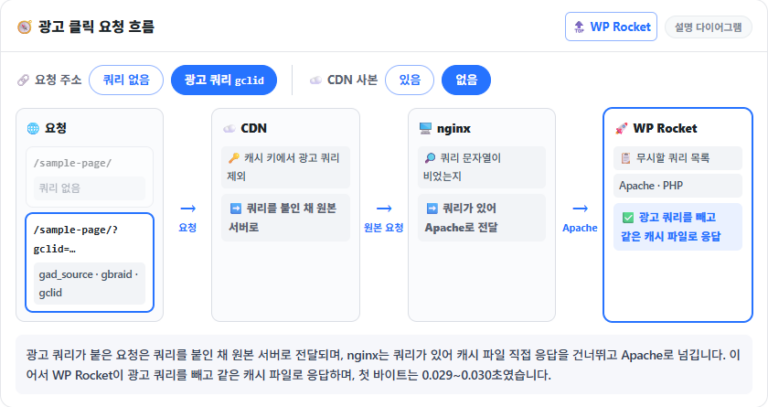
If the query string goes into the cache key as is, every click with a different gclid value becomes a new address. The CDN, nginx and WP Rocket that the response passes through each handle this query by different rules.
If the CDN has no copy or its cache key tells queries apart, the request goes on to the origin server. From there, speed depends on whether nginx and WP Rocket find a cache file.
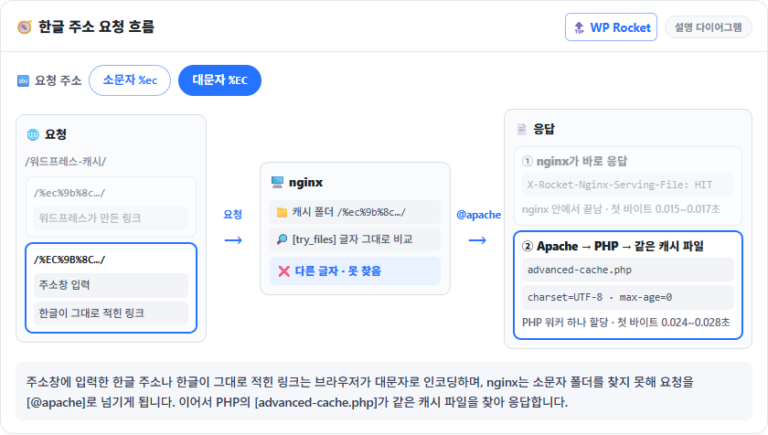
2️⃣ nginx Static Serving: Requests With a Query Go to Apache
Even when the cache file is on disk, nginx in an Nginx + Apache setup does not serve it directly to a request with a query. That is because the configuration below, which lets nginx read WP Rocket cache files directly, only builds a file path when the query string is empty.
# nginx.conf — http block: conditions for skipping the cache file
map $http_cookie $rocket_cookie {
    default                   0;
    '~*wordpress_logged_in'   1;
    '~*wp-postpass'           1;
    '~*comment_author'        1;
    '~*woocommerce_items'     1;
}
map $request_method $rocket_method {
    default  1;
    GET      0;
    HEAD     0;
}
map $query_string $rocket_query {
    default  1;
    ''       0;      # 0 only when the query string is empty
}

# server block
set $rocket_bypass '';
if ($rocket_cookie = 1) { set $rocket_bypass '1'; }
if ($rocket_method = 1) { set $rocket_bypass '1'; }
if ($rocket_query  = 1) { set $rocket_bypass '1'; }
set $rocket_file '/wp-content/cache/wp-rocket/example.com${request_uri}index-https.html';
if ($rocket_bypass = '1') { set $rocket_file ''; }

location / {
    try_files $rocket_file @apache;                       # to Apache if the path is empty or the file is missing
    add_header X-Rocket-Nginx-Serving-File 'HIT' always;  # marks responses nginx served straight from the cache file
}
[$rocket_query] only checks whether the whole query string is empty, so gclid, which WP Rocket ignores, is treated just like any other query. If mobile copies are kept separately, there is one more check that adds [-mobile] to the file name.
The [.htaccess] rules WP Rocket writes for Apache also require an empty query string. Whether in nginx or Apache, the step that serves the cache file directly without PHP only applies to requests without a query.
Requests without a query carried the [X-Rocket-Nginx-Serving-File: HIT] header, and the six requests with gclid and ad-style queries did not. Time to first byte grew by 0.014–0.015 seconds for requests with a query because Apache and PHP reading and returning the cache file was added to the path.
curl -so /dev/null -H 'Accept-Encoding: gzip' -w '%{time_starttransfer}\n' \
'https://example.com/sample-page/'0.015127curl -so /dev/null -H 'Accept-Encoding: gzip' -w '%{time_starttransfer}\n' \
'https://example.com/sample-page/?gclid=test123'0.029525curl -sI 'https://example.com/sample-page/' | grep -i x-rocket-nginx-serving-filex-rocket-nginx-serving-file: HIT[time_starttransfer] is the time from the request until the first byte arrives. To measure inside the server without going through the CDN, add [--resolve example.com:443:127.0.0.1].
3️⃣ WP Rocket's Ignored Query List: Same Cache File Served
Not caching URLs with a query is WP Rocket's default, but ad click queries are an exception. WP Rocket removes the parameters on its ignored list before deciding, and if no queries are left, it responds with the cache file of the URL without a query.
// wp-rocket/inc/classes/Buffer/class-tests.php (3.23.5.1)
public function get_query_params() {
    // …
    $params = array_diff_key(                                  // remove the ignored queries first
        self::$get,
        $this->config->get_config( 'cache_ignored_parameters' )
    );
    // …
}

public function can_process_query_string() {
    // …
    $params = $this->get_query_params();

    if ( ! $params ) {                                         // no queries left: handle with cache
        return self::memoize( __FUNCTION__, [], true );
    }
    // only lang · s · permalink_name · lp-variation-id and queries added to [Cache Query String(s)] pass
    // …
}
If what [get_query_params] returns after removing the ignored queries is empty, the cache file path is also set to the URL without a query. The request with gclid went through Apache and PHP, but the cache comment at the end of the HTML matched the request without a query, and the response size was 350,668 bytes, the same as the cache file (gzip).
The ignored query list is a default list that WP Rocket downloads from its own servers once a week and saves to [wp-content/wp-rocket-config/dynamic-lists.json]. As of October 17, 2026, the list includes gclid, gbraid, wbraid, gad_source and gad_campaignid.
If even one query not on the list is mixed in, WP Rocket does not use the cache: the same page with an arbitrary query not on the list was built fresh by WordPress, with no cache comment. If your ad URLs carry tracking queries you made yourself, those clicks take this path every time.
To change the list, use the helper plugin WP Rocket points to. The plugin adds or removes queries through the [rocket_cache_ignored_parameters] filter and regenerates WP Rocket's config file when it is activated or deactivated.
// from WP Rocket | Ignore Query Strings 1.1.1 (helper plugin by the WP Rocket support team)
function define_ignored_parameters( array $params ) {
    $params['new_query_string'] = 1;      // add to the ignored queries
    //unset ( $params['utm_source'] );    // remove from the ignored queries
    return $params;
}
add_filter( 'rocket_cache_ignored_parameters', __NAMESPACE__ . '\define_ignored_parameters', 999 );

register_activation_hook( __FILE__, __NAMESPACE__ . '\flush_wp_rocket' );   // runs rocket_generate_config_file() on activation
WP Rocket writes this list into the domain-named config file inside [wp-content/wp-rocket-config/] and reads that file on every request, so if you only add the filter without regenerating the config file, the new list does not take effect. Queries on the list share the one cache file of the base URL whatever their value, so do not add queries whose value changes what the page shows.
After adding [uk_test], which was not on the list, to the helper plugin and activating it, the config file was regenerated with that query added to the end of the list. Then the URL without a query and two URLs with different [uk_test] values were requested in turn.
curl -s -o /dev/null -w '%{size_download} %{time_starttransfer}\n' -H 'Accept-Encoding: gzip' 'https://example.com/sample-page/'
curl -s -o /dev/null -w '%{size_download} %{time_starttransfer}\n' -H 'Accept-Encoding: gzip' 'https://example.com/sample-page/?uk_test=abc'
curl -s -o /dev/null -w '%{size_download} %{time_starttransfer}\n' -H 'Accept-Encoding: gzip' 'https://example.com/sample-page/?uk_test=xyz'
21390 0.025720
21390 0.025507
21390 0.027929All three requests returned the same 21,390 bytes within 0.03 seconds, and the end of the HTML for the [uk_test] request was opened to check the cache time.
curl -s --compressed 'https://example.com/sample-page/?uk_test=abc' | tail -c 200ck=lazyLoadYoutubeIframe;}});</script></body>
</html>
<!-- This website is like a Rocket, isn't it? Performance optimized by WP Rocket. Learn more: https://wp-rocket.me - Debug: cached@1792248839 -->The cache time in the closing comment matched the cache file of the URL without a query. Before the helper plugin was activated, the same request was built fresh in 0.36–0.38 seconds, with no cache comment.
Even after activation, a request that also carried [foo], which is not on the list, did not use the cache file and was built fresh.
For one minute right after the config file was regenerated, [uk_test] requests were also built fresh. With PHP OPcache set to recheck changed files every 60 seconds (revalidate_freq), responses came from the cache file only after a minute had passed.
Even after the helper plugin was deactivated and deleted, the [uk_test] line stayed in the config file. The deactivation code tries to remove the filter, added with priority 999, at the default priority, so the config file is regenerated with the filter still in place. Only regenerating the config file once more after deleting the plugin removes it from the list.
4️⃣ CDN Cache Key: Excluding Ad Queries and Origin Requests
If the CDN puts the query string into the cache key as is, every click with a different gclid value finds no copy, and the request goes all the way to the origin server. Dropping queries altogether solves this, but it does not suit sites with URLs whose content changes by query, such as search results, so it is better to remove only the ad queries from the cache key.
With the ad queries removed this way, the CDN answers with the same copy as the URL without a query even when the gclid value differs, and only when it has no copy does it send the request, query attached, to the origin server.
# CDN cache status for two requests with different gclid values (header names vary by CDN)
curl -sI 'https://example.com/sample-page/?gclid=test1' | grep -i -E 'cache|age'
curl -sI 'https://example.com/sample-page/?gclid=test2' | grep -i -E 'cache|age'If both requests with different values are HITs and their copies were stored at the same time as the URL without a query, that CDN is leaving gclid out of its cache key. The first visit at a location with no copy still goes through nginx and WP Rocket on the origin server, even if the CDN removes ad queries from the key.
5️⃣ What Slows Ad Clicks: An Empty Page Cache
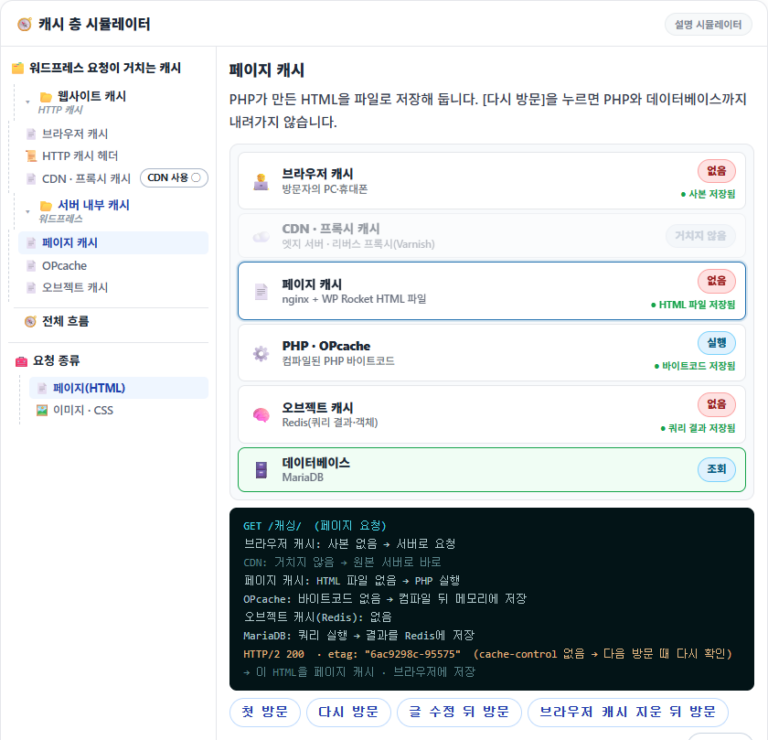
When the first page from an ad loads slowly, it is tempting to blame gclid for bypassing the cache, but if a cache file exists, the same cache file is served even with a query attached. What adds seconds to time to first byte is an empty cache file, which makes WordPress build the page from scratch.
Cache files are deleted once the Cache lifespan has passed; WP Rocket's default is 10 hours. Saving a post or settings also deletes the related cache, and when the list WP Rocket downloads once a week is replaced with a new version and saved, the whole site cache is emptied too.
With preload on, WP Rocket reopens emptied URLs and refills the cache, and visitors who arrive before that wait while the page is built. A request with only ad queries also creates the cache file under the URL without a query, so the ad click that first hits an empty cache fills it for the next visitor.
Right after the cache was cleared, the first request opened with ad-style queries found no cache file and was built fresh in 0.341–0.369 seconds, and the cache file for the URL without a query appeared in the same second.
curl -s -o /dev/null -w '%{size_download} %{time_starttransfer}\n' -H 'Accept-Encoding: gzip' 'https://example.com/sample-page/?gclid=EXAMPLE1'
ls -l --time-style='+%F %T' wp-content/cache/wp-rocket/example.com/sample-page/
curl -s -o /dev/null -w '%{size_download} %{time_starttransfer}\n' -H 'Accept-Encoding: gzip' 'https://example.com/sample-page/'
21361 0.366881
total 116
-rw-r--r-- 1 example nobody 90908 2026-10-17 23:56:38 index-https.html
-rw-r--r-- 1 example nobody 21385 2026-10-17 23:56:38 index-https.html_gzip
21385 0.025379All three runs went in the same order, and the request without a query that followed was answered from the new cache file in 0.023–0.025 seconds. Because the request did not come from a mobile device, only the two desktop files were created.
For the URLs your ads link to, check yourself whether a cache file exists and when it was created; if mobile copies are made separately, check both the desktop and mobile files.
ls -l --time-style='+%F %T' wp-content/cache/wp-rocket/example.com/sample-page/total 3520
-rw-r--r-- 1 example nobody 1445922 2026-10-17 14:07:44 index-https.html
-rw-r--r-- 1 example nobody 350668 2026-10-17 14:07:44 index-https.html_gzip
-rw-r--r-- 1 example nobody 1446862 2026-10-17 14:07:47 index-mobile-https.html
-rw-r--r-- 1 example nobody 351042 2026-10-17 14:07:47 index-mobile-https.html_gzipcurl -s --compressed 'https://example.com/sample-page/?gclid=test123' | tail -c 200n/1/wp-content/uploads/example-plugin/style.css' media='all' /></noscript></body>
</html>
<!-- Cached for great performance - Debug: cached@1792213663 -->A response served from a cache file has the time the file was created, in Unix time, after [Debug: cached@] in the comment at the end of the HTML. Without this mark, WordPress built that response from scratch.
🔢 FAQ & Recommended Content












ℹ️ Affiliate Disclosure
This site's content contains affiliate links. When a visitor buys a product or service through one of them, the site receives a commission from the seller. The amount the buyer pays(it goes down during event discounts ↓)does not go up. Posted prices, discounts, and stock reflect the time of writing and may differ, so confirm with the seller before buying. Products are chosen and reviewed by our own standards, and commissions do not affect the order or content of reviews.