
WP-Cron (wp-cron.php): Disabling It and Setting Up a System Cron | WordPress Performance Optimization
In WordPress, Cron jobs are a feature that automatically runs tasks scheduled for a specific time or date. They run through the wp-cron.php file, and WordPress calls this file every time a page loads to process scheduled tasks. This approach is simple, but on high-traffic sites it can hurt performance.
Ⅰ. How WP-Cron Runs and Its Performance Problems
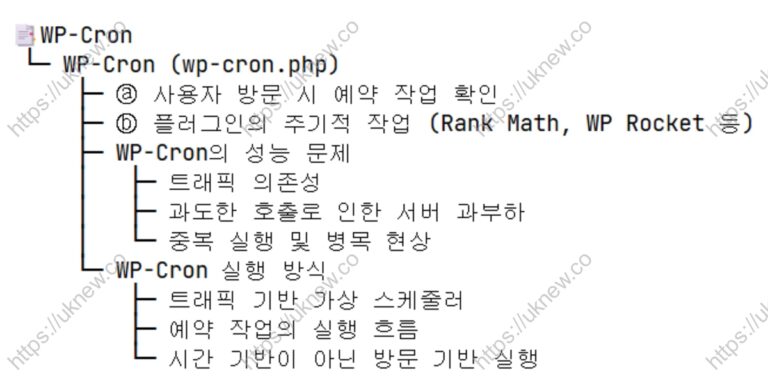
Instead of the traditional Cron system of Linux servers, WordPress provides its own Cron feature, WP-Cron. WP-Cron works through the wp-cron.php file: ⓐ every time a user visits the site, it checks whether there are scheduled tasks and runs them, and ⓑ plugins such as Rank Math and WP Rocket run their own scheduled periodic tasks.
On the other hand, on high-traffic sites wp-cron.php can be called far too often, overloading the server. In particular, when many users connect at the same time, duplicate cron jobs run, which can lead to higher CPU usage, slower responses, slower page loading and similar problems.
These structural limits of WP-Cron can degrade WordPress performance, and especially on sites that need high performance, online stores and news portals they can cause serious bottlenecks.
🔄 How WP-Cron Runs and Is Structured
Ⅱ. WordPress Performance Optimization
There are many ways to optimize WordPress performance. After optimizing caching, the frontend and the database, you can improve things further through the WP-Cron settings.
Scheduled events are checked every time a WordPress page loads, and because of plugins' periodic tasks, the inefficient WP-Cron needs to be used more efficiently.
1️⃣ Testing WP-Cron
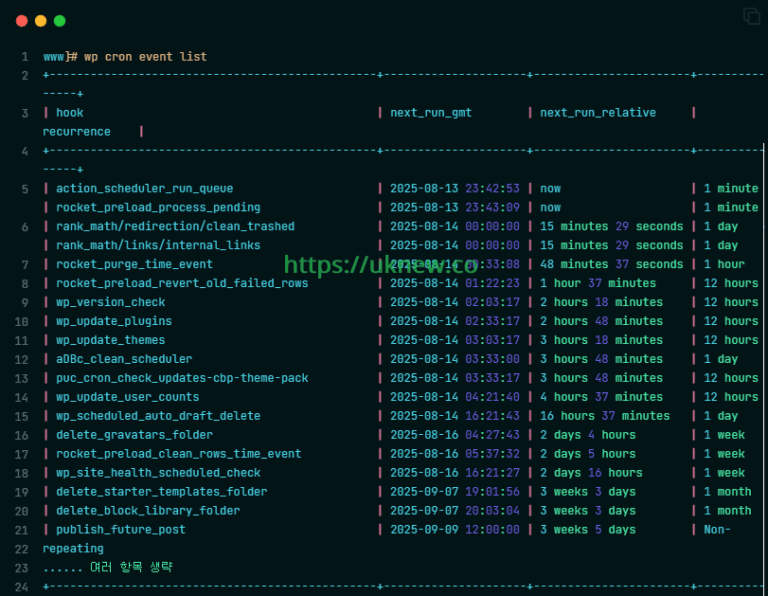
Checking the cron jobs with WP-CLI shows the active Cron events running. You can see plugins such as Rank Math and WP Rocket running scheduled tasks daily or every few minutes.
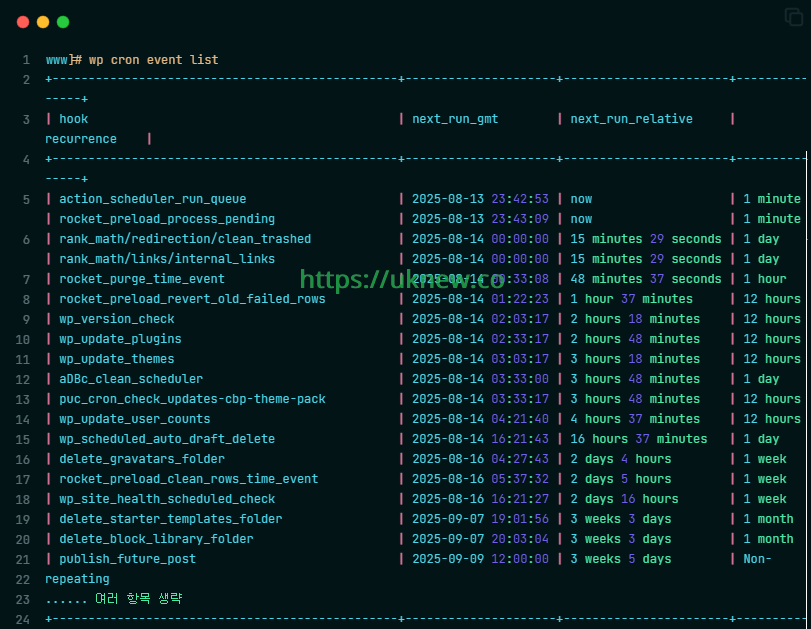
2️⃣ How to Configure WP-Cron
WP-Cron is a virtual scheduler that handles WordPress's scheduled tasks; wp-cron.php runs when users visit. But traffic-based execution is unreliable and excessive calls can load the server, so it is usually supplemented with a system cron.
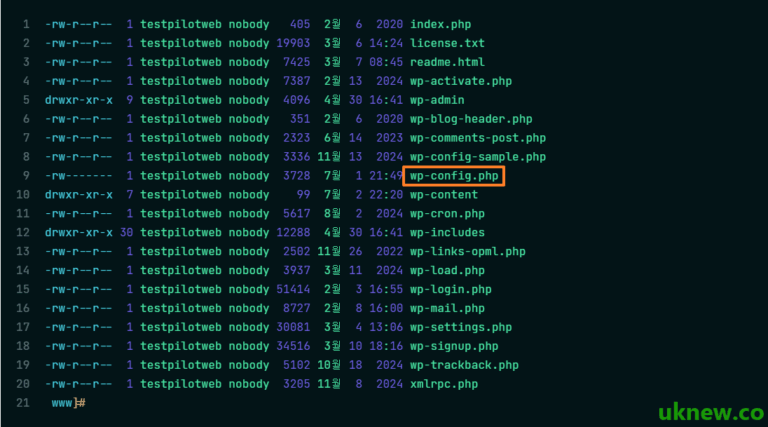
If needed, the recommended approach is to set DISABLE_WP_CRON in wp-config.php to turn WP-Cron off and run it regularly with a Linux cron.
|
Item |
Disable WP-Cron + run only the system cron |
|---|---|
|
Settings |
Turn off WP-Cron and run wp-cron.php from the system cron |
|
Pros |
No duplicate runs, precise time-based execution and low server load |
|
Cons |
Some plugin features may stop, and a setup mistake risks missed tasks |
|
Recommended · Situation |
Suited to sites with heavy traffic and many scheduled tasks |
However, method ① has a drawback: it disables the preload feature of cache plugins such as WP Rocket, which every minute builds the cache in advance before visitors arrive.
⚙️ Editing the wp-config.php File
You can set it up by disabling WP_CRON.
# Disable WP_CRON
define( 'DISABLE_WP_CRON', true );
While WP-Cron is running, WP_CRON_LOCK_TIMEOUT acts as a [time-based lock] that blocks other attempts to run it.
# 5 minutes = 300, every 60 minutes = 3600
define('WP_CRON_LOCK_TIMEOUT', 300);
For these reasons, rather than only disabling WP-Cron in the wp-config.php file, I recommend disabling it and then adding a System Cron job, and the server I currently manage is set up this way as well.
⚙️ Enabling a System Cron on a Linux Server [Basic]
You can enable it per domain.
# Run every 5 minutes
*/5 * * * * curl -s https://example.com/wp-cron.php?doing_wp_cron > /dev/null 2>&1
# Run every 30 minutes
*/30 * * * * curl -s https://example.com/wp-cron.php?doing_wp_cron > /dev/null 2>&1
# Run every hour
0 * * * * curl -s https://example.com/wp-cron.php?doing_wp_cron > /dev/null 2>&1
# Run once a day
0 3 * * * curl -s https://example.com/wp-cron.php?doing_wp_cron > /dev/null 2>&1
The four lines above are examples for each interval that you add to crontab; at each set time, curl calls the [wp-cron.php] URL, so scheduled tasks run even when there are no visitors.
# If the server is a local server
*/5 * * * * php /path/to/wordpress/wp-cron.php > /dev/null 2>&1

# Run every 30 minutes
*/30 * * * * php /path/to/wordpress/wp-cron.php > /dev/null 2>&1

# Run every hour
0 * * * * php /path/to/wordpress/wp-cron.php > /dev/null 2>&1

# Run once a day
0 3 * * * php /path/to/wordpress/wp-cron.php > /dev/null 2>&1
If WP-CLI is installed, you can set just one line for the interval you want. ▼
# Run every 5 minutes
*/5 * * * * cd /sites/example.com/files/ && flock -n ~/.wp_cron.lock /usr/local/bin/wp cron event run --due-now --quiet

# Run every 30 minutes
*/30 * * * * cd /sites/example.com/files/ && flock -n ~/.wp_cron.lock /usr/local/bin/wp cron event run --due-now --quiet

# Run every hour
0 * * * * cd /sites/example.com/files/ && flock -n ~/.wp_cron.lock /usr/local/bin/wp cron event run --due-now --quiet

# Run once a day
0 3 * * * cd /sites/example.com/files/ && flock -n ~/.wp_cron.lock /usr/local/bin/wp cron event run --due-now --quiet
This setup has WP-CLI run only the scheduled tasks that are due, using the [--due-now] option inside the server, and [flock -n] skips a new run if the previous one has not finished.
⚙️ WP-CLI and a 1-Minute System Cron, Plus Preventing Duplicate Cron Jobs
By default, WP_CRON simply ignores (skips) jobs when there is a lot of work and runs them again later. Turn off the default WP-Cron and set scheduled tasks to keep a 5-minute lock, which stops the system cron and WP-Cron from running at the same time.
define('DISABLE_WP_CRON', true);         // turns off WP-Cron's automatic runs
define('WP_CRON_LOCK_TIMEOUT', 300);     // no waiting → skipped; keeps a 5-minute lock while a scheduled task runs

/* That's all, stop editing! Happy publishing. */
Add the flock -n option to the system cron so that, on the system cron side, a run that finds the lock exits immediately.
# wp cron setting: flock -n → no waiting → exit immediately
*/1 * * * * cd /sites/example.com/files/ && flock -n ~/.wp_cron.lock /usr/local/bin/wp cron event run --due-now --quiet
The result of combining these settings is:
- WordPress's internal auto-run is off → scheduled tasks run regardless of visitor numbers
- The system cron tries to run every minute → scheduled tasks run if there are any
- Once locked, nothing reruns for 5 minutes → prevents duplicate runs (in practice, WP_CRON_LOCK_TIMEOUT is not really needed given the flock -n setting.)
With duplicate-run prevention, the actual flow is:
- 08:00 → the system cron calls wp-cron.php
- Scheduled task A runs → 5-minute lock set
- 08:01 → the system cron calls again
- Task A is locked → does not run
- 08:02–08:04 → same
- 08:05 → lock released → the next scheduled task runs if there is one
Instead of WordPress running tasks automatically, the system takes charge of running them. And WP_CRON_LOCK_TIMEOUT works as a backup safeguard against duplicate runs.
|
Item |
WP_CRON_LOCK_TIMEOUT |
flock -n |
|---|---|---|
|
Lock type |
Inside WordPress |
System level |
|
Lock location |
DB-based: doing_cron in wp_options |
File-based on the system: ~/.wp_cron.lock |
|
Waits? |
❌ Does not wait → skips |
❌ Does not wait → exits immediately |
|
Duplicate-run prevention |
✅ Prevents duplicate runs |
✅ Prevents duplicate runs |
Once done, you can check with a WP-CLI command that cron is still working as before.
wp cron event list+-------------------------------------------+---------------------+-----------------------+---------------+
| hook | next_run_gmt | next_run_relative | recurrence |
+-------------------------------------------+---------------------+-----------------------+---------------+
| rocket_saas_pending_jobs | 2026-10-17 12:00:57 | now | 1 minute |
| action_scheduler_run_queue | 2026-10-17 12:00:57 | now | 1 minute |
| action_scheduler_run_queue_rucss | 2026-10-17 12:00:58 | now | 1 minute |
| rocket_saas_on_submit_jobs | 2026-10-17 12:00:58 | now | 1 minute |
| rocket_preload_process_pending | 2026-10-17 12:00:59 | now | 1 minute |
| rocket_purge_time_event | 2026-10-17 12:16:59 | 15 minutes 8 seconds | 1 hour |
| wp_privacy_delete_old_export_files | 2026-10-17 12:28:46 | 26 minutes 55 seconds | 1 hour |
| wp_update_user_counts | 2026-10-17 20:15:52 | 8 hours 14 minutes | 12 hours |
| rocket_preload_revert_old_failed_rows | 2026-10-17 20:17:59 | 8 hours 16 minutes | 12 hours |
| wp_version_check | 2026-10-17 20:28:34 | 8 hours 26 minutes | 12 hours |
| wp_update_plugins | 2026-10-17 20:58:34 | 8 hours 56 minutes | 12 hours |
| wp_update_themes | 2026-10-17 21:28:34 | 9 hours 26 minutes | 12 hours |
| recovery_mode_clean_expired_keys | 2026-10-18 07:28:46 | 19 hours 26 minutes | 1 day |
| wp_privacy_personal_data_cleanup_requests | 2026-10-18 07:28:46 | 19 hours 26 minutes | 1 day |
| wp_scheduled_delete | 2026-10-18 08:15:52 | 20 hours 14 minutes | 1 day |
| delete_expired_transients | 2026-10-18 08:15:52 | 20 hours 14 minutes | 1 day |
| wp_scheduled_auto_draft_delete | 2026-10-18 08:15:54 | 20 hours 14 minutes | 1 day |
| wp_delete_temp_updater_backups | 2026-10-18 08:16:17 | 20 hours 14 minutes | 1 week |
| rocket_update_dynamic_lists | 2026-10-18 08:16:57 | 20 hours 15 minutes | 1 week |
| rocket_saas_clean_rows_time_event | 2026-10-18 08:16:57 | 20 hours 15 minutes | 1 week |
| rocket_performance_hints_cleanup | 2026-10-18 08:16:58 | 20 hours 15 minutes | 1 day |
| rocket_preload_clean_rows_time_event | 2026-10-18 08:26:57 | 20 hours 25 minutes | 1 week |
| rocket_database_optimization_time_event | 2026-10-18 09:34:25 | 21 hours 32 minutes | 1 day |
| wp_site_health_scheduled_check | 2026-10-19 07:28:46 | 1 day 19 hours | 1 week |
| rocket_remove_saas_failed_jobs | 2026-10-19 08:16:58 | 1 day 20 hours | 3 days |
+-------------------------------------------+---------------------+-----------------------+---------------+The output shows the registered hook names, the next run time and the recurrence, and tasks whose [next_run_relative] column says [now] are processed right away on the next cron run.
Ⅲ. When WP-Cron Scheduled Tasks Don't Run
It's easy to assume a task runs on its own once its scheduled time arrives, but WP-Cron checks for work when a page request comes in, not at a set time. A task scheduled for 2 p.m. runs at the first request at 5 p.m. if no requests come in before then.
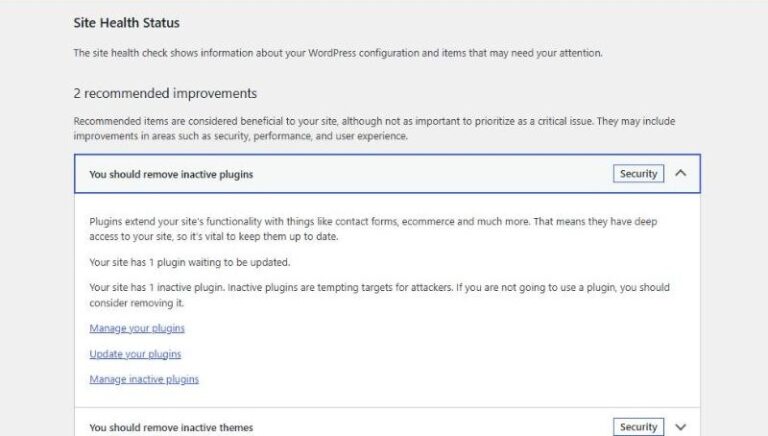
When runs fall behind, scheduled posts show as [Missed schedule] in the post list. Under [Recommended improvements] on the Status tab of [Tools › Site Health], [A scheduled event has failed] appears. Tasks registered by plugins, such as cache preloading, wait to run for the same reason.
Scheduled tasks run in [wp-cron.php] after passing through a page request, a check for due work and a loopback request; if any one of these links breaks, they don't run even after their time has passed.
1️⃣ When There Are No Visits or the Page Cache Responds
WP-Cron only checks for due work on requests that run WordPress, so during hours without visits, tasks past their time simply pile up. Even with visits, the result is the same if a page cache file responds, because WordPress doesn't run.
On a WordPress install with the WP Rocket page cache on, opening the cached home page logged no [wp-cron.php] call. Opening an uncached URL logged a call in the same second, and the five tasks that had fallen behind ran.
You can check the overdue tasks by filtering the WP-CLI list to the rows whose [next_run_relative] is [now].
wp cron event list --next_run_relative=now --fields=hook,next_run_gmt,next_run_relative+----------------------------------+---------------------+-------------------+
| hook | next_run_gmt | next_run_relative |
+----------------------------------+---------------------+-------------------+
| rocket_saas_pending_jobs | 2026-10-17 14:49:57 | now |
| action_scheduler_run_queue | 2026-10-17 14:49:57 | now |
| action_scheduler_run_queue_rucss | 2026-10-17 14:49:58 | now |
| rocket_saas_on_submit_jobs | 2026-10-17 14:49:58 | now |
| rocket_preload_process_pending | 2026-10-17 14:49:59 | now |
+----------------------------------+---------------------+-------------------+[now] means the scheduled time has already passed. This list command also loads WordPress, so if there are overdue tasks it calls [wp-cron.php] the moment it finishes. Run the same command again right away and the tasks you just saw are gone from the list.
To clear the overdue tasks before fixing the cause, run only the tasks that are past due right away with WP-CLI.
wp cron event run --due-nowExecuted the cron event 'rocket_saas_pending_jobs' in 0.005s.
Executed the cron event 'action_scheduler_run_queue' in 0.006s.
Executed the cron event 'action_scheduler_run_queue_rucss' in 0.006s.
Executed the cron event 'rocket_saas_on_submit_jobs' in 0.005s.
Executed the cron event 'rocket_preload_process_pending' in 0.007s.
Success: Executed a total of 5 cron events.This command runs the tasks inside the server without an HTTP request; to process them at fixed intervals regardless of visits, register the same command in the system cron.
2️⃣ When Only DISABLE_WP_CRON Is On and There Is No System Cron
With [DISABLE_WP_CRON] set to true, WP-Cron doesn't check for due work even when page requests come in. The official documentation also says to register with the system task scheduler first and then add this constant; adding only the constant, without registering, leaves nothing to run the scheduled tasks.
With the constant in place, a post scheduled a little over a minute ahead stayed [Scheduled] after its time passed, and the date column of the post list showed [Missed schedule]. Not a single [wp-cron.php] call was logged in the meantime.
You can check whether the constant is on with [wp cron test].
wp cron testError: The DISABLE_WP_CRON constant is set to true. WP-Cron spawning is disabled.If you get this error, check whether the system cron has a line that calls [wp-cron.php] or runs [wp cron event run]. If the site account's crontab is empty, it shows the following.
crontab -lno crontab for exampleIf there is no such line, register a system cron; if your environment doesn't allow that, delete the [DISABLE_WP_CRON] line and use WP-Cron again.
3️⃣ When the Server's Loopback Request Is Blocked
When there is work to do, WP-Cron has the server send a request to [wp-cron.php] at its own site address to run the tasks; this is the loopback request. If a security rule blocks [wp-cron.php], the loopback request comes back with a 403 and the tasks don't run.
On a server with an Nginx and Apache setup, restricting [wp-cron.php] so it only opens from 127.0.0.1 blocked the loopback request with a 403. That's because the request the server sends to its own domain comes in through the public IP, and [wp cron test] returns the same status code.
wp cron testError: WP-Cron spawn returned HTTP status code: 403 ForbiddenWith the tasks more than five minutes overdue, opening the [Site Health] screen showed a loopback warning and a failed scheduled event together under [Recommended improvements].
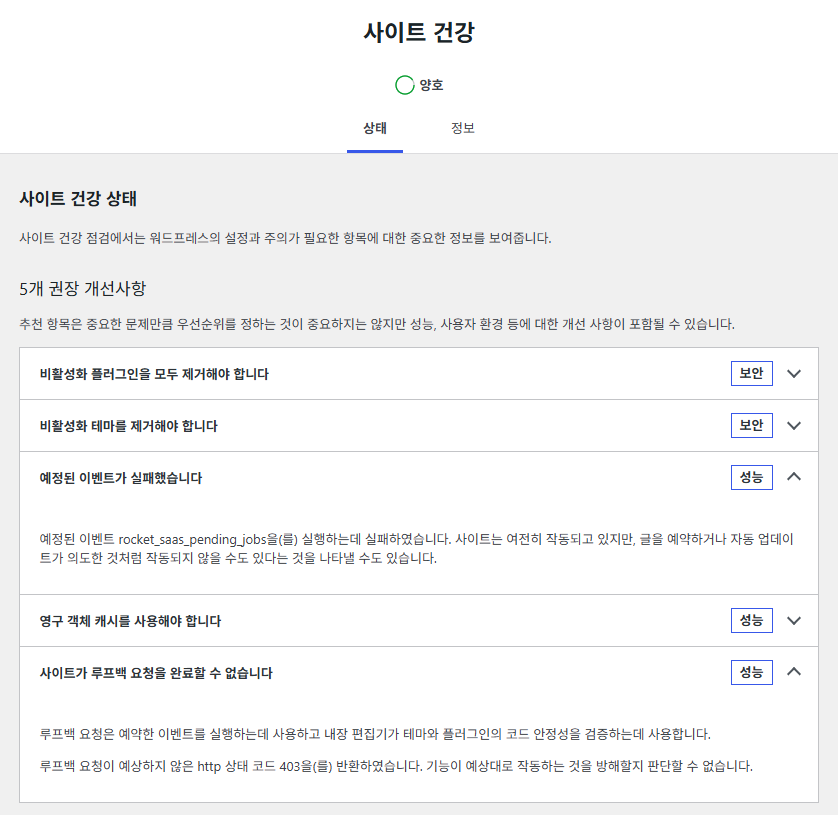
Once the rule was removed, [wp cron test] succeeded again. If you need to keep the rule, run the tasks with WP-CLI from the system cron. A WP-CLI run doesn't go through an HTTP request, so the overdue tasks were processed even with the same rule in place.
🔢 FAQ & Recommended Content




ℹ️ Affiliate Disclosure
This site's content contains affiliate links. When a visitor buys a product or service through one of them, the site receives a commission from the seller. The amount the buyer pays(it goes down during event discounts ↓)does not go up. Posted prices, discounts, and stock reflect the time of writing and may differ, so confirm with the seller before buying. Products are chosen and reviewed by our own standards, and commissions do not affect the order or content of reviews.