Among Cloudways promo codes, TREAT26 from the Halloween promotion now running gives new customers 40% off their bill for 4 months when they sign up with it. We checked the code field on the sign-up screen, the terms on the official promotion page, and the discount tab on the billing screen after signing up.
TOC
2-minute read
TOC
2-minute read
View more
1️⃣ Where to enter a Cloudways promo code
On the sign-up screen, checking [I have a promo code] opens the [Promo Code] field; enter the code in this field and continue signing up.
Applied discounts and credits are shown on the [Credits & Discounts] tab of the [Billing] screen.
This tab has no code field and only lists applied discounts in a table, so enter the code when you sign up (checked on 2026-10-27).
2️⃣ Cloudways discount terms
Cloudways charges build up by usage time from the moment you create a server. On its official promotion page, Cloudways announces the Halloween promotion now running (event period · checked on 2026-10-27). New customers who sign up with the code TREAT26 get 40% off every plan for 4 months. For an $11-a-month DigitalOcean Standard 1GB server, that works out to $4.40 off each month, or $17.60 over the 4 months.
WPUKNEWCO is a code you enter in the [Promo Code] field on the sign-up screen.
After you enter the code and leave the field, a green check appears on its right, so you can confirm the code is valid before signing up (checked on 2026-10-27).
Item
Terms
Check
Halloween promotion (TREAT26)
New customers · 40% off every plan for 4 months · the larger discount during the event
Event period · official promotion page on 2026-10-27
WPUKNEWCO
10% off the monthly bill for the first 3 months · use after the Halloween event ends
Shown as valid on the sign-up screen on 2026-10-27
Free trial
3 days
Official pricing page on 2026-10-19
Billing method
Postpaid · invoice for the previous month's usage on the 1st of each month
Official pricing page on 2026-10-19
Smallest server
DigitalOcean Standard 1GB $11 a month · $0.0164 an hour
Official pricing page on 2026-10-19
Tax
Added as a separate line on the invoice
Official pricing page on 2026-10-19
※ Tax not included · prices are based on the official pricing page as of October 19, 2026. ※ The [Promo Code] field on the sign-up screen takes only one code, so only one discount applies: TREAT26 or WPUKNEWCO (per the FAQ on the official promotion page).
[Get 40% Off for 4 Months] appears at the top of the page, and clicking the [Grab This Deal] button takes you to a sign-up screen with the TREAT26 code attached (checked on 2026-10-27). According to the official page, the discount applies when you sign up through this path.
The discount terms list three conditions.
Only new customers are eligible.
It applies only when you sign up with a promo code.
Free migration must be requested within the first four billing cycles.
For a server you will test for only a few days and then delete, the 3-day free trial without a code is enough.
3️⃣ Where to check invoices on the billing screen
Cloudways Billing has an [Overview] tab whose estimate for the current month appears only after usage has been tallied; it still showed USD 0.00 the day after the test server was created. The estimate can differ from the actual invoice by up to 3%, so the discounted amount is confirmed on the invoice.
The [Overview] tab shows this month's estimate, the payment due date and a monthly summary by service.
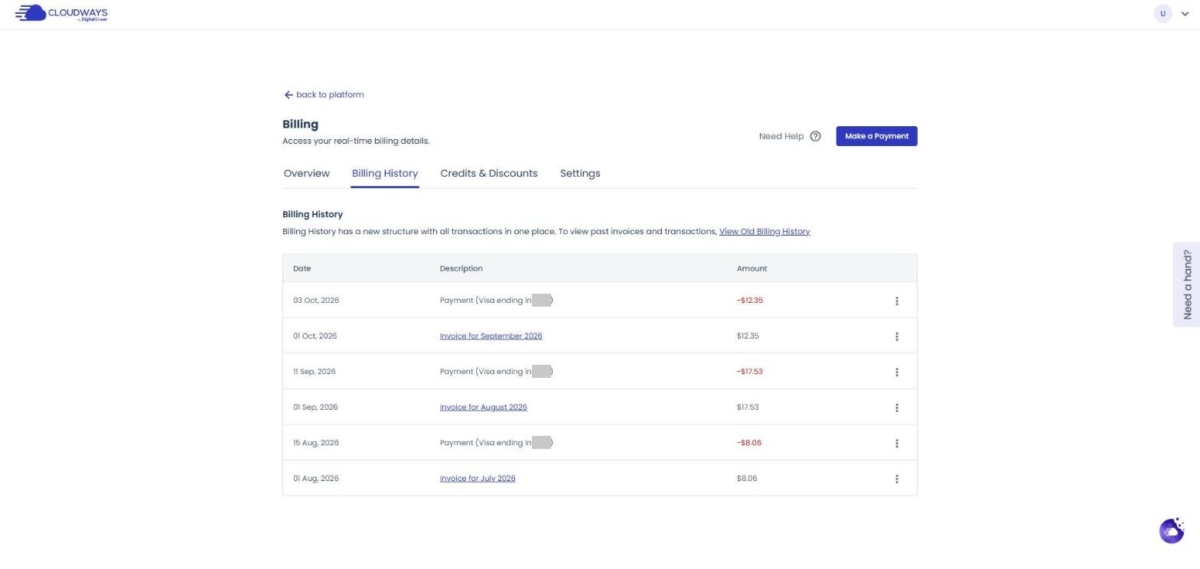
The [Billing History] tab lists the invoice for the previous month's usage, issued on the 1st of each month, as [Invoice for September 2026]. The charge to your registered card is recorded a few days later as a [Payment] line.
🔢 FAQ & Recommended Content
After the discount period, the server you chose is billed for its usage time without a discount. If you change the server size mid-month, each size is charged for the time it was used.
According to the official pricing page, you can start the free trial without a credit card.
According to the FAQ on the official promotion page, a promo code cannot be combined with other discount codes (checked on 2026-10-27). The [Promo Code] field on the sign-up screen takes only one code, so you choose either TREAT26's 40% off for 4 months or WPUKNEWCO's 10% off for 3 months.
☁️Recommended Cloudways contentPost 21 · Tool 2
🗂️ Running Cloudways
📄 What Is Cloudways📄 Signup and basic setup📄 Domain connection📄 SSL setup
📋 Server & Application📄 Admin login📄 Staging Management📄 Billing · Pricing📄 Email · SMTP add-on📄 MCP · AI Server Management📄 SFTP and SSH Access📄 Migration📄 Backup📄 Vertical Scaling
📋 Hosting Comparison Top 7📄 What is cloud hosting📄 What is managed hosting📄 Web Hosting Costs📄 Cloudways for Small Businesses📄 Cloudways WooCommerce📄 Cloudways Alternatives
ℹ️ Affiliate Disclosure This site's content contains affiliate links. When a visitor buys a product or service through one of them, the site receives a commission from the seller. The amount the buyer pays(it goes down during event discounts ↓)does not go up. Posted prices, discounts, and stock reflect the time of writing and may differ, so confirm with the seller before buying. Products are chosen and reviewed by our own standards, and commissions do not affect the order or content of reviews.


 .00, No credits available, "Discounts" table header, No code entry field" data-lazy-srcset="https://uknew.co/storage/2026/10/2-billing-credits-discounts-261027-1024x508.jpg 1024w, https://uknew.co/storage/2026/10/2-billing-credits-discounts-261027-300x149.jpg 300w, https://uknew.co/storage/2026/10/2-billing-credits-discounts-261027-768x381.jpg 768w, https://uknew.co/storage/2026/10/2-billing-credits-discounts-261027-18x9.jpg 18w, https://uknew.co/storage/2026/10/2-billing-credits-discounts-261027.jpg 1200w" data-lazy-sizes="(max-width: 1024px) 100vw, 1024px" data-lazy-src="https://uknew.co/storage/2026/10/2-billing-credits-discounts-261027-1024x508.jpg"/>