
Cloudways WooCommerce: From Installing a Small Online Store to Excluding Cart and Checkout from Cache


Cloudways WooCommerce is an online store run by installing the WooCommerce plugin on a WordPress application on a Cloudways server. To try out a small shop's online store, I installed WooCommerce on WordPress on a Vultr Seoul 1GB test server and went as far as a test order. The cart, checkout and my account pages were excluded from cache automatically, and the product page's first byte dropped from 532.4ms to 54.9ms with the Breeze cache.
1️⃣ Installing WooCommerce on Cloudways
It may seem that an online store needs its own separate application, but adding the WooCommerce plugin to an existing WordPress application opens the store. On the test server, too, I did not create a new application and installed it as a plugin on the existing WordPress application.
The installation was done by connecting to the application over SSH and using wp-cli; it can also be installed from the Add Plugins menu in the WordPress admin.
wp plugin install woocommerce --activateInstalling the plugin...
Plugin installed successfully.
Activating 'woocommerce'...
Plugin 'woocommerce' activated.
Success: Installed 1 of 1 plugins.Installing and activating took 30 seconds, and the plugin folder was 72MB.
wp post list --post_type=page --fields=ID,post_title,post_name --format=csvID,post_title,post_name
7,Shop,shop
8,Cart,cart
9,Checkout,checkout
10,My account,my-account
11,Refund and Returns Policy,refund_returns
2,Sample Page,sample-page
3,Privacy Policy,privacy-policyOn activation, WooCommerce created five pages: Shop, Cart, Checkout, My account and a refund policy page.
2️⃣ Basic settings: selling country, currency, payment methods
Even with the pages created, a freshly installed store is set to a California, USA address and US dollars, so a Korean shop starts by changing the selling country and currency.
| Settings | Right after install | Changed to |
|---|---|---|
| Selling country (Country / State) | California, USA | South Korea |
| Currency (Currency) | US dollar (USD) | South Korean won (KRW) |
| Bank transfer (Direct bank transfer) | Off | On |
| Check (Check payments) | Off | Off |
| Cash on delivery (Cash on delivery) | Off | Off |
The won has no decimal places, so set [Number of decimals] to 0 and save with [Save changes]. Right after install there were three payment methods — bank transfer, check and cash on delivery — and only bank transfer was enabled for the test order. On screen, you click [Enable] for [Direct bank transfer] under [Take offline payments] in the [Payments] tab.
Card payments are not in the offline payments list. After the selling country is changed to South Korea, the [Payments] screen shows Visa Acceptance Solutions and PayPal Payments with an [Install] button, and to sell by card you install one of these payment gateway plugins.
3️⃣ Adding a product and a test order: from the cart to a bank transfer order
An incoming order does not mean payment is complete. A bank transfer order stays in [On hold] status until the deposit is confirmed.
The test product was added at a price of 15,000 won with 10 in stock, then put in the cart and ordered by bank transfer just as a visitor would.

wp wc shop_order list --user=1 --fields=id,status,total,payment_method --format=csvid,status,total,payment_method
13,on-hold,15000,bacswp wc product get 12 --user=1 --fields=id,price,stock_quantity --format=csvField,Value
id,12
price,15000
stock_quantity,9The order was recorded with status on-hold and payment method bank transfer (bacs), and even before payment the stock was reduced from 10 to 9 at the moment of ordering.
4️⃣ WooCommerce cache exclusions: cart, checkout and my account URLs
Page cache suits the shop and product pages, but not the cart, checkout and my account pages, whose content differs for every visitor. Keeping the cart out of the cache is like printing shelf price tags in advance but printing a new receipt for each customer at the till. Even with no cache plugin on, WooCommerce sent response headers telling caches not to store these three pages.
curl -sI https://example.com/cart/ | grep -i cache-controlcache-control: no-cache, must-revalidate, max-age=0, privateWhen I activated Breeze, the cache plugin installed with the Cloudways application, with its default settings, the exclusion URL field on the settings screen was empty, but the Breeze config file recorded the three URLs in its exclusion list.
grep -A4 exclude_url wp-content/breeze-config/breeze-config.php 'exclude_url' =>
array (
0 => '/cart/*',
1 => '/checkout/*',
2 => '/my-account/*',I requested each URL 10 times from another server in Seoul and measured the median time to first byte (TTFB); the application's Varnish was turned off.
| Address | Cache off | Breeze on |
|---|---|---|
| Shop /shop/ | 484.7ms | 55.2ms |
| Product /product/test-mug/ | 532.4ms | 54.9ms |
| Cart /cart/ | 506.7ms | 496.9ms |
| My account /my-account/ | 507.4ms | 377.0ms |
With Breeze on, the shop and product pages answered in about 55ms, while the cart and my account pages were built by PHP every time without cache and took 377–497ms.
5️⃣ What the 1GB test server covered: when it doesn't fit a small store
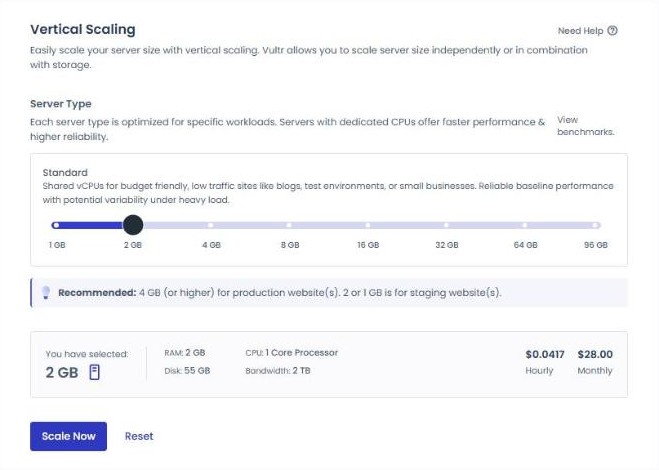
Even if the product pages are made fast with cache, the cart and checkout are handled by PHP for every order. This test server only covered installation, ordering and cache exclusions with one product and one test order, and a store whose growing orders bring more cart and checkout requests should also look at Server resizing.
The PHP version is also worth checking. The test server's PHP 8.2.34 falls short of the WooCommerce documentation's recommendation (PHP 8.3 or later), but installation and ordering worked.
On the Vultr Seoul 1GB test server, installing WooCommerce took 30 seconds, the test order was saved in [On hold] status, and the product page's first byte was 54.9ms with Breeze versus 496.9ms for the cart. The next step is to connect a payment gateway plugin in test mode and place the same order again by card.
🔢 FAQ & Recommended Content










ℹ️ Affiliate Disclosure
This site's content contains affiliate links. When a visitor buys a product or service through one of them, the site receives a commission from the seller. The amount the buyer pays(it goes down during event discounts ↓)does not go up. Posted prices, discounts, and stock reflect the time of writing and may differ, so confirm with the seller before buying. Products are chosen and reviewed by our own standards, and commissions do not affect the order or content of reviews.