
What Is WP Rocket: Key Features, Pros and Cons of an All-in-One Cache Plugin (3.23.5.1 Ver)


WP Rocket is a paid cache plugin that pre-builds WordPress pages as HTML cache files and answers later visitors with those files instead of going through PHP. To check the claims of comparison articles that recommend alternative plugins, I requested the same post on an Nginx + Apache server as a PHP response and as a cache-file response, and the first byte dropped from 1,432.4ms to 15.6ms.
Ⅰ. What is WP Rocket
When people think of speeding up WordPress, they first think of shrinking images or code, but the core of WP Rocket, a WordPress cache plugin, is page caching. When a visitor first opens a post, the finished HTML is saved as a file, and later requests for the same URL are answered with that file. Answering with a cache file is like a restaurant plating its most popular dishes before the lunch rush.
WP Rocket's Preload requests pages ahead of visitors to build cache files, and rebuilds them every time the cache is cleared. This feature is on by default once the plugin is installed, and it is also on on the measured Nginx + Apache server.
In the same server's access log, preload requests came in all day long. About 77% of the requests with a recorded response time were for URLs with no cache file, so they went through PHP to build a new one.
On an Nginx + Apache server, nginx finds this file directly and serves it, and the response header shows [x-rocket-nginx-serving-file: HIT].
curl -sI https://example.com/wp-rocket/ | grep -i -E 'x-rocket|content-type'content-type: text/html
x-rocket-nginx-serving-file: HITcurl -sI 'https://example.com/wp-rocket/?test=1' | grep -i -E 'x-rocket|content-type|cache-control'content-type: text/html; charset=UTF-8
cache-control: max-age=0Requests with a query string on the end got no cache file; PHP built the page fresh, and the headers carried [charset=UTF-8] and [cache-control: max-age=0]. The median time to first byte for 10 requests per URL from within the same server was as follows.
| Request | Answered by | First byte (median of 10) |
|---|---|---|
| URL with a cache file | nginx serves the cache file directly | 15.6ms |
| Request with a query string on the end | PHP builds the page fresh | 1,432.4ms |
The official WP Rocket page presents four strengths: instant results, powerful features, compatibility, and updates and support. The line that installing it automatically applies 80% of web performance best practices is an official claim, and no measurement results are shown with it.
How managed hosts treat WP Rocket varies by provider. Kinsta's official help now presents WP Rocket, which it once banned, as a partner, and WP Rocket is not on WP Engine's list of disallowed plugins.
Pressable's knowledge base says it does not support WP Rocket's caching, but that the optimization features can be used if page caching is turned off. WP Engine also explained in a 2021 official blog post that WP Rocket turns off its own caching and runs only its optimization features.
On hosts with their own server-side page cache, WP Rocket ends up being used mainly for its optimization features.
As of October 18, 2026, WP Rocket's official documentation had 335 articles, more than FlyingPress (93) and Perfmatters (137). Beyond caching and file optimization, there are separate docs for plugin compatibility, broken layouts and error fixes, and the MCP docs were updated in September 2026.
The blog has posts on how to read PageSpeed Insights and GTmetrix reports, and one that discloses the cause of and response to a WordPress 7.1 compatibility outage. Customer support is included in the license price (per the official WP Rocket page).
With WP Rocket you can clear the cache of a single post via [Clear this cache] under the post title in the admin post list. WP Rocket MCP Server lets you clear a single post's cache from AI tools as well, once it is connected.
I bought FlyingPress twice a few years ago and got refunds both times. The features weren't bad, but back then there was no way to clear the cache of one post at a time from the post list.
The current docs and changelog still have no clear option in the post list, while clearing a single page has been available since the October 2020 version (per the FlyingPress documentation).
Thinking it over As posts pile up, clearing the whole cache every time you edit one post gets heavier. WP Rocket can clear individual posts…
Other cache plugins (FlyingPress included) will probably hold up too, but could they match WP Rocket?
So why hasn't WP Rocket, with its development staff and know-how, added features like the image compression found in alternative plugins?
The exact reason is unknown, so what follows is unconfirmed guesswork.
- The more features there are, the higher the chance of conflicts with other plugins or themes.
- There is no guarantee that the features alternative plugins added work without errors.
- Adding one more feature can lead to bigger errors.
- If stable features alone deliver the speed, the gain from adding features may be small.
The same company sells image compression separately as Imagify, but that can't be called the reason for certain.
On the test site, turning on Remove Unused CSS stopped the mobile menu from opening, and on live posts render-blocking was already 0ms with this feature off. This result can't be called the reason for certain either.
I'll answer again once uknew has more than 10,000 pieces of content.
Ⅱ. WP Rocket pricing: one-year licenses and auto-renewal
However fast the cache, the license costs money every year. According to the official pricing page, WP Rocket has no free version and sells three licenses by number of sites, and tax may be added depending on your country of residence.
| License | Number of sites | Yearly price |
|---|---|---|
| Single | 1 site | $59.95 |
| Plus | 3 sites | $119.95 |
| Multi | 50 sites | $299.95 |
Multi lets you choose 50, 100 or 500 sites.
Licenses run in 12-month terms with auto-renewal on by default. All three licenses include the Rocket Insights performance tool free.
The 14-day free trial starts only after you register a payment method; if you don't cancel within 14 days, the first charge happens automatically and a one-year license begins. If you buy outright, you can still get a full refund within 14 days.
Ⅲ. Five claims from FlyingPress recommendation articles: checked against official docs and measurements
Many comparison articles rank an alternative like FlyingPress first, but that doesn't mean all their claims were measured. Of the 15 articles I read on page one of the alternatives and comparison searches, 5 included their own measurements.
Among the articles I read, three English ones ranked FlyingPress first, and all three carried FlyingPress referral links. Of the four that ranked NitroPack first, three were written by NitroPack itself.
WP Rocket's own FlyingPress comparison page has no speed measurements either. It compares setup time, compatibility and years of updates (per WP Rocket's official comparison page).
1️⃣ The five claims and what I found
I checked the five claims those articles share against official screens and server measurements.
Of the five claims, three matched the official screens and measurements, and two differed from the official changelog and measurements.
Per the official changelog, lines marked [New] were 0 in 2022 and 1 in 2023, but rose to 2 in 2024 and 3 in 2025, and in 2026 there were 9 by October 2. In 2022, instead of [New] lines, the major Remove Unused CSS overhaul and the new Preload module were listed as [Enhancement]. There were 21–32 releases each year.
Per the official changelog, Automatic Lazy Rendering was added as a new feature in 2024, and Self-Host Google Fonts was added in 2025. Some comparison articles still list these two as missing features.
Comparison articles disagree on the inline approach of Remove Unused CSS, and the alternative articles point out that HTML gets heavier and layouts break if styles are missing. On a test site with the same Nginx + Apache setup, I compared this feature off and on directly.
When on, two CSS files are dropped and only the CSS that page needs goes inline into the HTML. On desktop, HTML and CSS transfer (gzip) fell from 28.7KB to 22.0KB.
The PageSpeed mobile score was 100 in both states and LCP was the same 1.6 s; only the render-blocking requests item (estimated saving 430ms) disappeared when it was on.
The needed CSS (Used CSS) is generated on WP Rocket's servers. The access log showed WP Rocket's server requesting the page once for desktop and once for mobile about 45 seconds after the first visit, and generation finished about a minute after the first visit. Until then the page was served with the original CSS files, and the first screen at 1920px and 390px looked the same as before turning it on.
However, the needed CSS did not include the rules for the open menu, so tapping the menu button on a phone didn't open the menu. After turning the feature off and clearing the cache, the menu opened again.
Official documentation says styles missing like this are included in the needed CSS if you add their class names to the [CSS Safelist] field in the settings.

Measuring three posts on the Nginx + Apache server actually in operation with this feature off, the render-blocking requests item passed from the start for all three. The [Reduce unused CSS] item showed estimated savings of 12KiB and 23KiB on two posts, and the third passed (PageSpeed mobile, October 18, 2026).
That was about all turning it on could save, and on the test site the mobile menu stopped opening after it was turned on.
2️⃣ Image compression and CDN: official pricing on both sides
Alternative-recommendation articles count the lack of image compression and the separately priced CDN as WP Rocket's weak points. I checked the same items in the alternative plugins' official docs and pricing pages.
WP Rocket does not keep image compression inside the plugin; the [Image Optimization] tab in its settings points you to Imagify, a separate plugin made by the same company.
Since version 5.3 in January 2026, FlyingPress sends JPG and PNG images to its cloud servers and converts them to WebP or AVIF. LiteSpeed Cache also processes image compression on QUIC.cloud servers.
According to the official docs, LiteSpeed Cache sends images to QUIC.cloud in batches, starting with a single batch and sending larger ones after it gets results back. The support forum still has 2026 reports of requests stuck at 1% or optimized images never coming back to the site.
FlyingPress works on Apache, Nginx and LiteSpeed servers with no separate server requirements (per its official docs). LiteSpeed Cache's page cache needs a LiteSpeed server or QUIC.cloud CDN to work (per its official requirements). On an Nginx + Apache server you end up using only image compression and CSS/JS optimization.
For both WP Rocket and FlyingPress, the CDN costs extra. RocketCDN is $79 a year per domain (for WP Rocket users) and delivers only static files from the CDN, with HTML served by the origin server. FlyingCDN is $10 a month per domain, plus $5 for every 100GB over 100GB, and it caches HTML pages too on the Cloudflare Enterprise network.
QUIC.cloud CDN, used with LiteSpeed Cache, offers a free plan on six US and European nodes with no bandwidth limit. From November 10, 2026, it changes to monthly plans starting free or at $5 a month (100GB) (per the official docs).
According to both companies' official docs, when the license ends WP Rocket's cache keeps working and only the cloud features stop after 15 days, while FlyingPress largely stops working because most of its optimization is cloud-based. LiteSpeed Cache is described in the official wordpress.org FAQ as always free and open source, so it has no license to expire. QUIC.cloud services such as CDN, image optimization and Critical CSS become paid beyond a certain usage (per the QUIC.cloud docs). From October 2026, the free allowance includes 100 image optimizations a month, among others.
Ⅳ. What WP Rocket doesn't handle: image compression and requests outside the cache
Page caching suits blogs and about pages where many visitors read the same page. WP Rocket doesn't handle pages whose content differs per visitor or image file size; image size is reduced with Imagify, the compression plugin from the same company (WP Media).
| What WP Rocket does | Not handled | Who handles it |
|---|---|---|
| ✓Serves blogs and about pages that many visitors read the same way from cache files.Measured on an Nginx + Apache server: 15.6ms | ✕Pages whose content differs per visitor | — |
| ✕Reducing image sizeWP Rocket has no built-in image compression. | Imagify: same company ➡️ WP Media's compression plugin | |
| ✕Requests with a query string on the endHandled without a cache file. | PHP · ad click URLs ➡️ Check the gclid cache setting |
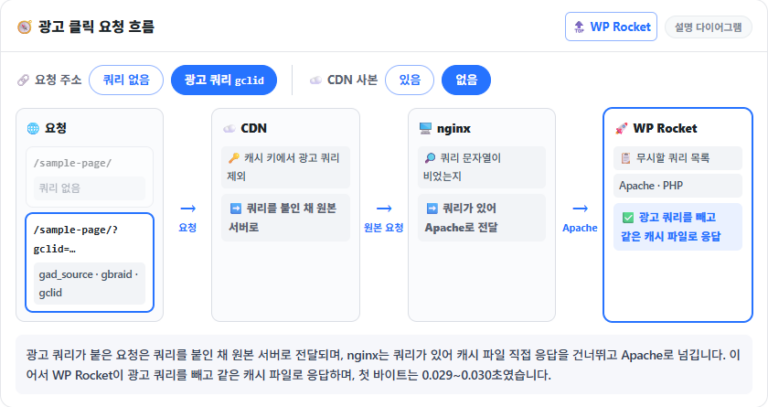
In the Nginx + Apache server's access log, every post request with a query string was answered by PHP, and none were served from a cache file. For visits that arrive with a query string, like ad click URLs, check the gclid cache setting as well.
On the Nginx + Apache server, cache-file responses took 15.6ms, and after installing you set the default for each menu in the WP Rocket Setup Guide.
🔢 FAQ & Recommended Content













ℹ️ Affiliate Disclosure
This site's content contains affiliate links. When a visitor buys a product or service through one of them, the site receives a commission from the seller. The amount the buyer pays(it goes down during event discounts ↓)does not go up. Posted prices, discounts, and stock reflect the time of writing and may differ, so confirm with the seller before buying. Products are chosen and reviewed by our own standards, and commissions do not affect the order or content of reviews.