
WP Rocket Multilingual Cache: Why Translated Page Caches Disappear When a Draft Is Saved, and the Fix
WP Rocket's multilingual cache is a page cache stored separately under a language folder for each TranslatePress translated URL. On a WordPress server running Nginx + Apache, we traced in the WP Rocket code why the translated page cache disappeared along with its whole language folder every time a draft was saved, and solved it with code that leaves unpublished posts out of translated-page cache clearing and tells the preload again about URLs we delete ourselves.
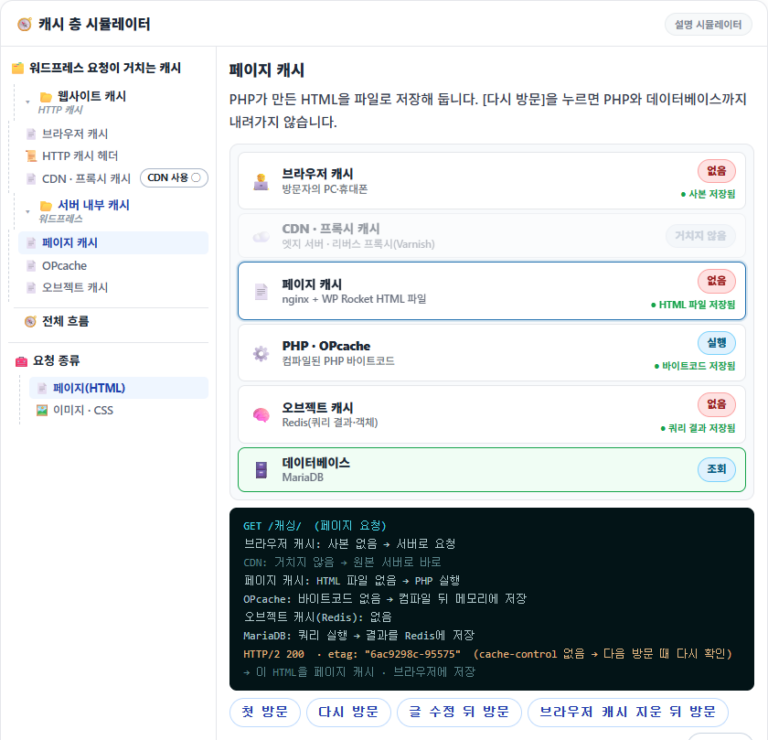
Time to first byte, measured inside the same server, was 0.015 seconds with the translated page cache and 2.492 seconds without it. Once a language folder is empty, visitors to the translated pages get this slow response until someone opens the URL again and the cache is rebuilt.
1️⃣ How WP Rocket's Multilingual Cache Is Organized: Per-Language Folders and Translated-Page Clearing
A translated page shows the original post in translation, so it is easy to assume its cache belongs together with the original, but WP Rocket caches translated URLs as separate pages. Under the cache folder, language folders such as [en] and [ja] appear next to the original post folders, and translated posts are stored inside them under their translated slugs.
When you edit a post, WP Rocket's TranslatePress integration also deletes that post's translated page cache. The official documentation also says that a regular edit clears all translated versions, while an edit made in the TranslatePress translation editor clears only the language that changed.
// wp-rocket/inc/ThirdParty/Plugins/I18n/TranslatePress.php (3.23.5.1)
'post_updated' => 'clear_post_languages',            // runs every time a post is saved

public function clear_post_languages( $post_id ) {
    // …
    $default_permalink = get_permalink( $post_id );   // post status is not checked

    foreach ( $trp_settings['translation-languages'] as $language ) {
        if ( $language === $trp_settings['default-language'] ) {
            continue;
        }
        $clear_urls[] = $converter->get_url_for_language( $language, $default_permalink, '' );
    }
    // …
    rocket_clean_files( $clear_urls );
}
The integration function converts the post URL into the translated URL for each language, then hands them to the cache cleanup function [rocket_clean_files]. Nothing in this process checks the post status, so translated URLs are built and deleted in the same way whether the post is published or a draft.
2️⃣ Saving a Draft: The Whole Language Folder Is Deleted
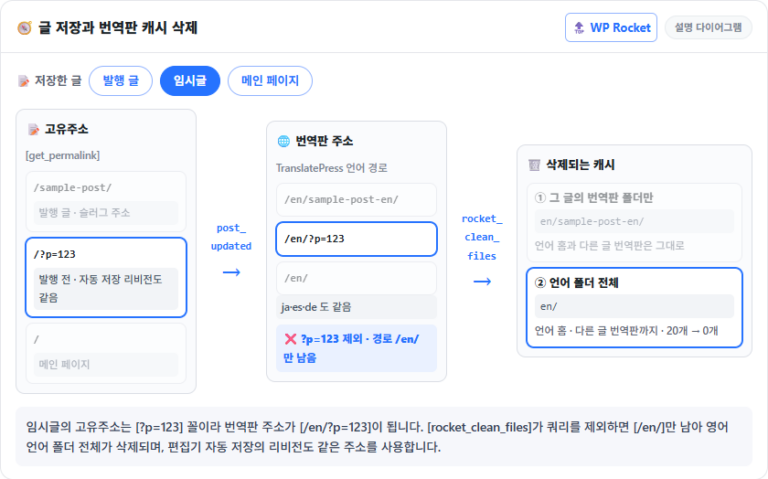
Saving a draft is not unrelated to the translated page cache. Before a post is published, its permalink is not a slug but the [?p=post ID] form, and TranslatePress converts that URL into one with a language path, like [/en/?p=post ID].
[rocket_clean_files] drops the query from the URL and finds the cache location by path alone. If the remaining path is [/en/], that means the whole cache folder for that language, and if the target is a folder, it is deleted recursively, subfolders included.
// wp-rocket/inc/functions/files.php (3.23.5.1) — inside rocket_clean_files()
$parsed_url = get_rocket_parse_url( $url );               // splits the path and the query
// …
$entry = $dir . $parsed_url['path'];                      // …/example.com/en/
// …
if ( $filesystem->is_dir( $entry ) ) {
    rocket_rrmdir( $entry, [], $filesystem );             // deletes the whole folder recursively
} else {
    $filesystem->delete( $entry );
}
The front page goes through the same path. Its URL [/] is converted to [/en/], so even saving the published front page deletes the whole language folder. Just editing a draft's title and saving it again emptied the cache folders of all four languages, and from save times and cache-deletion logs we confirmed the same deletion repeating more than 30 times over one night when draft saves piled up.
In the code, editor autosave follows the same path too. Revisions saved while you edit a published post also use a URL of the [?p=] form.
On a test site running Nginx + Apache, we edited a published post in the editor while counting the files in the language folders. After the first autosave the English and Japanese folders still had 20 files each, and after the second autosave a minute later both folders were down to 0.
The first autosave creates a new revision, and from the second one on the same revision is updated and saved, so [post_updated] fires. If you keep editing after the first autosave, the translated page cache is deleted along with the language folder even without pressing the save button.
The same symptom has been open in the official WP Rocket repository as issue #6130 since August 31, 2023. Pull request #7616 to fix it was submitted in September 2025 but has not been merged, and the changelog for 3.23.5.1, released on October 2, 2026, contains no fix either.
3️⃣ The Fix: Clear the Translated Page Cache Only for Published Posts
Until an official fix arrives, you detach the integration function and replace it with one that clears translated pages only when the URL is certain. The workaround posted in the issue comments takes the same direction, returning from the integration function right away when the post is not published.
However, a condition that only checks the post status leaves two cases. The front page clears the whole language folder when saved even though it is published, and when you switch a published post back to draft, its translated page cache is not deleted, so the unpublished post keeps opening at its translated URLs.
<?php
/**
 * Plugin Name: Rocket TranslatePress Draft Fix
 * Description: Limits the translated page cache deletion of the WP Rocket TranslatePress integration to cases where the URL is certain
 */

// 1. Detach the WP Rocket integration function from post_updated and keep it
add_action( 'init', function () {
    global $wp_filter;
    if ( empty( $wp_filter['post_updated'] ) ) {
        return;
    }
    foreach ( $wp_filter['post_updated']->callbacks as $priority => $callbacks ) {
        foreach ( $callbacks as $cb ) {
            $fn = $cb['function'];
            if ( is_array( $fn ) && is_object( $fn[0] )
                && 0 === strpos( get_class( $fn[0] ), 'WP_Rocket\\' )
                && false !== stripos( get_class( $fn[0] ), 'TranslatePress' ) ) {
                remove_action( 'post_updated', $fn, $priority );
                $GLOBALS['rtdf_original'] = $fn;
            }
        }
    }
}, 9999 );

// 2. Replacement function
add_action( 'post_updated', function ( $post_id, $after, $before ) {
    if ( empty( $GLOBALS['rtdf_original'] ) || ! class_exists( 'TRP_Translate_Press' ) ) {
        return;
    }
    $trp       = TRP_Translate_Press::get_trp_instance();
    $converter = $trp->get_component( 'url_converter' );
    $settings  = $trp->get_component( 'settings' )->get_settings();
    $languages = array_diff( $settings['translation-languages'], [ $settings['default-language'] ] );

    // Front page — only the language home page cache files, not the language folder
    if ( 'page' === get_option( 'show_on_front' ) && (int) get_option( 'page_on_front' ) === (int) $post_id ) {
        $urls = [];
        add_filter( 'trp_add_language_to_home_url_check_for_admin', '__return_false' );
        foreach ( $languages as $lang ) {
            $home = $converter->get_url_for_language( $lang, home_url( '/' ), '' );
            $dir  = WP_ROCKET_CACHE_PATH . wp_parse_url( $home, PHP_URL_HOST ) . wp_parse_url( $home, PHP_URL_PATH );
            array_map( 'unlink', glob( $dir . 'index*.html*' ) ?: [] );
            $urls[] = $home;
        }
        remove_filter( 'trp_add_language_to_home_url_check_for_admin', '__return_false' );
        do_action( 'rocket_after_clean_terms', $urls );   // notify the preload (5️⃣)
        return;
    }

    // Saving a published post — WP Rocket's original function as is
    if ( 'publish' === $after->post_status ) {
        call_user_func( $GLOBALS['rtdf_original'], $post_id );
        return;
    }

    // Published → draft·private·trash — only the translated pages of the URL from before unpublishing
    if ( 'publish' === $before->post_status ) {
        $old  = get_permalink( $before );
        $urls = [];
        add_filter( 'trp_add_language_to_home_url_check_for_admin', '__return_false' );
        foreach ( $languages as $lang ) {
            $urls[] = $converter->get_url_for_language( $lang, $old, '' );
        }
        remove_filter( 'trp_add_language_to_home_url_check_for_admin', '__return_false' );
        rocket_clean_files( $urls );
    }

    // Anything else (drafts·revisions·autosave) has no translated URL, so nothing is deleted
}, 10, 3 );
The first part finds the integration function WP Rocket registered, detaches it from [post_updated] and keeps the original function. The replacement function clears only the language home page cache files for the front page, runs the stored original function as is for published posts, and, when a published post is taken down, finds and deletes the translated pages using the URL from before it was taken down.
Saved as a PHP file in the [wp-content/mu-plugins/] folder, it takes effect immediately without activation, and deleting the file returns WP Rocket to its original behavior. In a test with code that behaves the same way, saving a draft again left the number of files in the language folders unchanged, and saving a published post again cleared only that post's original and translated page folders.
Before and after adding the code above, we compared the number of files in the language folders for four cases in the same environment. The English and Japanese folders each held 20 PC and mobile cache files for the language home page and four posts.
Before adding the code, saving a draft, saving the front page and unpublishing all brought both folders to 0, and only saving a published post deleted just that post's translated page cache.
After adding the code, all 20 files remained when saving a draft and on editor autosave. Saving the front page deleted the 4 language home page cache files, and saving a published post or unpublishing deleted only that post's 4 translated page files, leaving 16; the English translated URL of the unpublished post returned 404.
| Case | Before the fix | After adding the code | Cache deleted after the fix |
|---|---|---|---|
| Saving a draft | 20 → 0 | 20 → 20 | None |
| Saving a published post | Only that post's translated pages deleted | 20 → 16 | 4 translated page files of that post |
| Saving the front page | 20 → 0 | 20 → 16 | 4 language home page cache files |
| Unpublishing | 20 → 0 | 20 → 16 | 4 translated page files of that post · translated URL returns 404 |
4️⃣ Missed Preload Rebuilds: Completed Status Left in the Queue
Even with draft saves blocked, cache files deleted without the deletion signal from a WP Rocket function are not refilled by the preload. WP Rocket's preload uses a queue table that records a status for each URL: URLs waiting to be requested are pending, requested ones are in progress, cached ones become completed, and those not finished within 3 minutes become failed.
A completed URL goes back to pending in three cases: its file was removed when the cache lifespan ended, WP Rocket sent a deletion signal while clearing it, or it failed more than 12 hours ago. If you pass false as the third argument of [rocket_clean_files] or delete files directly, this signal is not sent, so only the cache files disappear while the queue still shows them as completed.
Code that receives the deletion signal and goes on to clear other caches passes false as the third argument to avoid repeated calls. When we checked the translated page caches, 3 of 65 English and 7 of 65 Japanese translated pages were still marked completed in the queue while their cache files were missing.
A WP Rocket support contributor also acknowledged in the comments on issue #6130 that after the cache is cleared, URLs in the table stay completed and the state goes out of sync. A proposal to periodically reconcile the table with the cache files (#2939) was closed in 2020 without being implemented.
5️⃣ Re-registering for Preload: Telling the Queue About URLs You Cleared Yourself
For URLs you delete yourself, one line that notifies the preload right after deleting solves it. When the preload receives the [rocket_after_clean_terms] signal, it puts the URLs it was given back to pending and adds any URLs missing from the table.
// After deleting without the deletion signal — register the deleted URL array in the preload queue again
rocket_clean_files( $urls, null, false );          // third argument false = no deletion signal
do_action( 'rocket_after_clean_terms', $urls );     // the preload puts these URLs back to waiting (pending)
Inside WP Rocket, the only places that receive this signal are the preload queue function and the SpinUpWP hosting integration, and the preload function only updates queue rows without deleting WP Rocket cache files or sending the deletion signal again, so no repeated calls occur. Sites that clear the cache only through WP Rocket functions and leave the third argument at its default already send the signal, so they do not need this line.
After adding this line, we cleared the cache of one post that has translated pages in four languages, and within 2 seconds its four queue rows switched to pending. Testing twice on a server that runs cron every minute, all 8 PC and mobile cache files of the translated pages were rebuilt after 101 and 153 seconds. You can check this through the queue table status and the files in the cache folder.
# Status of that URL in the queue table (the wp_ before the table name is the site prefix)
wp db query <<'SQL'
SELECT url, status, modified FROM wp_wpr_rocket_cache WHERE url LIKE '%/en/sample-post-en'
SQL
url status modified
https://example.com/en/sample-post-en pending 2026-10-17 09:10:48# Whether the cache files are back about a minute later
ls -l wp-content/cache/wp-rocket/example.com/en/sample-post-en/total 240
-rw-r--r-- 1 example nobody 95084 Oct 17 18:12 index-https.html
-rw-r--r-- 1 example nobody 22352 Oct 17 18:12 index-https.html_gzip
-rw-r--r-- 1 example nobody 95083 Oct 17 18:12 index-mobile-https.html
-rw-r--r-- 1 example nobody 22348 Oct 17 18:12 index-mobile-https.html_gzipRight after deletion the status changes to [pending], and once the preload sends its request and the cache file is created, it becomes [completed]. If the status is [completed] but there is no cache file, that URL was deleted without the signal.
When we saved the front page and the code above deleted the language home page cache files and sent the signal, the English and Japanese home URLs went back into the queue. The PC and mobile caches of the language home pages were rebuilt by the second cron run at the latest.
In two tests, it took 47 and 91 seconds from saving to the last cache file.
🔢 FAQ & Recommended Content










ℹ️ Affiliate Disclosure
This site's content contains affiliate links. When a visitor buys a product or service through one of them, the site receives a commission from the seller. The amount the buyer pays(it goes down during event discounts ↓)does not go up. Posted prices, discounts, and stock reflect the time of writing and may differ, so confirm with the seller before buying. Products are chosen and reviewed by our own standards, and commissions do not affect the order or content of reviews.