Test environmentCloudways|Lightning stack|WordPress 7.1.3|Breeze 2.6.1|Object Cache Pro 1.25.5|Checked 2026-10-19
In the Cloudways cache setup, Varnish on the server stores finished pages and Redis stores database query results, and Cloudways-optimized WordPress comes with the Breeze and Object Cache Pro plugins already installed. Checking the response headers of a Lightning Stack test application showed that the first page had been served from the same Varnish copy for more than 9 hours, and edits to a post only show up after Breeze or WP Rocket purges the cache.
TOC
3mn read
TOC
3mn read
View more
1️⃣ Cloudways cache structure
A Cloudways server comes with the web servers Nginx and Apache, the page cache Varnish, the object cache Redis, PHP-FPM and MariaDB installed together. For each application you pick one of two stacks under [Application Settings] › [WebStack]: the Hybrid Stack, which uses Nginx and Apache together, or the Lightning Stack, which uses Nginx only. The Lightning Stack does not read [.htaccess].
The [WebStack] tab in the application's [Application Settings]
🗂️ Cloudways cache setup
📂 Web server
NginxLightning Stack uses only Nginx and PHP-FPM
ApacheHybrid Stack processes .htaccess rules
📂 Page cache
VarnishStores page copies on the server, switched on or off per app
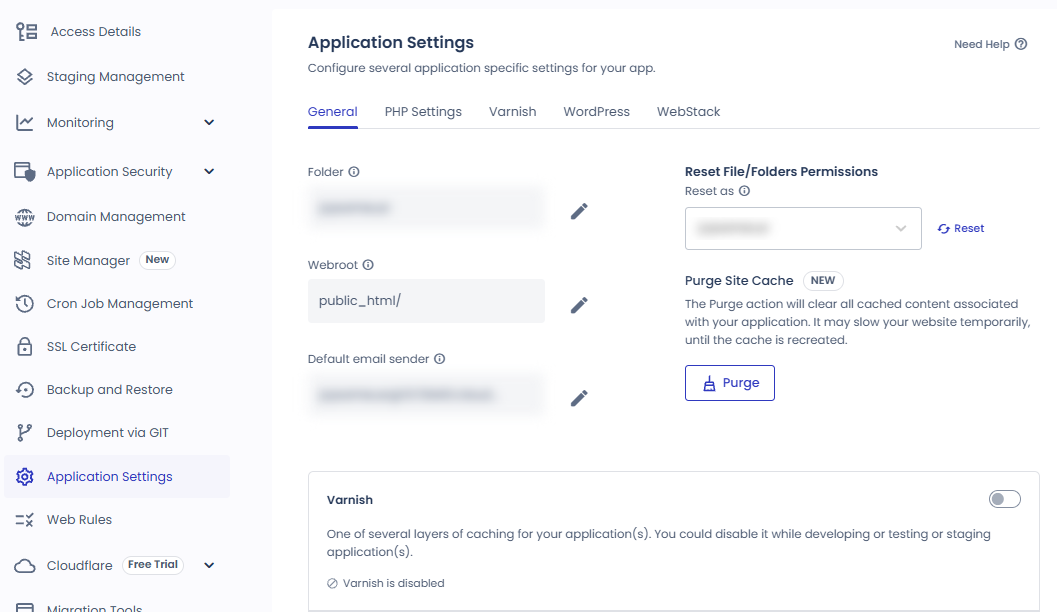
Varnish is on by default on every Cloudways server, and when it is on at the server level it applies to every application on that server. To turn it off for one application only, switch off [Varnish] under [Application Settings] › [General] of that application.
The [General] tab of the application's [Application Settings] and the [Varnish] switch
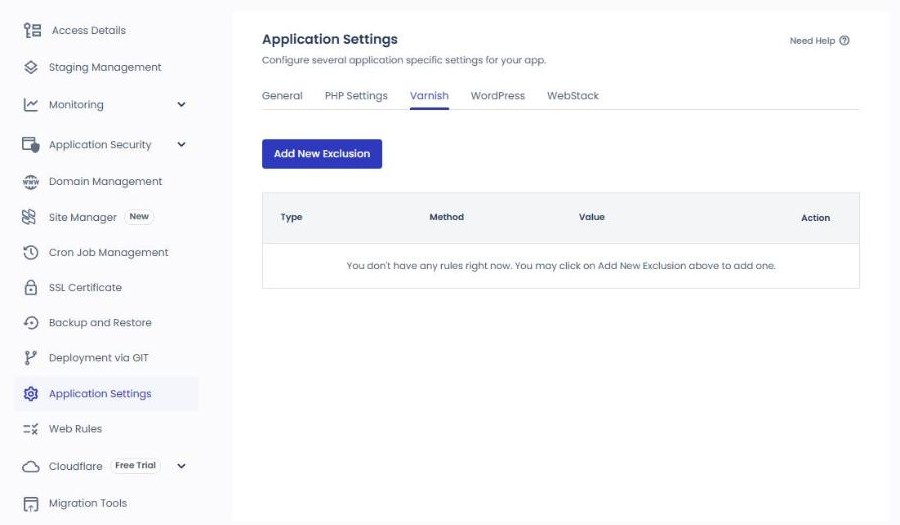
The WordPress login and admin screens, the WooCommerce cart and checkout pages, and requests that carry a login cookie are excluded from the cache from the start. To exclude additional URLs or cookies, add them with [Add New Exclusion] on the [Varnish] tab of [Application Settings]. Enter a URL as a path without the domain, like [/booking/].
The [Varnish] tab in the application's [Application Settings]
When the test application was requested with a login cookie attached, the response had no [x-cache] header, while the first page requested without a cookie showed [x-cache: HIT] and [age: 33254]. [age] is the number of seconds since the Varnish copy was created, which here is about 9 hours 14 minutes.
Varnish is used with WordPress and Magento 2, and it is not suited to Laravel or PHP applications you build yourself.
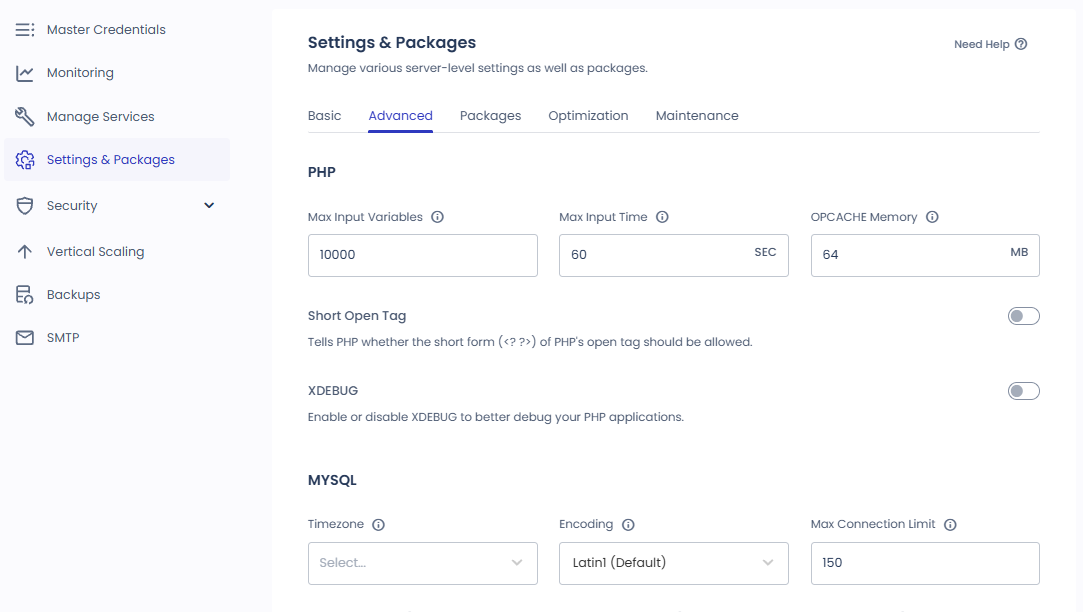
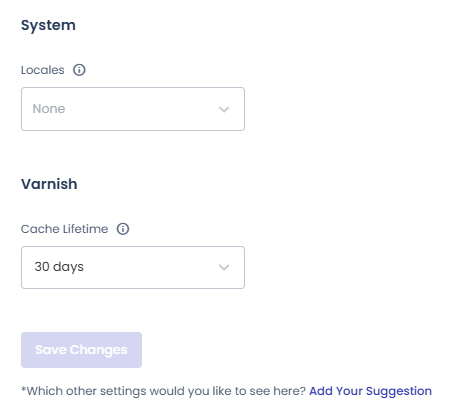
The cache lifetime (TTL) is set in the Varnish [Cache Lifetime] under [Settings & Packages] › [Advanced] of the server, and on a newly created test server the value was 30 days. The values you can choose are 4, 8, 14 and 24 hours and 7, 14 and 30 days, and because this value works per server, it applies to every application on it, staging included.
The [Advanced] tab of the server's [Settings & Packages][Cache Lifetime] of Varnish at the bottom of the [Advanced] tab
Click a highlighted item in the left menu or a highlighted switch on the screen
3️⃣ Redis and Object Cache Pro
Even when Varnish stores a page, requests that are excluded from the cache, such as those of logged-in users or a shopping cart, make WordPress query the database to build the page. Object Cache Pro is a plugin that stores these query results in Redis memory so that the database is not consulted when the same data is requested again.
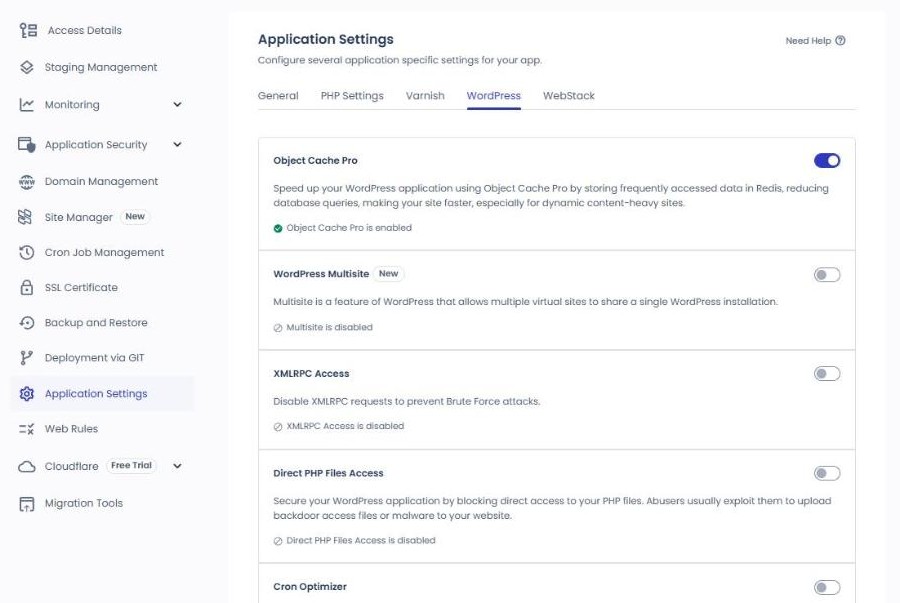
On Cloudways-optimized WordPress and WooCommerce applications, Object Cache Pro is installed and activated when the application is created, and Cloudways users can use it for free. You turn it on and off on the [Application Settings] › [WordPress] tab of the application, and a newly created test application also had it on from the start.
The [Object Cache Pro] switch at the very top of the [Application Settings] › [WordPress] tab
Installing it together with another object cache plugin such as Redis Object Cache or WP Redis causes a conflict, so delete that plugin first. Turning off the Redis service on the server deactivates Object Cache Pro for every application, and it cannot be used on PHP versions lower than 7.4.
4️⃣ Choosing between Breeze and WP Rocket
The page cache works with Varnish alone, without Breeze. However, Varnish does not know on its own that a post has changed, so the old page is shown until the cache lifetime passes or you purge it yourself.
Breeze is a free cache plugin that comes installed on Cloudways-optimized WordPress, and you open its settings screen from [Settings] › [Breeze] in the admin menu.
In the application that was checked, [Cache System] was on, and the internal cache was cleared every 1440 minutes (1 day). If [Auto Purge Varnish] on the [VARNISH] tab is on, publishing a new post or page or receiving a comment also purges the Varnish cache.
The [BASIC OPTIONS] tab of the Breeze settings
If you use WP Rocket, deactivate and delete other optimization plugins such as Breeze. Right after a site that had been using WP Rocket was moved to a new application with the Migrator plugin, the first page's HTML contained both Breeze's cache marker and WP Rocket's lazy-loading script. So after moving a site, check first whether Breeze is on.
WP Rocket's [Varnish] tab has an automatic purge option that does the same job as Breeze when turned on, and Object Cache Pro can be used together with page cache plugins such as Breeze and WP Rocket.
5️⃣ Purging the cache
To purge the cache right away, use the [Breeze] menu in the WordPress admin toolbar at the top.
The [Breeze] menu in the admin toolbar
If you are connected over SSH, the following command purges the plugin cache and the Varnish cache together.
wpbreezepurge--cache=all
[--cache=varnish] purges only the Varnish cache.
wpbreezepurge--cache=varnish
[--cache=local] purges only the plugin cache.
wpbreezepurge--cache=local
On a site with a proxy such as Cloudflare in front, changes may not show up right away even after you purge Varnish, and in that case you purge the Cloudflare cache as well.
🔢 FAQ & Recommended Content
Varnish caches 404 pages too, for 5 minutes.
The default exclusion list is based on English URLs such as [/cart], so a translated URL such as the German [/warenkorb] has to be added separately to the Varnish exclusion rules.
If you turn off Object Cache Pro in the application settings, the plugin is deactivated and deleted. If you turn off the Redis service of the server instead, the plugin is only deactivated and stays installed, and it is activated again when you turn Redis back on.
☁️Recommended Cloudways contentPost 19 · Tool 2
🗂️ Running Cloudways
📄 Signup and basic setup📄 Domain connection📄 SSL setup
📋 Server & Application📄 Admin login📄 Staging Management📄 Billing · Pricing📄 Email · SMTP add-on📄 MCP · AI Server Management📄 SFTP and SSH Access📄 Migration📄 Backup📄 Vertical Scaling
📋 Hosting Comparison Top 7📄 What is cloud hosting📄 What is managed hosting📄 Web Hosting Costs📄 Cloudways for Small Businesses📄 Cloudways WooCommerce
ℹ️ Affiliate Disclosure This site's content contains affiliate links. When a visitor buys a product or service through one of them, the site receives a commission from the seller. The amount the buyer pays(it goes down during event discounts ↓)does not go up. Posted prices, discounts, and stock reflect the time of writing and may differ, so confirm with the seller before buying. Products are chosen and reviewed by our own standards, and commissions do not affect the order or content of reviews.